Web to Workstation Single Registration
Facts
- One-way registration flow: Users initiate registration once via browser web application interface; no explicit workstation registration required
- Dual profile creation: HYPR Server creates both web and desktop authentication profiles automatically
- One-time user experience: From the user's perspective, a single registration ceremony provides access to both platforms
- Asynchronous certificate processing: HYPR Enrollment Service manages certificate generation and delivery asynchronously
- Linked deregistration: Users deregister web or workstation profiles independently or simultaneously
Prerequisites
- Create and configure rpApp for Workstation
- Create and configure rpApp for all web applications requiring passwordless access
- Deploy and configure HYPR Enrollment Service
- Install HYPR Workforce Access Client (optional, for workstation sign-in)
- Windows Server with .NET Framework enabled for Enrollment Service deployment
Configuration
Feature Flags
Enable the following flags:
Control Center Admin rpApp:
WINDOWS_WEB_ENROLLMENTENROLLMENT_SERVICEENROLLMENT_SERVICE_APP
Web rpApp:
ASYNC_REGISTRATIONWINDOWS_WEB_ENROLLMENTRP_APP_WORKSTATION_ENABLEDWEB_TO_WS_SINGLE_REGISTRATION_TRANSLATIONVIRTUAL_DESKTOP_INFRASTRUCTUREENDPOINT_API_SECURITY_TOKEN_DEVICE(Enabled by Default)ENDPOINT_API_SECURITY_TOKEN_WORKSTATION(Enabled by Default)
Workstation rpApp:
WINDOWS_WEB_ENROLLMENTRP_APP_WORKSTATION_ENABLEDWEB_LOGIN_WITH_WFA_REGISTRATIONVIRTUAL_DESKTOP_INFRASTRUCTUREENDPOINT_API_SECURITY_TOKEN_DEVICE(Enabled by Default)ENDPOINT_API_SECURITY_TOKEN_WORKSTATION(Enabled by Default)
Linking web and workstation rpAppIds
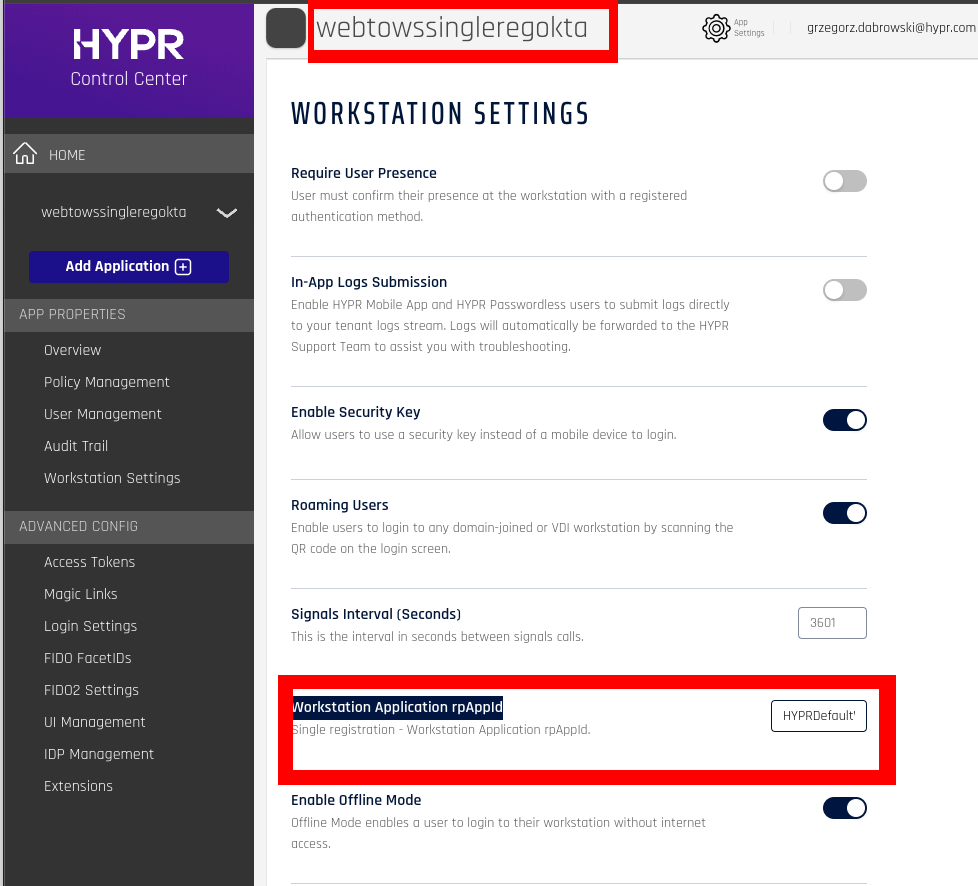
To make single registration working in multiple rpAppIds environments we need to link rpApps together.
This can be done through the Workstation Settings in the web rpAppId. There is a field Workstation Application rpAppId in which you need to enter the rpAppId of the Workstation rpApp.
On the screen you can see webtowssingleregokta as the web rpApp and HYPRDefaultWorkstationApplication as the WFA one.
Registration Scenarios
New Web Profile
When a user registers for the first time via web interface:
- User initiates registration through the web application
- HYPR Control Center Server queues the mobile device certificate request
- Enrollment Service processes the certificate asynchronously
- HYPR Control Center automatically provisions the desktop profile through Device Manager
- User gains access to both web and desktop platforms
Existing Web Profile
When a user with an existing web profile registers via web interface:
- Administrators enable the SingleReg feature flag on the web rpApp
- User initiates registration through the web application
- Desktop profile is automatically created and linked to existing web credentials
- Enrollment Service validates and processes the certificate requests
Existing Workstation Profile Scenario
Deregistration
Users can deregister from either platform with specific outcomes:
- When user removes web or workstation profile via Device Manager
- Deregistering web profile maintains workstation access
- Deregistering workstation removes web profile if still linked
- User can re-register to obtain both profiles again
- Clean state allows fresh registration without conflicts