11.1.0 Release Notes
HYPR 11.1.0 is an Enterprise Channel Release.
The Enterprise Release Channel follows a quarterly upgrade cycle, ensuring a stable and predictable update process. This schedule provides organizations with ample time to test, adapt, and implement changes while minimizing disruptions to business operations. With each release, customers receive the latest security, performance, and feature enhancements, allowing them to stay up to date with improvements while maintaining operational stability.
Minimum Supported Versions
| Release Date | HYPR Product | Minimum Requirement | Notes |
|---|---|---|---|
| March 27 | HYPR Passwordless for Windows 11.1.0 | Windows (10 "2004", 11) | Reboot required if upgrading from 7.6 or below; Security Key Support for YubiKey 5 Series with firmware 5.X, YubiKey Bio Multi-Protocol Edition, IDEMIA ID-One on Cosmo 8.2, Feitian K9 Plus and K40 Plus and its offshoots |
| March 27 | HYPR Passwordless for Mac 11.1.0 | macOS (High Sierra, Mojave, Catalina, Big Sur, Monterey, Ventura, Sonoma 14.1 [not 14.0], Sequoia, Tahoe) | Security Key Support for YubiKey 5 Series with firmware 5.X and Feitian ePass K9 Plus, K40 Plus and their respective offshoots |
| March 27 | HYPR Mobile App for Android 11.1.0 | Android 9.0+ | |
| January 7 | HYPR Mobile App for iOS 10.7.1 | iOS 12.4+ | |
| March 27 | HYPR Server 11.1.0 | Java Development Kit (JDK) 17 | Upgrade to 7.10 required before upgrading to 8.0.0 or higher |
| March 27 | HYPR SDK for Android 11.1.0 | Android 9.0+ | |
| March 27 | HYPR SDK for iOS 11.1.0 | iOS 12.4+ | |
| March 27 | HYPR SDK for Java 11.1.0 | Java Development Kit (JDK) 17+ |
All HYPR components are fully compatible across the three previous/subsequent minor (X.X) HYPR releases.
Breaking Changes
-
Windows Minimum Version Update — The minimum supported Windows version for HYPR Passwordless for Windows has been updated from Windows 10 version 1803 to Windows 10 version 2004. Windows 10 versions 1803 and 1809 are no longer supported. Customers using these older Windows versions will need to upgrade to Windows 10 version 2004 or later (22H2 is recommended), or Windows 11, before upgrading to HYPR 11.1.0.
-
[Control Center] FIDO2 MDS legacy APIs deprecation — Legacy FIDO2 metadata-management APIs are scheduled to be deprecated beginning in 11.3. Customers using these APIs should plan to update integrations to the newer metadata controls and query APIs.
New Features
-
[Affirm] Liveness-only verification option that allows organizations to perform motion and liveness checks without requiring document upload, reducing friction for low‑risk or follow‑up scenarios while preserving fraud‑detection coverage where a full document check is not needed.
-
[Affirm / Integrations] New Affirm authenticator option in Integration Login Settings (including OIDC, Entra EAM, Okta, Ping DaVinci) so admins can route login flows into Affirm verification by selecting a configured Affirm workflow, providing a consistent handoff from sign‑in prompts to identity verification across supported integrations.
-
[Android] Offline PIN support for HYPR Passkey so users can complete authentications even when the Android device is temporarily offline, subject to policy and app support, helping maintain access during brief connectivity issues while still respecting configured security rules.
-
[Platform] Custom image uploads in email templates so administrators can add tenant-specific logos and imagery directly to notification designs, with built-in size and format guardrails that help keep layouts clean and accessible across mail clients.
-
[Single Registration / Control Center] Single Reg pilot group support that lets administrators enable Single Registration only for a specific pilot group of users; the pilot group can then validate Single Reg behavior safely before rolling it out to all users.
New Features in Beta
-
[Enterprise Passkey / HYPR Passkey] [Beta] HYPR Passkey Fabric experience for Android that unifies workstation, web, and mobile HYPR Passkey flows into an opt-in beta, enabling more seamless registration and unlock journeys across devices as the experience continues to expand in later releases.
-
[Platform] [Beta] Email notification configuration workspace that lets administrators manage branding, content, and versions for email templates tied to key events (such as verification approvals), with support for tenant- and application-aware variables across HYPR products so that notifications stay consistent with corporate branding while still reflecting the correct application context.
-
[HYPR Passwordless for Windows] [Beta] ARM-based Windows device support available on demand for customers who want to pilot HYPR Passwordless on ARM-based Windows workstations, with installers provided only on request.
-
[Platform] [Beta] Centralized client log upload and retrieval for support operations adds platform support for uploading mobile and workstation diagnostic logs and retrieving them through administrative workflows, improving troubleshooting for support-led investigations. Availability is controlled by feature flags and deployment configuration, and may be limited to selected environments.
New Integrations
HYPR is excited to announce to all customers and partners that HYPR with Microsoft External Multi-Factor Authentication (External MFA) capability is generally available!
This cloud-native integration is a powerful way for organizations using Microsoft Entra ID to strengthen their identity security strategy with high assurance, passwordless authentication from HYPR.
Notable UI/UX Changes
-
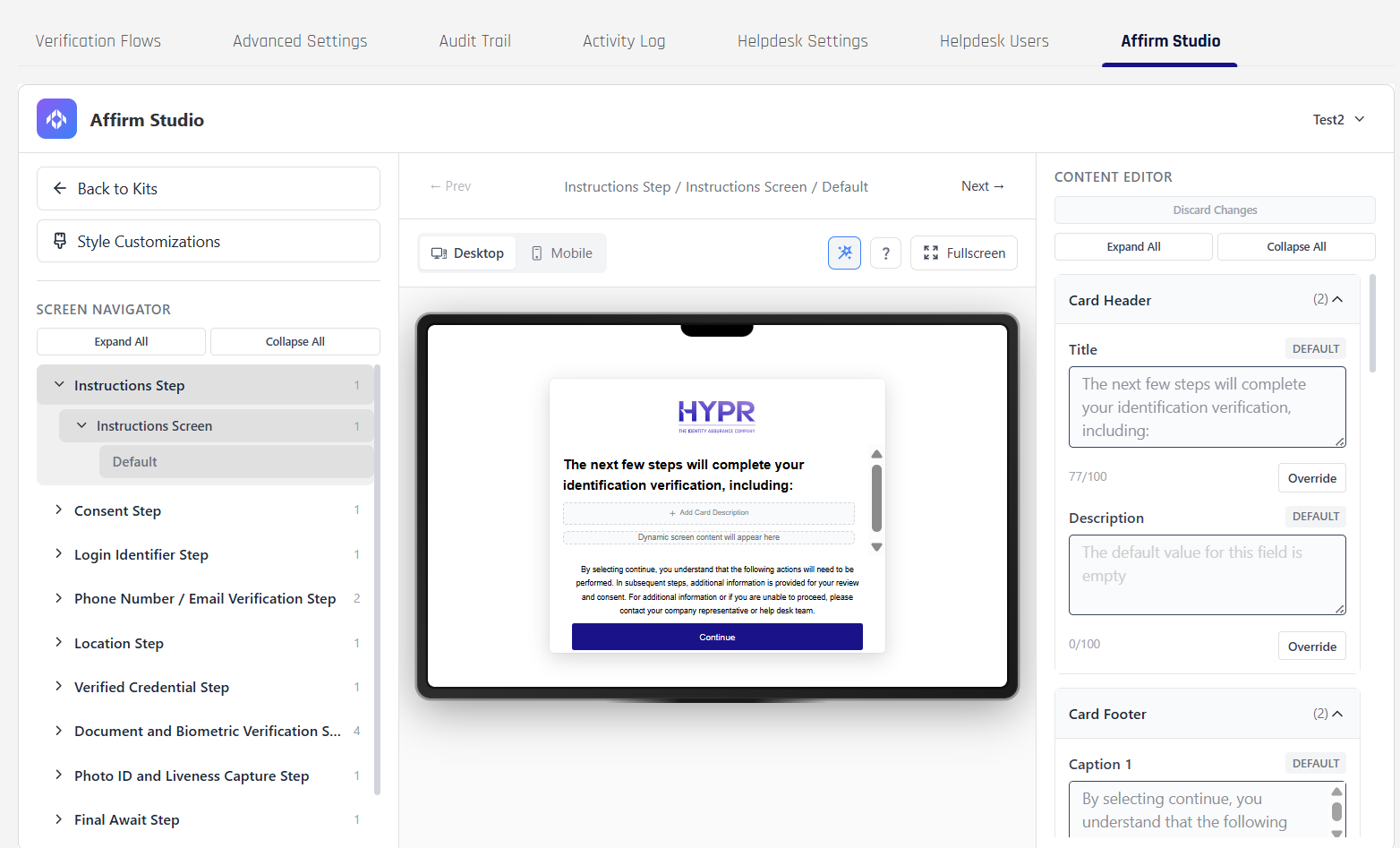
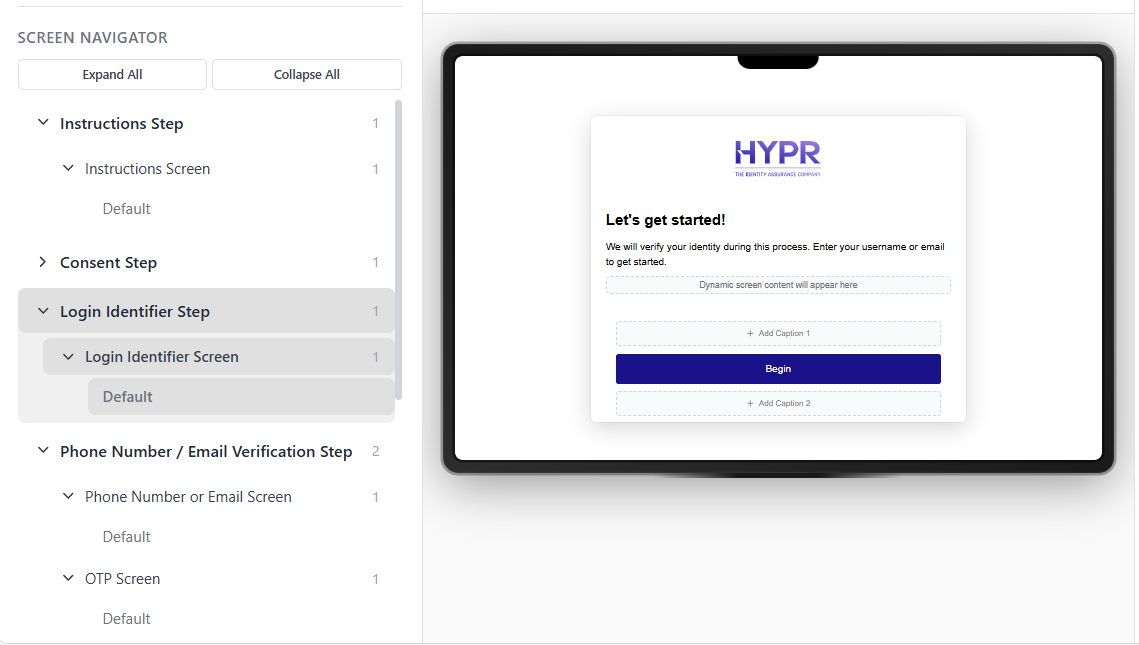
[Affirm Studio] The Studio editor now provides stronger inline preview and editing workflows, including clearer screen navigation, direct content/style editing panels, and more resilient save/apply interactions. Administrators can validate how verification screens render while they are configuring them, which shortens the edit-review cycle for branding and content changes.
- Strengthens the design-edit-preview loop by showing edits and preview context in one workspace
- Improves navigation between configurable screens and editable sections
- Makes pending changes easier to track before save/apply

-
[Affirm Helpdesk] The Helpdesk experience now includes richer operational controls in the UI: clearer session-timeout messaging, configurable initialize-channel defaults (including SMS where required), tighter workflow visibility controls, and improved refresh behavior so analysts can see updated request states without relying only on full browser reloads. These updates are intended to make active investigations easier to manage during longer troubleshooting sessions.
-
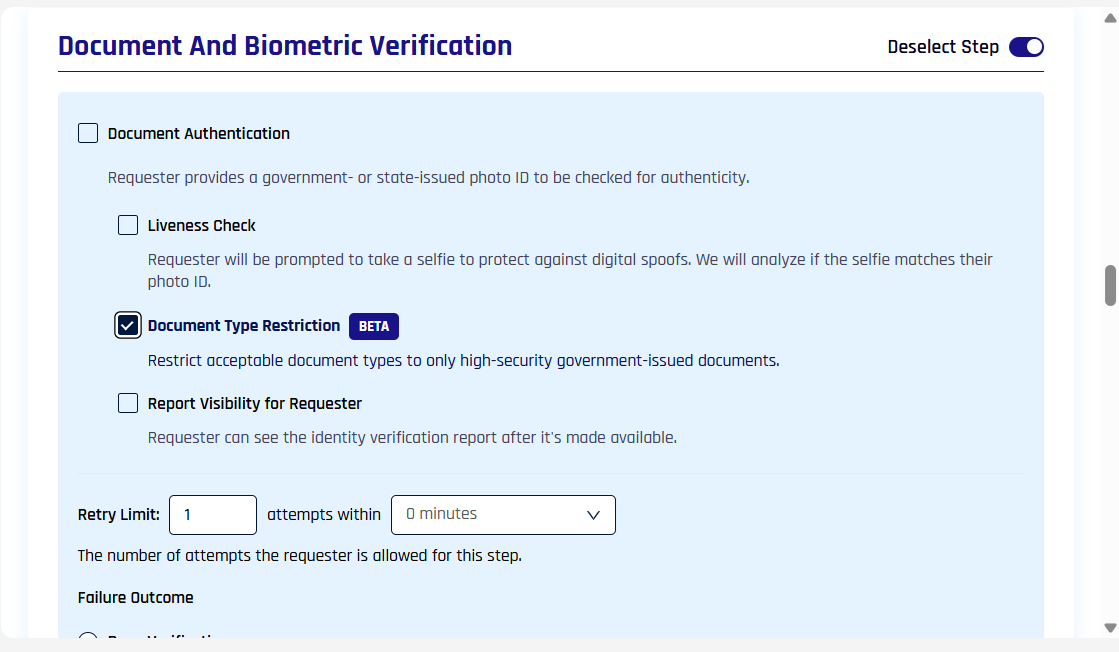
[Affirm] Verification flow configuration now includes a Document Type Restriction control directly in the step editor. Administrators can limit allowed document types in the same screen where they define identity-verification logic, which reduces context switching when building or updating workflows.
-
[Control Center] A Helpdesk link is now surfaced in relevant Control Center areas to reduce navigation friction between configuration and investigation tasks. This gives admins and analysts a faster handoff path from setup views into the Helpdesk workspace.

-
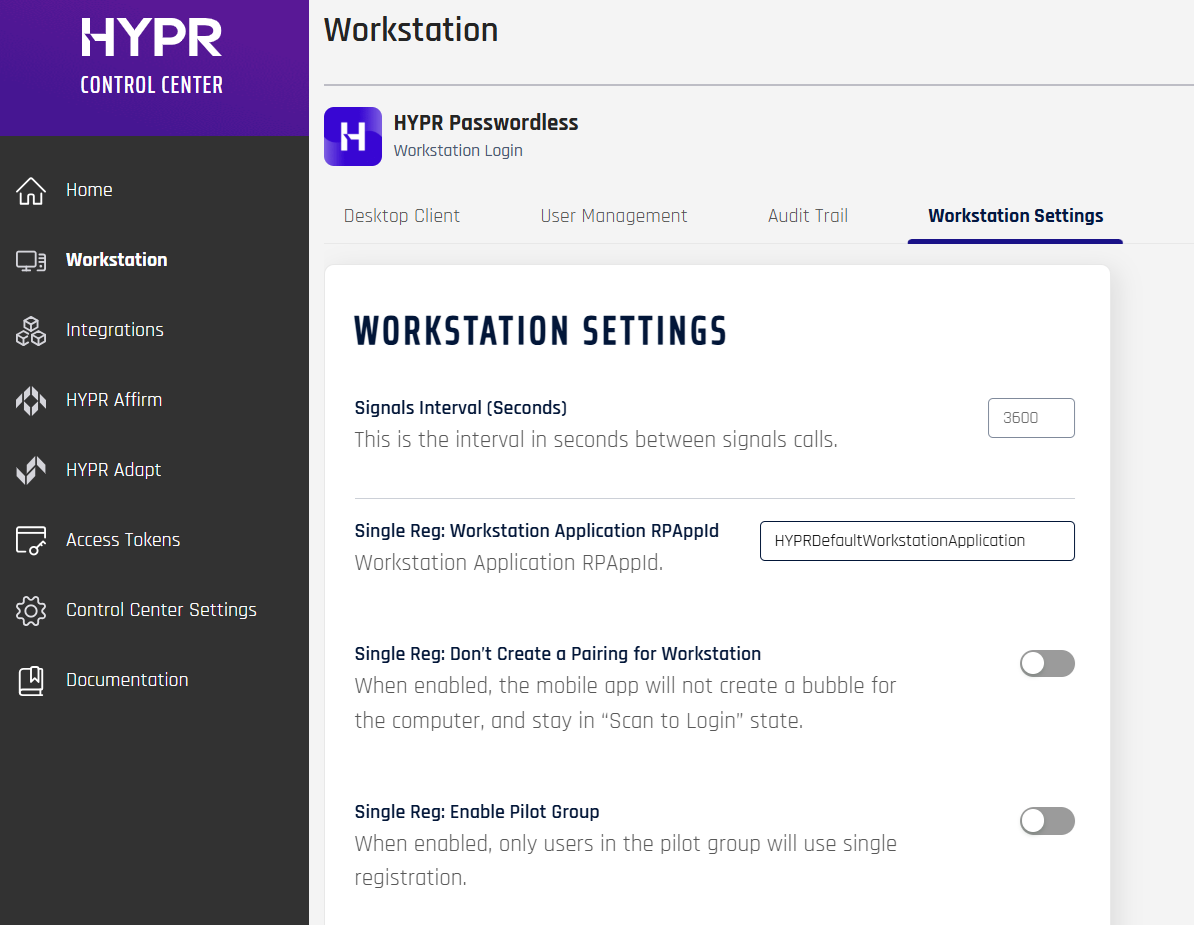
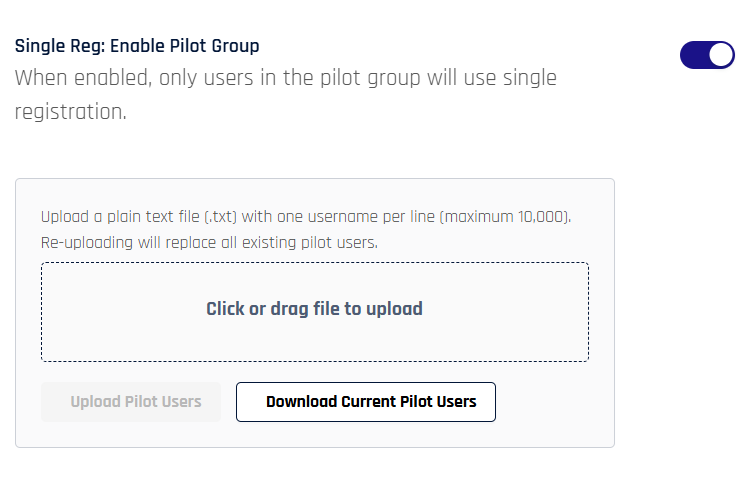
[Control Center / Workstation Settings] Single Registration rollout controls are now more explicit in the UI. Administrators can enable Single Reg: Enable Pilot Group and then manage pilot users in an expanded pane by uploading a plain-text user list, making staged rollout behavior more visible and easier to operate from the settings screen.
- Exposes pilot rollout controls directly in Workstation Settings
- Adds a dedicated pilot-user management pane
-
[HYPR Passwordless for Windows] The desktop client and adjacent enrollment dialogs include UI polish updates (labels, spacing, interaction consistency) to improve readability and reduce ambiguity in common login and security-key flows.
Enhancements
Enhancements to existing behavior, performance, UX, and configuration will be captured in this section.
-
[Adapt] Refined built-in risk policy templates so blocked and unblocked scenarios report clearer messages, pending attempts are evaluated with more realistic time windows, and inline comments more clearly document policy variables and logic, making policies easier to understand and tune for operations teams.
-
[Affirm] Backend improvements to how content customizations are stored and cached so Affirm Studio changes are applied more efficiently, with smoother save/apply behavior for admins and better runtime performance for end users.
- Restructures storage for Affirm content customizations so updates are stored more efficiently and safely, reducing the chance of inconsistent content after edits.
- Adds caching for Affirm content customizations to reduce load on the backing store and speed up runtime rendering for high‑volume workflows.
-
[Affirm] Configurable allowed document types for document verification so organizations can limit which issuing authorities' documents are presented in workflows based on regional or policy requirements.
-
[Affirm] Optional regional SMS routing for Canada so that Affirm notifications sent to Canadian phone numbers use dedicated SMS short codes, improving deliverability and shortening delivery times for Canadian recipients without additional configuration complexity.
-
[Affirm Helpdesk] Configuration for how long completed requests remain visible on the Helpdesk tab (beyond the previous 24‑hour default), so analysts can keep multi‑day investigations open in the UI instead of relying solely on exports or external tracking.
-
[Affirm Helpdesk] Dedicated Helpdesk roles and access controls so organizations can separate configuration access from investigation access more cleanly.
-
[Affirm Helpdesk] Improved agent experience with clearer session‑timeout messaging, configurable defaults for using SMS as the initialize channel where required, controls over which workflows are visible to helpdesk agents, and dedicated refresh behavior (including UI refresh options instead of relying solely on browser reload), leading to faster triage and fewer confusing states in long‑running sessions.
-
[Affirm Studio] Inline previews for key screens directly in the Studio editor so designers and admins can see how customized flows will look while configuring content and styles, reducing the need for repeated test runs to validate small visual or wording changes.
-
[Control Center] New device notification emails for older deployments now honor the support email configured in tenant branding, so recipients are directed to the organization’s own support contact instead of a generic fallback address.
-
[Control Center] Added a Helpdesk link in the Control Center UI so administrators and analysts can quickly navigate from configuration views to the Affirm Helpdesk workspace, reducing clicks when switching between configuration and investigation tasks.
-
[Control Center] Feature configuration as code for self-hosted deployments so administrators can declare global and per-application feature states in deployment configuration, reducing post-deployment setup and helping prevent configuration drift across restarts.
-
[HYPR Passwordless for Windows] Administrators can configure YubiKey PIN policy during pairing so security teams can enforce stricter PIN‑entry behavior for high‑risk environments while keeping the workflow straightforward for end users.
-
[Single Registration / Control Center] Rollout controls for Single Registration in Control Center so administrators can gradually enable Single Reg across environments or user groups, supporting safer pilots and staged production rollouts before broad adoption.
-
[HYPR Passwordless for Windows] Bundled YubiKey smart‑card minidriver 5.0.4.273 to improve smart‑card behavior in Citrix environments and align with the latest Yubico guidance, helping reduce smart‑card login issues in virtual desktop deployments.
-
[HYPR Passwordless for Windows] Improved roaming and QR reconnection behavior, resulting in more reliable unlock experiences in large environments.
-
[HYPR Passwordless for Windows] YubiKey Bio fingerprint enrollment now works reliably in Citrix remote sessions.
-
[HYPR Passwordless for Windows] Various general UI improvements.
Events
See Event Descriptions for a list of all HYPR Events and parameters.
Error Messages
The following error codes have been added or updated:
-
1207021:
ACTIVITY_LOG_NOT_FOUND— The activity log was not found. Check the workflow ID provided. -
1207022:
CONTENT_CUSTOMIZATION_INVALID_SCREEN_CONTENT— Screen content payload is invalid for the given screen name. Ensure the request body is valid JSON and matches the schema for the screen (for example,instructionsScreen,otpScreen).
- 1207024:
CONTENT_CUSTOMIZATION_VALIDATION_FAILED— Content customization validation failed because one or more fields exceed their maximum allowed length. Ensure all content fields stay within the supported limits.
To see all HYPR errors by component, see HYPR Error Codes Troubleshooting Table.
APIs
-
[Control Center]
API additions and schema changes for 11.1.0 will be documented in this section. -
[FIDO2 / APIs] Added a query API for FIDO2 Metadata Service (MDS) records so integrators can look up authenticator metadata by identifier or filter authenticators by characteristics, instead of downloading and parsing the full metadata set.
You can find detailed descriptors and other API calls in HYPR's full Postman API set at https://apidocs.hypr.com/?version=latest.
Upcoming Changes
-
[Affirm] [Beta] Enhanced Identity Report
- Expanded identity-report and system-of-record checks intended to surface richer validation and discrepancy details in request reviews, scorecards, and logs, helping approvers and analysts make higher-confidence identity decisions.
- Aims to give helpdesk and verification teams clearer visibility into document-validation outcomes and related verification signals across Affirm workflows.
-
[Affirm] Custom Steps in Verification Workflows
- Custom, pluggable verification steps intended to let organizations insert tenant-specific web experiences and logic into Affirm workflows while managing associated security policies and supporting functions from Control Center.
- Designed to support more specialized verification journeys without requiring each scenario to be implemented as a native built-in HYPR step.
-
[Enterprise Passkey / HYPR Passkey] [Beta] HYPR Passkey Fabric for iOS
- Planned expansion of HYPR Passkey Fabric to iOS so workstation, web, and mobile HYPR Passkey journeys can work more consistently across Apple-device experiences.
- Intended to improve how iOS users move between registration, sign-in, and saved-device journeys in supported HYPR Passkey scenarios, while the beta continues to mature.
-
[HYPR Mobile App] [Beta] Mobile UX Optimization
- Mobile-app UX updates focused on QR-first journeys for web and workstation access, reducing friction when users start sign-in or pairing flows from QR interactions instead of traditional workstation-unlock paths.
- Aims to make mobile authentication and registration experiences feel more intuitive across a broader set of HYPR use cases.
-
[HYPR Passkey] iOS Support
- Planned support for HYPR One as a native HYPR Passkey provider on iOS, enabling more natural enterprise passkey registration and sign-in experiences across supported mobile and web scenarios.
- Aims to align the iOS experience more closely with platform-native passkey interactions while preserving enterprise-managed credential controls.
If you're interested in previewing upcoming beta capabilities before they are generally released, please contact HYPR Support or your HYPR account team.
Bug Fixes
-
[Adapt] Fixed a condition where signal handlers could ingest unrelated events.
-
[Affirm] Improved error handling for content customization operations in Control Center so administrators receive clearer, more consistent error responses.
-
[Affirm] Hardened content customization APIs with stricter validation so invalid or malformed content maps are rejected early, reducing the risk of runtime failures in Affirm flows.
-
[Affirm] Fixed several issues in advanced end-user and helpdesk flows to improve workflow consistency, customization behavior, activity-log accuracy, and Helpdesk visibility across customized Affirm journeys.
- Corrects how document-upload fallback behavior is enforced in Affirm workflows so fallback rules consistently apply.
- Adjusts limits and behavior for anchor images in content customizations to prevent layout and rendering issues.
- Resolves specific Affirm activity-log edge cases where event details were incomplete or misleading.
- Ensures email-only contact preference flows deliver OTPs reliably when no phone number is present.
- Improves handling of branding assets in Affirm flows so logo and color updates apply consistently.
- Fixes population of Affirm Helpdesk tables so all relevant requests and states appear correctly.
- Improves handling of customized messaging and layout in advanced Affirm flows.
- Tightens validation around date-of-birth and similar fields in customized Affirm workflows.
- Further refines activity-log entries and state transitions for multi-step Affirm journeys.
- Stabilizes interactions between advanced end-user flows and Helpdesk views for shared requests.
- Improves evaluation of liveness and document-verification steps so the latest attempt is reflected in decisions and logs.
- Cleans up residual UX/state issues following liveness and document-verification steps.
- Corrects Affirm activity-log values in scenarios with multiple verification attempts and later approvals.
- Clarifies rendering and handling of complex customizations in Affirm content maps.
- Fixes remaining edge cases in the Affirm Helpdesk UI when working with customized workflows.
- Adds further tuning and resilience improvements for advanced Affirm end-user flows.
-
[Control Center] Fixed an issue that could prevent log content from being retrieved in Control Center.
-
[HYPR Mobile App for Android] Fixed passkey display so relying party IDs from HYPR Passwordless (for example
login.microsoft.com) are shown clearly in the Android app instead of only the generic provider name. -
[HYPR Mobile App for Android] Adjusted domain allow‑list checks so they are enforced at passkey registration time but no longer incorrectly block authentication, and improved error messaging around domains or email domains not being allowed.
- Improves HYPR Passkey checks to avoid unnecessary authentication failures.
- Improves error messaging around domain and email-domain disallow lists so admins and users can more easily diagnose configuration issues.
-
[HYPR Mobile App for Android] Multiple passkey UX fixes so registration failures no longer affect the app itself, QR scans now resume correctly after errors, and new passkeys appear immediately without requiring an app relaunch.
- Fixes an issue where QR scan would not reopen after a failed passkey registration on Android.
- Ensures newly registered HYPR Passkeys are visible in the Android app without requiring a manual relaunch.
- Resolves registration failures when scanning a HYPR QR in scenarios where existing passkeys are already present.
- Adds stability and UX refinements for HYPR Passkey registration on Android.
-
[HYPR Passwordless for Windows] Improved certificate enrollment error handling so workstation enrollment failures surface clearly instead of failing silently, improving reliability and diagnostics.
-
[HYPR Passwordless for Windows] Resolved an uninstall/upgrade issue where the installer could prompt the user to close Microsoft Edge.
-
[Server] Fixed a minor issue in log retrieval so generated log links are cleaner and more reliable in administrator workflows.
Known Issues
-
[Adapt] After a cold start of the risk engine, such as after an upgrade, a blocked policy might not be applied.
-
[Authenticate] The HYPR Service does not always restart as intended after resuming from Modern Standby or hibernation, sometimes resulting in multiple restart attempts and network recovery failures
-
[Control Center] Server still sends push notifications with incorrect proxy credentials
-
[Enterprise Passkey / HYPR Passkey] [HYPR Passkey Fabric] For users with an existing registration created before upgrading to 11.1.0, the save-computer prompt may not appear on the HYPR Mobile App during pairing. To use saved-computer functionality in 11.1.0, users need to reregister. This is a beta limitation and planned behavior in a future release is backward compatibility.
-
[Enterprise Passkey / HYPR Passkey] [HYPR Passkey Fabric] Locking the workstation immediately after saving the computer from the HYPR Mobile App can fail in some environments when there is no valid Windows session entry; a subsequent lock attempt typically succeeds.
-
[Enterprise Passkey / HYPR Passkey] Deregistering a HYPR Passkey from the HYPR Mobile App removes the workstation pairing from the mobile device, but it may not fully remove the associated workstation or web registration from Control Center and related integration records; administrators may need to clean up these registrations manually.
-
[HYPR Mobile App for iOS] The text below the logo on the home screen may still display "True Passwordless Security" instead of "Identity Assurance."
-
[HYPR Mobile App for iOS] Registration may continue without an alert when a future-dated version-enforcement policy is configured in Control Center.
-
[HYPR Passwordless for Windows] Some text on the Windows login screen may appear incorrectly under certain circumstances.
-
[HYPR Passwordless for Windows] If the YubiKey mini-driver is updated by HYPR Passwordless installer, a reboot is required
-
[Integrations - Okta] The Enroll button may appear for Control Center administrators who are not in the Okta directory.
-
[Integrations - Okta] New integrations may fail to be added because of "Default Policy" errors.
-
[Integrations - OneLogin] Users who are already enrolled may still appear in the integration's User Directory in Control Center.