10.7.1 Release Notes
HYPR 10.7.1 is an Enterprise Channel Release.
The Enterprise Release Channel follows a quarterly upgrade cycle, ensuring a stable and predictable update process. This schedule provides organizations with ample time to test, adapt, and implement changes while minimizing disruptions to business operations. With each release, customers receive the latest security, performance, and feature enhancements, allowing them to stay up to date with improvements while maintaining operational stability.
HYPR 10.7.0 was not released due to a bug discovered late in the QA process. All fixes and features listed in this document are delivered in HYPR 10.7.1.
To make it easier for customers to understand visual and workflow updates across HYPR products, we are introducing the Notable UI/UX Changes section of the Release Notes. This section highlights changes to Control Center, workstation app, and mobile interfaces and may be updated after the GA Release as additional improvements are introduced.
Minimum Supported Versions
| Release Date | HYPR Product | Minimum Requirement | Notes |
|---|---|---|---|
| January 6 | HYPR Passwordless for Windows 10.7.0 | Windows (10 "2004", 11) | Reboot required if upgrading from 7.6 or below; Security Key Support for YubiKey 5 Series with firmware 5.X, YubiKey Bio Multi-Protocol Edition, IDEMIA ID-One on Cosmo 8.2, Feitian K9 Plus and K40 Plus and its offshoots |
| January 6 | HYPR Passwordless for Mac 10.7.0 | macOS (High Sierra, Mojave, Catalina, Big Sur, Monterey, Ventura, Sonoma 14.1 [not 14.0], Sequoia, Tahoe) | Security Key Support for YubiKey 5 Series with firmware 5.X and Feitian ePass K9 Plus, K40 Plus and their respective offshoots |
| January 6 | HYPR Mobile App for Android 10.7.0 | Android 9.0+ | |
| January 6 | HYPR Mobile App for iOS 10.7.0 | iOS 12.4+ | |
| January 6 | HYPR Server 10.7.1 | Java Development Kit (JDK) 17 | Upgrade to 7.10 required before upgrading to 8.0.0 or higher |
| January 6 | HYPR SDK for Android 10.7.0 | Android 9.0+ | |
| January 6 | HYPR SDK for iOS 10.7.0 | iOS 12.4+ | |
| January 6 | HYPR SDK for Java 10.7.0 | Java Development Kit (JDK) 17+ |
All HYPR components are fully compatible across the three previous/subsequent minor (X.X) HYPR releases.
Breaking Changes
-
Windows Minimum Version Update — The minimum supported Windows version for HYPR Passwordless for Windows has been updated from Windows 10 version 1803 to Windows 10 version 2004. Windows 10 versions 1803 and 1809 are no longer supported. Customers using these older Windows versions will need to upgrade to Windows 10 version 2004 or later, or Windows 11, before upgrading to HYPR 10.7.1.
-
Database Performance Improvements — This change may be noticeable during database migration. Index optimizations have been applied to the
rp_registered_usertable to improve query performance for registered user operations.Index Optimizations on
rp_registered_userTableAdded Indexes:
- Performance Index: Added composite index
idx_rru_rpappid_created_dateon columnsrpAppIdandcreateDateInUTCto improve query performance for time-based user lookups - User Lookup Index: Added composite index
idx_rru_rpappid_named_useron columnsrpAppIdandnamedUserto optimize user identification queries
Removed Indexes:
- Legacy Index Cleanup: Removed obsolete index
rpappid_status_nameduser_idxon columnsrpAppIdandnamedUser(replaced by the more efficientidx_rru_rpappid_named_userindex)
Migration Notes:
- Database migration is expected to take 1-2 minutes for index creation operations
- These changes optimize database performance for registered user operations by implementing more efficient indexing strategies and removing redundant indexes
Impact:
- The new indexes improve query performance for both time-based filtering and user lookup operations on the
rp_registered_usertable
- Performance Index: Added composite index
-
[Control Center] FIDO2 MDS legacy APIs deprecation — with the introduction of granular AAGUID allow/deny controls, legacy metadata management APIs are scheduled to be deprecated beginning in 11.3. Update integrations to the new controls under
cc/api/rp/api.
New Features
-
[Affirm] Affirm Studio
- Control Center administrators can now customize content for end-user screens in the Affirm workflow through a new user interface in Control Center, enabling customization of titles, descriptions, instructional text, and button labels for verification screens including consent, instructions, login identifier, OTP, location, identity verification, and outcome screens.
- Administrators can also define visual themes and styling for Affirm workflows, including button colors and styles, typography, background colors, borders, and optional HTML components. Customizations can be applied at the tenant level or overridden per workflow, and branding is consistently applied across both HYPR-native and Onfido-driven screens within the Affirm identity verification workflow. This feature requires the
ENABLE_CUSTOM_BRANDINGfeature flag to be enabled for your tenant. - To be included in future updates: Administrators can preview customizations before applying them to ensure a seamless user experience.
- Content and style customizations can be applied to workflows, supporting both Requester and Approver screens in the Affirm workflow.
-
[Affirm] SMS Notification Branding
- Control Center administrators can now brand SMS notifications sent for OTP verification, approver messages, and Help Desk operations using the Company Name and Support Email values configured in the Company Identity section of Custom Branding.
- The system provides separate toggles for Affirm SMS Notifications (OTP verification and Manager/Approver messages) and Affirm Helpdesk SMS Notifications, allowing administrators to enable or disable sending of each SMS notification type while using the same branded identity.
-
[Affirm] [Beta] Network and Location-Based Policy Controls
- Control Center administrators can now configure IP-based and location-based policy controls for Affirm identity verification workflows, enabling contextual, risk-informed access decisions to address location spoofing, network impersonation, and insider fraud threats. The
AFFIRM_NETWORK_LOCATION_POLICY_CONTROLSfeature flag must be enabled for the tenant for these controls to be available. - IP-based policy controls include block lists and allow lists, with an optional strict enforcement mode that requires all access attempts to originate from allow-listed IP addresses. Administrators can configure these lists through the Control Center user interface.
- Location-based policy controls allow administrators to set a distance threshold that defines the maximum allowed distance from an expected location. Verification fails if a user's current location (determined via browser geolocation or IP geolocation) exceeds this threshold.
- Policy enforcement is integrated into Affirm workflows, with all policy-triggered events logged in the activity log for audit and compliance purposes. Administrators can enable or disable these policy controls as needed.
- Control Center administrators can now configure IP-based and location-based policy controls for Affirm identity verification workflows, enabling contextual, risk-informed access decisions to address location spoofing, network impersonation, and insider fraud threats. The
-
[Affirm] [Preview] Identity Verification via Verified Credentials
- Control Center administrators can now configure Microsoft Entra Verified ID credentials as a verification step in Affirm workflows, enabling users to present their Verified ID credential stored in Microsoft Authenticator to complete identity verification.
- When this step is active, users are presented with a QR code or deep link option. Users open Microsoft Authenticator, scan the QR code or use the deep link, and select their Verified ID credential. The credential is sent to Microsoft Entra for verification, and Affirm validates the credential claims, issuer trust, and expiration.
- Administrators configure this step through the verification steps dialog, specifying required fields including Authority ID (identifies the credential issuer), Contract ID (specifies the credential contract), and Credential Type (specifies the credential type). Optional configuration includes Azure Application Assignment, retry limits, and failure outcome handling.
-
[Enterprise Passkey] [Preview] FIDO2 Security Key Provisioning for Entra ID — self-managed enrollment experience for security keys on Entra-joined devices, allowing users to register, manage PINs, and unpair FIDO2 credentials directly
-
[Enterprise Passkey] [Preview] Windows HYPR Passkey Integration — enhanced Windows integration with HYPR Passkey provider interface for improved cross-platform passkey functionality
-
[Enterprise Passkey] [Preview] Mobile HYPR Passkey Registration Gating — enhanced mobile passkey experience with enterprise-controlled credential management and streamlined registration workflows for improved security and compliance
-
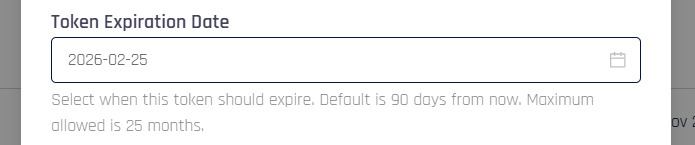
[Control Center] Customizable token expiration settings — administrators can now set custom expiration times for access and installation tokens to better align with organizational deployment timelines and integration requirements
-
[Control Center] FIDO2 MDS Granular Control — enhanced security with granular allow/deny controls for authenticator AAGUIDs, providing administrators with fine-grained control over approved security devices
-
[Enterprise Passkey] Single Registration Bi-Directional — flexible registration workflows allowing users to begin registration from workstation, web, or mobile and complete with both web and computer accounts registered
Notable UI/UX Changes
-
[Affirm] Affirm Studio Control Center Interface — a new user interface in Control Center that allows administrators to manage both content and style customizations for Affirm verification screens. The interface provides editing capabilities for screen content including titles, descriptions, instructional text, and button labels, along with configuration of visual themes such as button colors and styles, typography, background colors, borders, and optional HTML-based components. Administrators can create, edit, and manage multiple customization presets (called "Kits") and apply them to workflows through the workflow configuration interface, with support for tenant-level defaults and per-workflow overrides.
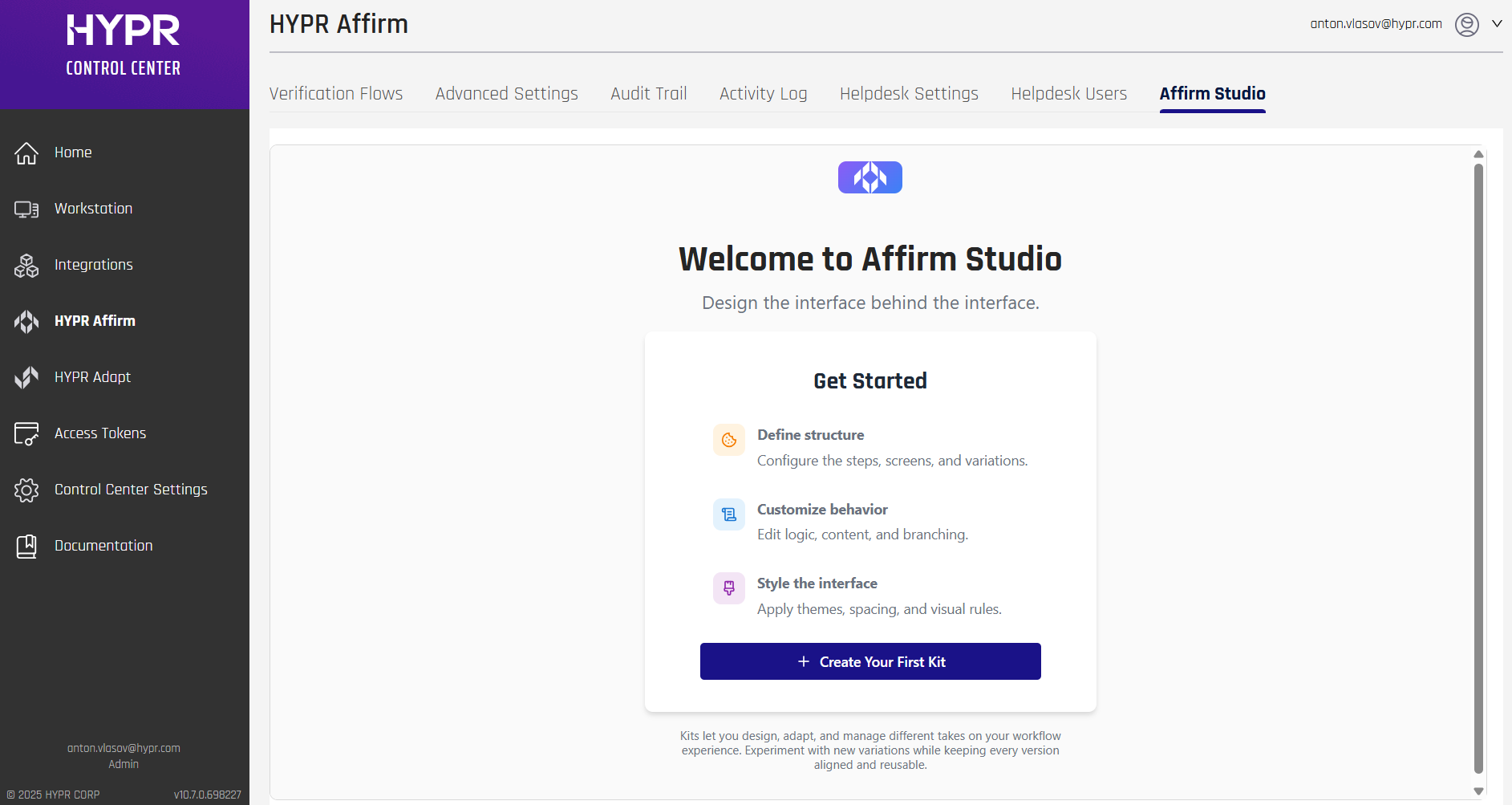
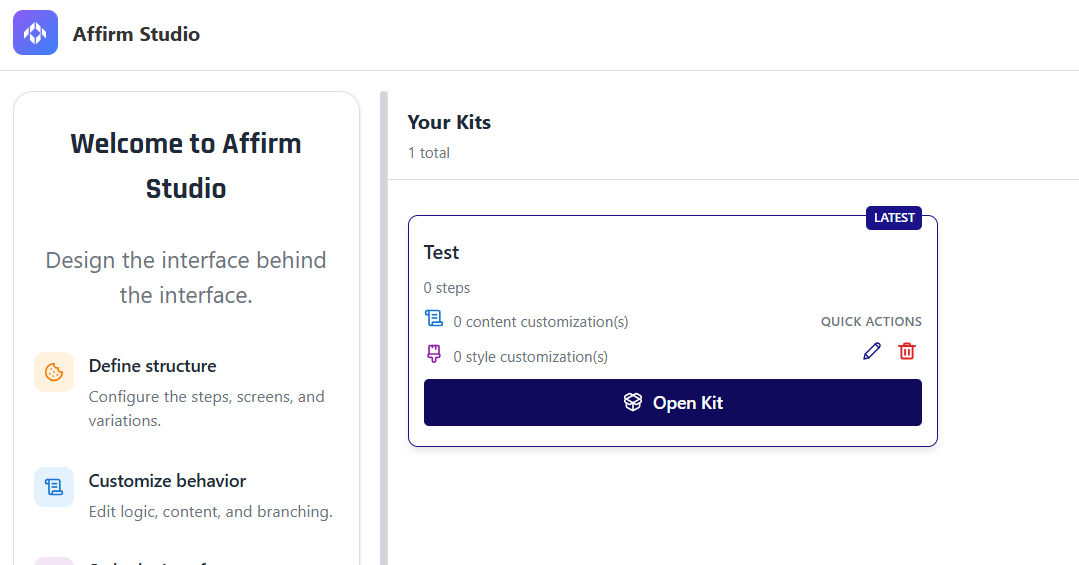
For more information, see Configuring End User Screen Customizations.
-
[Affirm] SMS Notification Branding Control Center Interface — new toggle switches in the Company Identity section of Custom Branding settings allow administrators to enable and customize SMS notification content and branding. The interface provides toggles for Affirm SMS Notifications (OTP verification and Manager/Approver messages) and Affirm Helpdesk SMS Notifications, with message customization capabilities and support for dynamic placeholders such as company name. Administrators can manage SMS message content directly from Control Center to ensure consistent corporate messaging across all SMS communications.
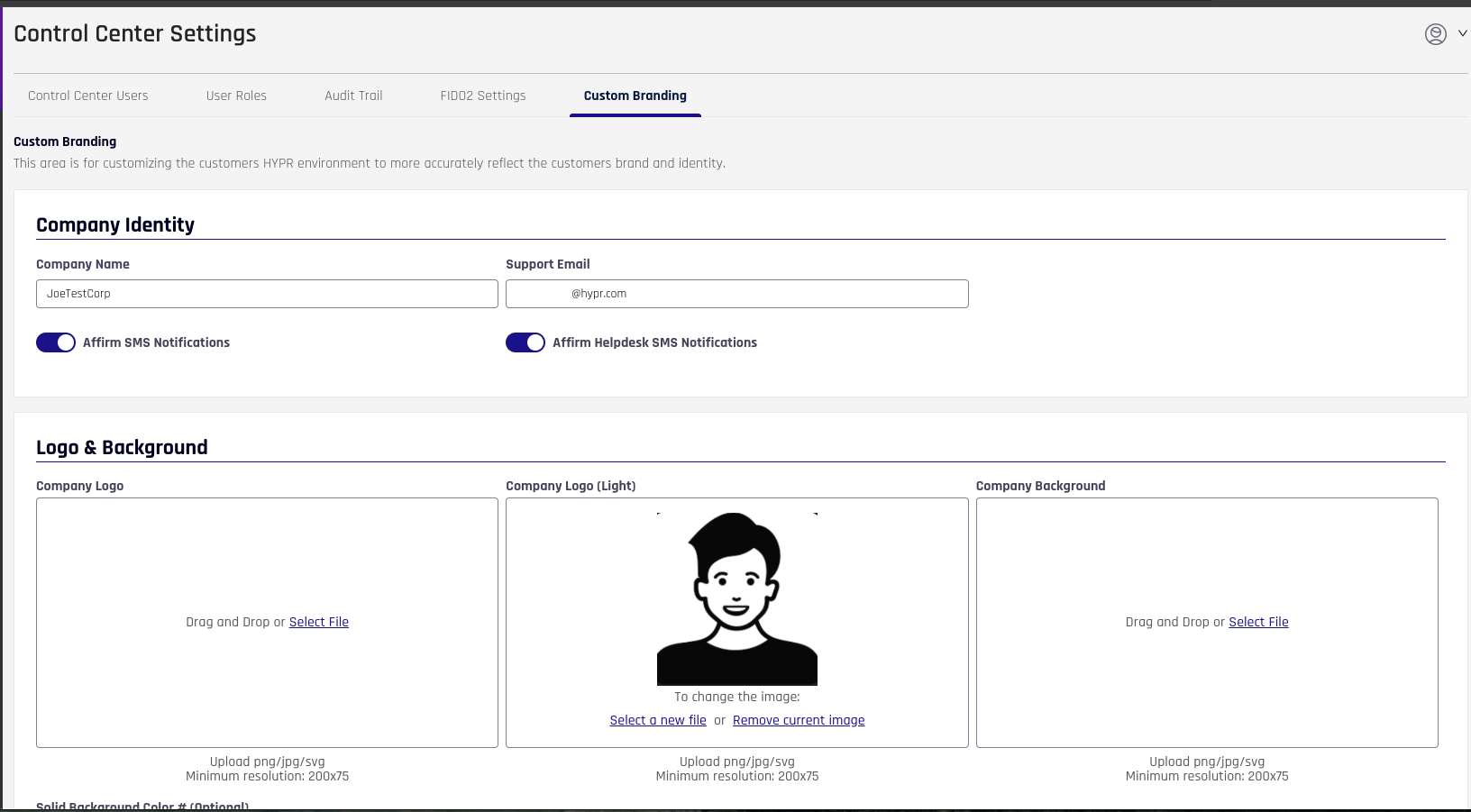
For more information, see SMS Notification Branding.
-
[Affirm] Network and Location-Based Policy Controls Configuration Interface — new configuration options in the Location verification step allow administrators to configure IP block lists, IP allow lists with strict enforcement, and distance thresholds for location-based policy controls. The interface provides table-based management for IP address rules with optional descriptions and supports multiple IP address formats including single addresses, ranges, CIDR notation, and wildcards.
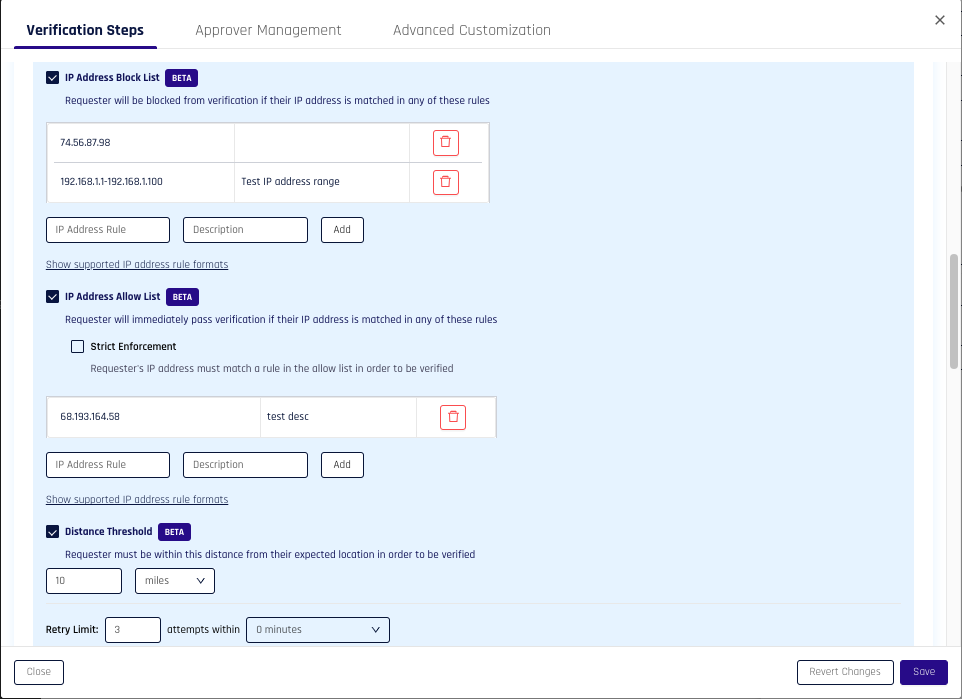
For more information, see Configuring Network and Location-Based Policy Controls.
-
[Affirm] [Preview] Identity Verification via Verified Credentials User Interface — new verification step in Affirm workflows enables users to present Microsoft Entra Verified ID credentials stored in Microsoft Authenticator. When this step is active, users are presented with a QR code that they can scan using Microsoft Authenticator to present their Verified ID credential for verification. The interface provides clear instructions and status feedback throughout the verification process.
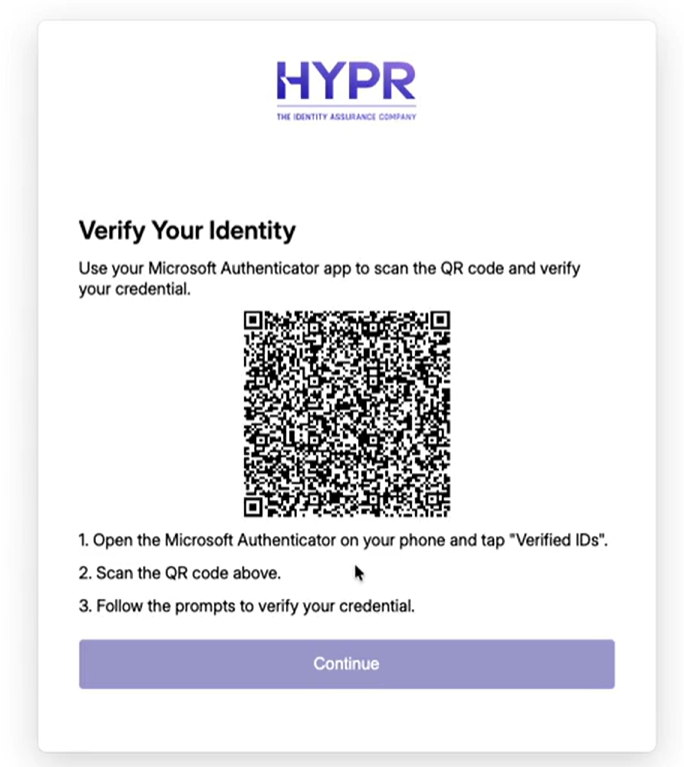
For more information, see Configuring Identity Verification via Verified Credentials.
-
[Enterprise Passkey] [Preview] FIDO2 Security Key Provisioning User Interface — new user flows in Workforce Access (WFA) enable users to self-enroll FIDO2 security keys, manage PINs, and manage fingerprints (for biometric keys) directly from their Entra-joined workstations. The WFA client detects when a FIDO2 key is plugged in and guides users through registration, PIN setup/change, and unpairing workflows with improved error handling and messaging. Control Center administrators can enable or disable FIDO2 provisioning, manage feature flags, and view registered security keys with device details including device name, vendor, and credentialId.
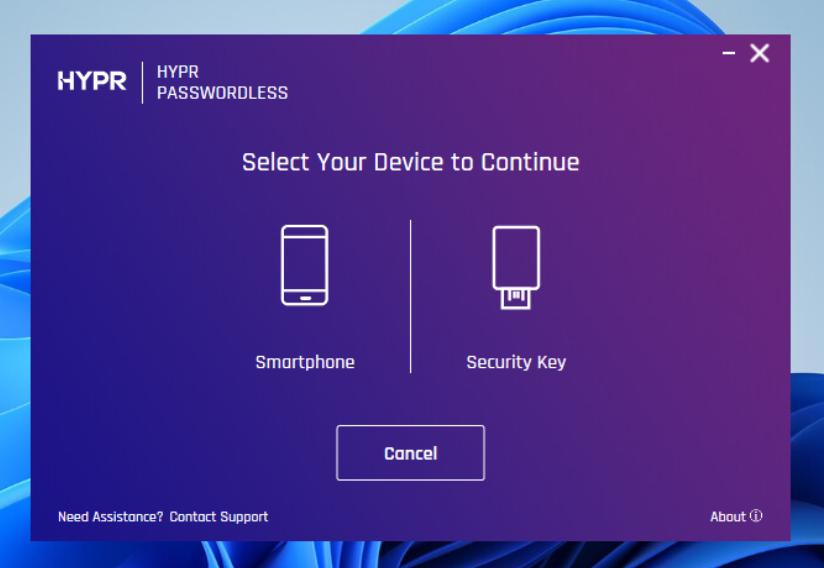
For more information, see Enterprise Passkey Settings.
-
[Control Center] FIDO2 AAGUID Allow/Deny Interface — new controls in the Advanced Mode FIDO2 Settings screen allow administrators to manage authenticator AAGUID allowlists and denylists per application, providing fine-grained control over which security key models are permitted for registration and authentication.
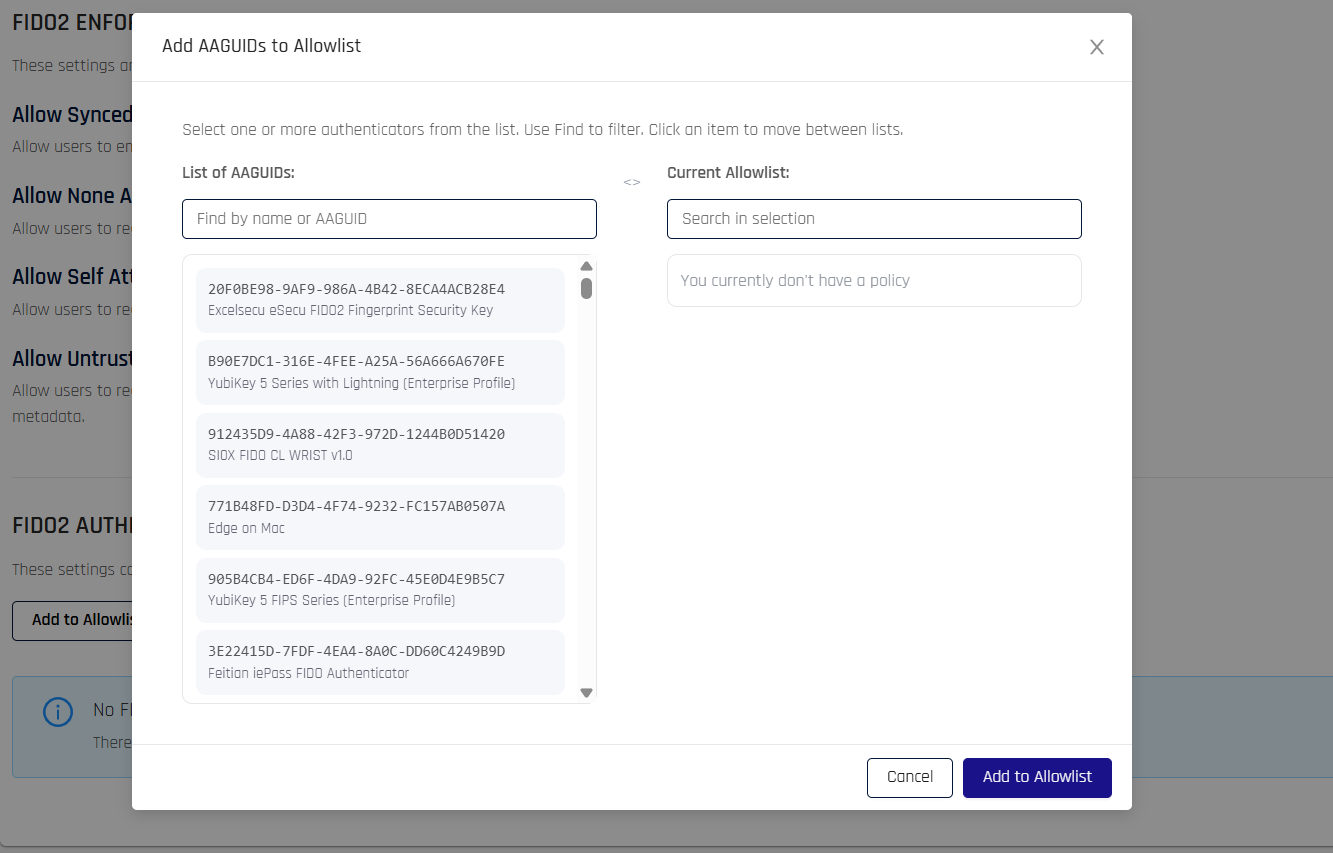
-
[Control Center] Access Token Expiration Control — the Create Token dialog in the Access Tokens section now includes a Token Expiration Date field, allowing administrators to choose the date on which a Control Center access token expires directly from the UI.
Enhancements
-
[Adapt] Enhanced policy evaluation controls — improved feature flag configuration for API-based policy evaluations
-
[Affirm] Enhanced user directory customizations — improved flexibility for administrators to configure user source customizations based on user roles, allowing different data sources for approvers and regular users
-
[Affirm] Enhanced OIDC integration — improved compatibility with identity providers that filter requests based on user-agent strings, allowing administrators to customize outbound request user-agents for Affirm Helpdesk and Approver flows
-
[Affirm] Enhanced single user workflow API — improved flexibility for creating workflows with non-email login identifiers, allowing administrators to use various identifier formats for user authentication
-
[Affirm] Improved error handling — enhanced user experience with better error messaging and graceful handling of system limitations
-
[Affirm] Administrators can now assign different rpApps to device management outcomes for customization
-
[Affirm] Enhanced user experience — improved identity verification interface with better mobile responsiveness, accessibility compliance, and streamlined verification workflows
-
[Affirm] Enhanced workflow retry limits — administrators can now set overall workflow attempt limits and blocking duration to prevent abuse, with improved user messaging for retry attempts
-
[Affirm] Improved labeling consistency — updated "Identity Verification" labels to "Document and Biometric Verification" across Control Center, activity logs, and API settings for better clarity
-
[Affirm] Enhanced event logging and analytics — improved workflow event tracking with start/end timestamps, duration metrics, and abandonment detection for better reporting and dashboard analytics
-
[Affirm] Improved Help Desk record display — enhanced default record count and customization options for better performance when managing large numbers of workflow records
-
[Affirm] Improved error reporting and debugging capabilities for 4XX and 5XX errors in the Help Desk interface
-
[Affirm] Role-based access control: improved security and user permissions management for Help Desk operations
-
[Affirm] Help Desk workflow initialization layout improvements — updated the Initialize a new workflow screen in the Help Desk interface to streamline field ordering and improve readability for operators
-
[Affirm] Improved username handling to support both short names and full UPNs for better compatibility with Entra ID and Okta integrations
-
[Authenticate for Windows] Enhanced code architecture and logging integration for improved debugging and maintenance
-
[Authenticate for Windows] Improved hyperlink styling — enhanced visual design for clickable links with customizable colors and underlines for better user experience
-
[Authenticate for Windows] Updated dependencies and security improvements — enhanced system stability and security through regular dependency updates
-
[Authenticate for Windows] Improved client upgrade mechanism to support configuration updates via JSON file or command line parameters for better enterprise deployment flexibility
-
[Authenticate for Windows] Enhanced security device validation — improved checks for Smart Card service status and mini-driver compatibility before attempting security device operations
-
[Authenticate for Windows] Enhanced notification customization — improved taskbar notification text customization capabilities for better enterprise branding and user communication
-
[Authenticate for Windows] Added support for filtering additional third-party credential providers via configurable GUID lists
-
[Authenticate for Windows] Added option to always enforce passwordless login regardless of device pairing status
-
[Authenticate for Windows] Enhanced password filtering controls by adding a new flag bit to the
Disable Password Loginvalue in the registry — added option to control password-based login filtering separately for console and remote desktop sessions -
[Authenticate for Windows] Enhanced YubiKey Bio fingerprint enrollment — improved support for YubiKey Bio fingerprint enrollment in Citrix remote sessions
-
[Authenticate for Mac] Enhanced security device support — improved PUK handling for security keys on macOS to ensure consistent user experience across Windows and Mac platforms
-
[Control Center] Enhanced security key activity tracking — accurate last active timestamps for workstation security keys in user management
-
[Control Center] Single Registration Certificate Renewal — automated certificate renewal for Web Registration deployments with centralized certificate management and user notifications
-
[Control Center] Improved QR code fallback UX
-
[Enterprise Passkey] Enhanced mobile pairing behavior — improved flexibility for workstation authentication workflows with configurable pairing options
-
[Enterprise Passkey] Improved error messaging for Provisioning API — enhanced user experience with clearer error messages
-
[Enterprise Passkey] Enhanced Entra Federation integration — improved authentication flows with OAuth Client Credential Grant, enhanced admin experience with clearer UI labels, and better SAML MFA claims handling
-
[Enterprise Passkey] Improved UX clarity for authentication options
-
[HYPR One App for Android] Improved user interface and functionality for authentication flows within embedded browsers
-
[HYPR One App for iOS] Enhanced deep link security — added user confirmation prompt for deep link authentication requests to improve security and prevent unauthorized access
-
[Integrations - Keycloak] Enhanced runtime logging controls — improved logging management with dynamic logging level configuration for better troubleshooting and system monitoring
-
[Integrations - Keycloak] Improved log message handling — enhanced logging efficiency by splitting log messages into separate parts
-
[Integrations - Keycloak] Enhanced cookie handling — improved performance and error handling for HYPR PMC Cookie loading
-
[Mobile & Workstation] Improved log collection and centralized storage for enhanced troubleshooting and support capabilities
-
[Platform] Improved performance, security, and reliability
-
[Platform] Added time zone awareness to events recorded in log files
-
[Platform] Streamlined QR fallback process with single text copy, copy shortcuts, and enhanced compatibility for embedded browsers and international users
Events
The following Event is being deprecated:
SSL_PINS_UPDATED
The following Events have been added:
-
AFFIRM_WORKFLOW_CHAT_START(IDENTITY_VERIFICATION) -
AFFIRM_WORKFLOW_CHAT_FINISH(IDENTITY_VERIFICATION) -
AFFIRM_WORKFLOW_DOCUMENT_BIOMETRIC_START(IDENTITY_VERIFICATION) -
AFFIRM_WORKFLOW_DOCUMENT_BIOMETRIC_FINISH(IDENTITY_VERIFICATION) -
AFFIRM_WORKFLOW_VERIFIED_CREDENTIAL_COMPLETED(IDENTITY_VERIFICATION)
The following Keycloak SubEvents have been documented in the Event Descriptions page:
See Event Descriptions for a list of all HYPR Events and parameters.
Error Messages
The following error codes have been added:
- 1207020:
CONTENT_CUSTOMIZATION_NOT_FOUND— The specified content customization preset was not found.
To see all HYPR errors by component, see HYPR Error Codes Troubleshooting Table.
APIs
- [Control Center]
- Added endpoint to retrieve default HYPR constants for content customization:
GET /cc/api/idv/content-customization/defaults - Added endpoint for verified credential callback handling:
POST /cc/api/idv/verify/verified-credential/callback - Enhanced log fetching endpoints — replaced
/cc/api/logs/fetchwith two specialized endpoints:POST /cc/api/logs/fetch/location— retrieve log file location informationPOST /cc/api/logs/fetch/content— retrieve log file content with streaming response support
- Updated
/cc/api/idv/verificationendpoint payload:contentCustomizationIdfield type changed fromintegertostring(breaking change)- Added
workflowAttemptLimitfield (integer, required) — maximum number of verification attempts within the time window - Added
workflowAttemptWindowMinsfield (integer, required) — time window in minutes for workflow attempt limits
- Updated
/cc/api/idv/verify/await/verifiableCredentialCallbackendpoint payload:- Added
receipt,verifiedCredentialsData,subject, andisPresentationVerifiedfields - Removed
errorandisIssuanceSuccessfulfields isPresentationVerifiedis now required;stateandisIssuanceSuccessfulare no longer required
- Added
- Updated
/cc/api/appconfig/workstationendpoint payload:- Added
singleRegNoWsPairingfield toRPAppWorkstationConfigschema
- Added
- Updated
/cc/api/idv/content-customizationand/cc/api/idv/content-customization/{contentCustomizationId}endpoints:- Added
stylePaletteMapfield toBaseContentCustomizationDTOschema
- Added
- Updated
/cc/api/versioned/smartkey/enrolland/cc/api/versioned/smartkey/reenrollendpoints:- Added
loginCertExpiryDatefield toEnrollmentRequestschema
- Added
- Updated
AffirmApplicationWorkflowConfigschema:contentCustomizationIdfield type changed fromintegertostring(breaking change)
- Updated
AffirmVerificationFlowConfigschema:- Added workflow retry limit fields:
workflowAttemptLimitandworkflowAttemptWindowMins - Added network and location policy fields:
locationCheckIPAllowListEnabled,locationCheckIPAllowList,locationCheckIPBlockListEnabled,locationCheckIPBlockList,locationCheckDistanceThresholdEnabled,locationCheckDistanceThreshold,locationCheckIPAllowListStrictEnforcement - Added document and biometric verification fields (replacing
idvCheckand related fields):documentBiometricCheck,documentBiometricDocumentAuthentication,documentBiometricLivenessCheck,documentBiometricMotionDetectionCheck,documentBiometricNameCheck,documentBiometricAMLCheck,documentBiometricOFACCheck,documentBiometricReportVisibleForRequester, and related failure outcome fields - Added verified credential fields:
verifiedCredentialCheck,verifiedCredentialCheckFailureOutcome,verifiedCredentialCheckFailureRedirectUrl,verifiedCredentialCheckFailureAttemptLimit,verifiedCredentialCheckFailureAttemptWindowMins,verifiedCredentialCheckFailureEscalate,verifiedCredentialCheckRpAppId,verifiedCredentialAuthorityId,verifiedCredentialContractId,verifiedCredentialType - Added
outcomeAssociatedRpAppIdfield for device management outcome RP app assignment - Added Azure login identifier fields:
azureLoginIdentifierPreferencesandazureLoginIdentifierCustomAttribute - Removed
idvCheckand all relatedidv*fields (replaced bydocumentBiometric*fields)
- Added workflow retry limit fields:
- Added endpoint to retrieve default HYPR constants for content customization:
You can find detailed descriptors and other API calls in HYPR's full Postman API set here.
Upcoming Changes
-
[Control Center] OAuth API Tokens
- OAuth-based access tokens across Control Center APIs to replace legacy bearer tokens and improve security, manageability and interoperability.
- Strengthens protection for signal endpoints by leveraging signed/validated tokens instead of static bearer credentials.
- Java SDK updated to support OAuth token flows, simplifying adoption for integrators and automation.
- Performance validated for high-throughput scenarios.
-
[Enterprise Passkey] Offline Use Cases
- Offline desktop login on Entra‑joined devices using encrypted, per‑user Offline PINs with a locally stored passkey bundle.
- Policies and limits are managed in Control Center; attempts are audited and PINs rotate automatically after successful online unlocks.
-
[Adapt] HYPR Adapt for Microsoft Edge for Business Integration
- HYPR Adapt policy risk engine integrates with Microsoft Edge for Business to extend signal collection and exchange with corporate browsers.
- Provides access to device signals directly through the browser, offering broader coverage by accessing attested information not available from regular web app contexts.
-
[Integrations - Keycloak] OAuth authentication
- As HYPR adopts OAuth as an authorization mechanism platform‑wide, the Keycloak integration will adopt OAuth exchanges in place of bearer tokens to increase security and flexibility.
-
[Affirm] Deepfake detection & real‑time feedback
- Additional capabilities beyond Motion — including expanded deepfake detection and richer real‑time capture feedback — planned for later releases.
Bug Fixes
-
[Adapt] Fixed signal handler duplicate execution — resolved issue where inbound webhook triggers were causing custom signal handlers to fire multiple times instead of once
-
[Adapt] Fixed login limits policy display — resolved issue where Push authentication option was not shown when login limits policy was assigned, causing users to be taken directly to QR authentication
-
[Adapt] Fixed Action Events are now emitted and consumed by the Event Bus when Adapt is enabled, restoring enforcement for policies like Login Limits
-
[Adapt] Fixed event ingestion behavior — resolved issue where the
ENABLE_ADAPT_POLICIESfeature flag was incorrectly ingesting events into the Adapt database. The feature flag now only enables the Adapt UI pages and allows creating policies without requiring event ingestion -
[Affirm] Fixed Web video liveness now times out and prompts users to redo when a face isn't detected; improved user feedback and result reporting
-
[Affirm] Fixed phone number validation — resolved issue where incomplete phone numbers were incorrectly accepted
-
[Affirm] Fixed device management flow routing — resolved issue where users with registered devices were incorrectly redirected to onboarding flow instead of device management interface
-
[Affirm] Fixed Error page visibility — transient error screen now remains visible for 5 seconds to ensure users can read the message before redirect
-
[Affirm] Fixed Injectable outcomes now record denial results and reasons in Activity Log (no longer shows N/A)
-
[Affirm] Fixed several broken documentation links in Control Center
-
[Affirm] Fixed labeling issues for Affirm users with the Viewer role
-
[Affirm] Fixed cases of error 500 occurring during audit trail sorting
-
[Affirm] Fixed an issue where "null" was displayed instead of an empty string when first opening injectable outcomes
-
[Affirm] Fixed activity log display for unused features — resolved liveness check and name comparison steps showing "pass" instead of "N/A" when not included in the verification flow
-
[Affirm] Fixed Viewer role permissions — enforced proper access controls to prevent Viewer role users from modifying Help Desk settings
-
[Affirm] Fixed workflow initialization issue — resolved problem where flows could not be initialized when email field was left blank after being accessed
-
[Affirm] Fixed single user workflow generation — resolved issue where flows with empty string
rpAppIdReferenceand no custom user directory could not be used to generate single user workflows; empty string values are now properly handled
-
[Affirm] Fixed issue where OIDC authentication was being skipped instead of prompting users as expected
-
[Affirm] Fixed Resolved
authorization_request_not_foundduring OIDC callback in requester flows; callbacks now complete and the flow continues as expected -
[Affirm] Fixed API flow reuse issue — repeated execution now correctly disallowed
-
[Affirm] Fixed issue where Control Center admin flows were displaying invalid link error screen instead of executing correctly
-
[Affirm] Fixed an issue where Identity Verification failure results were not being recorded in the activity log
-
[Affirm] Fixed chat escalation issue — resolved problem where subsequent approvers were not being invited to chat when previous approvers didn't respond
-
[Affirm] Fixed redirect URL error messaging — resolved issue where incorrect error message was displayed when attempting to set invalid redirect URLs
-
[Affirm] Fixed helpdesk recovery link routing — resolved issue where recovery links were directing to base Control Center URL instead of Device Manager recovery page
-
[Authenticate for Windows] Enhanced log collection and upload functionality — improved automatic log upload capabilities with configurable intervals and on-demand upload options
-
[Authenticate for Windows] Fixed crashes in Citrix VDI environments caused by security device instance ID retrieval fails
-
[Authenticate for Windows] Recovery PIN information no longer shown if Recovery PINs are disabled
-
[Authenticate for Windows] Fixed log file path configuration — absolute paths are now used during fresh installations
-
[Authenticate for Windows] Fixed Smart Card unlock failure — resolved issue where Smart Card unlock operation failed when the minidriver DLL version string contained extra text after the version number
-
[Control Center] Fixed role visibility in user creation — resolved issue where Control Center admin users could see helpdesk roles when creating new users; helpdesk roles are now properly hidden from Control Center admin user creation interface
-
[Control Center] Fixed multiple workstation enrollment issue where mobile devices were incorrectly paired to every workstation during QR code roaming login
-
[Control Center] Fixed certificate re-enrollment UI issues in User Management — resolved missing device and expiration information display for paired smart keys and improved trigger re-enroll functionality
-
[Control Center] Fixed user listing performance issues — resolved high database CPU usage when loading user listings for large tenants
-
[Control Center] Fixed custom branding issues — resolved page refresh problems and company name changes overwriting previously saved Affirm settings
-
[Control Center] Fixed an issue where certificate information popup was incorrectly shown for security devices like YubiKey
-
[Enterprise Passkey] Fixed workstation pairing deregistration — resolved issue where devices were not being removed from the desktop app or Control Center when deregistering workstation pairing from mobile app
-
[Enterprise Passkey] Fixed an issue where mobile unlock succeeded but workstation remained locked
-
[HYPR One App for Android] Fixed user selection screen not displaying during QR code unlock when multiple passkeys are registered for different users
-
[HYPR One App for Android] Fixed incorrect pairing removal during biometric invalidation — resolved issue where workstation pairing was removed instead of web pairing when deregistering from biometric invalidation error prompt
-
[HYPR One App for Android] Fixed deep link flag detection — resolved issue where the deep link flag (dl=true) was not being sent correctly on certain Android versions, particularly Android 15
-
[HYPR One App for Android] Fixed double popup issue when scanning with camera
-
[HYPR One App for iOS] Fixed app crash when re-enrolled certificate is transferred to mobile during workstation unlock
-
[HYPR One App for iOS] Fixed workstation icon crash — resolved app crash when tapping workstation icon after deregistration in Single Registration flows
-
[HYPR One App for iOS] Fixed an issue where offline PINs were not regenerating after authorization
-
[HYPR One App for iOS] Fixed an issue where device key exchange API was polling excessively when a tenant returned 503 errors; implemented rate limiting
-
[HYPR One App for iOS] Fixed HYPR Passkey issues where signing in to OneNote, Microsoft Copilot 365, and browser-based Microsoft services failed with blank pages or "passkey is invalid" errors
-
[HYPR One App for iOS] Fixed Crash when registering via HYPRLinks using the native camera; registration now completes reliably
-
[HYPR One App for iOS] Fixed registration failure in Single Registration flows
-
[HYPR Passwordless for Mac] Fixed an issue where recovery PIN option was not shown when only a security key was paired
-
[HYPR Passwordless for Mac] Fixed custom branding uninstall issue — resolved problem where app icons and references remained on the system after uninstalling custom-branded applications
-
[HYPR Passwordless for Mac] Fixed issue where changes to Security Key Recovery PIN settings in Control Center were not being mirrored to the local file
-
[HYPR Links] Fixed Scanning login QR codes with the device's native camera now triggers authentication after app handoff; web login succeeds without using the in‑app scanner
-
[Integrations - Keycloak] Fixed QR code rendering with Jamf — resolved issue where QR codes were not displaying properly in Jamf login screens on MacBook devices
-
[Integrations - Keycloak] Fixed QR fallback UI display — resolved UI issues and invalid "CODE" fields being displayed in embedded browsers during Microsoft app authentication with Entra Federation
-
[Integrations - Keycloak] QR code now displays a dynamic link instead of a landing page to streamline registration handoff
-
[Integrations - Entra] Fixed authentication failure — resolved issue where users could not authenticate when Entra was integrated with Control Center using client secret
-
[Integrations - Okta] Fixed: Users deleted from the Integrations rpApp do not get unassigned from the Okta app
-
[Okta Integration] Fixed intermittent integration creation errors — resolved issues with HYPR group assignment and custom attribute creation during new Okta integration setup
-
[Ping Integration] Fixed transaction success detection in specific authentication scenarios
-
[Platform] Improved the speed and performance of DELETE operations in the database
-
[RADIUS Integration] Implemented stricter validation rules to improve security
-
[Single Registration] Fixed an issue where the workstation application name was incorrectly displayed in "My Web Account" screen during workstation-to-web registration flow
-
[Single Registration] Fixed device deregistration error — resolved issue where missing database fields were causing deregistration failures when enrollment service was running
-
[Affirm] Fixed improved wording and clarity for specific error messages
-
[Affirm] Fixed implemented clear error messaging for users attempting to access Help Desk features without proper permissions
-
[Authenticate for Windows] Fixed removed retry options to streamline and improve user experience
Known Issues
-
[Adapt] Upon a cold start of the risk engine (e.g., after an upgrade) blocked policy might not be applied
-
[Authenticate] The HYPR Service does not always restart as intended after resuming from Modern Standby or hibernation, sometimes resulting in multiple restart attempts and network recovery failures
-
[Control Center] Server still sends push notifications with incorrect proxy credentials
-
[HYPR Passwordless for Windows] The text messages in the Windows login screen are replaced with incorrect text by HYPR Passwordless credential provider under certain circumstances
-
[HYPR Passwordless for Windows] If the YubiKey mini-driver is updated by HYPR Passwordless installer, a reboot is required
-
[HYPR One App for iOS] The text below the logo on the home screen still says "True Passwordless Security" and has not been updated to "Identity Assurance"
-
[HYPR One App for iOS] Registration isn't blocked and no alert is displayed when a version enforcement policy is set in Control Center for a future date
-
[Integrations - Okta] The Enroll button is displayed for Control Center admins who are not in the Okta directory
-
[Integrations - Okta] New integrations cannot be added due to 'Default Policy' errors
-
[Integrations - OneLogin] Users who are already enrolled may also be listed in the integration's User Directory, accessible through the User Management interface in Control Center