Audit Trail
The Audit Trail can be configured from more than one location in Control Center:
- In Standard Mode: Integrations under the Audit Trail tab for the integration
- In Standard Mode: Control Center Settings under the Audit Trail tab
- In Standard Mode: HYPR Affirm under the Audit Trail tab
- In Advanced Mode: App Properties for the Application selected under Choose an App
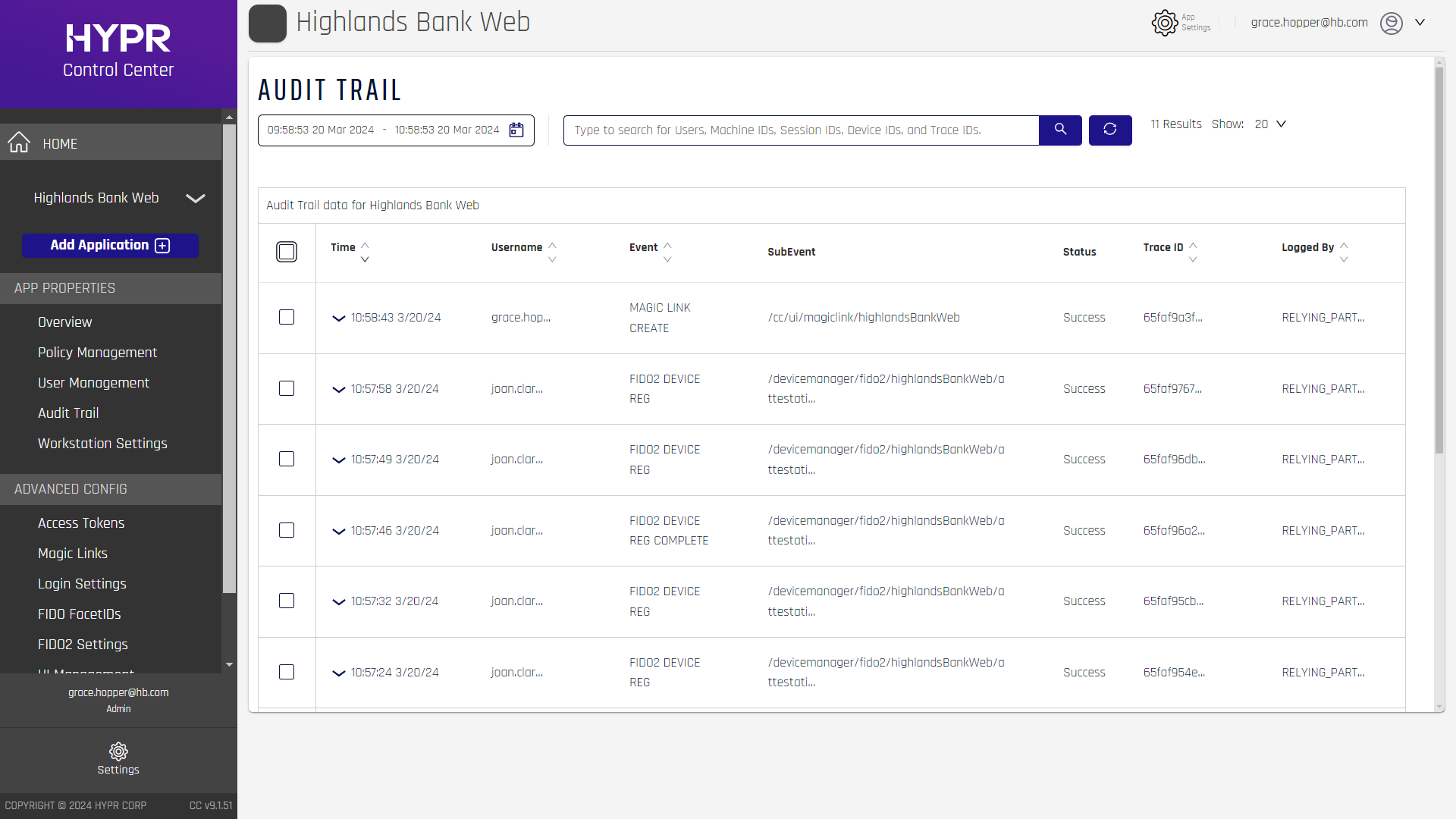
In all cases the experience is the same; clicking the Event entry will reveal additional information about the Event.
The calls to create, search for, and Export Audit Trail Events can be found here in the HYPR Passwordless API collection.
The Audit Trail is designed to help administrators discover if and when issues occur during registration, authentication, or transaction. HYPR captures this user activity data and provides access to it in a simple, easy-to-use interface which lowers troubleshooting time and personnel resources so the issue can be identified and remedied at speed.
Related Articles:
For an overview of all logged events, as well as which component they are logged by and where they originate, see Overview of Logged Events by Type, Component, and Source at the end of this article.
What Is the Audit Trail
The Audit Trail is a collection of user activity Events generated by the components in the HYPR ecosystem. These captured Events span the entirety of the flow of operations, whether it's registration, authentication, deregistration, or a transaction. At every step of each HYPR request or response, an Event is generated and collected with its corresponding information.
How It Works
Event data is stored in a separate schema away from the critical HYPR FIDO databases. This allows registration, authentication, and deregistration flows to continue functioning without being affected. The connection information to this schema can be found in the Vault; a HYPR representative can help you find it. The settings for the Audit Trail schema will be automatically set up for you during installation.
We anticipate there could be potentially millions of records in this database. We have included a means to roll over the data. This mechanism will be described in detail at the bottom of this guide.
Events
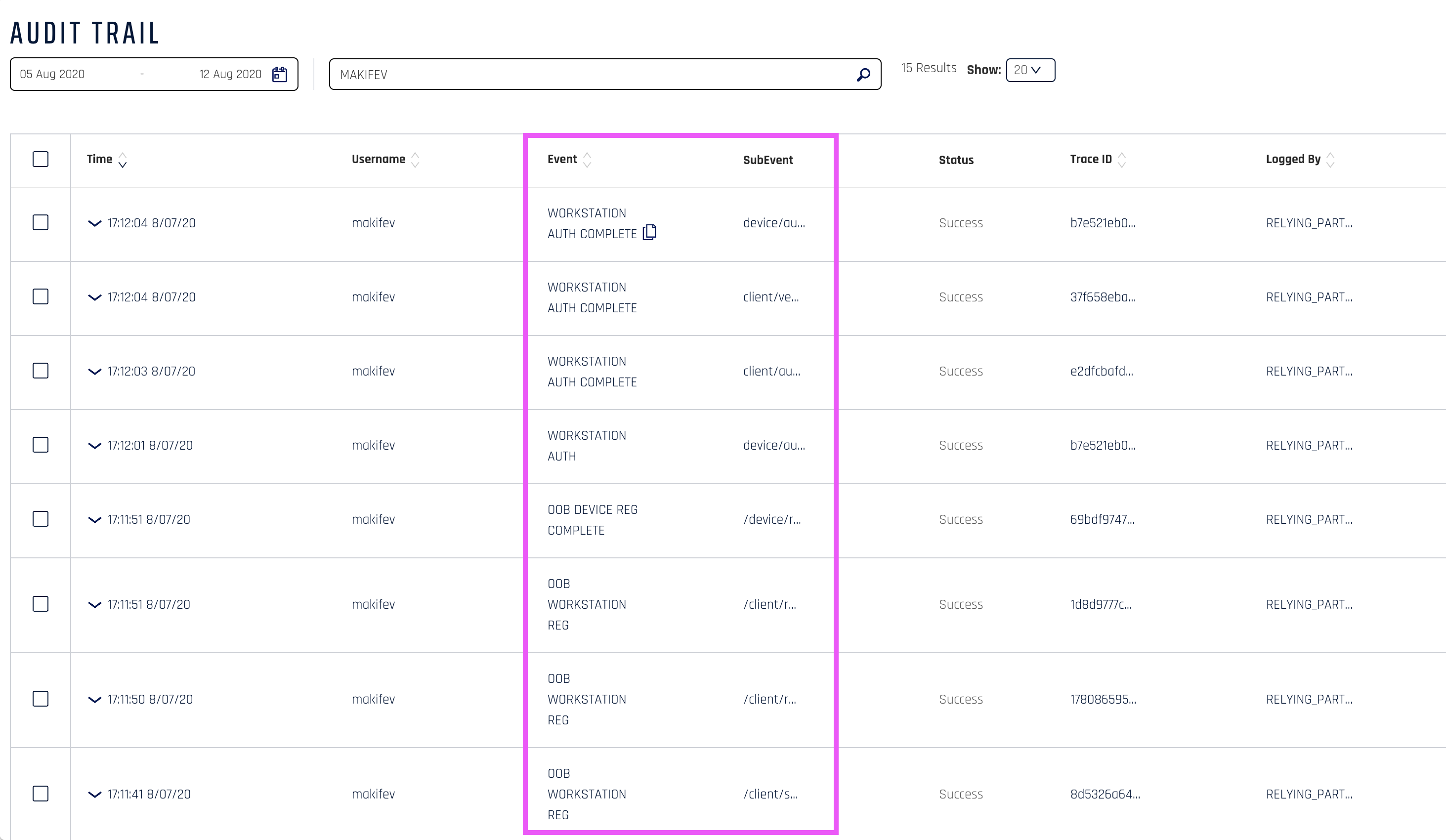
Each single captured Event is a result of a successful or failed attempt.
Audit Trail Events
A full list of all Events and common parameters can be found in the Event Descriptions article. Not every Event is listed in the CC Audit Trail; some only appear in API responses.
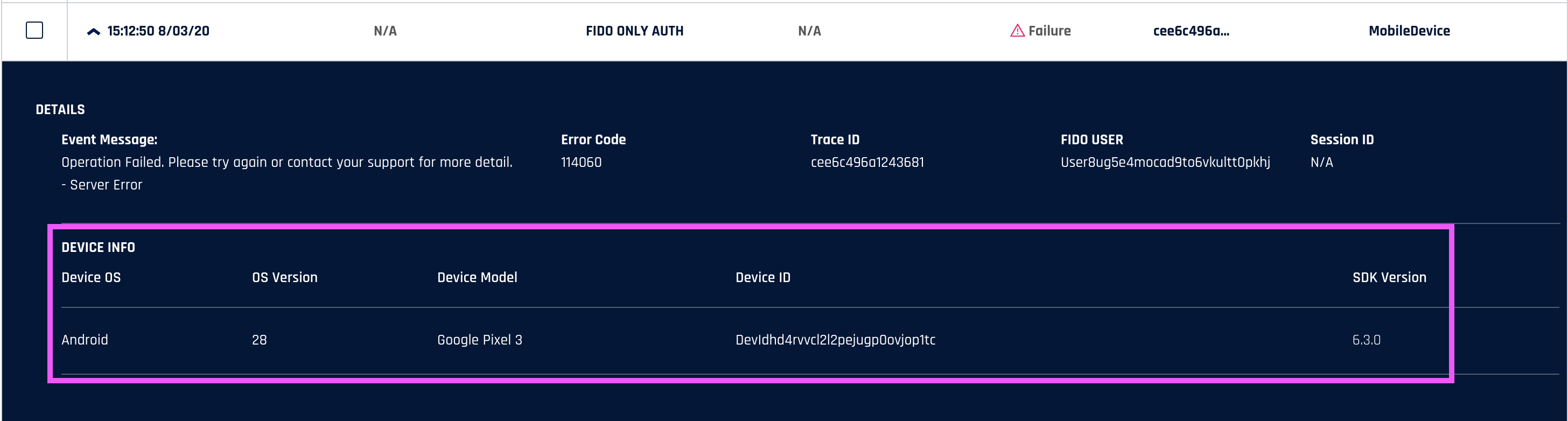
Mobile Device
Events triggered from a mobile device (including security keys and smart-cards) will display the Device OS, OS Version, Device Model, Device ID, and SDK Version. See parameter details here.
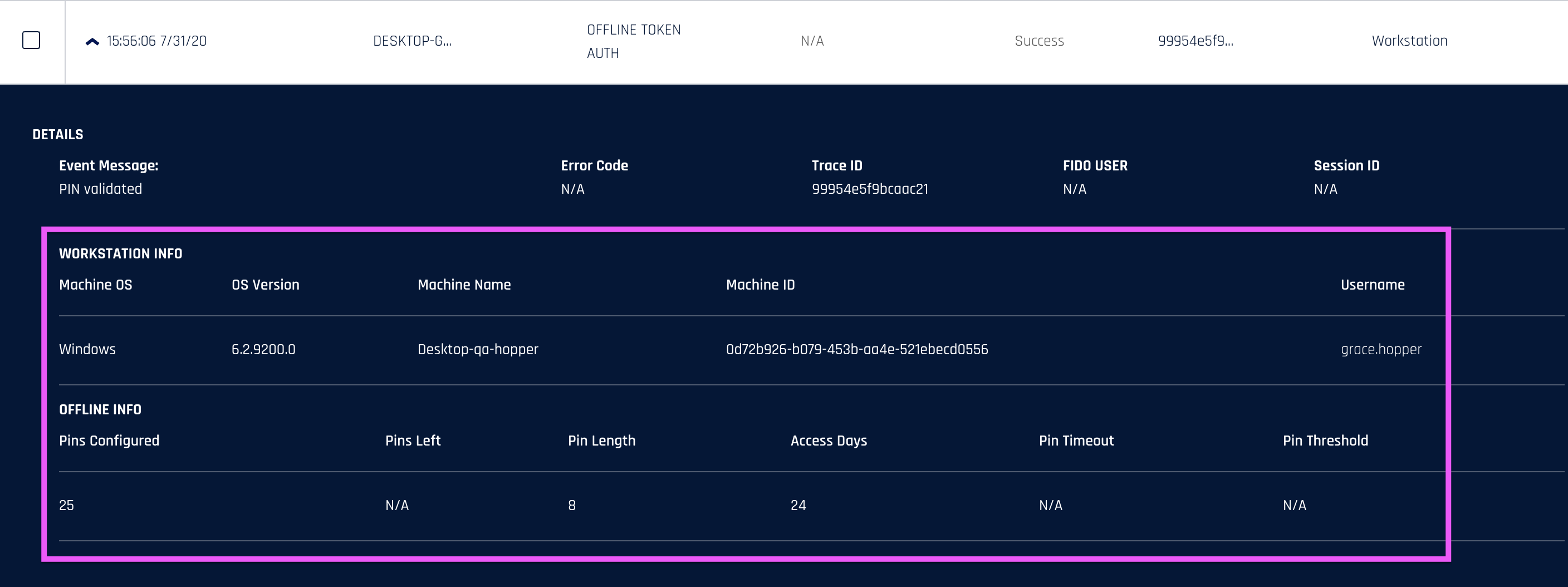
Workstation
Events triggered from a workstation will display Extended Message, OS Version, Model, OS, Offline Access Enabled, Offline Token Length, Offline Token Count, Offline Access Days, Tokens Available, and Tokens Remaining. See parameter details here.
Server
Events triggered from the server will display the Node ID and Control Center Version. See parameter details here.
Web
Events triggered from web operations will display the Extended Message and Machine Name. See parameter details here.
Getting There
The Audit Trail feature is Application-specific and does not encompass a global scope. You can locate it in the left navigation panel of the Control Center under App Properties.

Searching Events
When you first click on the Audit Trail option, the last 10 minutes of Events will be displayed by default.
A single activity can sometimes generate several events. In this case, the value in the Trace ID column will be the same, letting you see which events come from the same activity.
To copy a single piece of data from the Audit Trail, hover the mouse over the piece of data you want and then click the copy icon to place it in your clipboard.
Search by Time Frame
To expand the searchable timeframe, click the calendar icon.

Quick Filters
| Parameter | Description |
|---|---|
| Last Hour | Gets the last 24 hours of Events. |
| Today | Gets the Events from midnight to current time. |
| Yesterday | Gets the Events from yesterday. |
| Last 7 days | Gets the Events from the last 7 days. |
| Last 30 Days | Gets the Events from the last 30 days. |
User Interface
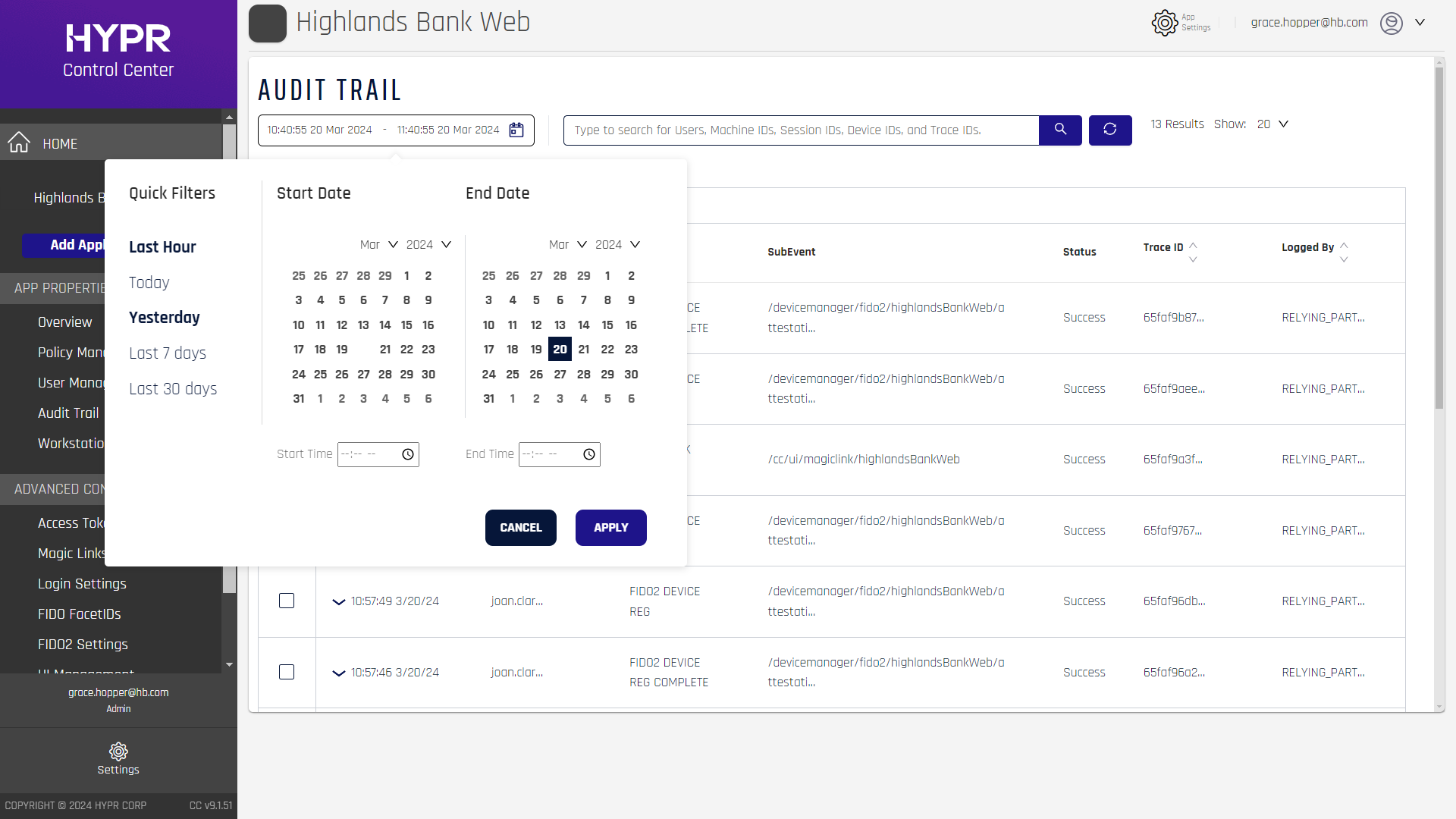
You can also select a specific timeframe by clicking the Start Date and End Date in the calendar. For a more precise timeframe search, you also can enter in a time (HH:MM:SS format).

Search by Username, Machine ID, Session ID, or Device ID
The Audit Trail allows searching by Username, Machine ID, Session ID or Device ID. Searching on one of these identifiers allows the administrator to narrow down the action and get a resolution to the issue without having to dig through the server logs. By quickly identifying a failed event and cross-referencing it with one of the above identifiers, you can further glean the root cause of the issue.
Export
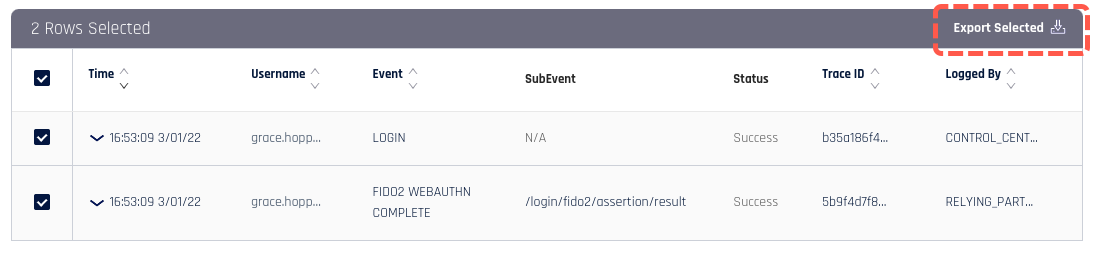
To export rows of the Audit Trail, select the checkbox next to the row you want to export and click Export Selected in the upper right. This will provide you with a .CSV file including all selected rows.
Examples
You have found a failed Event that is a timeout. By searching for the Machine ID, you see that this particular user has many timeouts and errors which say, "Did not receive anything from device." This could be a device issue. Check connectivity and try again.
Database Rollover
We keep the last 30 days of Event data.
Every hour we archive the data that is older than 30 days into a backup table.
The backup retains data indefinitely.
Overview of Logged Events by Type, Component, and Source
The following sections list all Events available in the HYPR Audit Trail, grouped by major feature area. Each table shows the technical eventName identifier and the normalized Logged By and Source values used for analytics and data-team reporting.
For detailed descriptions and parameters, see Event Descriptions.
Access Token Events
Events related to creating and revoking access tokens for administrative purposes.
| Event | Event Name | Logged By | Source |
|---|---|---|---|
| Access Token Created | ACCESS_TOKEN_CREATE | RP Server | Admin/UI |
| Access Token Revoked | ACCESS_TOKEN_REVOKE | RP Server | API |
Administrative Events
Events related to Control Center administrative actions, including user management, integrations, applications, and system configuration.
| Event | Event Name | Logged By | Source |
|---|---|---|---|
| User Logged In | LOGIN | CC Server | Admin/UI |
| User Logged Out | LOGOUT | CC Server | Admin/UI |
| Metadata Updated (FIDO2) | FIDO2_METADATA | CC Server | FIDO2/WebAuthn |
| Integration Created | CREATE_INTEGRATION | RP Server | Admin/UI |
| Integration Deleted | DELETE_INTEGRATION | RP Server | Admin/UI |
| Integration Disabled | DISABLE_INTEGRATION | RP Server | Admin/UI |
| Integration Enabled | ENABLE_INTEGRATION | RP Server | Admin/UI |
| Integration Refreshed | REFRESH_INTEGRATION | RP Server | Admin/UI |
| Integration Suspended | SUSPEND_INTEGRATION | RP Server | Admin/UI |
| Integration Updated | UPDATE_INTEGRATION | RP Server | Admin/UI |
| Authenticator Disabled | AUTHENTICATOR_DISABLED | CC Server | Mobile |
| Authenticator Enabled | AUTHENTICATOR_ENABLED | CC Server | Mobile |
| UAF Facet ID Added (UAF) | UAF_FACETID_ADDED | CC Server | Biometric |
| UAF Facet ID Removed (UAF) | UAF_FACETID_REMOVED | CC Server | Biometric |
| Application Action Created | CREATE_APP_ACTION | N/A | Mobile |
| Application Deleted | DELETE_APP | CONTROL_CENTER_SERVER | N/A |
| Application Action Deleted | DELETE_APP_ACTION | CC Server | Mobile |
| Application Configuration Deleted | DELETE_APP_CONFIG | RP Server | Mobile |
| Application Configuration Saved | SAVE_APP_CONFIG | RP Server | Admin/UI |
| Application Updated | UPDATE_APP | CC Server | Mobile |
| Application Action Updated | UPDATE_APP_ACTION | CC Server | Mobile |
| Username Dissociated | USERNAME_DISSOCIATE | RP Server | Admin/UI |
| Username Associated | USERNAME_ASSOCIATE | RP Server | Admin/UI |
Authentication Events
Events related to user authentication attempts and completions across various platforms and methods, including desktop SSO, WebAuthn, QR codes, and workstation authentication.
| Event | Event Name | Logged By | Source |
|---|---|---|---|
| Desktop SSO Initiated | DESKTOP_SSO | RP Server | Desktop SSO |
| Desktop SSO Completed | DESKTOP_SSO_COMPLETE | RP Server | Desktop SSO |
| External Authentication Completed | EXTERNAL_AUTH_COMPLETE | RP Server | Workstation Client |
| Fallback Authenticator Used | FALLBACK_AUTHENTICATOR | MobileDevice | Mobile |
| FIDO Only Authentication Attempted (FIDO) | FIDO_ONLY_AUTH | UAF Server | Mobile |
| FIDO Only Transaction Completed (FIDO) | FIDO_ONLY_TRANS | RP Server | Mobile |
| WebAuthn Request (FIDO2) | FIDO2_WEBAUTHN | RP Server | FIDO2/WebAuthn |
| WebAuthn Completed (FIDO2) | FIDO2_WEBAUTHN_COMPLETE | RP Server | Security Key |
| HYPR Gateway Workstation Driver Connected | HYPR_GATEWAY_WORKSTATION_DRIVER | Workstation | Mobile |
| HYPR Gateway Available | HYPR_GATEWAY_AVAILABLE | RP Server | Mobile |
| HYPR Mobile Database Accessed | HYPR_MOBILE_DATABASE | MobileDevice | Mobile |
| Website Authentication Started (Out-of-Band) | OOB_WEBSITE_AUTH | Browser | N/A |
| Website Authentication Completed (Out-of-Band) | OOB_WEBSITE_AUTH_COMPLETE | Browser | N/A |
| Website Transaction Completed (Out-of-Band) | OOB_WEBSITE_TRANS | Browser | N/A |
| QR Fallback Payload Cached | QR_FALLBACK_PAYLOAD_CACHED | CC Server | Mobile (QR) |
| QR Fallback Payload Retrieved | QR_FALLBACK_PAYLOAD_RETRIEVED | CC Server | Web |
| Session Website Authentication Started | SESSION_WEBSITE_AUTH | MobileDevice | Mobile (QR) |
| Session Website Authentication Completed | SESSION_WEBSITE_AUTH_COMPLETE | N/A | Mobile (QR) |
| Website Authentication Started | WEBSITE_AUTH | MobileDevice | Mobile |
| Authentication Attempt | WORKSTATION_AUTH | RP Server | Mobile |
| Authentication Completed | WORKSTATION_AUTH_COMPLETE | RP Server | Workstation Client |
| Universal QR Code Scan | UNIVERSAL_QR_SCAN | MobileDevice | Mobile (QR) |
| Authentication via JSON Scan | WORKSTATION_AUTH_JSON_SCAN | MobileDevice | Mobile |
| Authentication via QR Scan | WORKSTATION_AUTH_QR_SCAN | N/A | Mobile (QR) |
User Management Events
Events related to user creation and deletion operations.
| Event | Event Name | Logged By | Source |
|---|---|---|---|
| User Deleted | DELETE_USER | MobileDevice | Mobile |
| User Link Created | MAGIC_LINK_CREATE_USER | RP Server | Magic Link |
Device Deregistration Events
Events related to removing devices, websites, and workstations from the system, including unpairing and device resets.
| Event | Event Name | Logged By | Source |
|---|---|---|---|
| Website Deleted | MOBILE_INITIATED_WEBSITE_DELETE | MobileDevice | Mobile |
| Workstation Deleted | MOBILE_INITIATED_WORKSTATION_DELETE | Workstation | Mobile |
| Website Initiated Delete (Out-of-Band) | OOB_WEBSITE_INITIATED_DELETE | MobileDevice | Mobile |
| Device Unpaired (Out-of-Band) | OOB_DEVICE_UNPAIRED | Workstation | Mobile |
| FIDO Only Deregistration Completed (FIDO) | FIDO_ONLY_DEREG | UAF Server | Mobile |
| Device Deregistration Completed (FIDO2) | FIDO2_DEVICE_DEREG | MobileDevice | FIDO2/WebAuthn |
| Device Reset (FIDO2) | FIDO2_DEVICE_RESET | MobileDevice | FIDO2/WebAuthn |
| Workstation Unpaired | MOBILE_INITIATED_WORKSTATION_UNPAIRED | Workstation | Mobile |
Endpoint API Access Token Events
Events related to endpoint API access token creation, exchange, and revocation for workstation authentication.
| Event | Event Name | Logged By | Source |
|---|---|---|---|
| Token Created | ENDPOINT_API_ACCESS_TOKEN_CREATE | RP Server | Admin/UI |
| Token Exchange Completed | ENDPOINT_API_ACCESS_TOKEN_EXCHANGE | Workstation | API |
| Token Exchange Failed | ENDPOINT_API_ACCESS_TOKEN_EXCHANGE_FAILED | Workstation | Mobile |
| Token Revoked | ENDPOINT_API_ACCESS_TOKEN_REVOKE | RP Server | API |
Error Events
Events related to system exceptions and errors.
| Event | Event Name | Logged By | Source |
|---|---|---|---|
| Exception Occurred | EXCEPTION | RP Server | Mobile |
Feature Flag Events
Events related to enabling and disabling feature flags.
| Event | Event Name | Logged By | Source |
|---|---|---|---|
| Feature Flag Toggled | FEATURE_FLAG_TOGGLE | RP Server | Admin/UI |
Identity Verification Events
Events related to the Affirm identity verification workflow, including document upload, biometric verification, approval processes, and workflow management.
| Event | Event Name | Logged By | Source |
|---|---|---|---|
| Application Configuration Changed | AFFIRM_APPLICATION_CONFIGURATION_CHANGED | RP Server | Admin/UI |
| Approver Attestation Result Recorded | AFFIRM_WORKFLOW_ATTESTATION | RP Server | Web |
| Attestation Outcome Recorded | AFFIRM_WORKFLOW_ATTESTATION_OUTCOME_TYPE | RP Server | Web |
| Chat Escalation Initiated | AFFIRM_WORKFLOW_CHAT_ESCALATION | RP Server | Automated |
| Conversation Joined | AFFIRM_WORKFLOW_CONVERSATION | Web | Web |
| Document Upload | AFFIRM_WORKFLOW_DOCUMENT_UPLOAD | RP Server | Web |
| Email Code Sent | AFFIRM_WORKFLOW_EMAIL_CODE_SENT | RP Server | Automated |
| Face Match | AFFIRM_WORKFLOW_FACE_MATCH | MobileDevice | Mobile |
| Identity Verification Completed | AFFIRM_WORKFLOW_IDV_FINISH | RP Server | Automated |
| Identity Verification Started | AFFIRM_WORKFLOW_IDV_START | RP Server | Automated |
| Invite Sent | AFFIRM_WORKFLOW_INVITE_SENT | RP Server | Web |
| Location Step Completed | AFFIRM_WORKFLOW_LOCATION | Workstation | Browser |
| Phone Number Entered | AFFIRM_WORKFLOW_PHONE_NUMBER_ENTERED | RP Server | Web |
| Requester Blocked | AFFIRM_WORKFLOW_REQUESTOR_BLOCKED | RP Server | Automated |
| Requester Unblocked | AFFIRM_WORKFLOW_REQUESTOR_UNBLOCKED | RP Server | API |
| Workflow Result Recorded | AFFIRM_WORKFLOW_RESULT | RP Server | Web |
| Workflow Started | AFFIRM_WORKFLOW_STARTED | RP Server | Web |
| Step Result Recorded | AFFIRM_WORKFLOW_STEP_RESULT | RP Server | Automated |
| Text Code Sent | AFFIRM_WORKFLOW_TEXT_CODE_SENT | RP Server | Web |
| Text Code Verified | AFFIRM_WORKFLOW_TEXT_CODE_VERIFIED | RP Server | Web |
| Video Session Started | AFFIRM_WORKFLOW_VIDEO | Web | Web |
| Video Approver Enabled | AFFIRM_WORKFLOW_VIDEO_APPROVER_ENABLED | Web | Web |
| Video Requester Enabled | AFFIRM_WORKFLOW_VIDEO_REQUESTER_ENABLED | Web | Web |
| Chat Started | AFFIRM_WORKFLOW_CHAT_START | Web | Web |
| Chat Ended | AFFIRM_WORKFLOW_CHAT_FINISH | Web | Web |
| Document Biometric Started | AFFIRM_WORKFLOW_DOCUMENT_BIOMETRIC_START | RP Server | Web |
| Document Biometric Completed | AFFIRM_WORKFLOW_DOCUMENT_BIOMETRIC_FINISH | RP Server | Web |
| Verified Credential Completed | AFFIRM_WORKFLOW_VERIFIED_CREDENTIAL_COMPLETED | RP Server | Automated |
Keycloak Integration Events
Events related to Keycloak authentication and user management operations.
| Event | Event Name | Logged By | Source |
|---|---|---|---|
| Keycloak Admin Event Logged | KEYCLOAK_ADMIN_EVENT | Web | N/A |
| Keycloak Possible Brute Force Authentication Attempt | KEYCLOAK_POSSIBLE_BRUTE_FORCE_AUTH_ATTEMPT | Workstation | N/A |
| Keycloak User Event Logged | KEYCLOAK_USER_EVENT | Web | N/A |
| Keycloak User Temporarily Disabled | KEYCLOAK_USER_TEMPORARILY_DISABLED | Workstation | N/A |
Magic Link Events
Events related to magic link creation, expiration, and usage for passwordless authentication.
| Event | Event Name | Logged By | Source |
|---|---|---|---|
| Link Created | MAGIC_LINK_CREATE | CONTROL_CENTER_SERVER RELYING_PARTY_SERVER | N/A |
| Delete Existing Links After New | MAGIC_LINK_EXP_DELETE_EXISTING_AFTER_NEW | CC Server | Admin/UI |
| Existing Links Deleted | MAGIC_LINK_EXP_DELETED_EXISTING | CC Server | Admin/UI |
| Resend Email Message To Haas | MAGIC_LINK_EXP_RESEND_EMAIL_MSG_TO_HAAS | CC Server | Admin/UI |
| Username Not Found | MAGIC_LINK_EXP_USERNAME_NOT_FOUND | CC Server | Admin/UI |
| Link Expired Or Used | MAGIC_LINK_EXPIRED_OR_USED | RP Server | Magic Link |
| Link Not Found | MAGIC_LINK_NOT_FOUND | CC Server | Magic Link |
| Dynamic Link Used | MOBILE_DYNAMIC_LINK_USED | MobileDevice | Mobile (QR) |
Offline Access Events
Events related to offline token access and authentication attempts when network connectivity is unavailable.
| Event | Event Name | Logged By | Source |
|---|---|---|---|
| Offline Token Accessed | OFFLINE_TOKEN_ACCESS | Workstation | Mobile |
| Offline Token Authentication Attempt | OFFLINE_TOKEN_AUTH | Workstation | Mobile |
Proof of Verification Events
Events related to proof of verification expiration settings and management.
| Event | Event Name | Logged By | Source |
|---|---|---|---|
| POV Expiration Cleared | POV_EXPIRATION_CLEARED | RP Server | Admin/UI |
| POV Expiration Set | POV_EXPIRATION_SET | RP Server | Admin/UI |
RADIUS Integration Events
Events related to RADIUS client, server, and configuration management, including integration setup and tenant onboarding.
| Event | Event Name | Logged By | Source |
|---|---|---|---|
| Client Created | RADIUS_CLIENT_CREATE | CC Server | Admin/UI |
| Client Deleted | RADIUS_CLIENT_DELETE | CC Server | Admin/UI |
| Client Updated | RADIUS_CLIENT_UPDATE | CC Server | Admin/UI |
| Config Created | RADIUS_CONFIG_CREATE | CC Server | Admin/UI |
| Config Deleted | RADIUS_CONFIG_DELETE | CC Server | Admin/UI |
| Config Updated | RADIUS_CONFIG_UPDATE | CC Server | Admin/UI |
| Integration Created | RADIUS_INTEGRATION_CREATE | CC Server | Admin/UI |
| Integration Deleted | RADIUS_INTEGRATION_DELETE | CC Server | Admin/UI |
| Tenant Onboarded | RADIUS_ONBOARDED | CC Server | Admin/UI |
| Server Created | RADIUS_SERVER_CREATE | CC Server | Admin/UI |
| Server Deleted | RADIUS_SERVER_DELETE | CC Server | Admin/UI |
| Server Updated | RADIUS_SERVER_UPDATE | CC Server | Admin/UI |
Recovery PIN Events
Events related to recovery PIN generation, regeneration, authentication attempts, and PIN management.
| Event | Event Name | Logged By | Source |
|---|---|---|---|
| PIN Authentication Attempt | RECOVERY_PIN_AUTH | Workstation | PIN |
| PIN Revealed | RECOVERY_PIN_REVEAL | CC Server | Admin/UI |
| PINs Deleted | RECOVERY_PINS_DELETE | Workstation | PIN |
| PINs Generated | RECOVERY_PINS_GENERATED | RP Server | Admin/UI |
| PINs Regenerated | RECOVERY_PINS_RE_GENERATED | Workstation | PIN |
| PINs Set Up | RECOVERY_PINS_SETUP | N/A | Admin/UI |
Device Registration Events
Events related to device, website, and workstation registration and enrollment processes, including FIDO2, out-of-band, and security key enrollment.
| Event | Event Name | Logged By | Source |
|---|---|---|---|
| FIDO Only Registration Started (FIDO) | FIDO_ONLY_REG | UAF Server | Mobile |
| Device Registration Started (FIDO2) | FIDO2_DEVICE_REG | MobileDevice | FIDO2/WebAuthn |
| Device Registration Completed (FIDO2) | FIDO2_DEVICE_REG_COMPLETE | Workstation | Security Key |
| Device Registration Started (Out-of-Band) | OOB_DEVICE_REG | Workstation | Mobile (QR) |
| Device Registration Completed (Out-of-Band) | OOB_DEVICE_REG_COMPLETE | MobileDevice | Mobile (QR) |
| Device Paired (Out-of-Band) | OOB_DEVICE_PAIRED | Workstation | Mobile |
| Get Registered Devices (Out-of-Band) | OOB_GET_REG_DEVICES | MobileDevice | Security Key |
| Website Registration Started (Out-of-Band) | OOB_WEBSITE_REG | Workstation | Mobile (QR) |
| Workstation Registration Started (Out-of-Band) | OOB_WORKSTATION_REG | Workstation | Mobile |
| Enrollment Started | SMARTKEY_ENROLL | Workstation | Security Key |
| Enrollment Completed | SMARTKEY_ENROLL_COMPLETE | RP Server | Security Key |
Risk Engine Events
Events related to Adapt risk policy creation, assignment, evaluation, and user blocking based on risk assessment.
| Event | Event Name | Logged By | Source |
|---|---|---|---|
| Policy Created | ADAPT_CREATE_POLICY | CC Server | Admin/UI |
| Policy Deleted | ADAPT_DELETE_POLICY | CC Server | Admin/UI |
| Test Mode Enabled | ADAPT_LOGGING_ONLY_POLICY_EVALUATION | CC Server | Automated |
| Assignment Added | ADAPT_POLICY_ASSIGNMENT | CC Server | Admin/UI |
| Assignment Removed | ADAPT_POLICY_ASSIGNMENT_REMOVED | CC Server | Admin/UI |
| Help Requested | ADAPT_POLICY_ASSIST | CC Server | Admin/UI |
| Policy Checked | ADAPT_POLICY_EVALUATION | CC Server | Mobile |
| User Allowlisted | ADAPT_POLICY_EVAL_USER_ALLOWLISTED | CC Server | Mobile |
| User Blocked | ADAPT_POLICY_EVAL_USER_BLOCKED | CC Server | Admin/UI |
| Assignment Removed (Deleted Policy) | ADAPT_POLICY_UNASSIGN_DELETED_POLICY | CC Server | Admin/UI |
| Policy Updated | ADAPT_UPDATE_POLICY | CC Server | Admin/UI |
System Settings Events
Events related to system configuration updates, including SSL PINs, server settings, and FIDO2 policies.
| Event | Event Name | Logged By | Source |
|---|---|---|---|
| SSL PINs Updated | SSL_PINS_UPDATED | Workstation | Mobile |
| Server Global Configuration Updated | UPDATE_SERVER_GLOBAL_CONFIG | RP Server | Admin/UI |
| Policy Updated (FIDO2) | FIDO2_POLICY | RP Server | FIDO2/WebAuthn |
| Settings Updated (FIDO2) | FIDO2_SETTINGS | RP Server | Admin/UI |
Signal Events
Events related to device, workstation, and browser signal reception for communication and synchronization.
| Event | Event Name | Logged By | Source |
|---|---|---|---|
| Device Signal Received | DEVICE_SIGNAL_RECEIVED | MobileDevice | Mobile |
| Signal Received | WORKSTATION_SIGNAL_RECEIVED | Workstation | Workstation Client |
| Browser Signal Received | BROWSER_SIGNAL_RECEIVED | Workstation | Browser |
Security Key Events
Events related to security key authentication, enrollment, unenrollment, PIN management, and PUK operations.
| Event | Event Name | Logged By | Source |
|---|---|---|---|
| Unenrollment From Control Center | SMARTKEY_CC_INITIATED_UNENROLL | Workstation | Security Key |
| PIN Change Attempt | SMARTKEY_PIN_CHANGE | Workstation | Security Key |
| PIN Verified | SMARTKEY_PIN_VERIFICATION | Workstation | Security Key |
| Unenrollment From Workstation | SMARTKEY_WORKSTATION_INITIATED_UNENROLL | Workstation | Security Key |
| Authentication Attempt | SMARTKEY_AUTH | Workstation | Security Key |
| Authentication Completed | SMARTKEY_AUTH_COMPLETE | Workstation | Security Key |
| PIN PUK Changed | SMARTKEY_PIN_PUK_CHANGE | Workstation | Security Key |
| PIN PUK Verified | SMARTKEY_PIN_PUK_VERIFICATION | Workstation | Security Key |
| Recovery PINs Regenerated | SMARTKEY_RECOVERY_PINS_RE_GENERATED | N/A | Admin/UI |
| Security Key PUK Retrieved | SECURITY_KEY_PUK_READ | N/A | API |
| Security Key PUK Updated | SECURITY_KEY_PUK_UPDATE | Workstation | Security Key |
| Security Key PUK Created | SECURITY_KEY_PUK_CREATE | N/A | API |
Support Access Events
Events related to HYPR Support staff access to customer tenants, including access control, allow lists, expiration management, and login attempts.
| Event | Event Name | Logged By | Source |
|---|---|---|---|
| Access Enabled | SUPPORT_ACCESS_ENABLED | RP Server | Admin/UI |
| Access Disabled | SUPPORT_ACCESS_DISABLED | RP Server | Admin/UI |
| Expiration Date Set | SUPPORT_ACCESS_EXPIRATION_DATE_CHANGED | RP Server | Admin/UI |
| Access Blocked By Expiration | SUPPORT_ACCESS_EXPIRATION_DATE_EXCEEDED_BLOCKING_ACCESS | RP Server | Automated |
| Reenabled By New Expiration | SUPPORT_ACCESS_NEW_EXPIRATION_DATE_APPLICABLE_ENABLING_ACCESS | RP Server | Automated |
| Allow List Email Added | SUPPORT_ACCESS_ADDED_EMAILS_TO_ALLOW_LIST | RP Server | Admin/UI |
| Allow List Email Removed | SUPPORT_ACCESS_REMOVED_EMAILS_FROM_ALLOW_LIST | RP Server | Admin/UI |
| Access Opened To All HYPR Staff | SUPPORT_ACCESS_ALLOWANCE_CHANGED_FROM_ALLOW_LIST_TO_ALL | RP Server | Admin/UI |
| Access Restricted To Allow List | SUPPORT_ACCESS_ALLOWANCE_CHANGED_FROM_ALL_TO_ALLOW_LIST | RP Server | Admin/UI |
| Expiration Enabled | SUPPORT_ACCESS_EXPIRATION_DATE_ENABLED | RP Server | Admin/UI |
| Expiration Disabled | SUPPORT_ACCESS_EXPIRATION_DATE_DISABLED | RP Server | Admin/UI |
| Login Denied — Expired | SUPPORT_ACCESS_DENIED_TENANT_ACCESS_ATTEMPT_EXPIRATION_DATE_EXCEEDED | RP Server | Automated |
| Support Tenant Login Successful | SUPPORT_ACCESS_SUCCESSFUL_TENANT_ACCESS_ATTEMPT | RP Server | Magic Link |
| Login Denied — Unauthorized | SUPPORT_ACCESS_DENIED_TENANT_ACCESS_ATTEMPT_UNAUTHORIZED | RP Server | Automated |
| Login Denied — Disabled | SUPPORT_ACCESS_DENIED_TENANT_ACCESS_ATTEMPT_SUPPORT_ACCESS_DISABLED | RP Server | Automated |
| Magic Link Session Expired | SUPPORT_ACCESS_MAGIC_LINK_SESSION_EXPIRED | RP Server | Magic Link |
System Check Events
Events related to system health checks, including database validation, certificate expiry checks, and license validation.
| Event | Event Name | Logged By | Source |
|---|---|---|---|
| Batch Database Updated | BATCH_DB_UPDATE | CC Server | Admin/UI |
| Database Crypto Validation Problem Detected | DB_CRYPTO_VALIDATION_PROBLEM | CC Server | N/A |
| FIDO Certificate Expiry Check (FIDO) | FIDO_CERT_EXPIRY_CHECK | RP Server | N/A |
| License Validation Problem Detected | LICENSE_VALIDATION_PROBLEM | RP Server | Mobile |
| Certificate Renewal Expiry Check | MOBILE_CERT_RENEWAL_EXPIRY_CHECK | RP Server | Mobile |
| UAF Certificate Expiry Check (UAF) | UAF_CERT_EXPIRY_CHECK | RP Server | N/A |
Web Registration Events
Events related to certificate issuance, renewal, and revocation for workstation enrollment and web-based registration.
| Event | Event Name | Logged By | Source |
|---|---|---|---|
| New Certificate Canceled | MOBILE_CANCELLED_NEW_CERTIFICATE | Workstation | Mobile |
| Certificate Renewal Confirmed | MOBILE_CONFIRMED_CERTIFICATE_RENEWAL | MobileDevice | Mobile |
| New Certificate Confirmed | MOBILE_CONFIRMED_NEW_CERTIFICATE | Workstation | Mobile |
| Certificate Renewal Notified | MOBILE_NOTIFIED_OF_CERTIFICATE_RENEWAL | MobileDevice | Mobile |
| New Certificate Notified | MOBILE_NOTIFIED_OF_NEW_CERTIFICATE | Workstation | Mobile |
| Certificate Issued | WORKSTATION_CERTIFICATE_ISSUED | RP Server | Automated |
| Certificate Requested | WORKSTATION_CERTIFICATE_REQUESTED | RP Server | Web |
| Certificate Revoked | WORKSTATION_CERTIFICATE_REVOKED | Workstation | Workstation Client |
| Workstation Enrolled | WORKSTATION_ENROLLED | Workstation | Workstation Client |
Workstation Events
Events related to workstation configuration, state changes, socket connections, logging, and support requests.
| Event | Event Name | Logged By | Source |
|---|---|---|---|
| Workstation Configured | WORKSTATION_CONFIGURATION | Workstation | Workstation Client |
| Workstation Install Token Exchange Failed | WORKSTATION_INSTALL_TOKEN | Workstation | Workstation Client |
| Workstation Locked | WORKSTATION_LOCK | Workstation | Mobile |
| Socket Connected | WORKSTATION_SOCKET_CONNECT | Workstation | Workstation Client |
| Socket Disconnected | WORKSTATION_SOCKET_DISCONNECT | Workstation | Workstation Client |
| Workstation Shut Down | WORKSTATION_SHUTDOWN | Workstation | Workstation Client |
| Workstation Started | WORKSTATION_STARTUP | Workstation | Workstation Client |
| Workstation Upgraded | WORKSTATION_UPGRADE | Workstation | Workstation Client |
| Workstation Logging Captured | WorkstationLogging | Workstation | Workstation Client |
| Support Request Submitted | WorkstationSupportRequest | Workstation | Workstation Client |
Miscellaneous Events
Events that do not have assigned event tags, including authentication denials, registration denials, and system-level events.
| Event | Event Name | Logged By | Source |
|---|---|---|---|
| Website Authentication Started | WESBITE_AUTH | N/A | N/A |
| Certificate Reenrollment Initiated | MOBILE_CERTIFICATE_REENROLLMENT | Workstation | Mobile |
| Default Event Triggered | DEFAULT | N/A | N/A |
| Unknown Event Occurred | UNKNOWN | N/A | N/A |
| Log Submission | LOG_SUBMISSION | CC Server | N/A |
| Authentication Denied Low Version | AUTH_DENIED_LOW_VERSION | RP Server | Admin/UI |
| Registration Denied Low Version | REG_DENIED_LOW_VERSION | N/A | Admin/UI |
| Workstation Locked | MOBILE_INITIATED_WORKSTATION_LOCK | Workstation | Mobile |
Troubleshooting
Contact Support
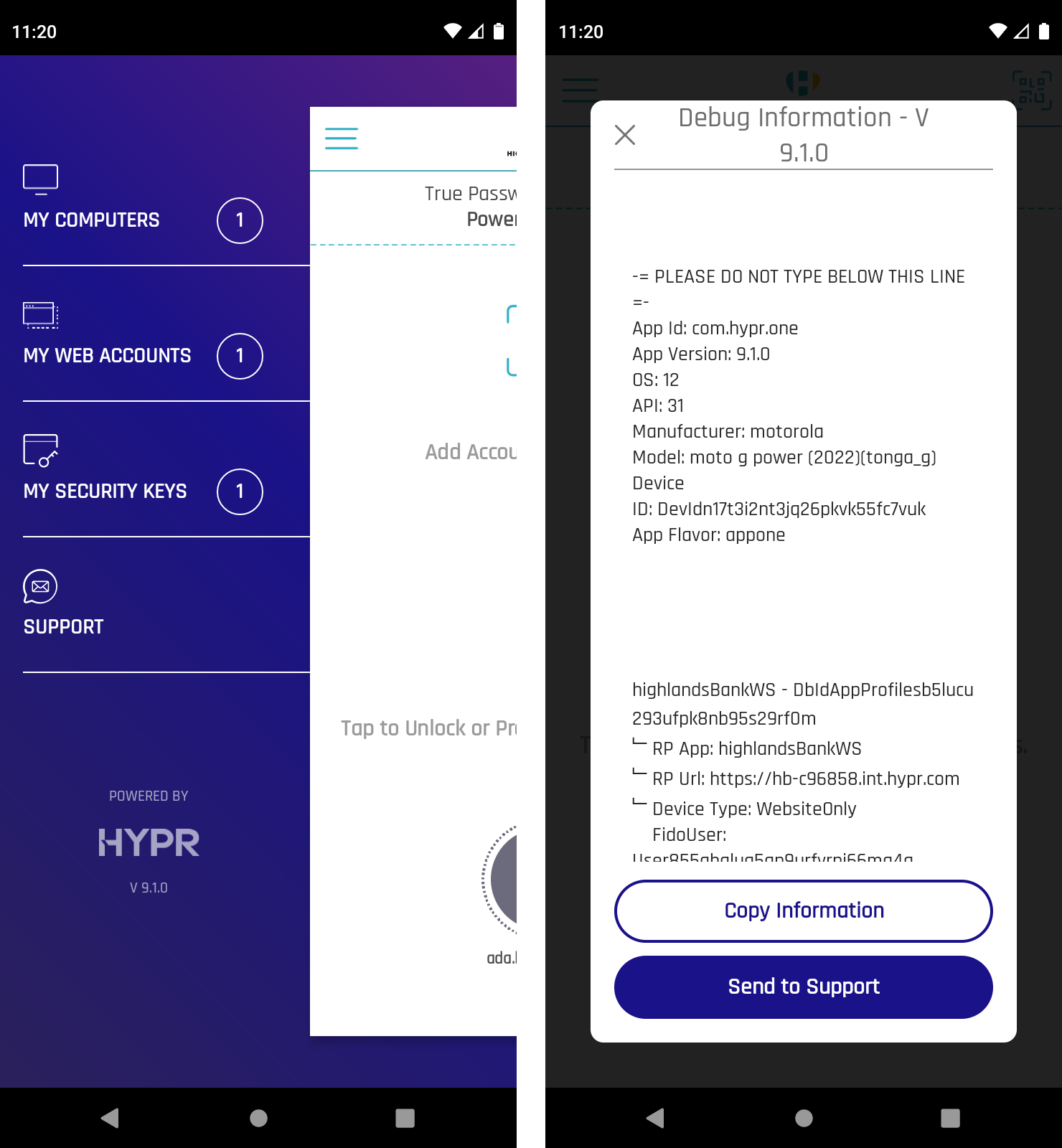
Mobile users may be asked to use the Support email function in HYPR Mobile App's Device Manager. When opened, it generates an email including relevant debug information.
HYPR Mobile App Support email settings are configured in Control Center Advanced Config Menu: UI Management.
Administrative Troubleshooting
-
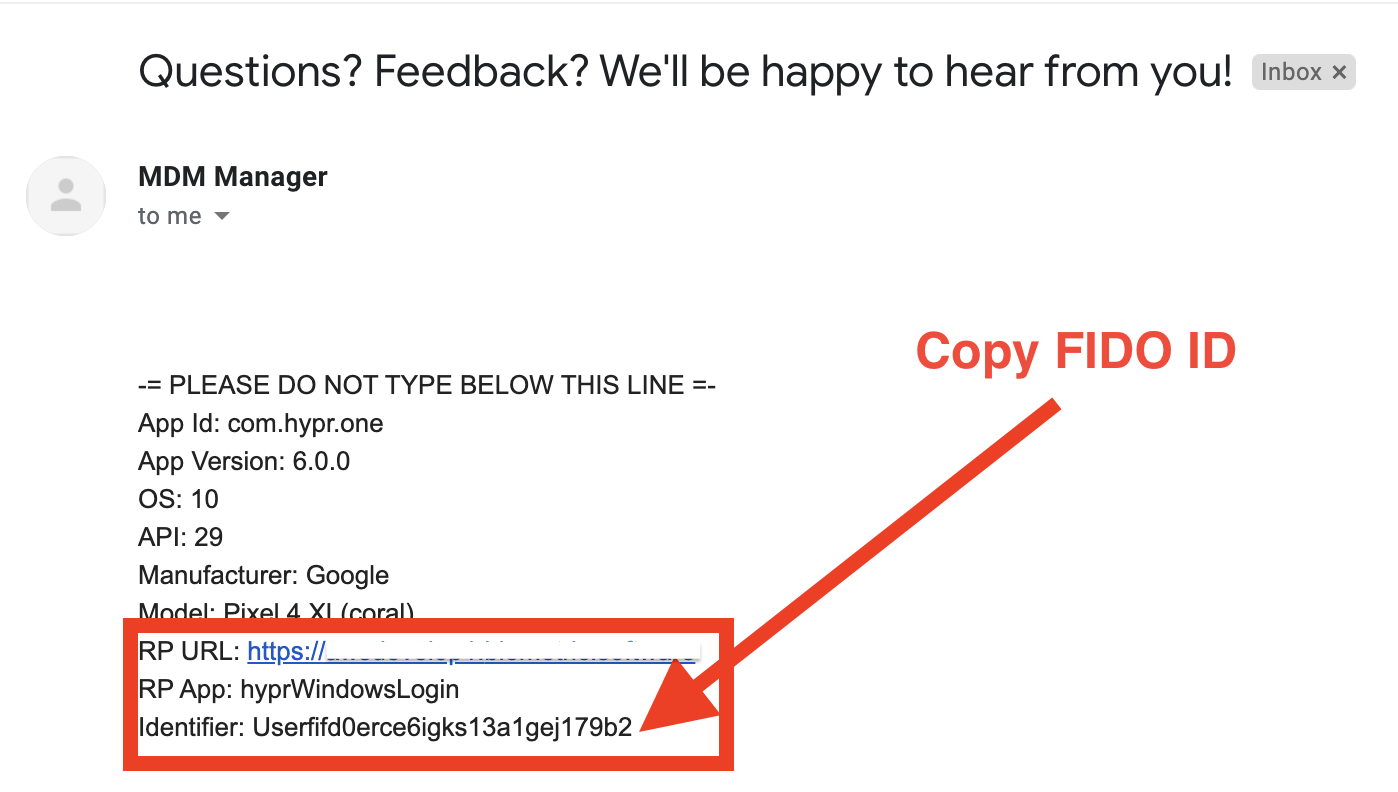
Check the diagnostic email from the user.
-
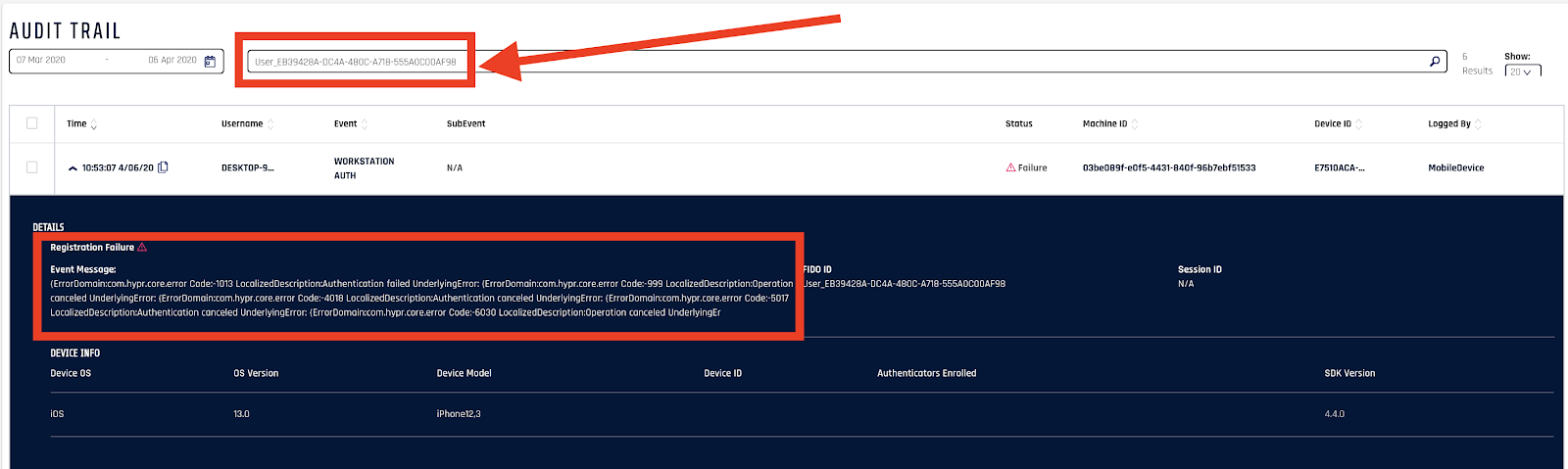
Copy the FIDO ID (Identifer) and paste it into the Audit Trail search.
-
Locate the final error Code: ####### entry and note the value.
-
Check the lists of HYPR Error Codes for error details and resolution steps.
API Access
Integrate Audit Trail APIs into your application to leverage advanced search capabilities or improve integration with the existing system.
Learn more about API Access.