11.3.0 Release Notes
HYPR 11.3 is an Enterprise Channel Release.
The Enterprise Release Channel follows a quarterly upgrade cycle, ensuring a stable and predictable update process. This schedule provides organizations with ample time to test, adapt, and implement changes while minimizing disruptions to business operations. With each release, customers receive the latest security, performance, and feature enhancements, allowing them to stay up to date with improvements while maintaining operational stability.
The full, per-item list of bug fixes and known issues for this release — and every prior release — is maintained in the Changelog.
Minimum Supported Versions
| Release Date | HYPR Product | Minimum Requirement | Notes |
|---|---|---|---|
| June 24 | HYPR Passwordless for Windows 11.3.0 | Windows (10 "2004", 11) | Reboot required if upgrading from 7.6 or below; Security Key Support for YubiKey 5 Series with firmware 5.X, YubiKey Bio Multi-Protocol Edition, IDEMIA ID-One on Cosmo 8.2, Feitian K9 Plus and K40 Plus and its offshoots |
| June 24 | HYPR Passwordless for Mac 11.3.0 | macOS (Big Sur 11.5 [not 11.0–11.4], Monterey, Ventura, Sonoma 14.1 [not 14.0], Sequoia, Tahoe) | Security Key Support for YubiKey 5 Series with firmware 5.X and Feitian ePass K9 Plus, K40 Plus and their respective offshoots |
| June 24 | HYPR Mobile App for Android 11.3.0 | Android 9.0+ | |
| July 15 | HYPR Mobile App for iOS 11.3.0 | iOS 12.4+ | Released later than the other 11.3.0 components — see Breaking Changes. |
| June 24 | HYPR Server 11.3.0 | Java Development Kit (JDK) 17 | Upgrade to 7.10 required before upgrading to 8.0.0 or higher |
| June 24 | HYPR SDK for Android 11.3.0 | Android 9.0+ | |
| June 24 | HYPR SDK for iOS 11.3.0 | iOS 12.4+ | |
| June 24 | HYPR SDK for Java 11.3.0 | Java Development Kit (JDK) 17+ |
All HYPR components are fully compatible across the three previous/subsequent minor (X.X) HYPR releases.
Breaking Changes
-
[HYPR Mobile App for iOS] The HYPR Mobile App for iOS 11.3.0 ships separately from the rest of the 11.3.0 components — the other components release on June 24, and the iOS app follows on July 15. Until the 11.3.0 build is available in the App Store on July 15, customers should continue using their currently-deployed iOS app version.
-
[API] The
/rp/api/versioned/recoverypin/retrieveendpoint now requires an access token minted under thecontrolCenterAdminRP app. Tokens minted under any other RP app return403 Forbidden. Integrations already calling this endpoint with a Control Center token are unaffected.
HYPR Affirm
New Features
▸ Directory Image Writeback
Organizations can push document photos and selfies captured during an Affirm workflow directly to an enterprise directory or external system (Entra ID, Okta, Ping, or a custom endpoint) without retaining those images in HYPR, supporting privacy-by-design and data minimization requirements. Images are transmitted immediately following a verification outcome and are not stored in the HYPR database.
- Configurable writeback target with per-tenant credentials.
- Per-workflow and per-step enablement (Photo & Liveness; Document & Biometric).
- Per-image-type attribute mapping (selfie, document front, document back).
- Configurable rotation / frequency policy per user (for example, update at most every 12 months).
- Outcome gating (PASS only / PASS + no escalation / PASS + manual approval).
- Synchronous retry with configurable attempt limit and terminal-failure handling.
- Full audit trail via writeback lifecycle events (
AFFIRM_WRITEBACK_TRIGGERED,_SUCCESS,_SKIPPED,_FAILURE,_EXHAUSTED). - Code customization hook (
USER_DIRECTORY_IMAGE_WRITEBACK) for organizations that need custom writeback logic. - Image repository configuration screen refreshed for clearer per-target setup and per-image-type mapping.
- Document capture is available at the Photo ID and liveness step regardless of prior step state, so users can re-submit a document image without restarting earlier steps.
- When writeback is configured as required for a verification, a writeback failure after approver approval is reflected in the final outcome, keeping the directory image and the verification result consistent.
▸ Risk Policy Builder
A Control Center editor where administrators define how Affirm responds to risk signals during a verification workflow. Policies are organized into Policy Evaluation Kits; each kit is assigned per verification flow, with customizable built-in defaults shipping for common workflows. See Risk Policy Builder for full configuration details.
- Per-action configuration — for each protected action (for example, Reading IDV Outcome), the kit exposes the action's emitted Risk Signals (read-only reference), an Action Retry Budget (maximum attempts and time window), and a list of Evaluation Rules.
- Predicate-driven Pass and Fail rules — each rule combines one or more predicates (risk signal + operator + value) with AND/OR grouping. Available operators include equality, range, set membership, and substring matching.
- Fail-rule outcomes — Deny the action, Escalate immediately, Redirect immediately, or Continue on failure (escalate). Escalate-type failures carry an admin-supplied escalation reason that surfaces in audit and review surfaces.
- Policy ledger — each policy evaluation appends a ledger entry to the Activity Log identifying the rules that fired, the signals that matched, and the action taken, providing per-verification policy auditability.
▸ Observability refresh
Affirm observability surfaces (CC Logs, Helpdesk logs, Scorecards, API results, and Events) received a coordinated refresh that unifies status semantics, surfaces evidence packages per step, and dynamically renders only the steps and attributes configured for the workflow.
- Standardized status semantics replace "N/A / Not Applicable" with explicit outcomes:
VERIFIED,UNVERIFIED,ABANDONED,SKIPPED,ERROR, andTIMED_OUT. Outcomes also report retry-attempt counts at the workflow level and per step, and the system clearly distinguishes system errors from user abandonment. - Verification Flow ID propagated across CC Logs, Helpdesk logs, API responses, and Affirm Events, enabling end-to-end correlation for audit and support.
- Activity Log UI refreshed in both Control Center and Helpdesk surfaces, including a redesigned table view and per-record detail view with evidence-package display per step.
- Step-conditional rendering: log surfaces only display steps that are actually configured in the workflow, removing empty "Not Applicable" placeholders.
- Attribute-conditional rendering: tenants can configure logs to display only the attributes used in their workflow (for example, hiding location when not configured).
- Document type uploaded during verification is captured in Logs, Events, and Scorecards, enabling analysts to filter and report on outcomes by document type.
- Affirm verification attempts from geographically blocked regions surface a user-friendly error message rather than a generic failure.
▸ Dual document verification
Affirm workflows can verify two identity documents per requester against a single live biometric capture. The Entrust SDK requests a second document upload at the end of the standard capture flow; both document checks reuse the original live photo or video, so the user does not repeat live capture. Supports verification flows that require two identity documents (for example, a government-issued ID plus proof of residence) while reducing end-user friction and improving completion rates compared with chaining separate flows.
▸ Customizable consent screen
Administrators can configure custom Terms & Conditions per workflow rather than using the default HYPR consent text. Custom content is configured via UI or API; required Entrust consent language is still included automatically alongside the customer-supplied text.
▸ Custom verification steps
Affirm workflows support pluggable custom verification steps, allowing organizations to insert their own verification logic alongside HYPR's built-in verification steps. Custom steps are configured via the Code Customization API; supporting functionality (CSP policy validation) makes custom steps usable in production verification flows.
▸ Location and network policy expansion
Affirm risk policy controls include two additional location-based enforcement capabilities.
- Sanctioned nation-state enforcement: administrators can configure a tenant-level sanctioned-country list. Verification workflows that originate from a sanctioned country are blocked before any verification step executes. Includes optional admin override and audit logging of blocked attempts.
- Multi-headquarters location policy: organizations with multiple primary locations can define location policies that reflect their distributed geographic footprint. Optional trusted IP ranges may be associated with each configured headquarters. Location validation succeeds when the user is within the configured threshold distance of any defined headquarters.
▸ Extended document-type restriction with National ID Document
The document-type restriction control adds National ID Document as a configurable allowed/disallowed type, complementing the existing passport, driver's license, and residence permit options.
▸ Configurable verification data retention
Administrators can set distinct data-retention periods for biometric and document verification data within a verification workflow, supporting data-residency and minimization requirements.
Notable UI/UX Changes
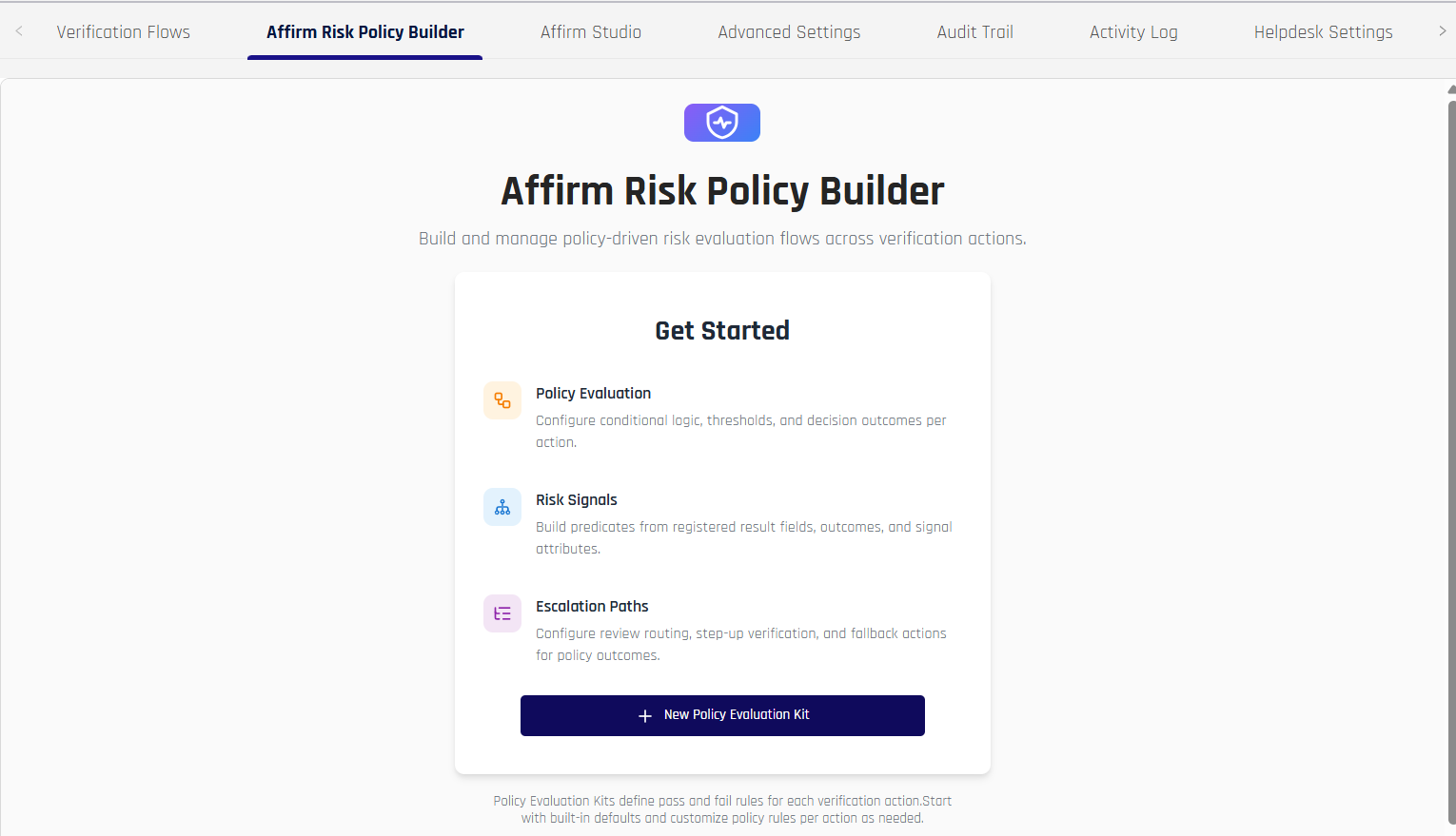
▸ Risk Policy Builder UI
New Control Center policy editor for Affirm verification workflows. Administrators manage Policy Evaluation Kits, assign them per workflow, configure per-action retry budgets and evaluation rules, and review the policy ledger that records how each kit evaluation resolved.
▸ Activity Log UI refresh
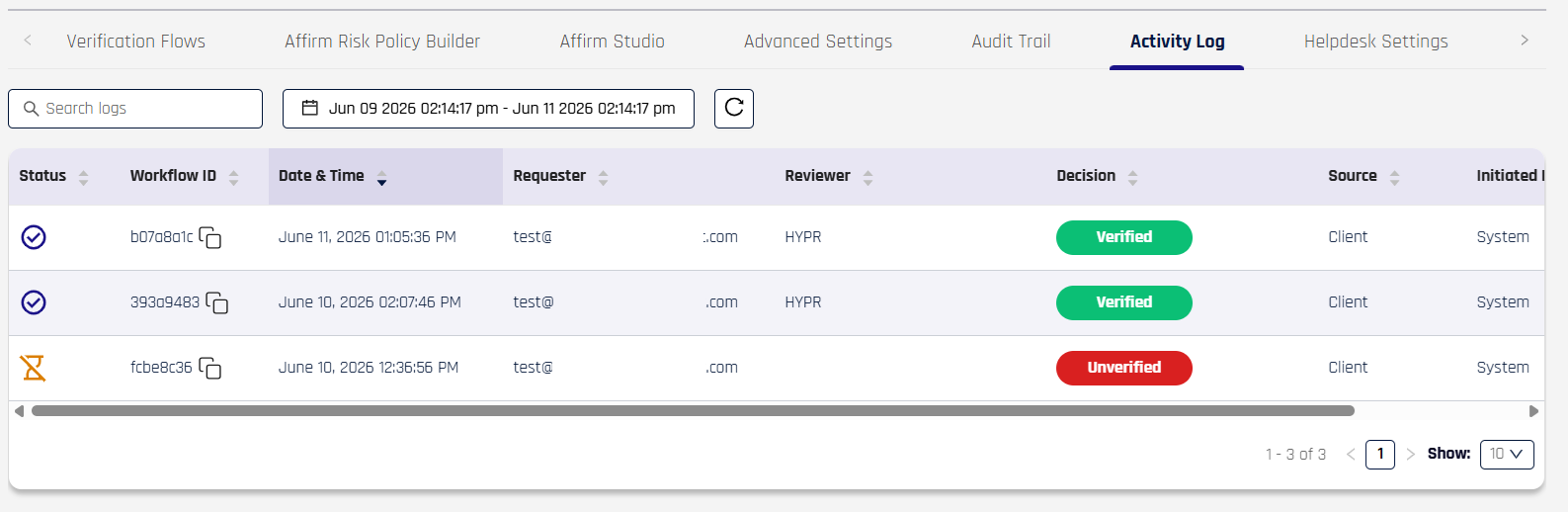
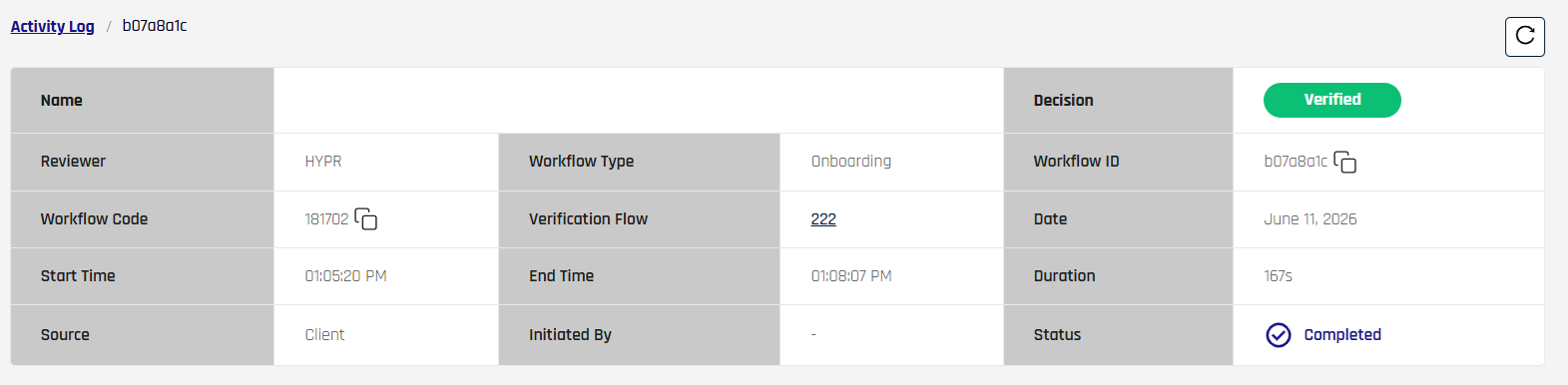
Activity Log tables and detail views have been redesigned in both Control Center and the Helpdesk portal, with new columns and Verification Flow ID surfaced for easier audit.
Refreshed table view:
Per-record detail view (opened by clicking a row):
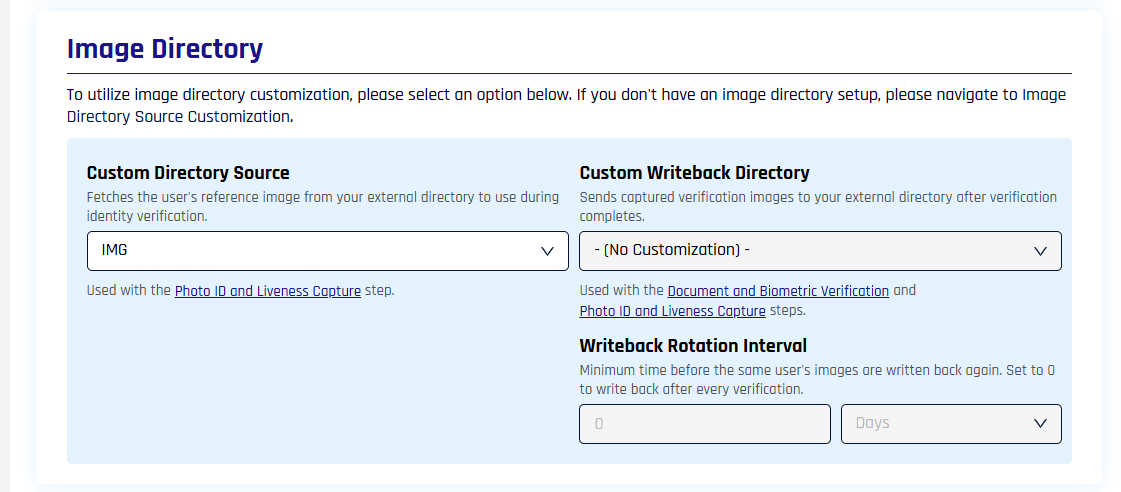
▸ Directory image writeback configuration
A new configuration section in Control Center lets administrators define writeback targets (Entra ID, Okta, Ping, or a custom endpoint) for identity verification images. Settings include per-tenant credentials, retry attempt limits, rotation rules, and writeback lifecycle event history alongside standard verification records.
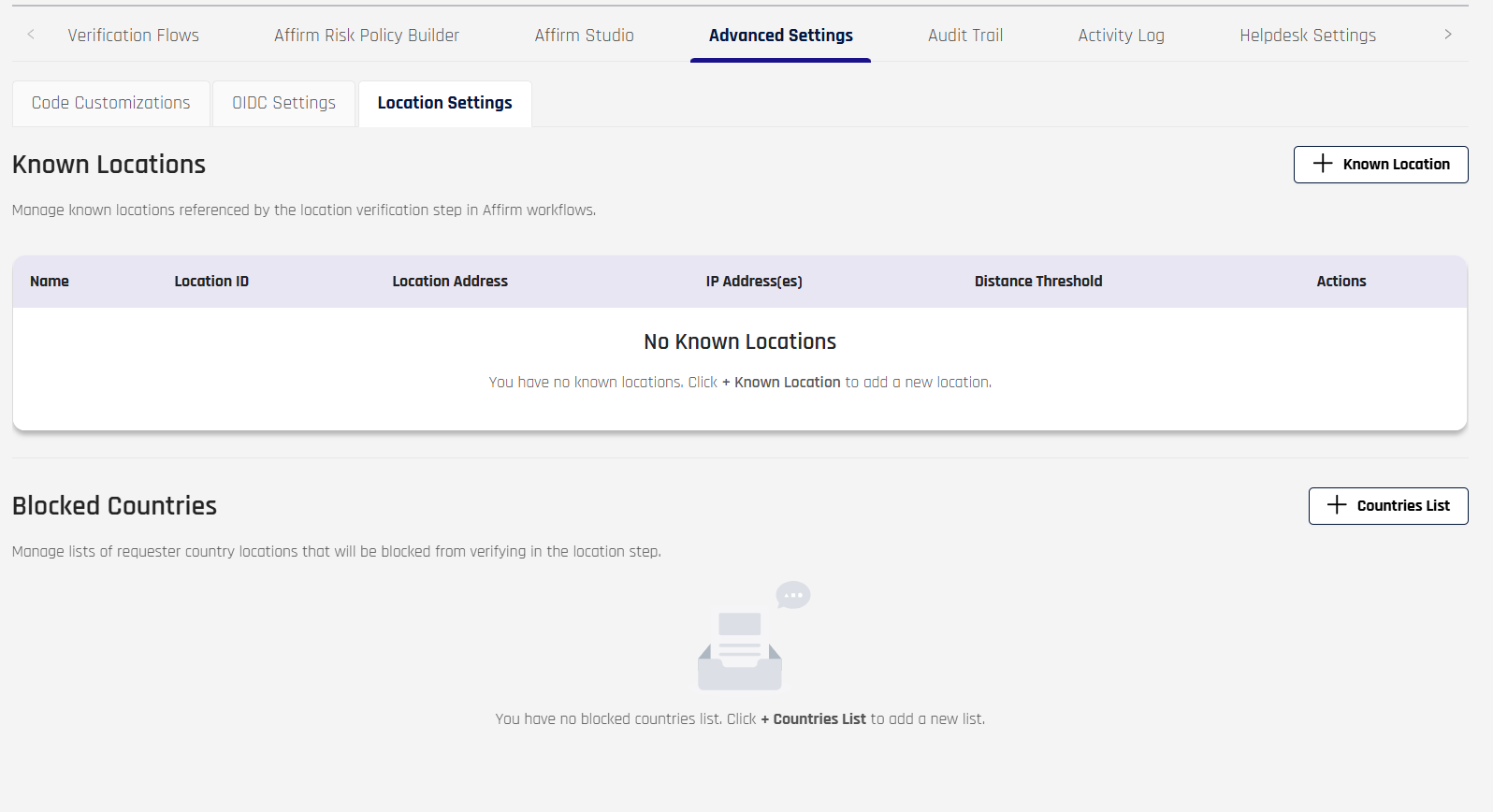
▸ Location and network policy controls
Location policy configuration now includes a sanctioned-country block list and support for multiple headquarters locations. Combined IP, sanctioned-country, and headquarters-proximity evaluation results surface in Control Center logs.
Enhancements
▸ Per-tenant custom-step execution timeout
The execution timeout for custom code steps in Affirm workflows is now configurable per tenant rather than fixed. Organizations with file uploads or other operations that require longer processing windows can adjust the timeout without needing custom engineering support.
▸ SMS OTP field auto-focus
The SMS OTP code input field auto-focuses when the step loads, reducing manual taps for users completing SMS-based verification.
▸ Workflow engine performance
Performance improvements across the Affirm workflow engine reduce end-to-end verification latency on high-volume tenants.
- Consent content caching reduces redundant fetches.
- An initial action-handler registry replaces per-step service lookups.
- Verification-context propagation between workflow steps avoids redundant database lookups.
▸ Unified workflow configuration schema
Internal workflow configuration schema unified for consistency between Control Center UI and Affirm API. Existing workflow configurations are migrated automatically and continue to function unchanged; no customer action is required.
HYPR Control Center
New Features
▸ FIDO2 Metadata Service UI in Standard view
The FIDO2 Metadata Service (MDS) management UI is available in Control Center's Standard view, alongside the Advanced view. This lets administrators in standard-view tenants browse and manage authenticator metadata without switching modes.
Enhancements
▸ FIDO2 AAGUID in authentication responses
Successful FIDO2 authentication responses can include the authenticator AAGUID when requested via the requestMeta parameter, enabling downstream integrations to identify the authenticator. See Retrieving the Authenticator AAGUID.
▸ FIDO2 OOB configurable field
FIDO2 Out-of-Band (OOB) requests and responses support an additional configurable field, expanding integration flexibility.
▸ FIDO2 device-name validation
FIDO2 device renaming validates the proposed name before saving, preventing invalid characters and length overflows.
▸ Passkey-favored login
A per-integration Login Settings option that, when enabled, sends returning users with a registered browser passkey straight to passkey sign-in instead of the login-method selection screen. See Passkey-Favored Login.
▸ Keycloak runtime on Node.js 18
Underlying Keycloak provider runtime upgraded to Node.js 18 (from Node.js 16, which reached end-of-life). No change in behavior; self-hosted Keycloak environments should plan accordingly.
▸ Pending-users query performance
Improved performance of the pending users query to reduce database load in large deployments.
Enterprise Passkey / HYPR Passkey
New Features
▸ Unified Single Registration Experience for Enterprise Passkeys on iOS
First iOS release of the unified registration experience that previously shipped on Android, bringing workstation, web, and mobile passkey journeys into a single consistent flow on Apple devices. Scope is single-user single-workstation in this release; multi-user and multi-workstation scenarios on iOS have known limitations — see the Known Issues in the Changelog for the active list.
Enhancements
▸ Offline sign-in from a saved workstation
Saved workstations let users sign in with passkeys when connectivity is unavailable. Users read an Offline PIN directly from a saved workstation tile and enter it at the workstation when the mobile device or the workstation has no network connection. Available on Android and iOS; on Android, saved workstations additionally provide a Recovery PIN.
Requires HYPR Passkey Fabric to be enabled on your tenant. See Offline Authentication.
▸ Saved workstations on mobile
After a QR-based login, the HYPR Mobile App offers to save the workstation to My Computers; the saved tile then signs the user in without a QR scan. This release brings the iOS saved-workstation experience to parity with Android and resolves a number of saved-workstation defects across both platforms — see the Changelog for the itemized list.
- Tap to Login on saved workstations. A saved tile unlocks its workstation directly from the app, with no QR scan.
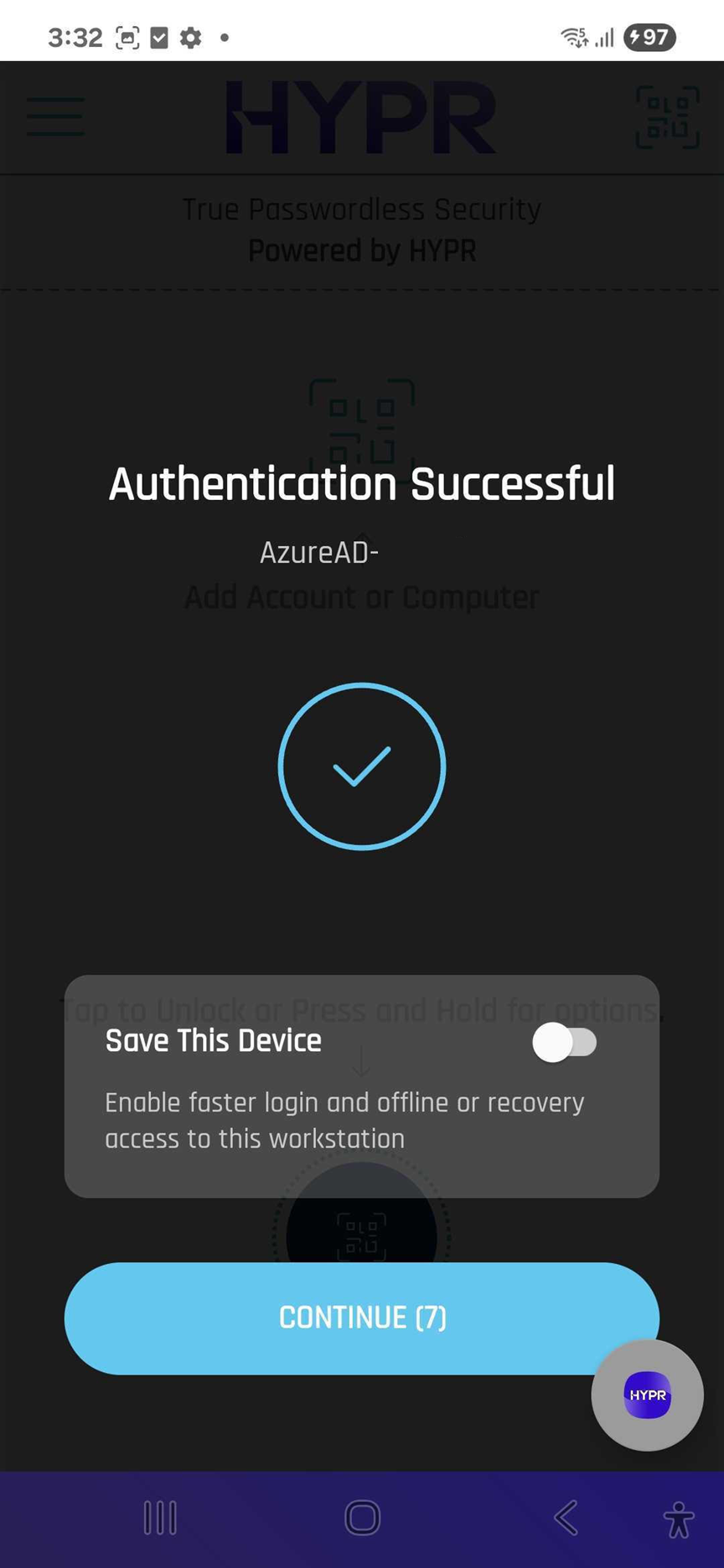
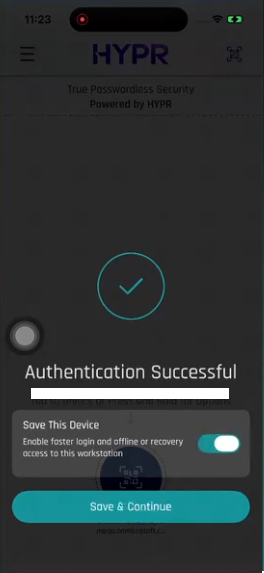
- Save This Device prompt on iOS. Completing a QR-based login presents the Save This Device prompt, turning the just-unlocked workstation into a persistent saved tile.
- Rescan unlocks instead of re-pairing. Scanning the QR code at an already-saved workstation unlocks it rather than creating a second tile for it.
See Saving a Workstation After QR Login.
HYPR Passwordless for Windows
New Features
▸ HYPRSpeed for Windows Hello for Business on Entra
HYPRSpeed (Desktop SSO) now triggers for sign-ins initiated by Windows Hello for Business on Entra-joined and Entra hybrid-joined Windows workstations. Eligibility extends to users without a HYPR Mobile App registration, enabling a seamless single sign-on experience to HYPR-protected web applications when the desktop session is established with Windows Hello for Business. Requires HYPR Control Center integrated against a Microsoft Entra tenant. Behavior for existing HYPR-initiated sign-ins is unchanged.
▸ Correct credential provider reported for RDP login/unlock
The Windows credential provider now reports the correct identifier for RDP login and unlock events, improving audit-trail accuracy for remote-session use cases.
Enhancements
▸ Improved resilience to transient network-path failures
Under certain network conditions (for example, an unreachable upstream proxy or PAC-defined gateway), the HYPR Passwordless service could previously fail to recover gracefully, surfacing as repeated authentication failures and service restarts. Connection handling has been hardened so transient failures no longer leave the service unrecoverable. Where the cause is a stale proxy or PAC URL left by a removed proxy or SASE client, clearing the stale reference is still required — see HTTP Proxy Support → Troubleshooting stale or leftover proxy configurations.
▸ HYPRSpeed session lifecycle hardening
Active HYPRSpeed (Desktop SSO) sessions are now invalidated when the workstation is locked from the HYPR Mobile App or the operating system, and when a user authenticates with an insecure credential provider such as a password-based provider.
▸ ARM YubiKey minidriver bundled in installer
ARM YubiKey minidriver is bundled with the installer, removing the need to install it separately on ARM-based Windows workstations.
HYPR Passwordless for Mac
New Features
▸ Enforce HYPR Login after macOS Login
Administrators can require HYPR authentication immediately after macOS sign-in, ensuring HYPR is the authoritative session credential rather than relying on macOS password-only sign-in.
▸ Manual fallback code entry
Manual pairing and unlock flows include a code-entry fallback for environments where QR-based pairing is not practical, providing an end-user-friendly alternative for environments with restricted camera or scanner access.
Notable UI/UX Changes
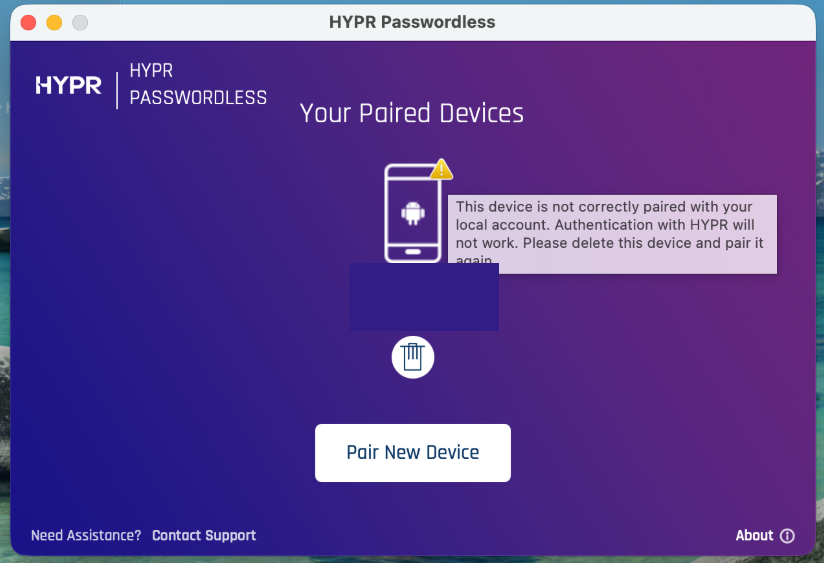
▸ Incomplete-pairing warning indicator
The Mac client now displays a warning icon next to pairings that did not complete successfully, helping users identify and re-pair affected workstations.
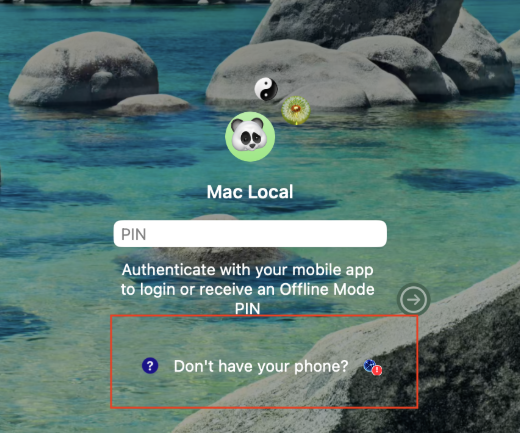
▸ Network-issue indicator
The Mac client surfaces an indicator when connectivity to HYPR is impaired, helping users distinguish transient network problems from configuration issues.
Enhancements
▸ YubiKey PIN policy on macOS
PIN policy can be configured for YubiKey enrollment on macOS, aligning with PIN-policy controls already available on Windows.
▸ LOCKED state restored on unlock timeout
Workstation LOCKED state is restored when the unlock timeout elapses, ensuring the lock-state UI matches workstation reality.
HYPR Mobile App
New Features
Android
HYPR Passkey as Android credential provider for Microsoft Entra — the HYPR Mobile App on Android operates as a third-party passkey provider for Microsoft Entra ID registrations, allowing enterprise device-bound passkeys to be registered and used through the native Android credential picker. A new in-app onboarding banner links directly into the device Settings to enable the HYPR credential provider, with an option to dismiss or postpone. Supports Microsoft Entra registrations (relying-party login.microsoft.com); other relying parties are not supported via this path.
iOS
Save workstation after first unlock — users can save a workstation pairing immediately after the first successful unlock from the HYPR Mobile App, rather than requiring an explicit pairing step beforehand. After saving, users can choose to enable Tap-to-Unlock and to retrieve workstation Offline PINs directly from the saved virtual workstation tile.
Notable UI/UX Changes
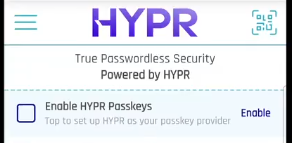
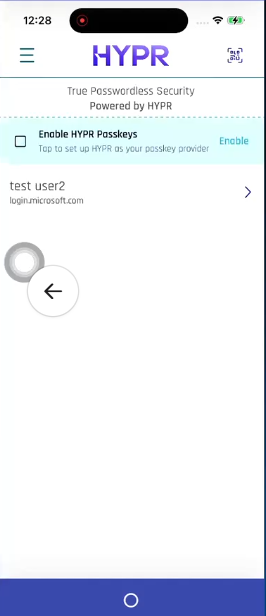
In-app onboarding for HYPR as the device credential provider — the HYPR Mobile App now surfaces an Enable HYPR Passkeys banner and guided dialog that helps users enable HYPR as their device's credential provider, instead of having to find the setting in their device OS on their own. Behavior differs slightly between Android and iOS.
See Enabling HYPR as your credential provider in the EPK / HYPR Passkey User Experience playbook for the full per-platform walkthrough.
iOS
Save-workstation prompt and saved tile for HYPR Passkey Fabric — after a successful unlock on iOS, the HYPR Mobile App presents the Save This Device prompt that turns the just-unlocked workstation into a persistent saved tile in My Computers. Saved tiles offer Tap-to-Unlock and Offline PIN access without re-scanning a QR code.
Integrations
Enhancements
▸ Event Hooks backward compatibility
Event Hooks are now backward compatible with earlier Control Center versions.
▸ Microsoft identity platform v2.0 endpoints for identity provider configuration
You can now configure an identity provider using Microsoft identity platform v2.0 endpoints. Earlier releases accepted only v1 endpoint values, so a configuration built from the v2.0 discovery document did not work. Existing configurations that use v1 endpoints continue to work and need no change. See Identity Provider (IdP) Management.
New Features in Beta
▸ [Affirm] Enhanced Identity Report (Beta)
Expanded identity-report and system-of-record checks surface richer validation and discrepancy details in request reviews, scorecards, and logs, and adds date-of-birth (DOB) extraction and propagation with admin-configurable DOB request behavior (collect only when missing, or always).
▸ [HYPR Mobile App for iOS] Device-bound passkeys for non-Entra scenarios (Beta)
iOS supports creating device-bound passkeys outside of Microsoft Entra ID configurations, broadening the platforms on which HYPR Passkey can act as a primary credential.
▸ [Enterprise Passkey / HYPR Passkey] iOS passkey storage hardened (Beta)
Non-Entra HYPR Passkeys on iOS are stored in the device Secure Enclave as hardware-backed, non-exportable credentials, aligning the iOS Beta with the FIDO/WebAuthn principle of device-resident private keys.
▸ [Adapt / Integrations] Edge for Business Device Trust Connector (Preview)
Initial preview of an Adapt integration that correlates Microsoft Edge for Business browser device trust signals with HYPR workstation signals, addressing a gap in browser-to-workstation signal correlation. Availability is limited; contact HYPR Support to participate.
▸ [HYPR Passwordless for Windows] ARM-based Windows device support (Preview)
Available on demand for customers piloting HYPR Passwordless on ARM-based Windows workstations. The Preview now bundles the ARM YubiKey minidriver in the installer and resolves the incorrect alert when an x64 MSI is attempted on an ARM device. Installers are provided on request.
Events
The following events were added in this release:
AFFIRM_WORKFLOW_VERIFIED_CREDENTIAL_START(IDENTITY_VERIFICATION) — a verified-credential step has started within an Affirm verification workflow.AFFIRM_WORKFLOW_VERIFIED_CREDENTIAL_FINISH(IDENTITY_VERIFICATION) — a verified-credential step finished within an Affirm verification workflow. Replaces the previousAFFIRM_WORKFLOW_VERIFIED_CREDENTIAL_COMPLETEDevent.AFFIRM_WORKFLOW_ERROR(IDENTITY_VERIFICATION) — an Affirm verification workflow encountered an error during execution.AFFIRM_WRITEBACK_TRIGGERED(IDENTITY_VERIFICATION) — a directory image writeback was initiated following an Affirm identity verification outcome. Includes the set of image sources included in the writeback payload.AFFIRM_WRITEBACK_SUCCESS(IDENTITY_VERIFICATION) — a directory image writeback to an external system completed successfully (on initial attempt or after retry).AFFIRM_WRITEBACK_SKIPPED(IDENTITY_VERIFICATION) — a directory image writeback source was skipped because it is within the configured rotation window and was excluded from the writeback payload.AFFIRM_WRITEBACK_FAILURE(IDENTITY_VERIFICATION) — a directory image writeback attempt failed. Includes the error reason and retry attempt count.AFFIRM_WRITEBACK_EXHAUSTED(IDENTITY_VERIFICATION) — all configured retry attempts for a directory image writeback were exhausted. The writeback was abandoned.
The following event was removed in this release:
AFFIRM_WORKFLOW_VERIFIED_CREDENTIAL_COMPLETED— superseded byAFFIRM_WORKFLOW_VERIFIED_CREDENTIAL_FINISH. Update SIEM/event-hook consumers that filter on the old name.
The following events received new fields in this release:
DESKTOP_SSO_COMPLETEandDESKTOP_SSO_FAILURE— newauthPathfield indicating which validation path was taken. Values:ENTRA_MSAL(Windows Hello on Entra-joined Windows) orFIDO(HYPR-initiated sign-in). Event semantics and emission conditions are unchanged.
See Event Descriptions for a list of all HYPR Events and parameters.
Error Messages
The following error codes were added or updated in this release:
- 1201099:
ADAPT_ALLOWLIST_USER_NOT_FOUND— User not found in the specified application for Adapt allowlist. Verify the username exists in the target application before attempting to allowlist. - 1201100:
FIDO2_OOB_ADDITIONAL_DETAILS_INVALID— The FIDO2 OOB request'sadditionalDetailsmap exceeds the allowed size limits (entry count, key length, or value length). Reduce the number of entries, shorten keys, or shorten values inadditionalDetailsand retry. - 1201101:
ADAPT_NOT_CONFIGURED— Adapt is not configured for this tenant; the requested action requires Adapt to be set up first. Configure the Adapt integration in Control Center before attempting Adapt-dependent actions. - 1202807:
JWT_KC_PROVISIONING_ERROR— JWT Keycloak provisioning failed due to missing or invalid Keycloak configuration. Ensure Keycloak service URL, username, and password are configured. - 1207025:
KNOWN_LOCATION_PROBLEM— There was an issue with the known location. Ensure the known location data is valid and the location exists. - 1207026:
AFFIRM_ASSET_PROBLEM— There was an issue with the asset content. Ensure the asset data is valid and the entry exists.
To see all HYPR errors by component, see HYPR Error Codes Troubleshooting Table.
APIs
-
[Control Center / Affirm] Breaking change: verification flow configuration schema rebuilt as a step-based model. The monolithic
AffirmVerificationFlowConfigschema has been replaced byVerificationFlowRequest, with verification logic now expressed as an orderedstepsarray ofVerificationStepentries. Each step carries anameenum (LOGIN_ID,CUSTOM,PHONE_OR_EMAIL,LOCATION,IDV,DOCUMENT_BIOMETRIC,DOCUMENT_LIVENESS,CHAT,ATTESTATION,VERIFIED_CREDENTIAL,OUTCOME,FAILURE_OUTCOME) and asettingsmap. The 10.7 single-payloadAffirmVerificationFlowConfigshape is no longer accepted. New required fields onVerificationFlowRequest:approvers,blockDurationMins,displayName,escalateToLiveChat,escalationApprovers,frictionLevel,imageWritebackRotationIntervalDays,imageWritebackRotationIntervalUnitUi,status,steps,type,workflowAttemptLimit,workflowAttemptWindowMins. -
[Control Center / Affirm]
- Added Email Customization endpoints for branded Affirm notification templates:
GET/POST/PATCHon/cc/api/email/customizationsGET/POST/DELETEper-version operations under/cc/api/email/customizations/{emailCustomizationId}/version- Clone, preview, and test-send:
POST /cc/api/email/customizations/{emailCustomizationId}/version/{versionId}/clone,POST /cc/api/email/customizations/preview,POST /cc/api/email/customizations/test - Revision history:
GET /cc/api/email/customization/revision/{revisionId},GET /cc/api/email/customization/{emailCustomizationId}/version/{versionId}/revisions - Notification type catalog:
GET /cc/api/email/notificationTypes - Email assets management:
GET/POST/DELETEon/cc/api/email/assets, plusPOST /cc/api/email/assets/uploadandDELETE /cc/api/email/assets/all - Per-RP-app email notification config:
GET/POST /cc/api/appconfig/email/notification
- Added Content Customization endpoints — extended the existing customization surface with screen-level granularity:
GET/PUT /cc/api/idv/content-customization/{contentCustomizationId}/screens/{screenName}— per-screen content read/writeGET /cc/api/idv/content-customization/{contentCustomizationId}/stylesheet— retrieve compiled stylesheetPATCH /cc/api/idv/content-customization/{contentCustomizationId}/metadata— update display name and metadataPUT /cc/api/idv/content-customization/{contentCustomizationId}/duplicate— duplicate a customizationDELETE /cc/api/idv/content-customization— bulk deleteGET /cc/api/idv/content-customization/defaults/style— retrieve default style palette
- Added Custom Step endpoints — pluggable verification-step framework for Custom Verification Steps:
GET/POST/PUT/DELETE /cc/api/idv/custom-stepand/cc/api/idv/custom-step/{id}for step lifecyclePATCH /cc/api/idv/custom-step/{id}/{version}for version-level updatesDELETE /cc/api/idv/custom-step/s3for tenant artifact cleanup- CSP override management:
GET/POST/PUT/DELETE /cc/api/idv/custom-step/cspand/cc/api/idv/custom-step/csp/{id}
- Added Asset endpoints for uploaded workflow media:
GET/POST/PATCH /cc/api/idv/asset,GET/DELETE /cc/api/idv/asset/{id} - Added Policy Evaluation Kit endpoints (Risk Policy Builder):
GET/POST/PATCH/DELETE /cc/api/idv/policy-evaluation-kitsand/cc/api/idv/policy-evaluation-kits/{kitId}PUT /cc/api/idv/policy-evaluation-kits/{kitId}/duplicateGET /cc/api/idv/policy-evaluation-kits/defaults— built-in kit defaultsGET /cc/api/idv/policy-evaluation-kits/risk-signalsand/.../{actionName}— risk-signal catalogGET /cc/api/idv/policy-ledger/{workflowId}— retrieve policy-evaluation ledger
- Added Known Location and Blocked Country endpoints (Network and Location Policy):
GET/POST/PATCH /cc/api/idv/known-location,DELETE /cc/api/idv/known-location/{id}GET/POST/PATCH /cc/api/idv/location/blocked-countries,DELETE /cc/api/idv/location/blocked-countries/{id}POST /cc/api/idv/location/blocked-countries/sanctioned— apply the sanctioned-country preset list
- Updated
POST/PATCH /cc/api/idv/verificationpayload — addeddataRetentionSettings(object),policyKitId(string),imageWritebackRotationIntervalDays(integer, required) (breaking change),imageWritebackRotationIntervalUnitUi(string, required) (breaking change). - Updated
POST/PATCH /cc/api/idv/content-customization—displayNameis now required (breaking change). - Updated
POST /cc/api/idv/userandGET /cc/api/idv/helpdesk/workflows/{workflowId}— added observability fieldsinitiatedBy,workflowRequestSource(HELPDESK/API/UI), plusstartTime,endTime,durationMs,statuson the helpdesk response. - Updated all step-result schemas (
IdvStep,LocationStep,AttestationStep,PhoneOrEmailStep,PhotoIdAndLivenessStep,VerifiedCredentialStep,ApproverChatAndVideoStep) — added shared observability fieldsdurationMs,startTime,endTime,status,errorMessage,errorStatusCode,policyResults. - Updated
IdvStepschema — added dual-document fields:documentType,secondaryDocumentType,secondaryIdvDocumentAuthentication,secondaryIdvLivenessCheck,secondaryIdvNameChecking,idvNoPiiSecondaryAggregatedResults,idvDataRetentionPolicy. - Updated
LocationStepschema — addedbrowserLocationDistanceResults,countryBlockListCheck,ipLocationDistanceResults,matchedIpRule. - Updated verifiable-credential callback endpoints —
POST /cc/api/idv/verify/verified-credential/callbackandPOST /cc/api/idv/verify/await/verifiableCredentialCallbackremoved thereceiptfield from the request body (breaking change). - Removed endpoints (replaced by the new step-based and content-customization surfaces):
GET /cc/api/idv/configurationGET /cc/api/idv/configuration/supportedTenantRpAppsDELETE /cc/api/idv/configuration/{rpAppId}GET /cc/api/idv/verification(the bare-path list variant —GET /cc/api/idv/verification/{id}is retained)
- Added Email Customization endpoints for branded Affirm notification templates:
-
[Control Center]
- Added JWT RP App configuration endpoints:
GET/PUT /cc/api/appconfig/jwt,DELETE /cc/api/appconfig/jwt/{appId}. - Added CSV report endpoints:
GET /cc/api/reports/metadata,POST /cc/api/reports/execute, plusPOST /cc/api/csv/definition/retrieve,POST /cc/api/csv/definition/update,POST /cc/api/csv/definition/delete. - Added Job Scheduler endpoints for cluster-aware batch processing:
GET /cc/api/jobs/scheduler/jobsand sevenPOSToperations under/cc/api/jobs/scheduler/...(current,parameters,processing,trigger,update/batch,update/config,update/schedule). - Updated
GET/PUT /cc/api/appconfig/push— addedpasskeyFirstEnabledflag to RP App push configuration. - Updated
GET/PUT /cc/api/appconfig/workstation— addedsingleRegPilotGroupEnabledflag to workstation configuration. - Updated
POST /cc/api/integrations/adapt/user/allowlist— addeddurationMinutesandpolicyIdsrequest fields, allowing time-bound and policy-scoped Adapt allow-list entries. - Updated
POST /cc/api/user/fido/delete—expectedfield is no longer required (relaxation, breaking change for callers that relied on the required-validation behavior).
- Added JWT RP App configuration endpoints:
-
[Control Center / FIDO2] FIDO2 authentication responses include the AAGUID claim; OOB endpoints accept an additional configurable field.
-
[Recovery PIN] The
/rp/api/versioned/recoverypin/retrieveendpoint now requires an access token minted under thecontrolCenterAdminRP app — see Breaking Changes.
You can find detailed descriptors and other API calls in HYPR's full Postman API set here.
Bug Fixes and Known Issues
The complete, per-item list for this release is maintained in the Changelog: