HYPR AgentPass: Overview

HYPR AgentPass™ is the trust layer for enterprise AI agents. It gives every agent a verifiable identity, routes its traffic through one gateway, and puts a person in charge of the actions that matter.
The Challenge
Teams across your organization now build and run AI agents, from coding agents on workstations to agents on cloud platforms.
Most of these agents run without the controls you apply to people.
They often use shared credentials, can reach any tool those credentials allow, and work unattended, so no one approves a risky action before it happens.
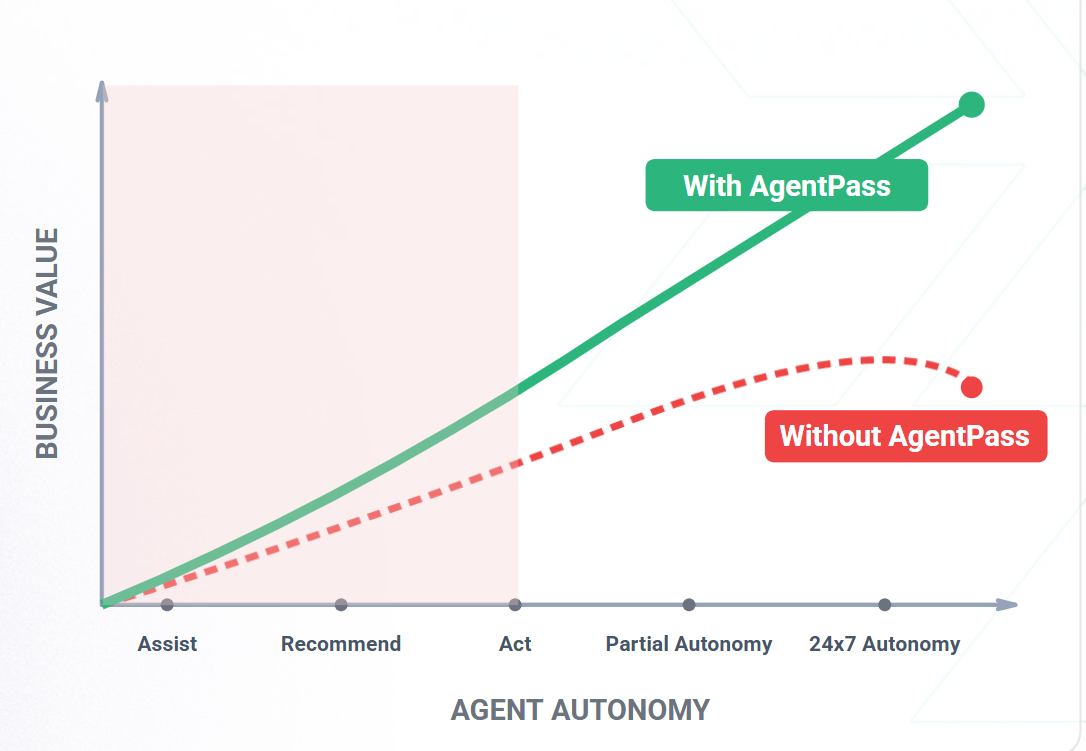
The value of agents rises as they take on more autonomy, but only while you can still govern them. Without that control, the value levels off and then falls, as agents move from acting to running around the clock.
What HYPR AgentPass Can Do for You
HYPR AgentPass binds each AI agent to an accountable person. It sits between your agents and the providers and tools they call. For every request, it:
- Identifies the agent and its supervisor
- Applies policy and tool permissions before the request runs
- Holds high-risk actions for the supervisor's approval in the HYPR mobile app
- Records every request for audit
It does this with the identity provider, model providers, and tools your teams already use.
AgentPass combines four capabilities.
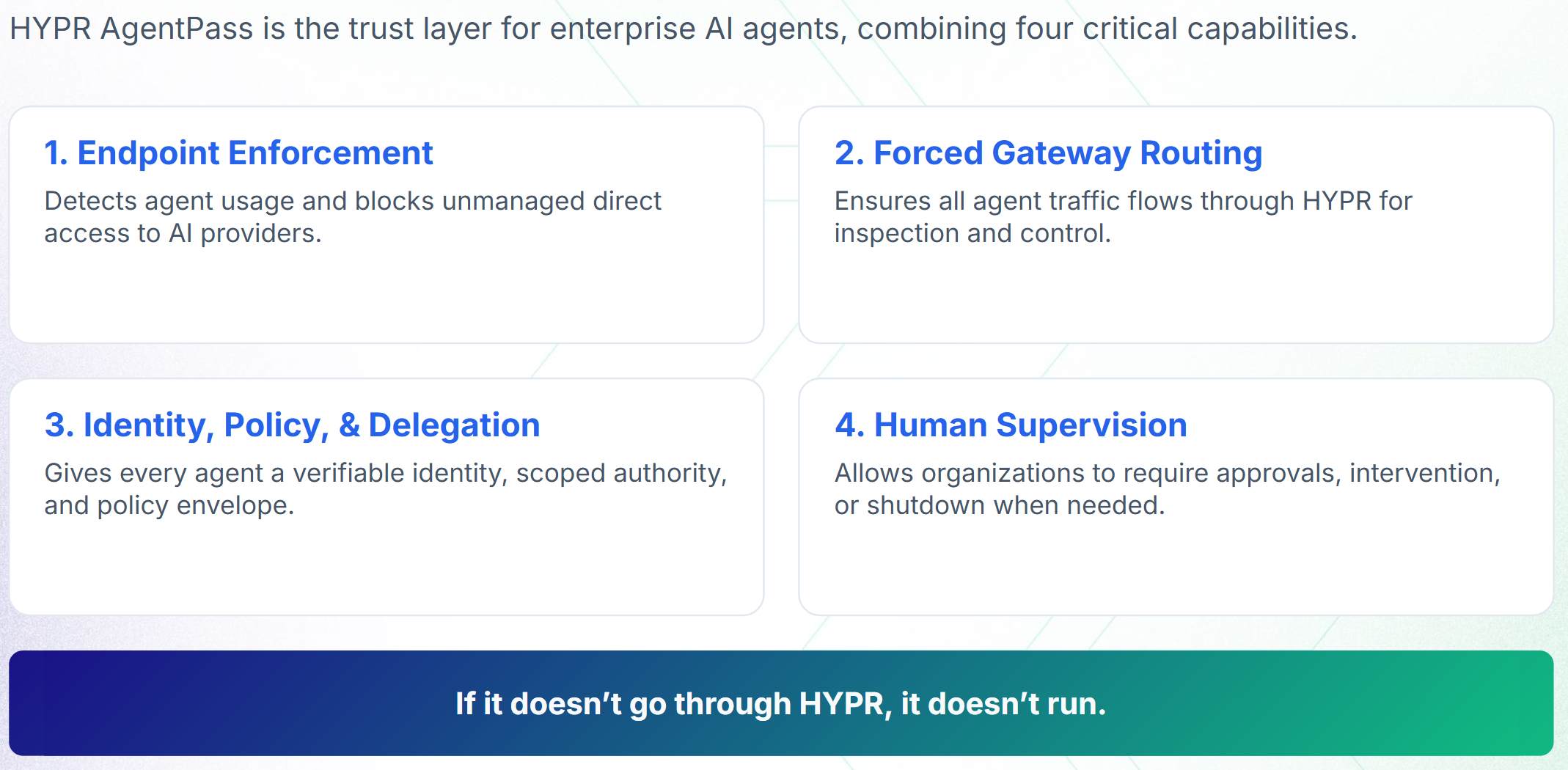
The following table describes each capability, and links to its pages.
| Capability | What it does |
|---|---|
| Endpoint Enforcement | Detects agent use on workstations and blocks unmanaged direct access to AI providers |
| Forced Gateway Routing | Sends all agent traffic through the gateway for inspection and control |
| Identity, Policy and Delegation | Gives every agent a verifiable identity, scoped authority and a policy envelope |
| Human Supervision | Requires a person's approval for sensitive actions, and lets supervisors intervene or turn an agent off, even when the agent works unattended |
Security Benefits to Your Organization
AgentPass limits what each agent can reach, and records what it does. The following table lists what that gives your security team.
| Benefit | What it gives you |
|---|---|
| Policy enforcement | Stops unmanaged AI traffic from bypassing your policies, so agent activity stays compliant |
| Data protection | Reduces sensitive data leaking to external services by classifying and inspecting what each call carries |
| Access control | Enforces least privilege for agent actions, and limits each agent to the tools its role is granted |
| Human approval | Puts a person in the loop for high-risk or ambiguous agent actions |
| Immediate kill switch | Turns off or revokes any agent, taking effect on its very next request |
| Audit and investigation | Keeps an end-to-end record of agent activity for compliance and security forensics |
Next Steps
-
Read HYPR AgentPass: How It Works to follow a request through the gateway.
-
Check the Prerequisites before you set anything up.
-
Follow Your First Governed Agent to bring your first agents under AgentPass.
Start Here by Role
Pick the guide that matches your job. Each one says what you can do, how AgentPass works from your seat, and what to try in your first hour.
| You are | Start with |
|---|---|
| The person who sets up the gateway, sign-in, connectors and roles | Administrator |
| The person who runs the gateway day to day | Operator |
| In security operations, triaging alerts and investigating agents | Security Analyst |
| Checking configuration and collecting evidence | Auditor |
| Responsible for the models that guardrails consult | Model Governance Owner |
| Responsible for one or more agents, approving what they do | Supervisor |
| Using a coding agent, such as Claude Code, on a work computer | Developer |
| Chatting with your organization's agents in a browser | Agent Portal User |
Common Jobs
| I want to | Go to |
|---|---|
| Connect an AI provider, MCP server or REST API | Connectors |
| Decide who signs in, and with which role | Roles and Permissions |
| Bring the AI tools on our workstations under the gateway | Getting Started with Desktops |
| Point a coding agent at the gateway | Onboarding Your Agent |
| Require a person's approval for an action | Require a Person for High-Value Agent Actions |
| Approve or deny a request on my phone | Approving and Denying Agent Actions |
| Stop an agent now | Turning Off an Agent |
| Find out why a request was blocked | Investigating a Policy Decision |
| Respond to an agent incident, from alert to evidence | Respond to an Agent Incident |
| Investigate what an agent did in a session | Agent Session Forensics |
| Review which agents still need their access | Running Agent Access Reviews |
| Send records to our SIEM, or export them | Data Management |
Playbooks
Playbooks walk through a complete use case in order. See AgentPass Playbooks for all of them.
- Quick Start: Administering HYPR AgentPass, for the Admin rolling out AgentPass
- See and Govern the AI Tools Already on Your Workstations, for IT and security administrators
- Give a Team Governed Coding Agents, for administrators rolling out coding agents
- Require a Person for High-Value Agent Actions, for security and platform teams
- Respond to an Agent Incident, for security analysts working with an Admin
- Using AI Tools with HYPR AgentPass, for employees whose AI tools run through AgentPass
What's New
The Changelog lists the changes in each AgentPass version.
Related
-
How AgentPass Organizes Agents — every kind of agent, and how each one joins
-
Security Controls — each control, what it prevents and how AgentPass does it
-
Permissions by Role — what each role can do, by product area
-
Supported Platforms and Components — what each operating system's endpoint client applies
-
Glossary — the terms these pages use