Suggested Policies
The Suggested tab of Policies proposes rules worth considering: patterns in your traffic that no policy matched, and obligations from the standards on the Reference material tab. Every suggestion states the evidence behind it, and links to the requests that motivated it. You can check the reasoning instead of taking it on trust.
Traffic is reviewed once a day. Until there is something to propose, the tab reads No suggestions yet.
Suggestions are a starting point, never a shortcut. Nothing on this tab is live until you create a policy from it.
Any role with Policies: View can read the Suggested tab. Acting on a suggestion needs Policies: Add, which Admin, Operator and Supervisor hold out of the box.
Where Suggestions Come From
One list holds suggestions from the three sources in the following table.
| Source | What it is |
|---|---|
| Your traffic | HYPR AgentPass™ detectors run on a schedule over observed calls and coverage, and raise a gap they can count |
| An external client | A registered security or compliance tool submitted a proposal through the policy MCP server |
| A reference document | An obligation in a standard you uploaded, raised by the Suggest policies action on that document |
Traffic-derived suggestions come from deterministic detectors, not from asking a model what it thinks. A detector decides that something is worth proposing, such as:
- An ungoverned tool carrying real volume
- A destructive operation nobody governs
- Access to sensitive paths
- A tool that was quiet last window and busy this one
The evidence on a suggestion is counted, never generated. Only the wording of the suggested intent is phrased for readability.
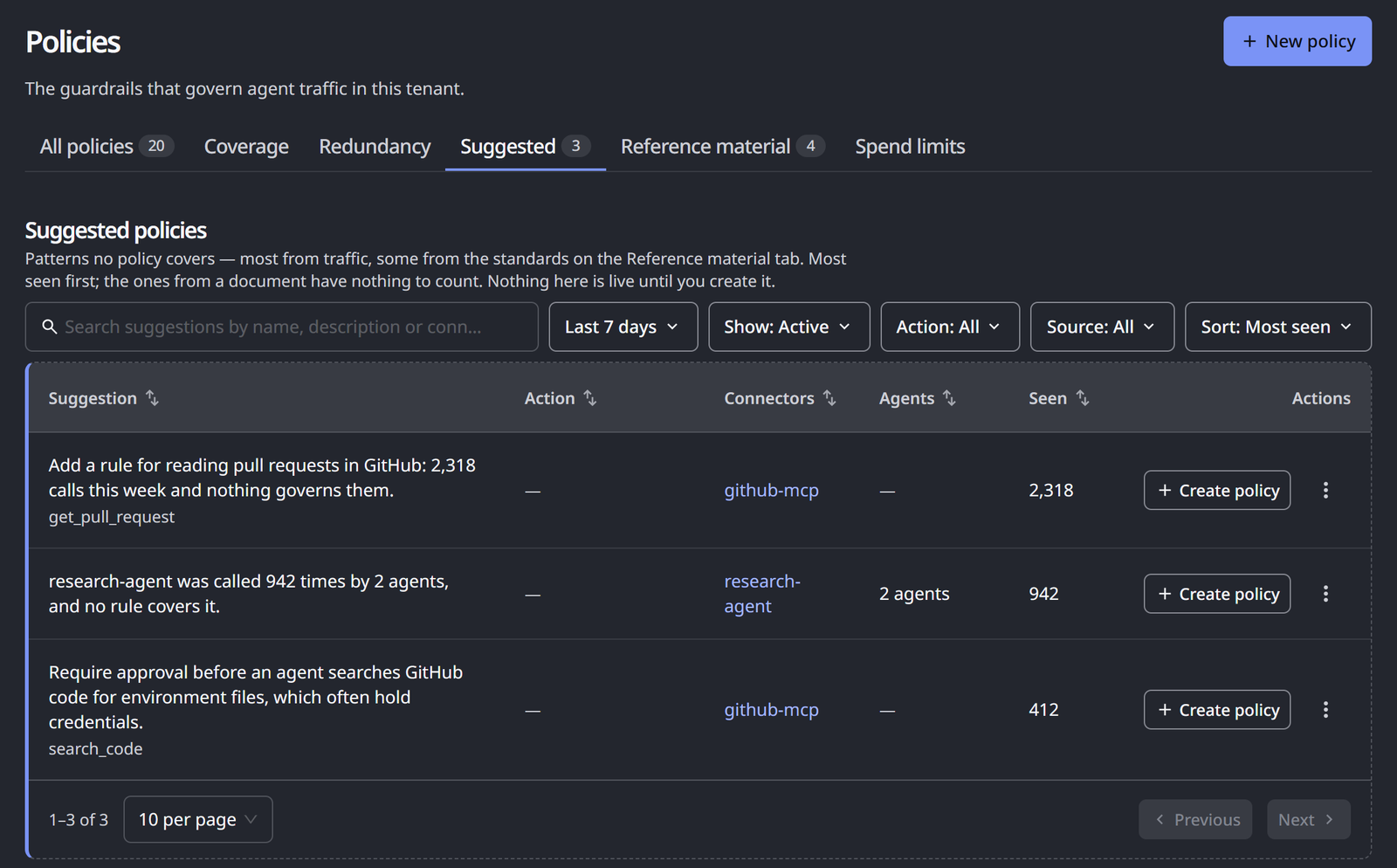
Read the List
The list is a table, with one suggestion per row.
| Column | What it shows |
|---|---|
| Suggestion | The rule the suggestion proposes, in plain language. Beneath it, the tool or target it is about, or the document and clause it came from |
| Action | The action the suggestion proposes: Deny for access to a sensitive path, Require approval for a risky tool, or a dash when it proposes none. A suggestion from a document proposes what the document calls for |
| Seen | How many requests showed the pattern. A suggestion from a document has nothing to count |
| Agents | How many agents made those requests |
| Connectors | The connector the requests went through |
| Actions | Create policy, and a menu with See the N requests, Open the connector and Dismiss |
See the N requests opens the Request log.
Filters above the table narrow and order it:
- Show: Active or Dismissed
- Action: the proposed action
- Source: Traffic, or one document by its title
- Sort: Most seen, the default, Most agents, Newest first or Name A–Z
A search box finds suggestions by name, description or connector.
Answering a suggestion needs Policies: Add. Any role that can open the page can read the list.
Reading a Suggestion From an External Client
A suggestion submitted through the policy MCP server is an outside party's claim. Check it against your own traffic before you act on it: open the requests behind it, and the connector it names. A claim about a specific external host is confirmed only as far as the connector that would reach it.
Accept a Suggestion
Click Create policy on the suggestion's row. The New policy wizard opens From a suggestion. Its first step shows the suggestion with its evidence and proposed action. The next steps arrive filled in: the connector, the tools, the name and the action. A document-derived suggestion also brings the passage that motivated it. When AI drafting is set up, the Logic step drafts the condition from the suggestion as it opens. No policy is created until you publish.
Everything that guards any other policy still applies. You see the condition, the back test against your own traffic and the duplicate check. The policy is published in Observe by default, for you to promote when you are ready. See Creating a Policy.
Once the policy is created, the suggestion leaves the list. If you close the wizard without creating the policy, the suggestion returns to the list.
Dismiss a Suggestion
Dismissing asks for a reason, and the reason decides what happens next. Each reason suppresses a class of suggestion, not a single row, so the same proposal does not simply reappear on the next pass.
Open the suggestion's row menu, point to Dismiss, and choose a reason. Each reason carries a one-line hint.
| Reason | Hint in the menu | Effect |
|---|---|---|
| Not a risk for us | Stops this being suggested for this tool. | This signal is suppressed for this tool, and does not return |
| Already handled elsewhere | Stops this being suggested for this tool. We govern it another way. | Suppressed for this tool. Use it when you govern the activity another way |
| Not now | Comes back only if this gets materially busier. | Suppressed temporarily. Returns only if the activity behind it grows materially |
| Bad suggestion | Stops this kind of suggestion everywhere, not just here. | Suppresses this shape of suggestion across every tool. It is feedback about the proposal itself |
Only Not now comes back. It snoozes the suggestion for 14 days, and records the level of activity when you dismissed it. When the snooze ends, the suggestion returns only if that activity has at least tripled, because by then it is a different question.
The other three reasons are lasting.
A dismissed suggestion gives way to a line with Undo. It moves to Show: Dismissed, where Restore brings it back.
Suggestions raise no notifications, badges or emails. The tab is there when you are already thinking about policy. If activity needs urgent attention, raise it through your existing alerting, not this list.
What Suggestions Do Not Do
The tab has deliberate limits:
- It never creates, enables or promotes a policy. Every suggestion passes through the wizard and through you.
- It does not propose rules for activity that is already governed. A suggestion for something you have covered is suppressed before you see it.
- It shows a short list, not a feed. At most ten suggestions from your traffic are open at a time. Each daily pass replaces them, so when you answer one, the next candidate takes its place on the following pass. Suggestions from external clients and reference documents are listed in addition.
Related
- Policy Coverage — the ungoverned pairs most traffic-derived suggestions come from
- Policy MCP Server — register the external clients that may submit proposals
- Reference Material — turn an uploaded standard into a work list