Writing Policies from Reference Material
You can upload the documents your policies are written against, such as your own acceptable-use standard, or an extract from a framework you are held to. HYPR AgentPass™ turns the obligations in them into candidate rules, and quotes each passage beside the rules it informed.
Nothing on this page attests that your organization meets DORA, NIST, ISO or any other framework. AgentPass produces no compliance score, percentage or coverage rating against one. It helps an administrator write gateway rules, and shows which passage was in view when a rule was written. Assessing compliance remains the work of the people and auditors who do that work today.
Any role with Policies: View can read the Reference material tab. Uploading a document or running Suggest policies needs Policies: Add, and removing a document needs Policies: Delete. Admin, Operator and Supervisor hold both out of the box.
Upload a Document
- Open Policies, and click the Reference material tab.
- Click Add reference, and choose a file that meets the following requirements.
| Requirement | What is supported |
|---|---|
| Formats | Markdown, plain text, and PDFs that contain real text |
| Size | Up to 10 MB per file |
| Content | Text AgentPass can extract. The file type is detected from the file itself, not its name |
After the upload, AgentPass splits the document along its own headings and numbering. The unit you cite later, such as §4.2 Data egress, an article or a control ID, is something a reader can find in their own copy.
Your configured policy author then reviews the split, and picks out and names the passages worth citing. It selects from the document's own words instead of writing its own, so a stored passage is always text that appears in your file.
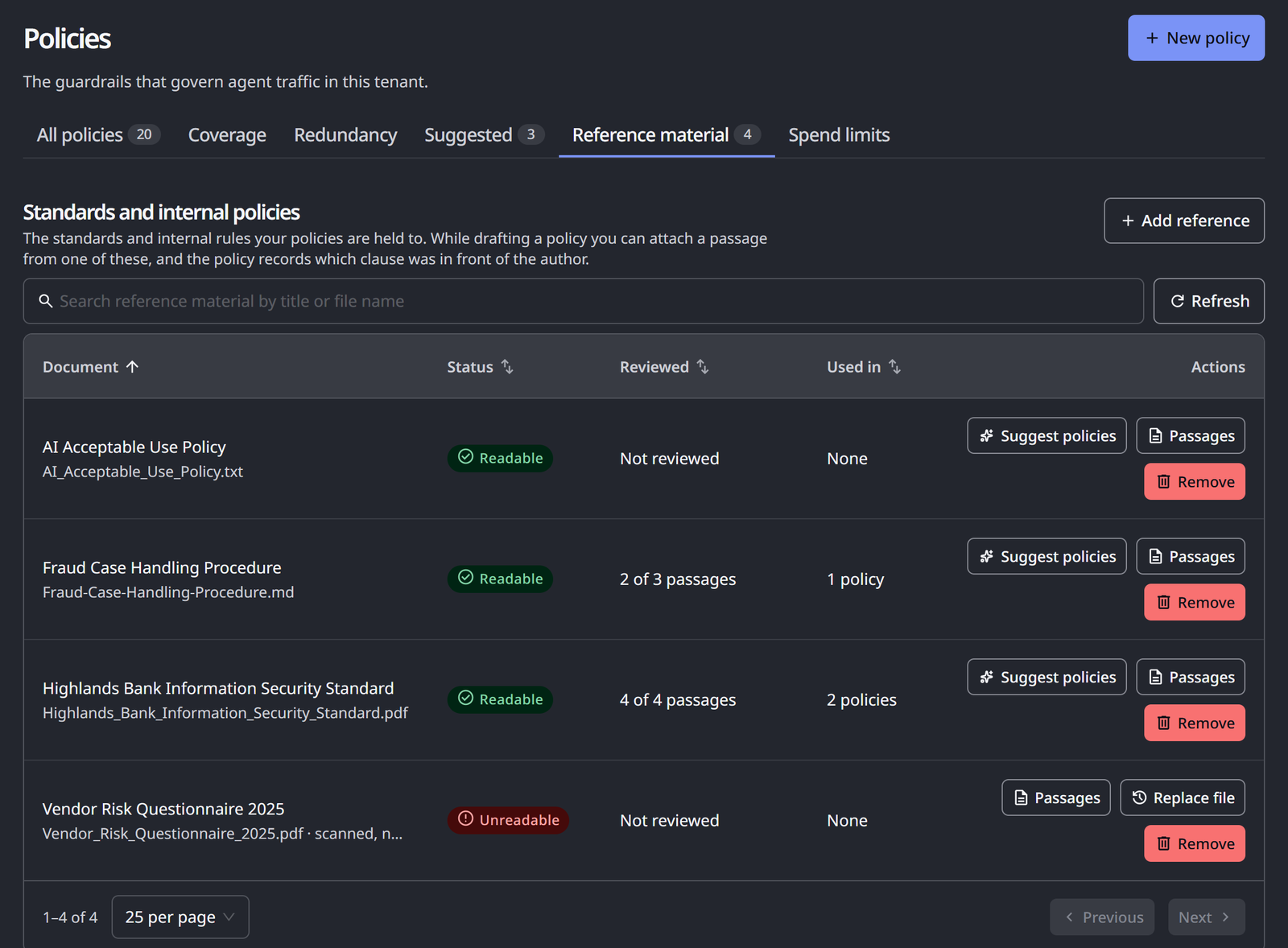
When the upload finishes, a message states how many passages the document produced. The Standards and internal policies list shows each document with the following columns.
| Column | What it shows |
|---|---|
| Document | The document's title, with its file name beneath |
| Status | Readable once the document is indexed, or Unreadable. While it is processed, the status reads Reading |
| Reviewed | How far Suggest policies has read, such as 71 of 258 passages, or Not reviewed |
| Used in | How many policies cite a passage from the document, or None |
| Actions | Suggest policies, Passages, Replace file on an unreadable document, and Remove |
Passages lists the passages a policy can cite, each with its heading path and the start of its text. Search them by text or heading. Search the list itself by title or file name, and click Refresh to reload it.
Upload an Extract, Not the Whole Standard
Upload the chapter you are held to, not the whole standard:
- The part you are held to is smaller than the document. Much of a standard governs procurement, training, board reporting and incident process. None of that becomes a rule about a tool call, so it adds passages to review without adding candidates.
- Review is per passage. Turning a document into candidate rules walks its passages in order. A 400-page standard is a long walk through material you already know is out of scope.
- A citation is only useful if a person can check it. Extracts keep the quoted passage close to the clause you cited.
If a whole standard is over the size limit, AgentPass says so, and suggests uploading the chapter you are held to instead.
Scanned PDFs Are Not Supported
A PDF has to contain extractable text. A scanned document is a picture of a page, and AgentPass does not run optical character recognition (OCR) over it.
A scan is accepted at upload, then fails to index, and its status reads Unreadable. Its Passages reads This file has no text to read. Click Replace file, and choose a text-based PDF, or the source in Markdown or plain text. A corrupt or password-protected file also fails to index, with a reason that says the file could not be read.
Turn a Document Into a Work List
Click Suggest policies on a document. AgentPass reads through its passages. For each obligation, it asks a question the document cannot answer alone: is there a gateway rule that would carry this?
To answer it, the request carries your real inventory:
- Your connectors and tools, and how much traffic each carried
- Which of them are already governed
- Whether a connector can carry an enforceable approval at all
That context separates advice from a rule. "Restrict egress of customer data" is a sentence in a standard. "Require approval on a specific tool of a specific connector" is a policy AgentPass can draft.
Anything it can carry becomes a suggestion on the Suggested tab, with the passage attached. From there, it goes through the New policy wizard like any other suggestion. You see the expression, the back test and the duplicate check, and it is published in Observe by default.
"Not Applicable" Is a Normal Answer
Every passage that cannot become a gateway rule is reported by name, with the reason. Expect many passages to land here.
Read the reasons. A passage may need a process, a contract, a training record or a board report, which a gateway has no view of. It may also name an obligation the gateway cannot enforce in that place.
For example, an approval cannot pause a model response that is already streaming. An obligation to hold that response for a human is therefore reported as not applicable, instead of quietly rewritten into a block. Blocking and asking a human are different decisions, and substituting one for the other silently would be worse than saying the gateway cannot help.
48 of 121 passages in the Reviewed column tells you how far through the document you are. It says nothing about how compliant you are, and neither does the number of suggestions produced.
A run reviews a batch of passages and remembers where it stopped. Running it again continues through the document, instead of starting from its title page.
Each run ends in a What this document implies for this gateway dialog. It states how many obligations became suggestions, such as 3 of 7 obligations became suggestions, and how far the document has been read. Under Not something a gateway rule can do, it lists the passages that need a process instead of a rule. See the N suggestions opens the Suggested tab narrowed to this document. Read the next N passages continues the review.
What a Citation Means
When a passage was attached to a draft, the policy records that fact, and shows the quoted text beside the rule.
A citation is a claim about provenance. It says this passage was in context when this rule was drafted. That is checkable. The passage is quoted in full next to the expression, and you can open the document it came from.
A citation is not a claim about compliance. It does not say the rule satisfies the clause, implements the control or discharges the obligation. Only you can judge that. That is why the passage and the expression are shown together, instead of hiding the passage behind a reference ID.
A passage reaches a draft only because a person put it there, by accepting a suggestion raised from it or by attaching it in the wizard. AgentPass does not search your library and decide for itself what is relevant. A policy author cannot invent a citation. Only a passage actually offered to it can be recorded.
If the passage behind a citation is later removed, because you deleted or replaced the document, the citation is dropped from the policy. It is not left pointing at nothing.
Read the "Used In" Column
Used in counts the policies that cite a passage from that document. Hover over it to see their names. A document no policy cites reads None. It shows whether a document earns its place in your library. A standard cited by nothing, months after you uploaded it, is one nobody needed.
Read it as a signal about the document, not as coverage of the framework. A long list means passages from that document informed several rules. It does not mean the document's obligations are met. A document that reads None does not mean you are exposed, either. The obligations in it may be carried by process instead of by the gateway.
Remove a Document
Removing a document needs the Delete permission on Policies.
- On the Reference material tab, click Remove on the document's row.
- Read the Remove …? confirmation. When policies cite the document, it states how many, and that those citations will disappear.
- Click Yes, remove document. To keep it, click No, keep document.
The document's passages are no longer available to attach to a draft.
Related
- Suggested Policies — where document-derived candidates arrive for review
- Choosing Who Drafts Your Policies — the author that reads your documents, and where it runs
- Understanding Your Policies — where a policy shows the passage it cites