How Policies Are Evaluated
Every HYPR AgentPass™ policy has the same shape:
- A condition that decides whether the policy matches
- An action that applies when the condition matches
- A mode that says whether the action is enforced yet
- A check point that says which half of the exchange the rule looks at
This page explains those pieces and how the gateway runs them, so you can predict what a policy will do before you promote it.
What a Rule Can Look At
A condition can test four kinds of detail about the exchange.
| Detail | Attributes | Examples |
|---|---|---|
| The request | request.* | The path and method, the parsed body, the signed-in person, the calling agent and any attached files |
| The reply | response.* | The status code, headers and body, and how long the backend took |
| The connector | connector.* | Which connector handled it and what kind it is. On AWS Bedrock and Microsoft 365 Copilot connectors, also the caller and surface behind the request |
| The conversation | inference.* | On a connector that reaches a model: the newest message, the model's reply, and the tools it is asking to run |
The Attribute Reference lists every attribute, with its type and when it is present.
Action and Mode Are Separate Settings
The action is what the policy does when its condition matches. The mode is whether that action is applied at all.
Action
A policy has one of three actions.
| Action | On a match in Enforce mode |
|---|---|
| Allow | The request continues. The match is recorded, but the outcome is unchanged |
| Deny | The request stops at the gateway. The agent receives the policy's message |
| Require approval | The request is held, and an approval is raised for the agent's supervisor. It continues only if approved |
Expressions and the API name the same actions ALLOW, DENY and REQUIRE_APPROVAL.
A matching ALLOW policy does not stop evaluation. If a later policy in priority order also matches and blocks, the request is still blocked. Use ALLOW to record that a rule matched, not as an exception to a block written elsewhere. An ALLOW policy records its matches only in Enforce mode. In Observe mode, it records nothing. To exempt traffic from a block, narrow the block's own condition or its connector scope.
Mode and State
A policy's state says whether it runs, and whether its action applies. The policy list shows it as a badge.
| State | Behavior |
|---|---|
| Disabled | Skipped at evaluation. Nothing is logged, and nothing is enforced |
| Observing | The condition is evaluated on every request in scope. Each DENY or REQUIRE_APPROVAL match is recorded as a Would deny or Would wait decision. Traffic flows unchanged. See Policy Decisions |
| Enforcing | The action applies to every match |
In the New policy wizard, two settings make up the state. Enforcement mode is Observe — evaluate and log, do not enforce or Enforce — apply the action to every match. The Enabled switch turns the whole policy off, whatever its mode. Keeping a policy enabled in Observe is how you record what it would have done.
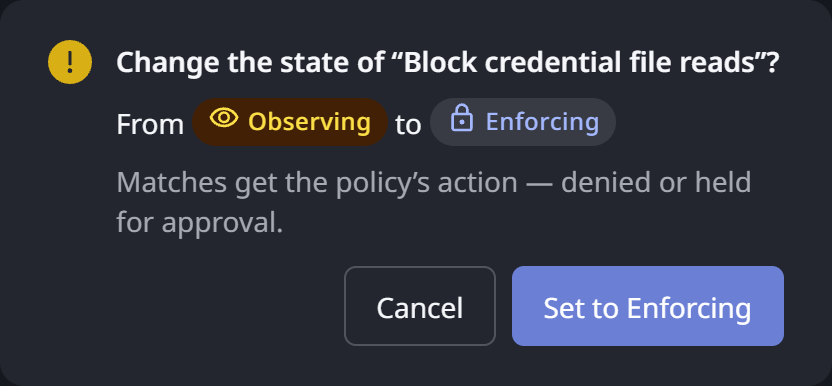
The wizard preselects Observe for a new policy. On the policy list, click a policy's State badge to change it. The gateway asks you to confirm, with Change the state of “…”?, and shows the state you are leaving and the one you are moving to.
Phase
The Checks field says which half of the exchange the rule looks at. This is the policy's phase, and the policy's page shows it as Checked.
| Checks | Phase | The rule sees |
|---|---|---|
| The request — before it is sent | Pre-Request | The request as it arrives: request.*, connector.*, and on a model connector the conversation being sent (inference.* request attributes). Nothing has left the gateway yet |
| The reply — before it returns | Post-Response | Everything in the request, plus the reply: response.*, and on a model connector what the model sent back (inference.* reply attributes) |
Blocking on the request is the stronger control, because nothing is forwarded. A rule about what a model proposes, such as a command it wants to run or a file it wants to read, can only be written on the reply, because that proposal is the reply. Governing Inference Traffic explains the choice in depth.
Priority and First Match
The Priority field is a whole number, 1000 by default. Lower numbers are evaluated first.
For each request, the gateway first narrows your policies to the ones that apply: enabled, not disabled, in the current phase, and in scope for the connector and tool. It sorts them by priority, then runs two passes:
- Every Observe policy in that set is evaluated, and each
DENYorREQUIRE_APPROVALmatch is recorded. - Enforce policies are evaluated in priority order, until one matches with
DENYorREQUIRE_APPROVAL. That policy decides the outcome, and evaluation stops. If none matches, the request continues.
The enforce pass stops at the first block or hold, so order matters when two enforcing rules could both match. Give the one whose message you want the agent to see the lower priority number.
A condition that fails to compile, because of a typo or an unbalanced bracket, takes that policy out of evaluation until it is fixed. The New policy wizard checks the condition as you write it, so this mainly affects a policy created outside the console.
If a condition fails while it is being evaluated, for a reason other than a missing attribute, the gateway treats it as a match.
Scoping a Policy
The Connector field scopes a policy to the connectors you choose. Leave it empty to apply the policy to all of them, including any connected later. Scoping lets you require approval on one provider's traffic while allowing another's. It also keeps a reply-side rule from changing how replies arrive on connectors it was never meant for.
A policy on a single MCP connector can also carry a tool scope: the specific tools on that connector it applies to. It is then evaluated only for calls to those tools. You set it under Apply to in the wizard's Details step, and a tool added to the connector later is not covered.
You can also state the scope inside the condition itself, with connector.template or connector.name. Doing both works. The field does the scoping, and the guard in the expression makes the intent readable to whoever reviews the rule later.
What a Match Does, by Kind of Traffic
The action is the same word everywhere, but what the agent or user experiences depends on the kind of connector.
| Traffic | DENY | REQUIRE_APPROVAL |
|---|---|---|
| A tool call on an MCP connector | The agent receives a tool error carrying the policy's message. It can read it and change course | The call is held. An approval is raised for the agent's owner. When the gateway cannot attribute the request to anyone, it goes to the policy's Owner |
| A REST or other HTTP request | The gateway answers with a 403 and the policy's message. Nothing is forwarded | The request is held for approval in the same way |
The request to a model (Pre-Request on an inference connector, reading request.*) | The agent receives a reply naming the policy and its message, in place of the model's answer. The blocked request is not sent to the provider. It is also left out of the conversation when later prompts are sent, so the developer can carry on with a different prompt. A request the gateway cannot answer in the client's own format, such as AWS Bedrock Converse, receives a 403 with the message instead. On AWS Bedrock with signed requests, the developer starts a new conversation after a block | Held for approval |
A model's reply, judged by a rule that reads inference.* | Replies stream. The gateway holds only the tool-call block and judges it. On a match, it ends the reply with a short note naming the policy and its message. Text already streamed stays, but the tool call is never delivered, so it never runs | Not available. See Where Require Approval Applies |
A model's reply, judged by a rule that reads only response.* | The whole reply is held until the rule runs. On a match, it is replaced by a reply naming the policy and its message. Otherwise it is released | Held for approval |
| A Microsoft 365 Copilot reply | Copilot replies are always judged whole. On a match, the user sees a blocked notice instead of the answer | Not available. See Where Require Approval Applies |
A DENY or REQUIRE_APPROVAL policy always needs a message, because it is the text the agent or user receives. Write it for the person who will read it.
A blocked agent receives the policy's name and your message, never the condition itself. A refusal therefore does not reveal how the rule is built.
On an inference connector, a matching reply-side rule deliberately shortens the reply. On a Microsoft 365 Copilot connector, any enabled reply-side rule makes replies arrive complete instead of streaming, for every conversation on that connector. Keep such rules in Observe until you have seen what they catch, and scope them to the connector you mean.
Where Require Approval Applies
REQUIRE_APPROVAL needs a person to approve, and a request that can wait. Some traffic has neither.
| Traffic | Require approval |
|---|---|
MCP tool calls, REST connectors, and Pre-Request rules on inference connectors that read request.* | Yes |
Any rule whose condition reads inference.* | No. Inference rules allow or block, and the gateway refuses to enforce REQUIRE_APPROVAL on one. You can publish such a rule in Observe, to record where approval would have been required, but not promote it. To keep a person in the loop, write the approval on the tool call the agent makes, or run the rule in Observe and review its matches |
| Requests from a workload agent | No human can approve, so the call does not complete. Choose block or allow for these agents, or scope the policy to supervised agents |
| Microsoft 365 Copilot replies | Block or allow |
| Copilot Studio turns and Agent Portal file uploads | No. REQUIRE_APPROVAL blocks the request with the policy's message, and no approval is raised |
An approval goes to the agent's owner, or to the supervisor the gateway resolved for the request. The policy's Owner is the fallback when the request carries no attributable identity at all. Approving and Denying Agent Actions covers what the supervisor sees, and what each answer does to the agent.
A Rule About a Detail the Gateway Never Learned Never Acts
Many attributes are present only when the gateway could resolve them. For example:
request.user, when someone signed inrequest.files, when a request carries filesconnector.aws.bedrock.user_email, when the developer was namedinference.*, on a connector that reaches a modeldata.*, when something classified the call
When such a detail is missing, a condition that tests it is not a match. The policy does nothing, with no error, and nothing in the Request log suggests it is idle.
That is the safe direction for the gateway to take, but it affects how you write a block. A DENY written as "the signed-in person is not from my domain" blocks the outsiders it names. It also lets through every request that carried no identity at all.
Write the block so the missing case matches too. Test presence with !has(…), as in !has(request.user) || !request.user.endsWith("@example.com"), or test an attribute that is always present. A guard on one of these attributes also says which traffic the rule governs:
connector.templateorconnector.namerequest.file_countconnector.aws.bedrock.identity_source, on Bedrockconnector.m365.copilot.surface, on Copilot
Then check the rule in Observe mode before you enforce it. The Attribute Reference marks which attributes are always present, and which arrive only when resolved.
Policies and Tool Access by Role
Policies are not the only control on what an agent may do. Controlling MCP Tool Access by Role decides which MCP tools an agent may see and call at all, based on its supervisor's role, before any policy runs.
- Use tool access by role for the standing answer to "may this kind of user's agents use this tool?"
- Use a policy for a rule about a particular call: its arguments, its timing, the person or connector behind it, or a step that should need a human each time.
A policy can also be written against what a tool handles, not what it is called. Data Classification lets you label your tools and connectors. You can then condition on tool.*, data.*, response.data.* and a connector's data_ceiling. A rule such as "hold anything Restricted for approval" then keeps working as connectors gain and rename tools.
Related
- Policies — the section overview
- Creating a Policy — the New policy wizard, step by step
- Authoring a Policy with AI — draft a rule from plain English
- Data Classification — label your tools, then write rules against the label