Policy MCP Server
The policy MCP server lets tools you already run, such as a scanner, a SIEM or a compliance platform, read your HYPR AgentPass™ policy set and propose rules for the gaps they find. A finding no longer becomes a ticket that somebody retypes into a new policy. It becomes a suggestion in your queue, carrying its own evidence.
The server is at /hypr/policy/mcp on your gateway. Every call is authenticated, and every client is one you registered. No tool on this server can change a policy.
Registering policy MCP clients needs Policy MCP clients: Manage, which only Admin holds out of the box. It is its own permission, separate from viewing or editing policies, so permission to edit policies does not let a user issue a credential that reads the policy set from outside the console.
What a Client Can Do
Four tools are available. Each one is either read-only or writes to your review queue.
| Tool | What it does |
|---|---|
list_policies | Returns your policies with their plain-language summary, expression, action, mode and scope, and whether each has matched recently |
get_policy_coverage | Returns the coverage map: which connector and tool pairs carried traffic, and which have a rule reaching them |
suggest_policy | Submits a proposal: the intent in natural language, the target connector (one the client is scoped to), an optional tool, a required justification and an optional external reference. Returns a suggestion ID |
get_suggestion_status | Reports whether a suggestion the client submitted was accepted or dismissed, or is still open |
Every submission needs a justification. A proposal nobody can triage is not worth queueing, and this is the one tool whose output a person has to act on.
A client can read the status only of the suggestions it submitted. It cannot list anyone else's.
What a Client Cannot Do
These limits are what make the server safe to expose:
- It cannot create, edit, enable, disable, delete, reprioritize or promote a policy, or change any policy's mode.
- It cannot read request bodies, audit records or agent conversations.
- It cannot reach another organization's data. A client is bound to the organization it was registered in, and no tool accepts an organization as a parameter.
- Its credential works only on the policy MCP server. The rest of the gateway rejects it.
A submitted suggestion is a proposal in a queue. It never becomes a policy on its own. Someone with Policies: Add reviews it, opens it in the New policy wizard, checks the expression and the back test, and publishes it, in Observe by default. Treat a client's justification as a claim to check against your own traffic. See Suggested Policies.
Register a Client
- Open Settings → Gateway settings, and click the Policies tab.
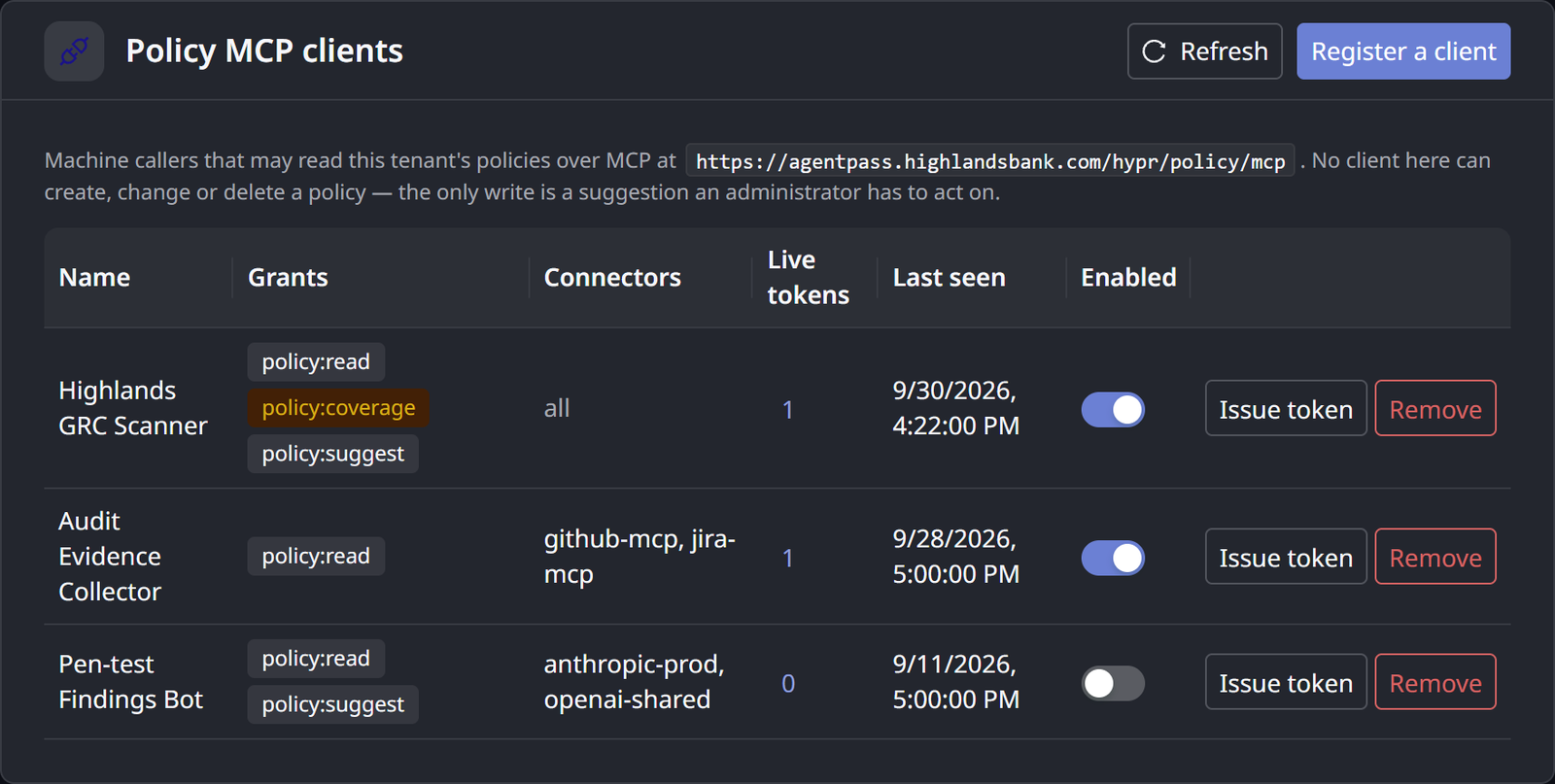
- On the Policy MCP clients card, click Register a client.
- Enter a name you will recognize in the suggestion queue.
- Choose the client's permissions, described in the following table.
- Optional: Restrict the client to named connectors. Every tool then filters to that scope, so a scanner that watches one connector cannot list the rest of your policy set.
Permissions are granted per client, and are deliberately narrow by default.
| Permission | Grants | Default |
|---|---|---|
| Read policies | list_policies | Granted when the client is created |
| Read coverage | get_policy_coverage | Off. Grant it deliberately |
| Propose policies | suggest_policy, get_suggestion_status | Off. Grant it deliberately |
Coverage is off by default because it is the most sensitive thing this server returns: a map of what your organization does not defend. Grant it to a tool whose job is finding gaps, and leave it off otherwise.
Credentials
A client authenticates in one of two ways, both designed for software with no person at a keyboard:
- An API token. Issued when you register the client, and shown once. AgentPass stores only a hash and cannot show the token again. If it is lost, issue a new one and revoke the old. You can give a token an expiry.
- Client credentials. The client exchanges an identifier and secret for a short-lived token. Only clients an Admin entered in this registry can do so. A client that registered itself dynamically with the gateway, for any other purpose, cannot obtain one.
An optional IP allowlist restricts a client to the addresses it should call from. It is inexpensive defense in depth for tooling with fixed egress, though not a substitute for the credential.
A policy MCP credential reads your organization's security controls. Store it in your tool's secret store, never in a repository or a widely shared configuration file.
Manage Clients Over Time
The client registry shows each client's permissions, how many suggestions it has submitted and how many were accepted, and when it was last seen:
- Acceptance ratio is the quickest measure of whether a client is useful. A client with forty suggestions and none accepted is producing noise, and this is where you notice.
- Last seen reveals a client that has gone quiet. That is often the first sign that a credential or an integration has stopped working.
- Disabling or revoking takes effect on the next call. You do not wait for a token to expire.
To remove a client, click Remove on its row, then Yes, remove client. Its tokens are revoked, and it loses access immediately.
Each client has a quota of suggestions it may submit in a rolling day: twenty by default, adjustable per client. Beyond the quota, submissions are refused with an explicit error, never silently dropped. A misbehaving integration therefore cannot flood your review queue.
Related
- Suggested Policies — where a client's proposals arrive and how to read them
- Policy Coverage — the map
get_policy_coveragereturns - Connectors — the connectors a client can be scoped to