Policy Coverage
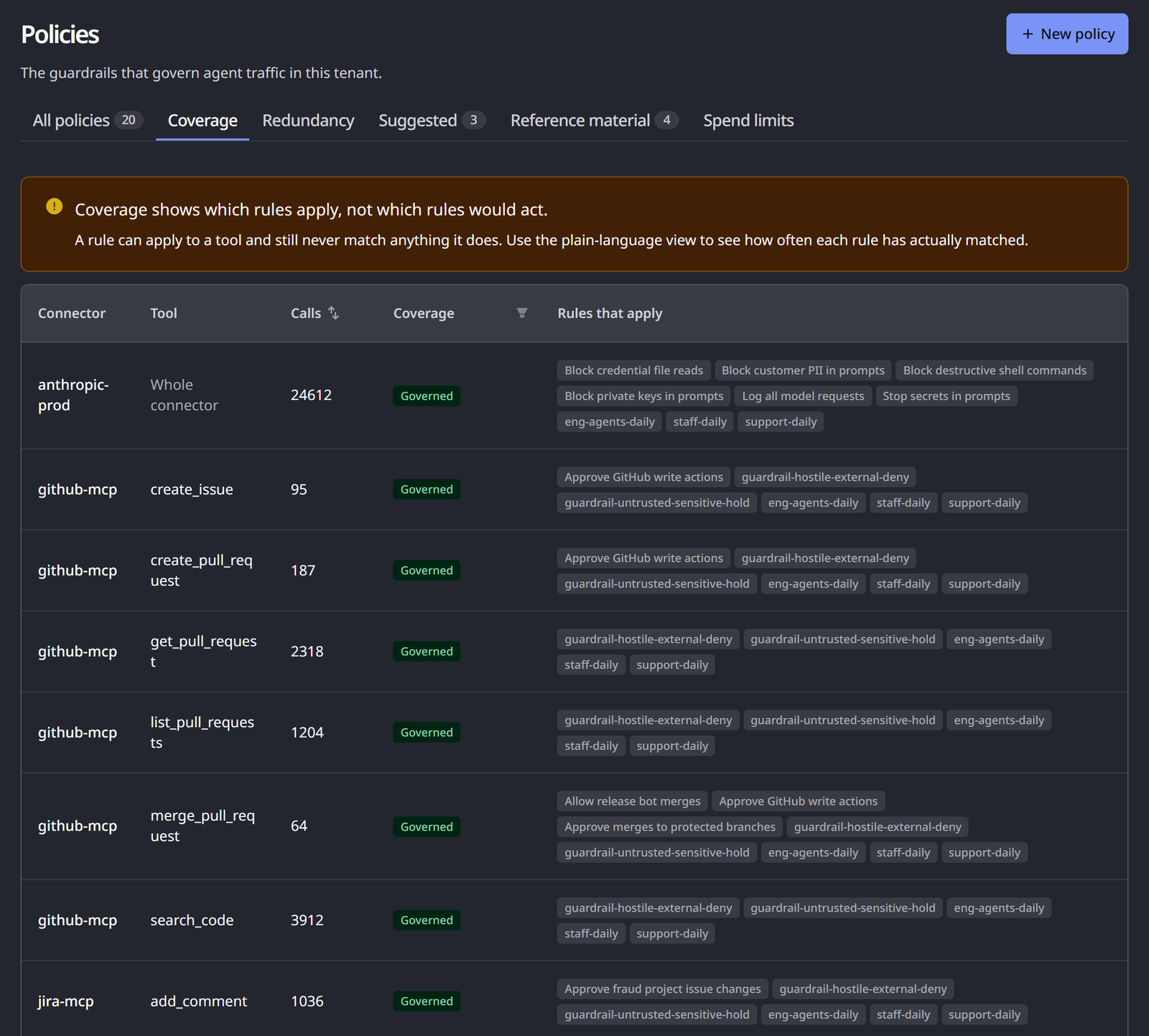
The Coverage tab of HYPR AgentPass™ answers a question a policy list cannot: what is not governed? It combines three things, and shows you where they do not meet:
- The tools your connectors expose
- The calls your agents actually made over the last seven days
- The scope of your policies
Coverage turns "I don't know what to write" into a work list. Rows are listed by connector, then tool. To put the busiest gaps first, filter the Coverage column to Not governed, and sort by Calls.
Any role with Policies: View can read this tab: Admin, Operator, Supervisor, Security analyst and Auditor, out of the box.
How to Read the Coverage Table
Open Policies, and click the Coverage tab.
Until the first pass has run, the tab reads Coverage has not been calculated yet. Coverage is recalculated periodically from recent traffic. That message does not mean there is nothing to report.
Each row is a connector and tool pair that carried traffic in the window. The table shows 20 rows per page, with the following columns.
| Column | What it shows |
|---|---|
| Connector | The connector that carried the traffic |
| Tool | The tool called. Whole connector means traffic that names no tool, such as model inference. An unlisted tag marks a tool not yet in the connector's catalog, which a rule written for a specific tool cannot reach |
| Calls | How many calls the pair received in the window. Click the header to sort |
| Coverage | The pair's state, described in the following table. Filter the column to show one state |
| Rules that apply | The policies that reach the pair, or None. A catch-all tag marks a pair reached only by an unscoped rule |
When any pair has no rule, a banner above the table counts them, such as 3 of 40 active connector and tool combinations have no rule at all. With no traffic in the window, the tab reads No traffic in the window, so there is nothing to compare against your rules.
Each pair is in one of three states.
| State | What it means |
|---|---|
| Governed | At least one policy scoped to this connector, or to this tool, reaches the pair. The policy must be enabled, and in Observe or Enforce mode |
| Catch-all only | The only policies reaching this pair are unscoped rules that apply to everything |
| Not governed | No enabled policy reaches this pair at all |
Catch-all coverage is shown separately from tool-specific coverage on purpose. An unscoped policy applies to every connector and tool. It makes the whole map look green while telling you very little about any single pair. When a tool is covered only by a catch-all, write a rule for it.
Counts cover your whole organization, even when your role limits you to your own policies. Rules owned by someone else appear as a count, such as and 2 more, instead of by name. Without that count, you could write a rule for a pair a colleague already governs.
What Governed Does Not Mean
Coverage is a question about scope, not outcomes. A green map is easy to over-read, so keep two limits in mind.
A policy in Observe mode covers a pair and blocks nothing. Coverage reports that a rule reaches a connector and tool, not that anything is being stopped. Check each governing policy's mode before you treat a pair as protected.
Coverage says a rule applies, never that it would match. A policy scoped to a tool counts as governing that tool, even if its condition can never be true for your traffic. You can see that gap elsewhere. The policy's Matches count shows whether a rule has fired. Redundancy reports rules that never run.
Read coverage as a map of where you have written something. Read the match counts and modes to find out what that something does.
The Window and Recency
Coverage describes the last seven days of traffic. It is recalculated about every 30 minutes, not on every page load. A connector that started carrying traffic minutes ago may not appear until the next pass.
"Not calculated yet" and "nothing ungoverned" are different answers, and the tab says which one you are looking at.
A pair with no traffic in the window does not appear in the table. No traffic is a different finding from no rule.
Related
- Understanding Your Policies — plain-language summaries and whether a rule has fired
- Suggested Policies — proposals raised from ungoverned traffic
- Policies — write and scope a rule for a gap you find