Policy Decisions
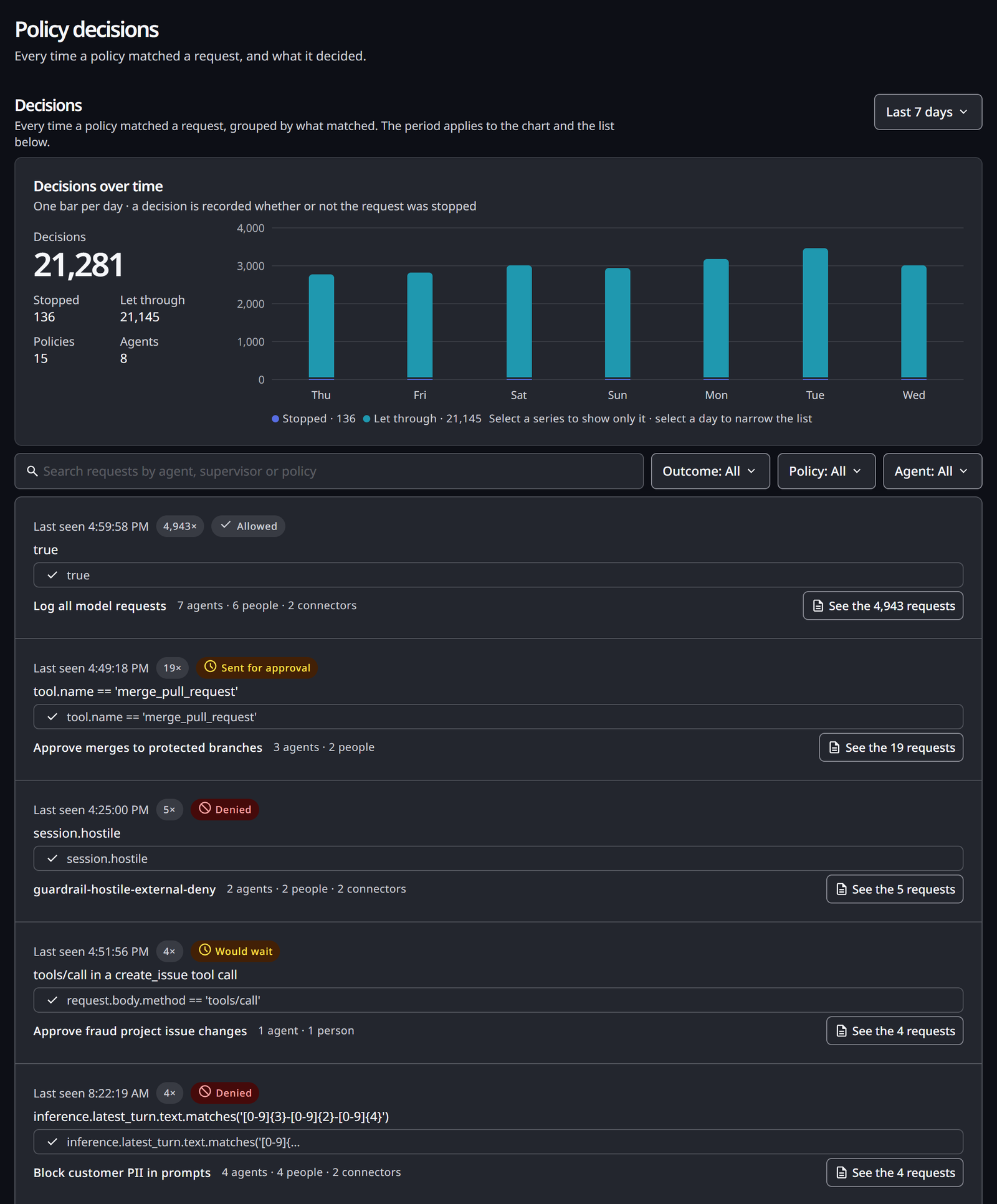
Each time a policy matches a request, HYPR AgentPass™ records a decision: what the policy did, or would have done, and the request it did it to. The Policy decisions page lists those decisions for every policy in your organization, grouped so that a busy rule reads as a few lines instead of thousands.
Use it to answer "what are my policies catching?" across the whole gateway. To read one policy's decisions, or one connector's, see Decisions for One Policy or One Connector.
The page needs Policies: View, which Admin, Operator, Supervisor, Security analyst and Auditor hold it for every policy, out of the box. See Who Sees What.
Open the Page
In the console, open Activity → Policy decisions. The page covers the last 7 days.
What a Decision Says
Every decision carries one of five outcomes. Two of them come from a policy in Observe mode, which records a match without changing the request.
| Outcome | The policy | What happened to the request |
|---|---|---|
| Denied | Enforces Deny | Stopped at the gateway. The agent received the policy's message |
| Sent for approval | Enforces Require approval | Held until a supervisor answered |
| Allowed | Enforces Allow | Let through, with the match recorded |
| Would deny | Observes Deny | Nothing. It would have been stopped once the policy enforces |
| Would wait | Observes Require approval | Nothing. It would have waited for a supervisor once the policy enforces |
Read the Trend
The Decisions over time card shows one bar per day. A decision is recorded whether or not the request was stopped, so an observing policy appears here, too.
Beside the chart, the card totals the period:
- Decisions: every match
- Stopped and Let through: how those matches split
- Policies and Agents: how many of each were involved
Click a series to show it alone. Click a day to narrow the list to that day.
When nothing matched in the period, the page reads No policy has matched anything yet. Every request was still checked against your policies, so this is a measured result, not missing data.
Read the List
Decisions are grouped by policy, by the condition that matched and by outcome. Each row shows:
- When the group was last seen, such as Last seen Thu 2:14:09 PM, and how many requests it holds, such as
17× - The outcome
- The condition that matched, and beneath it the part of the rule that held and the value it matched on
- The policy, and how many agents and people the requests came from
A row with several requests offers See the N requests. It opens that policy's own Decisions tab, narrowed to that condition and outcome. A row with one request offers Open request, which opens that request in the Request Log.
The list shows 20 groups at a time. Load more adds the next 20.
Narrow the List
Four controls filter the list.
| Control | What it does |
|---|---|
| Search | Finds requests by agent, supervisor or policy |
| Outcome: | One of the five outcomes |
| Policy: | One policy |
| Agent: | One agent |
The filters narrow the list only. The totals and the chart always cover every decision in the period.
Decisions for One Policy or One Connector
The same decisions are also shown where you are already working.
| Where | What you see |
|---|---|
| Policies, the number in a policy's Matches column, or View decisions in its row menu | A panel with the policy's trend over the last 7 days, and its requests grouped by condition and outcome. A button such as Open Decisions opens the policy's Decisions tab |
| The policy's page, Decisions tab | Every request the policy matched, newest first, one per row. Filter by Outcome, Connector, User or Condition. Load more adds the next 25 |
| A connector's Policies tab, Recent decisions on this connector | The most recent decision groups across the policies that govern the connector. Each row names the policy that caught it |
When a policy switched between Observe and Enforce during the period, its panel says when, such as Switched from observing to enforcing on Thursday at 14:10. Its groups then note since Thursday, so you can tell what happened before and after the switch.
Understanding Your Policies describes the policy's page.
Who Sees What
The page lists decisions for every policy you can view. The request behind a decision follows your Request log permission.
When your Request log: View is limited to your own records, as it is for Supervisor, the list is built only from your own agents' requests. The totals still count every decision. If every decision in the period was on someone else's requests, the list reads None of these decisions were on your requests. You see the requests of your own agents only.
You set permissions in Roles and Permissions.
Related
- Investigating a Policy Decision — trace one decision to the request that caused it and the values the rule matched on
- Promoting a Policy to Enforce — use observed decisions to decide when to enforce
- How Policies Are Evaluated — actions, modes and what a match does