Tool-Definition Integrity
A tool's definition, meaning its description, its schema and its annotations, is instruction the agent reads and acts on. An MCP server can change that definition at any time after you approved the tool. A tool that was safe when you granted it can quietly start telling the agent to do something else. Tool-definition integrity closes that gap. AgentPass remembers the definitions you approved, and flags a tool the moment its definition changes, so a person reviews what changed.
What Happens When a Definition Changes
AgentPass keeps the approved definition of every tool. Each time it sees the tool again, it compares the two.
- The definition matches an approved one. The tool works as before.
- The definition has changed. The tool is flagged for review. AgentPass records a tool-definition-changed event in your audit trail and raises an alert on Guardrails → Alerts.
The alert's severity follows what changed:
| Severity | What changed |
|---|---|
| High | The scanner flagged the new definition, or the tool gained a parameter or now accepts input it refused before |
| Medium | Any other change to the tool's input schema |
| Info | Only the wording of the description or title changed, and the scanner found nothing |
A change AgentPass cannot rate from the definitions is Medium, never Info. You can approve or reject the change from the alert itself. See Tool Definition Changes.
What agents see while the change waits for review depends on one guardrail setting, Quarantine tools whose definition changes after approval, on Guardrails → Settings. It is off by default.
| Quarantine | While the change waits for review |
|---|---|
| Off (default) | The tool is flagged and alerted, and agents can keep using it while you review |
| On | Agents cannot see or call the tool. It is removed from the tool list the agent receives, and refused if called, until the change is approved |
A change you reject is always blocked, whatever the setting.
When a tool is withheld, it is unavailable to everyone until the change is reviewed. No role bypasses it, and an Admin's session follows the same rule as any other.
Turning quarantine on while changed tools are still unreviewed asks Quarantine changed tools?. Agents lose those tools as soon as you save. See Guardrail Settings.
Seeing a Changed Tool
Open the connector, and click its Tools tab. A banner says how many tools changed definition after approval, and whether they are quarantined. The Integrity column shows each tool's state.
| Integrity | Meaning |
|---|---|
| ✓ Pinned | The tool matches an approved definition |
| ⚠ Changed | The definition changed after approval. Agents can still use it, because quarantine is off |
| ✕ Quarantined | The definition changed after approval, and agents cannot see or call the tool until you review it |
| ✕ Rejected | You rejected the change. The tool is blocked and disabled |
Review appears beside a changed, quarantined or rejected tool.
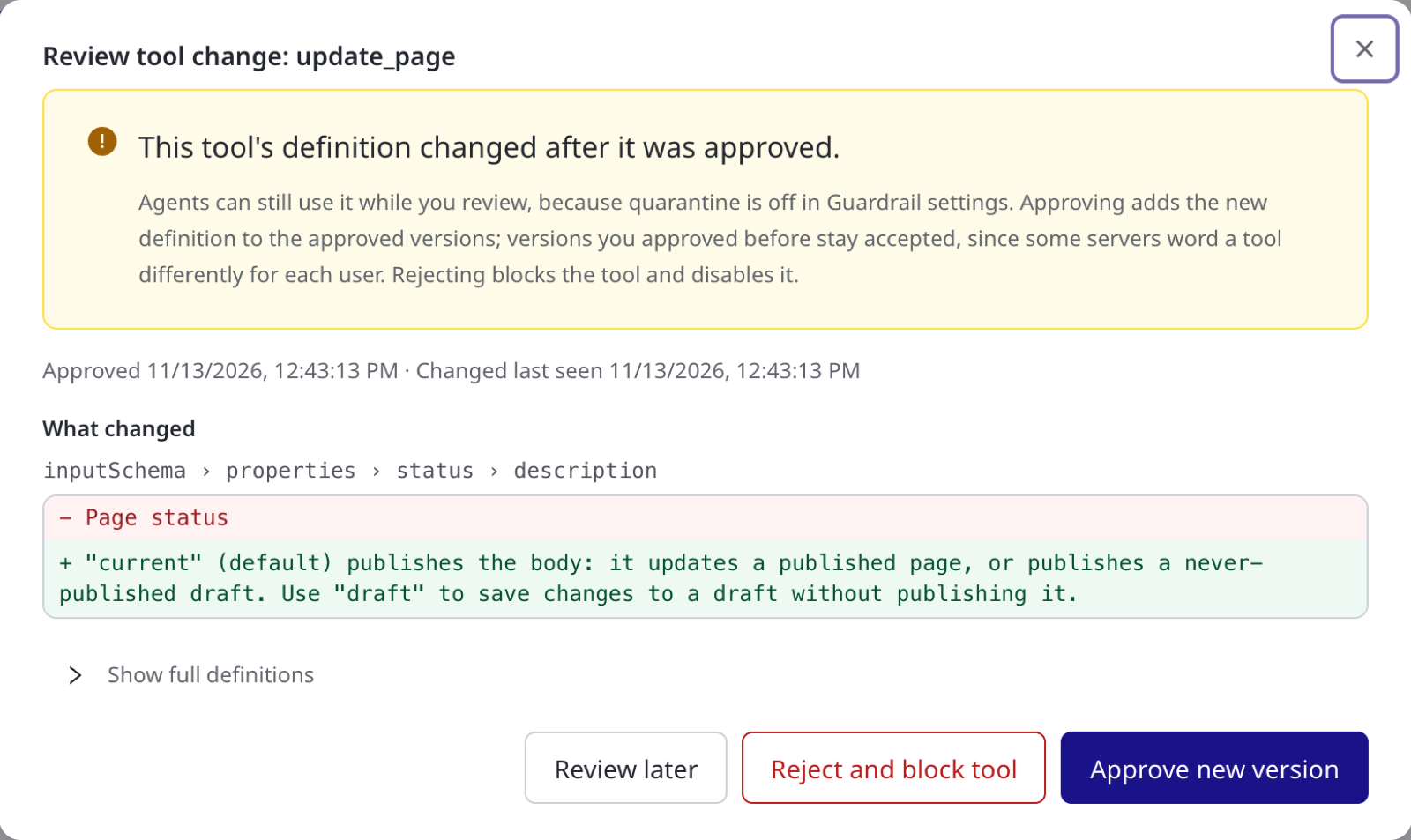
Reviewing a Change
Opening a review needs Connectors: View, which every role except Supervisor and Model governance owner holds out of the box. Approving or rejecting a change needs Connectors: Edit, which Admin holds.
- On the connector's Tools tab, click Review in the Integrity column. From an alert, click Open tool instead.
- In Review tool change, read What changed. It lists each changed field with only the lines that were added (+) or removed (-).
- Optional: To compare the whole Approved and New (observed) description and input schema, click Show full definitions.
- Under Scan findings, check what AgentPass flagged in the new text. It looks for an instruction addressed to the model, a credential path, a hidden parameter and invisible Unicode characters.
- Choose an outcome.
| Button | Effect |
|---|---|
| Approve new version | Adds the new definition to the approved versions. Versions you approved before stay accepted, because some servers word a tool differently for each user. The tool is available again |
| Reject and block tool | Blocks the tool and disables it |
| Keep quarantined, or Review later when quarantine is off | Closes the dialog and leaves the tool as it is |
Approving or rejecting closes the alert, and records who decided and when. If the definition changes again while the dialog is open, AgentPass asks you to review the latest version.
If the server goes back to a definition you approved, the tool works again. Whether its alert also closes is covered in When a Tool Keeps Changing.
Earlier Approved Versions
A pinned tool with more than one approved version shows +1, +2 and so on beside ✓ Pinned. To keep only the current definition, click the count, and confirm Reset earlier approved versions?. Any other version is then quarantined if the server serves it again.
Definitions That Differ Only in IDs
Some servers write the signed-in user into a tool's description, such as each user's own user ID, so every user sees slightly different text. When two definitions differ only in IDs, the review dialog says Only IDs differ between these definitions. To stop these tools being flagged for each user, select Accept ID-only differences for every tool on this connector, then approve.
The setting is off by default, applies to one connector, and can only be turned on from such a review. A change to any other text is still flagged, and each new ID variant is recorded in the audit log. To turn it off, click Turn off on the connector's Tools tab, beside ID-only differences are accepted on this connector.
When a Tool Keeps Changing
Each tool has one alert at a time. When several connectors reach the same server and see the same change, they share that one alert; see The Same Change on Several Connectors. A further change to the same tool updates that alert instead of raising another. The alert counts the changes, shows the latest one and records when it was last seen. Its severity never drops while it is open, so a tool that had a High change stays High.
Some servers serve more than one version of a tool and switch between them. The alert then shows Flapping between 2 versions, or however many versions it has seen. Approving the new version keeps the earlier approved one accepted too, so the tool stops alerting. See Earlier Approved Versions.
When the Server Goes Back to an Approved Definition
When the server serves an approved definition again, the tool works as before. The alert closes by itself only when all of these are true:
- Quarantine was on for the whole time the tool was changed, so agents never saw the changed definition.
- The scanner never flagged the tool while the alert was open.
- No agent called the tool successfully while it was changed.
An alert that closes this way shows Resolved by system:auto-close and the reason. Otherwise the alert stays open with a note saying why, such as a scanner finding or how many times agents called the tool. If AgentPass cannot check for calls, the alert also stays open. A changed tool that an agent used, or that the scanner flagged, always reaches a person.
With quarantine off, which is the default, the alert always stays open when the server goes back. Agents read a tool's description whenever they list tools, so a changed description can steer an agent even if it never calls that tool. Approve or reject the change once you have checked it.
If the tool changes again soon after an automatic close, the same alert reopens and keeps its history, so a flapping tool stays one alert. An alert you resolved or marked as a false positive is not reopened. A later change to that tool raises a new alert.
Why It Matters
Some attacks work by changing a tool after approval. A tool can behave one way when you grant it and another way later, a description can be edited to carry hidden instructions, or a different tool can appear behind the same name. Tool-definition integrity makes each of these a visible, alerted change that a person reviews. With quarantine on, agents also cannot use the changed tool until that review. You can see these patterns demonstrated in The Proving Ground.
Related
- Guardrails Overview
- Controlling MCP Tool Access by Role — the role grants that still apply after a tool is approved
- Connecting MCP Servers — where connector tools come from
- Alerts and Containment — working the alert a changed tool raises