The Rule-of-Two Breaker
The Rule-of-Two breaker is the mechanical core of input guardrails. It does not read the wording of a message to decide whether it is an attack. It reasons about what a session has done. A call is dangerous when the session has read from an untrusted source, holds sensitive data, and now uses a tool that can send data out or change something. Any two of those alone are ordinary work. All three together are the shape of an exfiltration.
The Three Facts
The breaker tracks three facts about each session as it runs. Policy authors read them as session.*, connector.* and tool.* attributes. See the Attribute Reference.
Source Trust
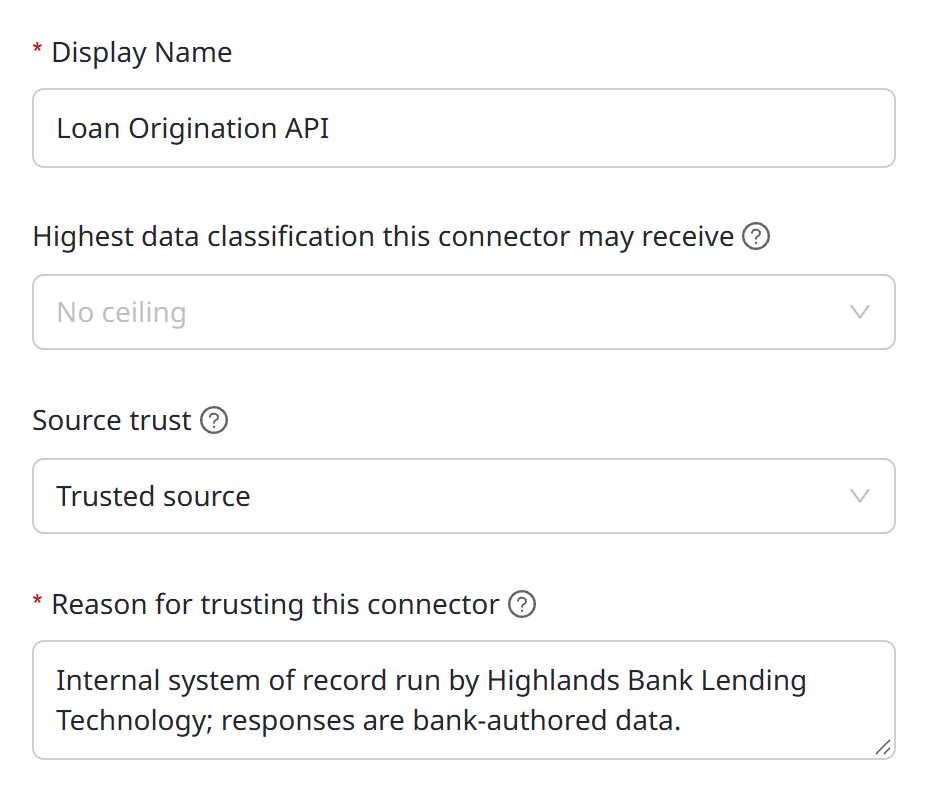
Every connector has a Source trust setting in its configuration.
| Source trust | Meaning |
|---|---|
| Untrusted source (default) | Content from this connector may have been written by someone outside your control. Reading it marks the session untrusted |
| Trusted source | Content from this connector comes from a source you govern. Reading it does not mark the session untrusted |
A connector is untrusted until you decide otherwise. Marking one trusted requires a Reason for trusting this connector, which is recorded, so the decision is attributable.
When one connector mixes governed and ungoverned content, override trust for a single tool. Open Settings → Data classification, click the Assignments tab, and set the tool's Source trust to Untrusted or Trusted. Left blank, the tool inherits the connector's setting.
Once a session reads from an untrusted source, it stays untrusted for the rest of its life. A later read from a trusted source does not clear it.
Sensitivity
Tool reads carry a sensitivity tier from your data classification, the same tiers your other classification policies use. A session's sensitivity only rises. Once it has read Confidential data, it is treated as holding Confidential data for every later call, whatever it reads afterward.
The breaker's starter rule treats your second-highest enabled tier and above as sensitive. It compares tier ranks, not names, so it keeps working when you rename a tier. With the default four tiers, that means Confidential and above.
The Sink
Each tool has a sink, which says what it can do with data.
| Sink | Example |
|---|---|
external_comms | Sending an email, posting to a chat channel, calling an outside API |
state_change | Writing to or deleting from a system of record |
execute | Running a command or code |
credential | Handling a secret |
none | A read. It takes data in, but sends nothing out |
Set a tool's sink in the Sink column of the Assignments tab on Settings → Data classification: None, External comms, State change, Credential or Execute. Left blank, the gateway infers the sink from the tool's MCP hints, then from its name. If it still cannot tell, it treats the tool as a state change, the safer assumption.
A read is not a sink, so retrieving data never trips the breaker on its own. The breaker acts only when the session reaches a sink after the risky reads.
What the Breaker Does
The breaker is delivered as four starter policies on the Policies tab of Settings → Data classification, listed with the other starters. Each card shows the rule's description, its action, when it is checked, its condition, and an observe tag.
| Policy | When it acts | Action |
|---|---|---|
guardrail-hold-untrusted-sensitive-sink | The session read untrusted content and data at or above your second-highest tier, and calls an external-communications or state-change tool | Require approval |
guardrail-refuse-hostile-external | The session read content judged hostile, and calls an external-communications tool | Deny |
guardrail-hold-untrusted-execute | The session read untrusted content, and calls a code-execution tool | Require approval |
guardrail-cut-untrusted-inference-exfil | The session read untrusted content, and a desktop agent's model then proposes a web fetch, a web search or a network command such as curl or wget | Deny, after the response |
The last rule covers desktop agents, whose outbound action is a tool the model proposes, not an MCP call. A model's reply cannot wait for approval mid-stream, so that rule cuts the proposed call instead of holding it.
All four need session tracking. Until it is on, each card is tagged needs session tracking, and the rule matches nothing.
To adopt one, you need Data labels: Manage, which Admin holds out of the box.
- Open Settings → Data classification, and click the Policies tab.
- Optional: Click Preview matches to see how many calls the rule would have matched in the last seven days.
- Click Add this policy. The policy is created in observe mode. It records what it would have held or refused, and lets every call through.
- When you trust it, switch it to enforce.
The card then reads Already added. All ten starter policies, including these four, are listed in The Starter Policies.
When a call is held, nothing is forwarded until a person approves it. The email is not sent, and the write does not happen. When a call is stopped, it ends at the gateway, and the target is never contacted. In both cases, the agent receives a verdict, never the rule that produced it, so it cannot learn the guardrail's shape and work around it.
Trust is a separate axis from wording. A message full of imperative language from a Trusted source never sets the untrusted condition, so the breaker does not touch it. Guardrails catch the dangerous data flow, not assertive text.
The Approval a Person Sees
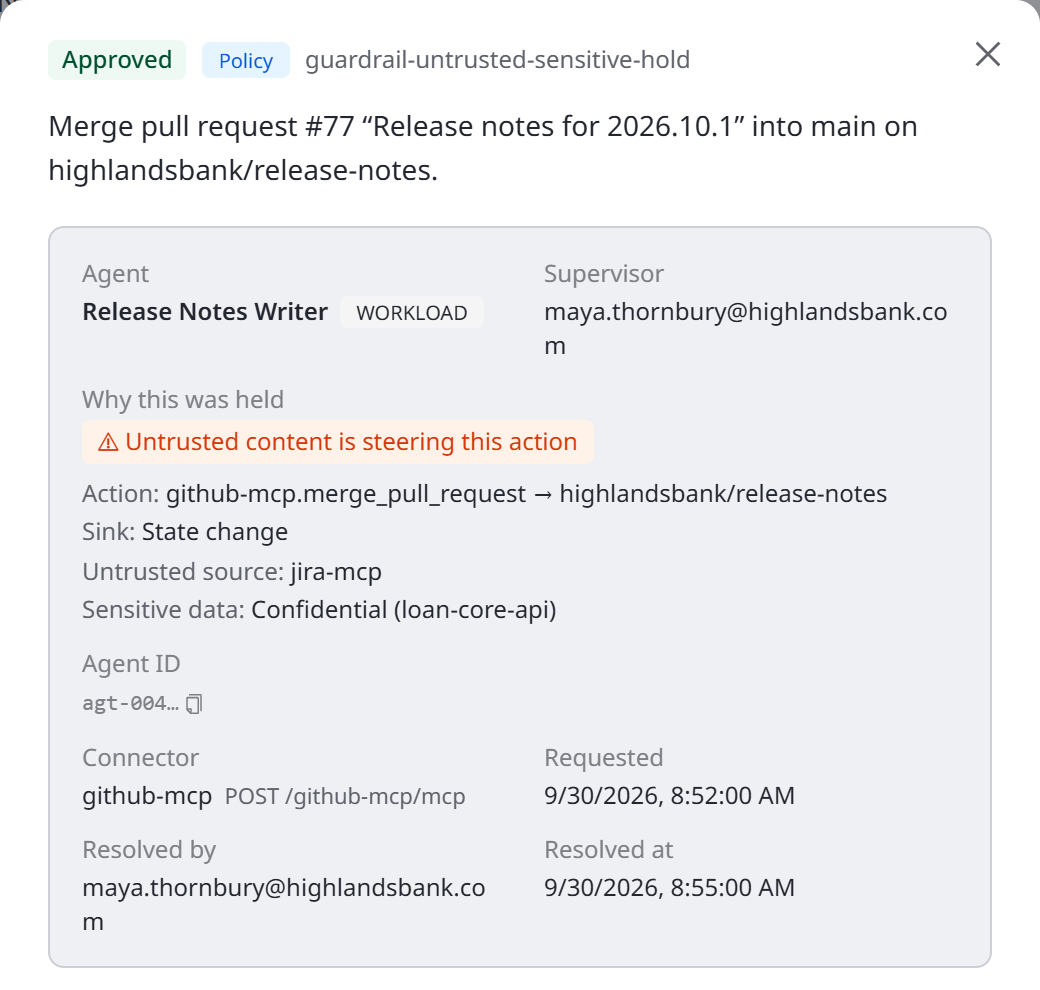
When the breaker holds a call, it raises an approval for the session's supervisor, through the same approval flow used elsewhere in AgentPass. Two things make a guardrail approval different.
It carries evidence. In the console, the approval's detail shows a Why this was held block. It is composed by the gateway from what it observed, never from model-generated text.
- Untrusted content is steering this action, when untrusted content is involved
- Action: the tool, and its destination when known
- Sink: the kind of sink, tagged not reversible when the action cannot be undone
- Untrusted source: the connectors the session read untrusted content from
- Sensitive data: the tier the session holds, and where it came from
- Hostile content detected in this session, when a detector fired
It is bound to the approver's device. The decision is signed with the supervisor's own passkey. The signature covers the specific action and its evidence with a one-time value, so an approval cannot be replayed against a different call. The record shows the decision was that person's, made on their device.
See Approving and Denying Agent Actions for the supervisor's side of an approval, and Setting Up Your Approval Passkey for the one-time device setup.
What the Breaker Does Not Judge
The breaker is deliberately mechanical. It keys on trust, sensitivity and the sink, not on what a message means. Scoring whether content looks like an injection attempt is the job of the optional judges.
Related
- Guardrails Overview — how the breaker fits with the other controls
- How Policies Are Evaluated — observe versus enforce, priority and first match
- Alerts and Containment — what happens when the breaker acts
- Attribute Reference — the attributes policy conditions can read