Bring-Your-Own Judges
Judges let you bring the model that reads the meaning of agent traffic for your guardrails. You register a provider, prove it against a labeled set, promote it, and bind it to a category of question.
The Rule-of-Two breaker is mechanical. It decides from trust, sensitivity and the sink, and it does not read the meaning of a message. A judge asks a model a bounded set of questions about a request, such as whether content looks like it is trying to steer the agent, and returns calibrated scores.
A judge returns scores. Your thresholds and the breaker decide what to do with them. A judge never allows a call, and it never changes the breaker's decision.
If your organization used data classification before judges were available, it already has one judge, HYPR default, promoted and bound to the classification category.
Before You Begin
| To | You need | Out of the box |
|---|---|---|
| Open Guardrails → Judges | Model governance: View | Admin, Security analyst, Auditor and Model governance owner |
| Register, probe, bench, promote, delete, bind and roll back | Model governance: Manage | Admin and Model governance owner |
| Store the provider's credential | Settings: Edit | Admin |
A person who holds Model governance owner and another role sees the console as one role at a time. Switch roles from the account menu. See Work in More Than One Role.
Get a Credential Reference
A judge's credential is never entered on Judges. The provider holds only a reference, which the gateway resolves at call time, so a secret never appears on the record, in a log or in an export.
The supported reference is setting:<key>, which points to a gateway setting that holds the secret. The key must name a secret: it contains api-key, secret, token, password or credential.
- Ask an Admin to store the provider's credential as a gateway setting with such a key, through the AgentPass administration API. Your HYPR representative can help.
- The Admin gives you the reference, such as
setting:judges.bank-bedrock.api-key. - Enter the reference in Secret reference when you register the provider.
A judge whose reference does not resolve abstains on every call. See When a Judge Abstains.
A provider that runs inside the gateway needs no credential. Leave Secret reference empty for it.
Bring Your Own
You need Model governance: Manage.
- Open Guardrails → Judges, and click Register provider.
- In Register judgment provider, fill in the fields.
- Click Register.
The console confirms Provider registered, and the provider appears on the Providers panel.
| Field | What to enter |
|---|---|
| Name | A name for the provider, up to 128 characters, unique in your organization |
| Kind | How the gateway calls the provider. The list shows only the kinds this gateway supports, such as TYPESAFE, OPENAI_SCHEMA, ANTHROPIC_TOOL and WEBHOOK. Where this gateway offers it, ONNX runs a model inside the gateway |
| Endpoint (https) | Where the provider answers. Required for every kind except an in-gateway ONNX model |
| Model | The model the provider uses |
| Secret reference | The setting:<key> reference an Admin gave you. See Get a Credential Reference |
| Residency | Where the provider runs: US, EU, CUSTOMER_VPC, ON_PREM or GATEWAY (the default) |
| Timeout (ms) | How long the gateway waits for an answer, from 100 to 60,000. The default is 1500 |
Probe, Bench, Promote
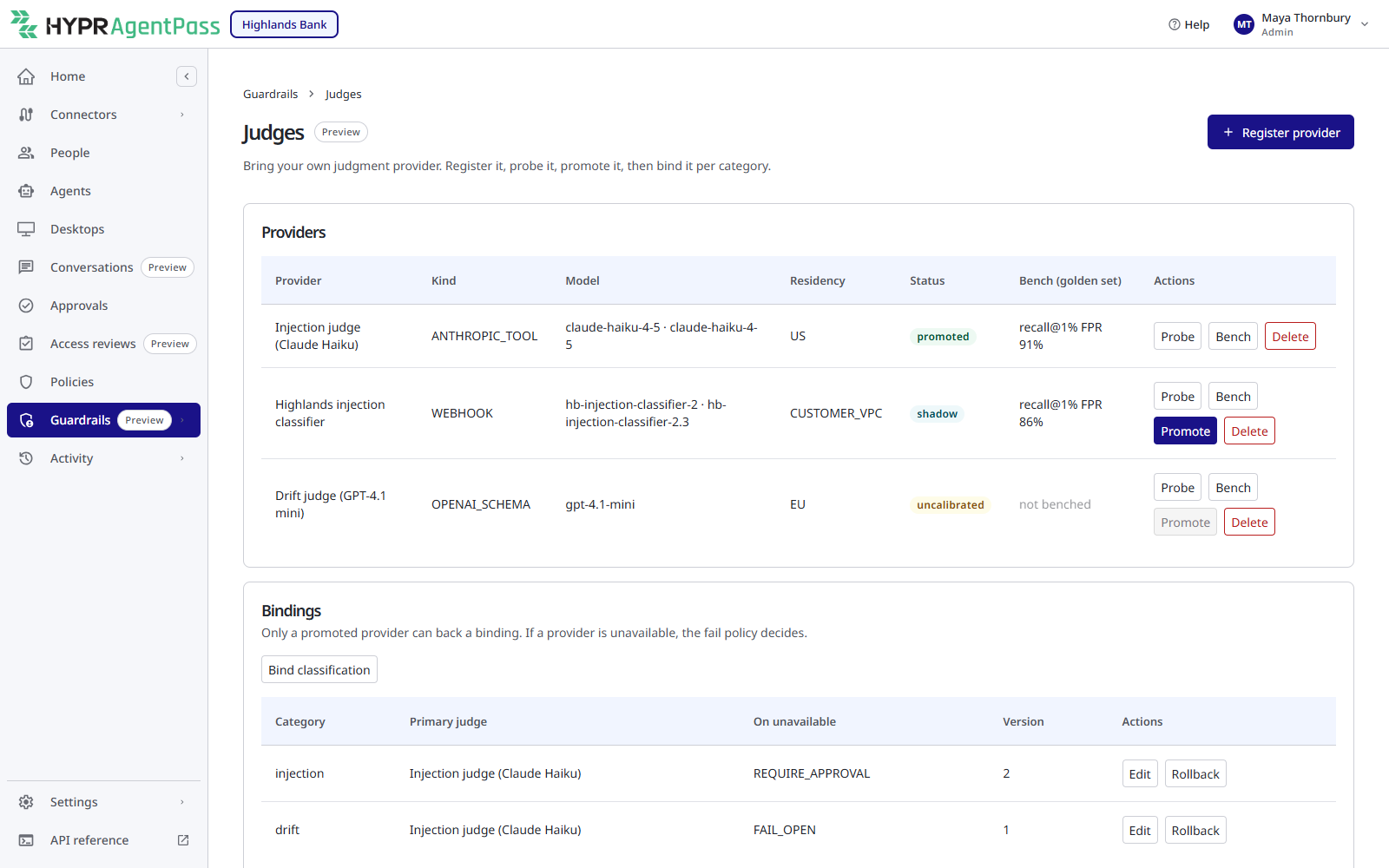
A judge does not back live guardrail signal the moment you register it. It earns that through a lifecycle you drive from the Providers panel on Guardrails → Judges.
- Probe it to confirm it is reachable and answers in the expected shape.
- Bench it against a shipped golden set, a labeled collection of injection and benign examples. The Bench (golden set) column shows its recall at a 1% false-positive rate. Hover for the AUC, calibration error and latency. Compare a candidate with the HYPR default judge, or with what you run today, on the same cases.
- Promote it. Promote stays unavailable until the provider has been probed. Only a promoted provider can back a binding.
Delete removes a provider, after you confirm Delete this provider?.
A primary judge that stays unavailable is stepped down automatically by a weekly check, rather than left in place answering nothing. Its Status on the Providers panel then reads shadow instead of promoted.
Binding a Judge to a Category
You bind a judge per category of question, injection, drift or classification, so different judges can do different jobs. On the Bindings panel, click Bind and the category, such as Bind drift. Each binding has two settings:
- Primary judge (must be promoted): the promoted provider that answers for this category.
- If the judge is unavailable: the binding's fail policy,
FAIL_OPENby default,FAIL_CLOSEDorREQUIRE_APPROVAL.
Click Save binding. The console confirms Binding saved.
The Bindings panel lists each binding's Category, Primary judge, On unavailable policy and Version. Edit changes a binding, and saving creates a new version. Rollback returns it to its previous version, after you confirm Roll back to the previous binding version?.
What a Drift Judge Does
A judge bound to drift runs only after the breaker has already held or stopped a call. It asks whether the proposed action serves the person's request, or comes from untrusted content, and adds its findings to the approval as evidence. It has three seconds to answer. Until you bind a judge to drift, nothing runs, so it adds no latency.
When a Judge Abstains
A judge abstains when it cannot give a usable answer: it is unavailable, misconfigured, too slow, over its budget, or its credential reference does not resolve. An abstention is never an allow. The binding's fail policy is the rule for that case.
For a drift judge, the breaker has already held or stopped the call before the judge runs. When the judge abstains, that decision stands, and the approval is created without the judge's lines.
Where Verdicts Appear
A drift judge's findings appear in the evidence of the approval the breaker raised, as lines that start with Intent check:, such as Intent check: arguments appear to come from untrusted content (0.82). They are shown with the approval on Approvals in the console, which needs Approvals: View.
Every verdict is also recorded with its scores and provenance, never the content it judged. That record is what the weekly check reads to step down an unavailable judge.
Deterministic Injection Detection
Alongside the judges, AgentPass runs a deterministic injection detector, pattern-based recognition of known injection shapes. It contributes its own signal without calling any model. Like a judge, it informs and can add caution, but it does not override the breaker or lower a session's sensitivity.
The Model Governance Owner
A judge is a model making security-relevant calls, so who may change one is governed separately from the rest of guardrails. The seeded, editable Model governance owner role is for the person who owns judge configuration. It holds:
- Model governance: View and Model governance: Manage, to govern judges;
- Guardrails: View and Request log: View, to read posture, alerts, history, the Proving Ground, the Session investigator and the Request log;
- its own passkeys.
It cannot change policies, connectors, settings or credentials, and it does not see Approvals, Policies or Connectors. Ask an Admin to store a credential, and someone with Approvals: View, such as an Admin, Operator, Security analyst or Auditor, to read a judge's lines on an approval.
Admin holds both judge permissions. Security analyst and Auditor can view judge configuration, but not change it. Operator cannot open Judges.
Related
- Guardrails Overview
- The Rule-of-Two Breaker — the mechanical decision a judge advises
- The Proving Ground — where you see guardrail defenses exercised end to end
- Roles and Permissions