The Session Investigator
The session investigator decides what to do about a coding-agent session as a whole: let it continue, pause it or terminate it. You watch its decisions in observe mode first, then let it act through session control once you trust it.
The investigator reads the findings that Session watch evaluators already produce. It works off the tool-call path, so weighing a session never slows the traffic going through the gateway, and it adds no second review of every call.
In the console, the investigator's page is Guardrails → Session investigator, and its settings are on Guardrails → Settings.
Continue, Pause, Terminate
The investigator turns a finding into one of three verdicts, each with a confidence and the evidence behind it.
| Verdict | Meaning |
|---|---|
| Continue | Nothing seen warrants acting. The session runs on |
| Pause | The session should be frozen for a person to look at |
| Terminate | The session should be ended. A terminating verdict can also turn the agent off. See A Hostile Verdict Disables the Identity |
A pause or terminate verdict acts only in enforce mode, and only at or above the confidence threshold you set. Below it, the fail-mode decides. See Fail-Open and Fail-Closed.
Off, Observe, Enforce
The investigator has three modes. Move through them in order, so you see what it would do before it does anything.
| Mode | What it does |
|---|---|
| Off | The investigator does not run. This is the default |
| Observe (shadow) | The investigator reaches verdicts and records every would-pause and would-terminate decision, without acting on a session |
| Enforce | A pause or terminate verdict at or above the confidence threshold acts through session control |
Start in observe mode. It costs a session nothing, and shows which runs the investigator would have contained.
Reading Would-Pause Decisions
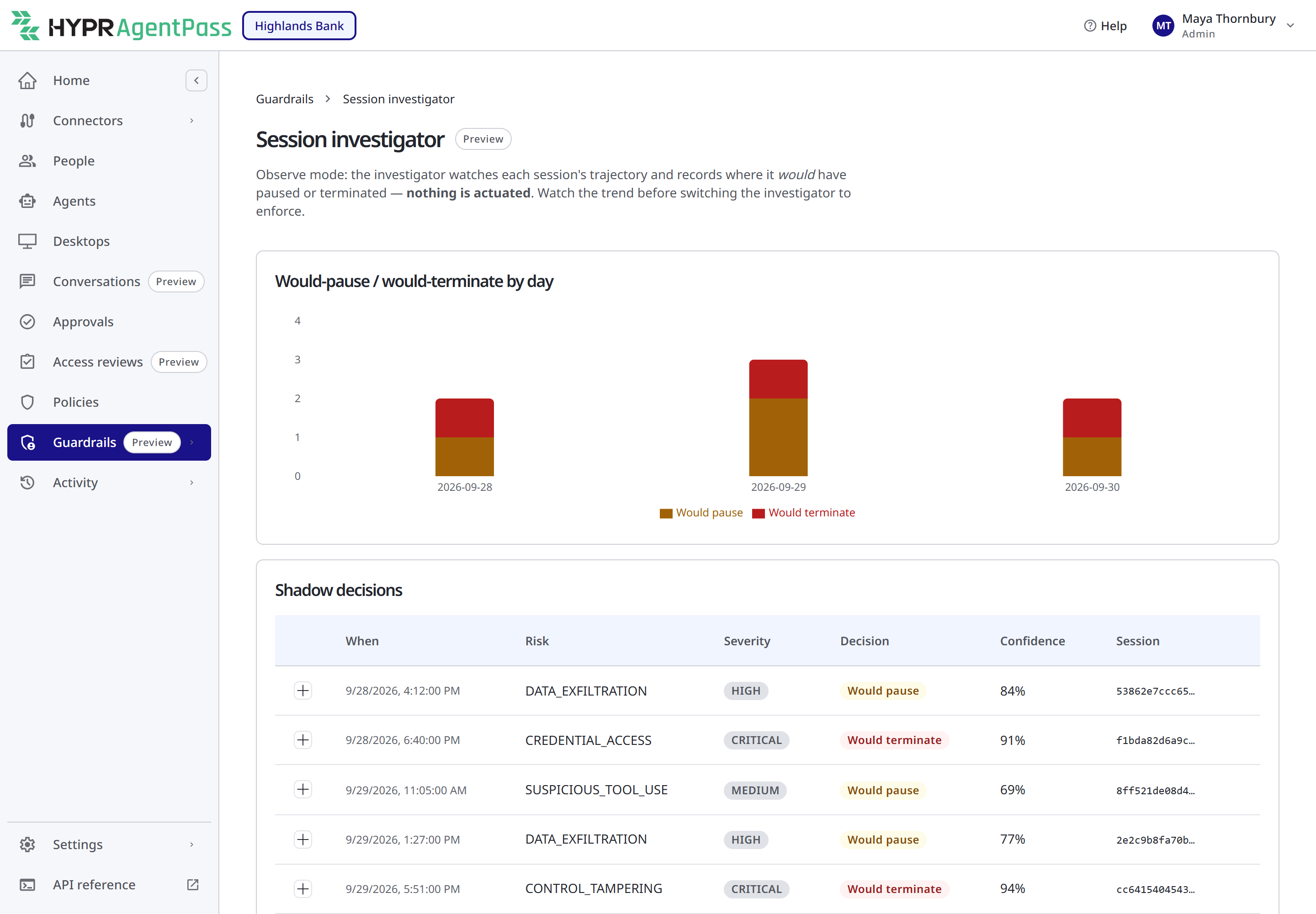
Open Guardrails → Session investigator. Any role with Guardrails: View can read it: Admin, Operator, Security analyst, Auditor and Model governance owner, out of the box.
- Would-pause / would-terminate by day charts how many sessions the investigator would have paused or terminated each day.
- Shadow decisions lists each recorded decision, with its When, Risk, Severity, Decision, Confidence and Session. Expand a row to read the reason and the evidence that triggered it.
Until the investigator has recorded a decision, the chart reads No observed-session decisions yet — enable the investigator in observe mode and let a session run.
Use this record to decide whether the investigator is ready for enforce mode, and to keep an eye on its judgment afterward. In enforce mode, the investigator keeps recording every pause and terminate verdict here as a would-pause or would-terminate decision, whether or not it acted on the session.
Fail-Open and Fail-Closed
A verdict can fall below the confidence threshold, or the evaluator behind it can be briefly unavailable. The setting When the investigator is uncertain decides what happens then.
- Fail open (allow + log), the default. The session continues, and the event is logged. A flaky evaluator never stops your developers' work.
- Fail closed (pause). The verdict acts anyway: a pause verdict pauses the session, and a terminate verdict terminates it. Choose this for agents where you would rather hold a session and check it than let an uncertain one proceed.
The fail-mode decides only the uncertain case. A confident pause or terminate verdict acts the same way under either setting. The fail-mode also decides what happens when a pause runs out of time. See If No One Responds.
Escalation and Signed Resume
When the investigator pauses a session in enforce mode, it escalates: it raises a High alert on Guardrails → Alerts, and emails the approver with the reason, the evidence, the confidence and a link to the approval. The setting Escalate a pause to chooses the approver.
| Value | Who is told, and who may resume |
|---|---|
soc (the default) | The addresses in SOC distribution list on Guardrails → Settings |
supervisor | The agent's assigned supervisor, who attests to the resume. If the agent has no supervisor, the pause goes to the SOC list instead |
| An email address | That one reviewer |
The pause raises a Session resume approval. It carries a Why this session was frozen block with the reason, the evidence, the kind of risk, its severity and the confidence.
Resuming a session is a signed decision, held to two rules on every path:
- Separation of duty. The agent running the session can never resume it. For a pause routed to
socor to a named reviewer, the reviewer must be someone other than the session's owner. For a pause routed tosupervisor, the reviewer must be the agent's assigned supervisor. - Authorization. The reviewer must also hold the permission for the route: Guardrails: Attest own for a supervisor resume, or Guardrails: Manage for a resume routed to the SOC list or a named reviewer.
The supervisor's side of a resume, on the phone, is in Approving and Denying Agent Actions.
How a Paused Session Ends
A paused session ends in one of these ways.
| How | What happens |
|---|---|
| The assigned supervisor resumes it | For a pause routed to supervisor. The supervisor approves the Session resume approval, signed with their passkey. Supervisor holds Guardrails: Attest own and Approvals: Grant for their own agents out of the box |
| The pause TTL passes | For every route. With Fail open, the session resumes. With Fail closed, it is terminated. See If No One Responds |
| A responder contains the agent | Contain on an alert turns the agent off and revokes all of its sessions. See Containing an Agent |
For a pause routed to soc or a named reviewer, plan around the pause TTL. The reviewer reads the evidence on the approval and the alert, contains the agent if the session was hostile, or marks the pause a false positive if it was not. The TTL then resolves the session the way your fail-mode says. Set Pause TTL (seconds) to the time your team needs to look. A reviewer who holds Guardrails: Manage and is not the session's owner can also resume the session through the AgentPass administration API.
When a pause lifts, the person who was running the agent receives an email that their session is active again. See Being Told the Session Is Active Again.
If No One Responds
Each pause carries a time limit, the Pause TTL (seconds) setting: 900 seconds by default, from 60 to 86,400. When it passes with no decision, the session resolves by your fail-mode: Fail open resumes it, and Fail closed terminates it. Either way, the outcome is recorded.
Marking a Pause a False Positive
When a reviewer decides the investigator was wrong, they can mark the pause a false positive. On Approvals, open the Session resume approval, and in Why this session was frozen, click Mark false positive. The console confirms Marked a false positive — this signal is suppressed for now.
The mark suppresses the same signal, the same kind of risk with the same reason on the same agent, for seven days. During that time, the investigator records the signal but does not pause a session for it again. The suppression then lifts on its own.
The mark does not resume the session that is already paused. That session ends in one of the ways in How a Paused Session Ends.
You need Guardrails: Manage to mark a false positive, and Approvals: View to open the approval. Admin and Security analyst hold both out of the box.
A Hostile Verdict Disables the Identity
Ending one session does little against an identity that can open a new one. So when the investigator terminates a session for control subversion or credential theft, it also turns the agent off. The agent's next request is refused until a person turns it back on. See Turning Off an Agent.
The setting Quarantine the identity on a hostile verdict controls this. It is on by default, applies in enforce mode, and is set for the whole tenant only. If turning the agent off fails for any reason, the session is still terminated. See also Stopping an Agent.
Per-Agent Overrides
Most of the investigator's settings can be overridden for one agent, for example to hold a higher-stakes agent to enforce and fail closed while the rest stay in observe mode. A blank field inherits the tenant setting. The identity quarantine and the fast-approval hold are tenant-wide only.
You need Guardrails: Manage and Settings: Edit. Admin holds both out of the box.
- Open Agents, click Details on the agent, and copy its Agent ID.
- Open Guardrails → Settings, and on the Per-agent overrides panel, click Add override.
- In Agent id, paste the agent's ID.
- Set the fields to override: Mode, Fail-mode, Escalate to, Minimum confidence (%) and Pause TTL (seconds). Leave the rest blank.
- Click Save.
The console confirms Per-agent override saved, and the agent's row appears on the panel, with Inherit (tenant default) in each field you left blank. Edit changes an override. Clear removes it, and the agent follows the tenant settings again.
Settings
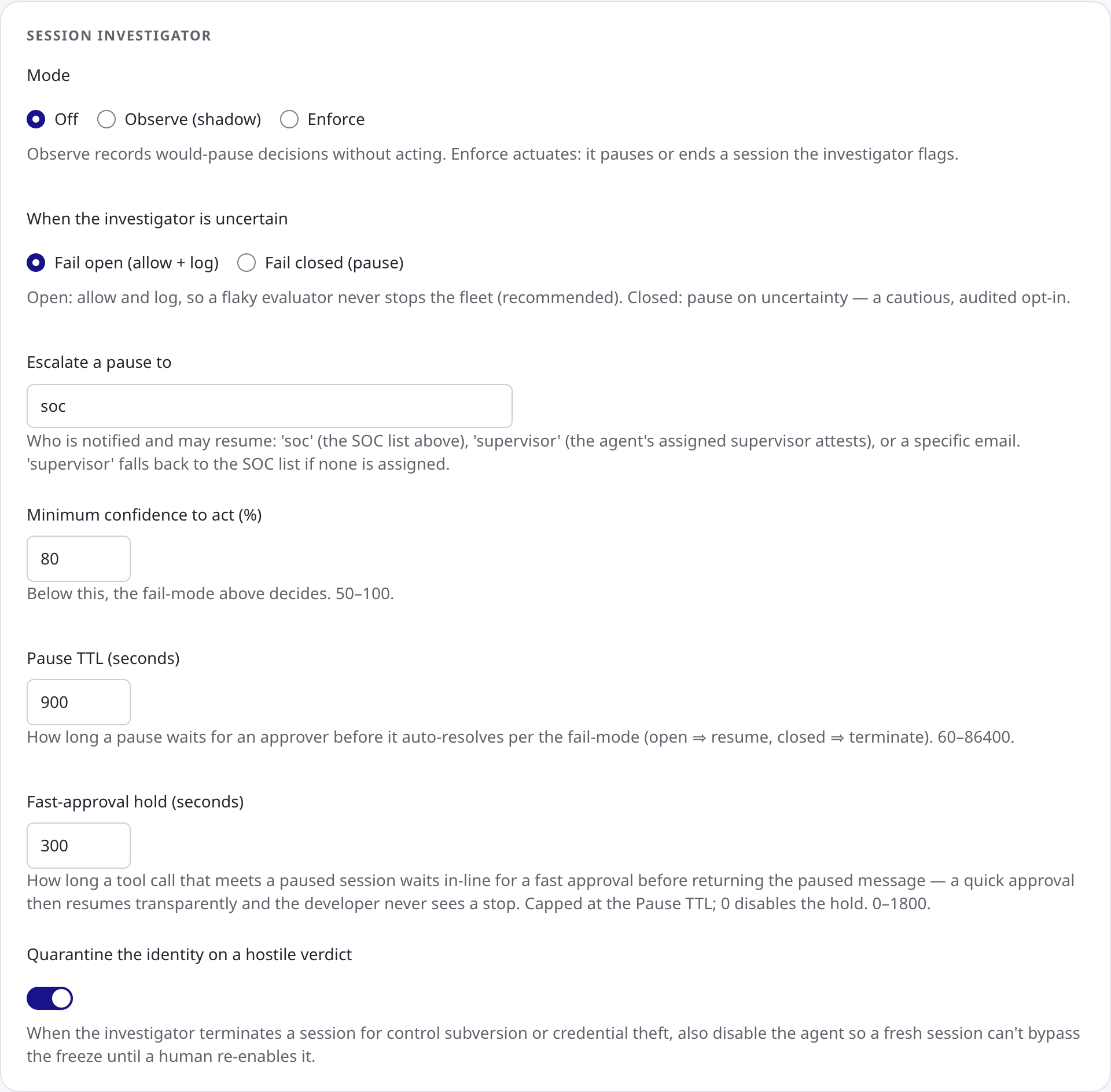
The investigator's settings are in the Session investigator panel on Guardrails → Settings. Saving needs Guardrails: Manage and Settings: Edit. Like the other guardrail settings, these are saved only from this page. The general settings API refuses them, so every change is deliberate and recorded against the person who made it. See Guardrail Settings for the whole page.
| Setting | What it controls | Default | Range |
|---|---|---|---|
| Mode | Off, Observe (shadow) or Enforce | Off | — |
| When the investigator is uncertain | Fail open (allow + log) or Fail closed (pause) | Fail open | — |
| Escalate a pause to | soc, supervisor or an email address | soc | — |
| Minimum confidence to act (%) | The confidence a verdict needs before enforce mode acts on it. Below it, the fail-mode decides | 80 | 50–100 |
| Pause TTL (seconds) | How long a pause waits for a decision before it resolves by the fail-mode | 900 | 60–86,400 |
| Fast-approval hold (seconds) | How long a tool call that meets a paused session waits for a fast resume before the paused result is returned. It is capped at the pause TTL, and 0 turns it off. See A Fast Resume Is Transparent | 300 | 0–1,800 |
| Quarantine the identity on a hostile verdict | Whether a hostile terminating verdict also turns the agent off | On | — |
Related
- Pausing and Stopping a Session — what a pause freezes, and what the developer sees
- Session Watch — the evaluators whose findings the investigator reads
- Guardrail Settings — every guardrail setting, including the SOC distribution list
- Approving and Denying Agent Actions — signing a resume from the mobile app
- Policy Attribute Reference — reading a session's control state in a policy condition
- Security Controls Reference — session containment as controls an auditor can check