MCP Servers
An MCP server connector places HYPR AgentPass™ in front of a Model Context Protocol (MCP) server. Agents call the gateway's URL for the server. The gateway authenticates the caller, filters the tools by role, evaluates policy, records the call and forwards it.
The Gateway MCP URL
Each connector is served at https://<your-gateway-url>/mcp/<connector-name>. Agents add that URL, not the server's own. A connector keeps its address for as long as it exists, and the console always shows the one to use, on the connector's Overview tab. See Connecting to a Gateway MCP Connector for the agent side.
For a popular hosted MCP server, such as Atlassian, Slack or GitHub, a preset fills in most of these settings for you. See One-Click MCP Servers.
Create the Connector
- Open Connectors → Add connector → MCP Servers → MCP Server.
- On the Name step, enter a Display Name. AgentPass derives the connector name from it. Connector names use lowercase letters, digits, hyphens and underscores, start with a letter or digit, and are up to 64 characters long.
restapiis reserved. - Click Next.
- On the Connect step, enter the MCP Server URL, with its full path, such as
https://mcp.example.com/v1/mcp. - Optional: For a server on your internal network, turn on Allow private network addresses. Detect and the gateway's sign-in to the server then reach it too. See Allow a Private Network Address.
- Optional: Click Detect. The gateway reads the server's OAuth metadata, and fills in the authorization server and endpoints it finds. If it cannot reach the server, Couldn't detect automatically appears, and you enter them yourself.
- Under Authentication, choose a method, described in the following table.
- Complete the method's fields.
- Click Create Connector. The Connector ready step shows your gateway MCP endpoint.
- Click Copy URL to copy it, or View Connector to open the connector.
Authentication
The authentication method decides who holds the credential for the server.
| Method | Who holds the credential for the server |
|---|---|
| OAuth | Each caller authorizes to the server themselves, and the gateway passes the credential through. You can also require a HYPR identity. See Requiring a HYPR Identity on an MCP Connector |
| API Token | The gateway holds one stored token, and lends it to callers it can name |
| OAuth (Managed by Gateway) | A supervisor signs in to the server the first time an agent uses the connector, and approves the request on mobile. The gateway stores and refreshes the tokens on that person's behalf, and attaches them to the agent's calls. The supervisor signs in again only when the gateway can no longer renew the token |
Each method asks for these fields.
| Method | Fields |
|---|---|
| OAuth | Authorization Server, the OAuth provider's issuer URL. Client ID (optional) is for display only, and is not used to authenticate |
| API Token | API Token. It is stored securely in the gateway, and never returned after saving |
| OAuth (Managed by Gateway) | Authorization Endpoint, Token Endpoint, Client Setup, OAuth scope / extra params and Notify Email (optional). See the following section |
OAuth (Managed by Gateway) Settings
Client Setup decides how the gateway obtains its OAuth client.
- Static (manually configured). You create an OAuth app on the provider, and enter its Client ID. Client Secret is optional for a public client that uses PKCE. The secret is stored encrypted.
- Dynamic Client Registration (RFC 7591). The gateway registers itself with the provider on first use, at the Registration Endpoint. Detect selects this option when the server advertises registration.
OAuth scope / extra params pins the exact permissions the gateway asks for, such as scope=read:jira-work%20offline_access. Leave it empty, and the gateway requests only what the MCP server's own metadata declares. If the server declares none, the provider applies its app defaults. Set it to request less, or when a provider rejects a sign-in with no scope.
Notify Email (optional) names the supervisor who receives the mobile sign-in request when the agent's request does not identify one.
After you create the connector, its Edit drawer also shows the Registered Client for Dynamic Client Registration, and the Token Status of each supervisor. It also holds Source trust: whether content the connector returns may be treated as trusted input. New connectors start as Untrusted source. See The Rule-of-Two Breaker. Re-register clears the registered client and every stored token. The gateway registers a new client the next time an agent uses the connector. Saving a change to the registration, authorization or token endpoint does the same, and every supervisor signs in again.
What the Overview Tab Shows
The connector's Overview tab has these fields.
| Field | Meaning |
|---|---|
| Name, Enabled | The name is the connector's path segment in the gateway MCP URL |
| Publish to endpoint catalog | On by default. Endpoint clients under the Endpoint Guard can automatically configure Claude Code, Codex and other tools to use this connector. See Provisioning MCP Tools |
| MCP Server Connection | The gateway MCP URL, with Copy, and the authentication method |
Other Tabs
MCP server connectors have these tabs as well.
| Tab | What you do there |
|---|---|
| Connections | See which supervisors have signed in, and pending sign-ins. See Sign-Ins on the Connections Tab |
| Tool calls | Review every tools/call through the connector, with its time, method, tool, client, supervisor, status and latency. An Errors only filter narrows the list |
| Tools | See the tools the server advertises, populated as clients use the connector. Click Refresh to probe the server now. It is unavailable on OAuth connectors, where the gateway holds no credential. Default access is the per-role starting point. See Controlling MCP Tool Access by Role. The Integrity column shows whether a tool's definition has changed since it was approved. See Tool-Definition Integrity |
| Policies, Recent Requests | Shared with every connector. See Connectors |
Sign-Ins on the Connections Tab
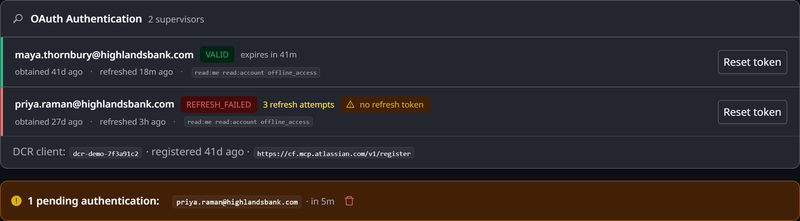
On an OAuth (Managed by Gateway) connector, the Connections tab lists each supervisor under OAuth Authentication, with the token's status and expiry.
Sign-ins that are waiting for a supervisor appear as pending authentications. Open appears only on your own pending sign-ins, and opens the sign-in in a new window. Only the person a sign-in belongs to can complete it. You can delete a pending sign-in, which stops it. A notification already sent for it no longer works.
To make one supervisor sign in again:
- On their row under OAuth Authentication, click Reset token.
- In the confirmation, which names the supervisor, click Yes, force re-authentication.
The gateway evicts only that person's stored token, and other supervisors keep theirs. The supervisor's next agent request sends them a fresh sign-in request on mobile.
Related
- Connecting to a Gateway MCP Connector — what a supervisor does to use it
- Controlling MCP Tool Access by Role — which tools each role's agents see
- Workload Agents — reaching a connector with nobody at the keyboard