OpenAI
An OpenAI connector routes OpenAI requests through HYPR AgentPass™, from Codex CLI, other local agents and cloud agents. Each request is attributed, evaluated by policy and recorded.
Before You Begin
- An OpenAI account with API access
- An OpenAI Admin API key, and the project ID the gateway serves
- The gateway's public origin, which your agents point at
Create the Connector
- Open Connectors → Add connector → AI Providers → OpenAI.
- Enter the Admin API Key and Project ID.
- Optional: Change the Base URL only if your OpenAI configuration requires a different value.
- Click Next.
- Choose the onboarding mode.
- Click Create Connector. The connector opens.
The first enabled connector for this provider also turns on Codex under Desktops → Desktop configuration → Configuration. Your organization's first AI provider connector also adds an Atlassian MCP server connector. See What Your First Provider Connector Turns On and One-Click MCP Servers.
What the Overview Tab Shows
The connector's Overview tab has these fields.
| Field | Meaning |
|---|---|
| Name, Enabled | The connector's name. Enabled turns traffic on or off |
| Endpoint | The upstream host and port (api.openai.com:443). Click Change to point at a private or regional deployment |
| Allow Channel connections | Lets agents use this gateway as a channel for real-time supervisor messaging. On by default. Turning it off stops new channel connections. Open ones keep working until they expire. See Having Conversations with Your Agent |
| Channel downloads | The Claude Code and Codex channel installers. See Channel Downloads |
| OpenAI Admin API | The base URL, project ID and write-only admin API key. Click Update Key to replace the key. Used to sync the project's API keys into agent identities |
| Download Bash Setup, Download PowerShell Setup | Scripts that configure Codex CLI with the gateway's public origin as its base URL, and the built-in AgentPass MCP server. The script keeps the rest of the user's Codex configuration |
| Onboarding Mode | What happens to an agent's first request. See Onboarding Mode |
| Routes | The request paths the gateway forwards |
Import Agents
To import the project's API keys as agent identities:
- In the console, open Agents.
- Click Import agents. Each connector that imports agents is listed, with when it last synced.
- Click the sync button beside this connector. A message reports how many agents were imported, conflicted and skipped.
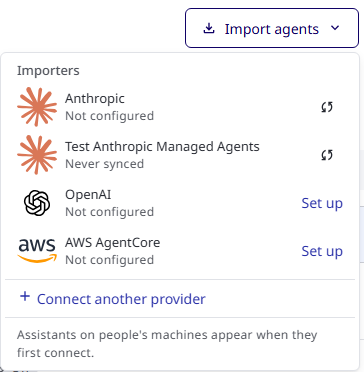
Each key becomes an agent identity, with a name, owner and status, on the Agents page. Sync from OpenAI on this tab does the same. See Import and Create Agents and Agent identity.
Point an Agent at It
Point Codex CLI at the connector in one of two ways:
- Run the downloaded setup script on the developer's workstation.
- Route Codex CLI through the Endpoint Guard, with no change on the agent side. See Routing and Observation.
Related
- Connectors — the tabs every connector shares
- Governing Inference Traffic — rules on what the model is asked and answers
- Anthropic — the equivalent connector for Claude traffic