AWS Bedrock
Overview
An AWS Bedrock connector routes model inference through HYPR AgentPass™ to Bedrock in your own AWS account. Prompts and responses are then subject to your policies, and visible in the Request Log.
You choose a region, and name the AWS account the connector serves. The connector derives everything else. It builds the Bedrock endpoint address for that region, and configures the four invoke and converse routes. You never type a hostname or a URL pattern.
A connector serves exactly one AWS account. The gateway refuses requests signed by a credential from any other account, so one team's credential is never logged as another's.
For models served only on Amazon Bedrock Mantle, such as Claude Mythos, use the separate AWS Bedrock Mantle connector. The two connectors can exist side by side.
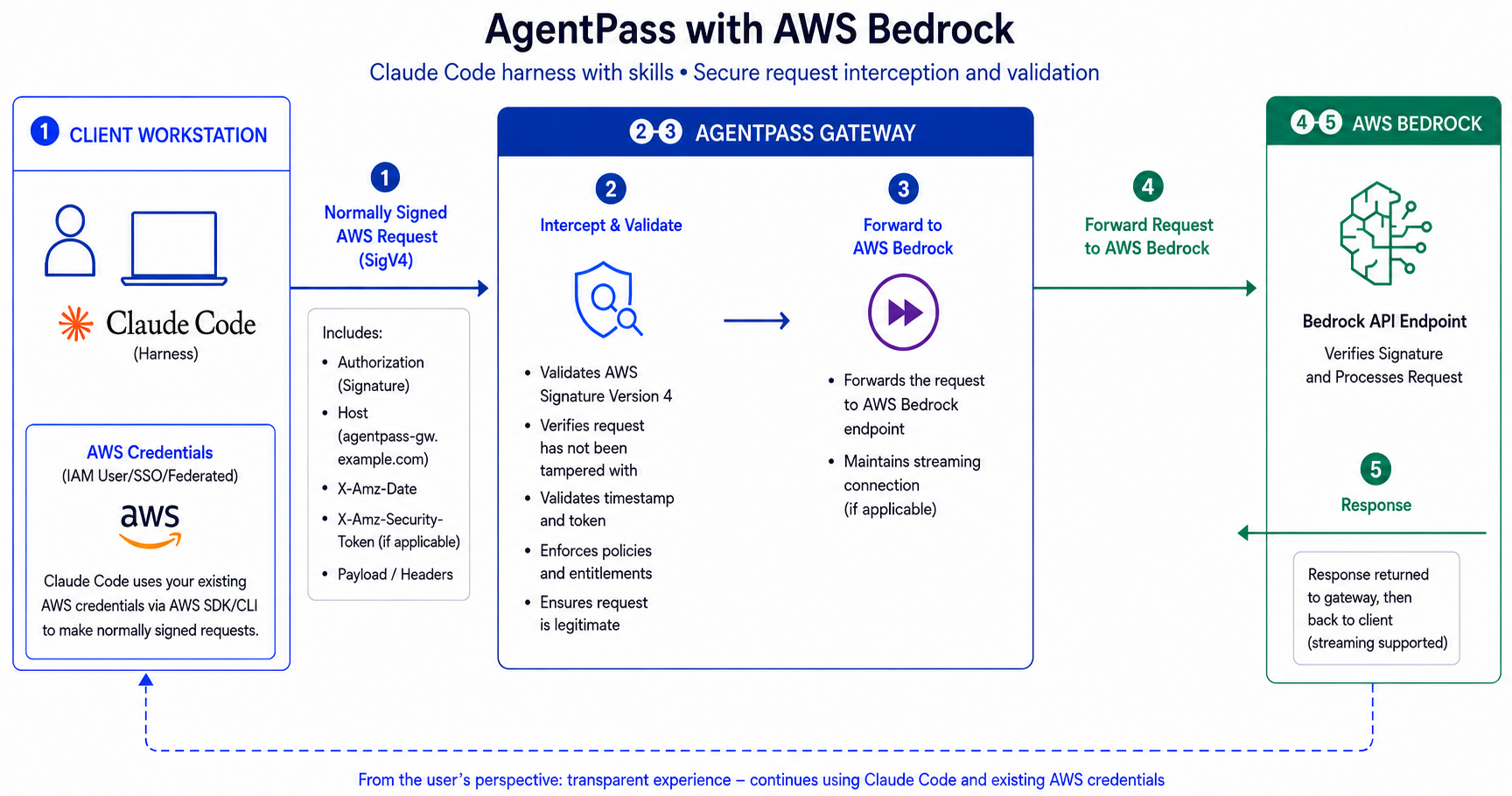
The request path works like this:
- Claude Code on the developer's workstation signs each request with the developer's own AWS credentials (SigV4), and sends it to the AgentPass gateway.
- The gateway validates the signature and applies policy.
- The gateway forwards the request, signature intact, to the Bedrock endpoint.
- Bedrock authorizes the request against the developer's IAM permissions, and returns the response through the gateway. Streaming responses are relayed as they arrive.
How Access Works
Each developer already has their own way of authenticating to AWS. The gateway forwards that credential to Bedrock unmodified, exactly as the developer sent it. AWS authenticates every call, and authorizes it against that developer's own IAM permissions.
This has three consequences:
- Nothing is granted to HYPR. The IAM policy you create is attached to your own developers' identity, not to AgentPass. There is no cross-account role to create, and no credential to hand over.
- Access follows your existing AWS permissions. A developer who cannot invoke a model directly in AWS cannot invoke it through the gateway either. Revoking their AWS access revokes their gateway access at the same moment.
- There is no stored secret to rotate. The gateway keeps no signing credential, so a Bedrock connector has nothing to expire or leak.
Built-In Protections
AWS, not the gateway, authenticates a Bedrock request. The connector therefore accepts traffic that carries no AgentPass credential of its own. Three protections bound what an unrecognized caller can do. All three are on by default:
- The account pin. The gateway refuses a credential that AWS confirms belongs to a different account, and never attributes it as one of your developers'.
- Credential coherence checks. The gateway refuses a credential it can positively fault, before anything is forwarded. Faults include a malformed credential, or one signed for a different AWS service or region. These are inexpensive local checks on facts no AWS client could produce. A credential that is merely unfamiliar is still forwarded for AWS to judge.
- Rate limits on caller identification. Naming the developer behind a request costs one lookup in your AWS account, so those lookups are capped per connector and per source IP. Ordinary developer traffic stays well within the caps, and you can raise them. See Adjusting the identification rate limits.
None of these can deny a request AWS would have allowed, and none can be switched off.
The Credentials Your Developers Bring
There is nothing to choose here. A connector accepts either kind of AWS credential at the same address, and a developer can switch between them without any change on your side. Both are forwarded untouched.
| What a developer connects with | How they set it up | Attribution in the Request Log |
|---|---|---|
| An AWS SSO session | Runs aws sso login | The developer, by name, when the connector has identity enrichment turned on |
| A Bedrock API key | Sets AWS_BEARER_TOKEN_BEDROCK to a key they create in the AWS console | A long-term key names its AWS account and IAM user. A short-term key is attributed like an SSO session |
Requests are logged and policies apply in every case.
In the AWS SDK, AWS_BEARER_TOKEN_BEDROCK takes precedence over a live AWS SSO session. Setting that variable is what selects the API key, not anything on the connector. For that reason the connector has no authentication setting: it could never be kept accurate.
Plan around what developers set locally, and use policies if you need to require one kind of credential. See Block long-term IAM keys.
An SSO session belongs to a person. It is what lets the Request Log name a developer, and what makes approval-based onboarding possible. A Bedrock API key is a machine credential, often shared or held by CI, so it identifies an account, not a person.
Before You Begin
Complete these tasks in the AWS console first. On the connector form, Set up in AWS opens the same steps, with your chosen region filled in and the policy ready to copy.
Create both policies on this page in the same AWS account you enter on the connector. A grant created in a second account looks correct in the AWS console but attributes nothing, and that is slow to diagnose from the AWS side.
Create the Permission Policy
- In the AWS console, open IAM → Policies → Create policy.
- Switch to the JSON tab.
- Paste the following policy, replacing
<region>with the region you intend to use. - Name the policy, for example
AgentPassBedrockInference, and create it.
{
  "Version": "2012-10-17",
  "Statement": [
    {
      "Sid": "AgentPassInvokeBedrockModels",
      "Effect": "Allow",
      "Action": [
        "bedrock:InvokeModel",
        "bedrock:InvokeModelWithResponseStream"
      ],
      "Resource": [
        "arn:aws:bedrock:<region>::foundation-model/*",
        "arn:aws:bedrock:<region>:*:inference-profile/*"
      ]
    },
    {
      "Sid": "AgentPassListModelsForSetupCheck",
      "Effect": "Allow",
      "Action": "bedrock:ListFoundationModels",
      "Resource": "*"
    }
  ]
}
Do not add bedrock:Converse or bedrock:ConverseStream to this policy. Those API operations exist, but they are not IAM action names. AWS authorizes Converse under bedrock:InvokeModel, and ConverseStream under bedrock:InvokeModelWithResponseStream. Adding them makes the IAM console reject the document.
Attach the Policy to Your Developers' Identity
Attach the policy to the identity your developers sign in as: their IAM Identity Center permission set, or their IAM user or role.
Enable Model Access in the Region
In the Bedrock console for your region, open Model access, and enable the models you intend to use.
You enable model access separately in each region. A model that has not been enabled stays invisible until an inference call fails with AccessDenied, which can be long after setup looks complete. Enable the models in the same region you configure on the connector.
Create the Connector
- In the console, open Connectors, and click Add connector.
- Choose AWS Bedrock.
- Complete the fields described in the following table.
- Click Test connection. See Test the connection.
- Click Next.
- Choose the onboarding mode. See Onboarding new developers.
- Click Create Connector.
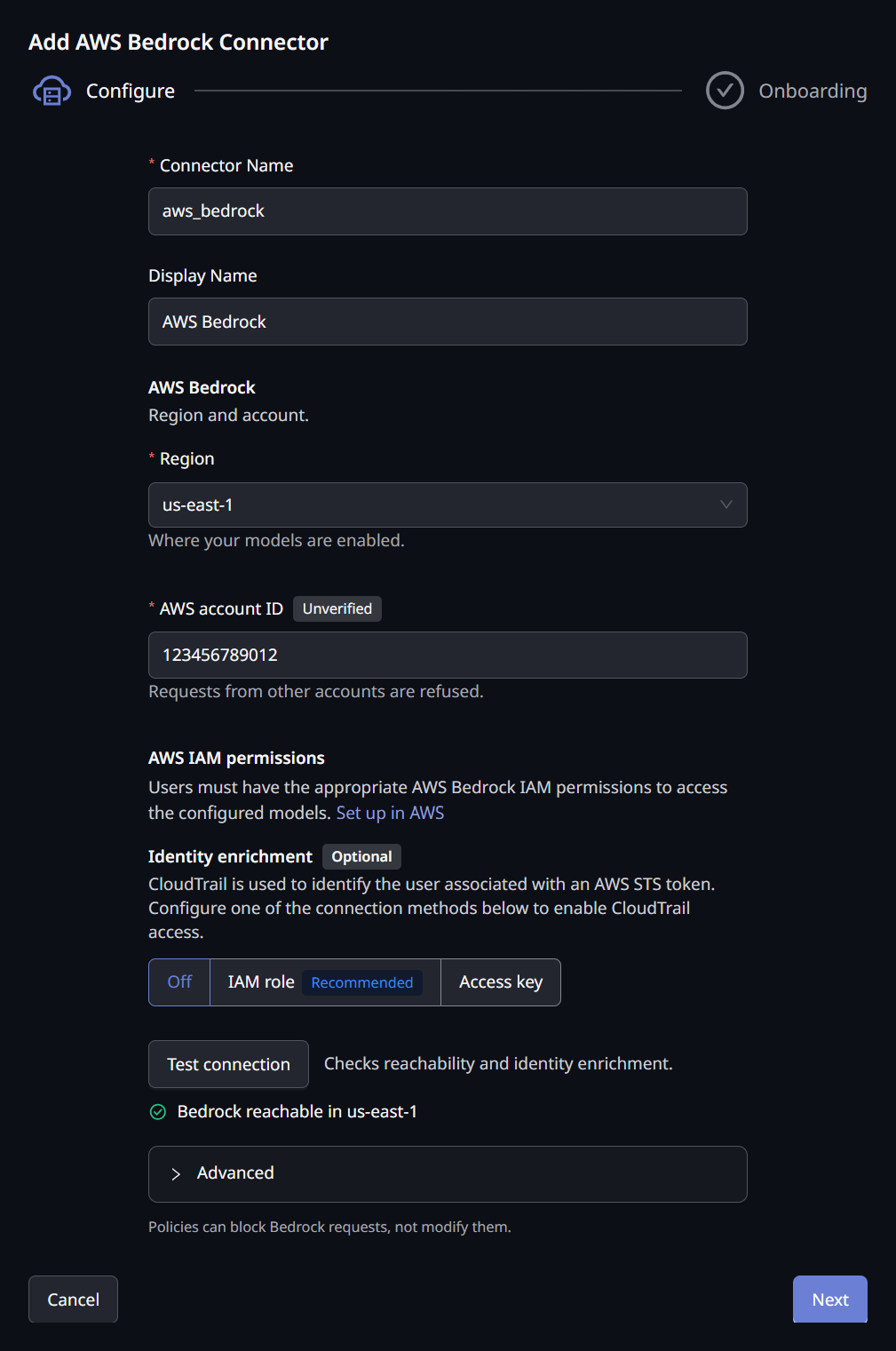
The connector form has these fields.
| Field | Description |
|---|---|
| Connector Name | The internal name for this connector |
| Display Name | The name shown in the console |
| Region | The AWS region to send inference to. Model availability differs by region, so use the region where you enabled model access |
| AWS account ID | The 12-digit account your Bedrock models run in. Requests signed by any other AWS account are refused |
| Identity enrichment | Optional. Off, IAM role or Access key. Lets the Request Log name developers, and is needed for Require Approval. See Optionally turn on identity enrichment |
| Onboarding mode | Whether a developer's first request is recorded or held for approval. See Onboarding new developers |
There is no authentication field. The connector accepts whichever AWS credential a developer brings.
An organization has one Bedrock connector. It serves one AWS account and one region, and it already accepts both AWS SSO sessions and Bedrock API keys. To change the account or region, edit the existing connector. A second Bedrock connector is refused when you save it.
There is no network setting either. The Allow private network addresses switch that other connector types show does not appear on a Bedrock connector, because the gateway derives the Bedrock address from the region rather than from anything you enter. When the gateway runs in an AWS VPC that has a Bedrock interface VPC endpoint with private DNS enabled, it reaches Bedrock through that endpoint with nothing to configure on the connector.
The AWS Account ID
The account ID ties the connector to your own AWS account. The caller's own credential is forwarded, so without the ID, a credential from an unrelated account would be attributed as one of your developers'.
A badge on the field shows how far the account has been confirmed. It updates each time you run Test connection.
| Badge | Meaning |
|---|---|
| Verified | The identity-enrichment credential belongs to this account |
| Doesn't match | The identity-enrichment credential belongs to a different account. Correct the account ID, or use a credential from the account you entered |
| Unverified | Nothing was available to check the account against, for example because identity enrichment is off. Saving is allowed, and the first successful request confirms the account |
A save is refused when the account is not 12 digits. It is also refused when the identity access key or identity role clearly belongs to a different account. An account that could not be checked is accepted, so your configuration never depends on AWS being reachable at that moment.
Optionally Turn On Identity Enrichment
Identity enrichment lets the Request Log name the calling developer, not only their AWS account. It works whichever credential your developers use, and it makes approval-based onboarding available. It is optional. Naming the developer behind a request covers the setup.
Adjusting the Identification Rate Limits
Under Advanced, two optional limits cap how many callers per minute the connector identifies: one per connector, and one per source IP. They apply only to callers the gateway does not already know, so ordinary developer traffic stays within them.
| Field | Description |
|---|---|
| Per connector, per minute | Raise it if more developers start fresh AWS sessions in the same minute than the default allows. AWS itself caps CloudTrail lookups at 2 per second per account |
| Per source IP, per minute | Stops one source from using the whole connector's budget. Raise it if your developers share an office egress IP |
Leave a field blank to use the gateway's default. Blank always means the default, never unlimited, because these limits bound identification lookups against your AWS account. Accepted values run from 1 to 10000. A value outside that range is refused, not quietly adjusted, so the number you see is always the number in force.
Exceeding a limit costs attribution, not inference. Requests are still forwarded and still governed by policy. Affected rows are logged without a developer name until the limit's one-minute window rolls over.
Test the Connection
Click Test connection. It works before the connector is saved, so you can confirm the region without creating anything. It reports a checklist, one row per check.
| Row | Meaning |
|---|---|
| Bedrock reachable in region | The gateway reached Bedrock in the chosen region |
| Identity enrichment working | The identity role or access key can read CloudTrail |
| This deployment has no AWS identity | AgentPass has no AWS identity that a trust policy can name, so it cannot assume a role here. Use an access key instead |
| Can't assume the role | AWS refused to let AgentPass assume the role. See Troubleshooting |
| Can't read CloudTrail in region | The role or key lacks the caller-identity permission for that region |
| Couldn't check identity enrichment | AWS did not answer the check, for example because it was busy. Run the test again |
| Account matches | The identity credential belongs to the account you entered |
| Credential is from another account | The identity credential belongs to a different account |
| Account not verified | Nothing confirmed the account yet. Saving is allowed, and the first successful request confirms it |
The identity rows appear only when identity enrichment is on. A failed identity row carries a Fix in AWS setup link, which opens the AWS setup steps for the role or IAM user.
When an identity check fails, the error AWS returned appears under the row, word for word. It names what AWS refused, such as the role and the principal that tried to assume it, or the missing permission, so you can correct the policy AWS points to.
An account mismatch is reported as a warning, not a failure. The connector still forwards inference, and failing the test would hide the reachability result.
The gateway holds no credential for inference, so the test has none to verify. AWS validates each developer's own credential when they make a request.
Connect Your Developers
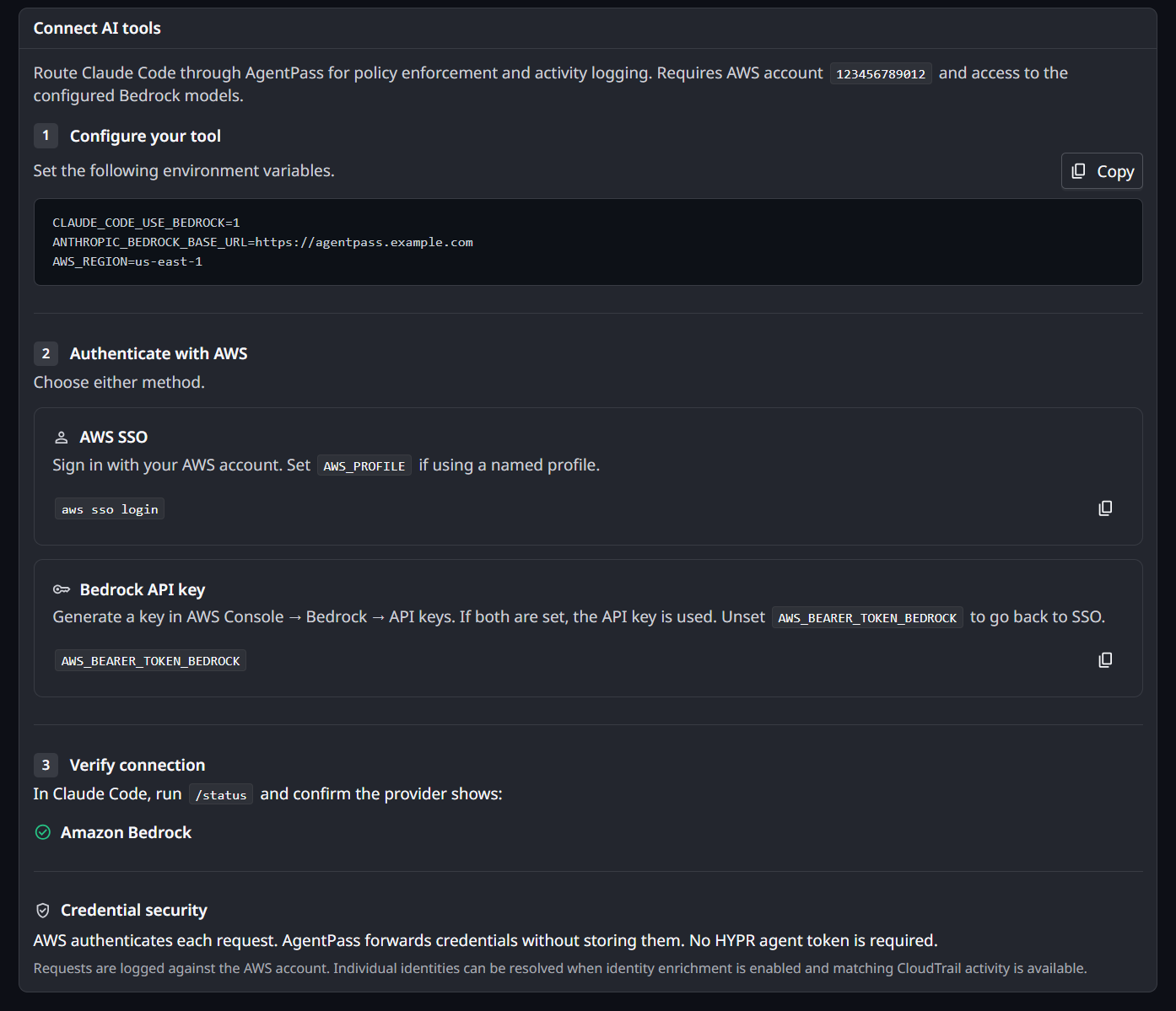
Once the connector exists, its page shows a Connect AI tools card with the settings to give your developers. The values are filled in for your gateway, region and account. The card has three steps: configure the tool, authenticate with AWS, and verify the connection. Claude Code then sends its Bedrock requests through AgentPass, where they are logged and governed by policy.
Configure Claude Code
The developer sets these environment variables, using the values on the card:
CLAUDE_CODE_USE_BEDROCK=1
ANTHROPIC_BEDROCK_BASE_URL=<your gateway URL>
AWS_REGION=<your region>
Authenticate With AWS
Each developer then either runs aws sso login to use an SSO session, setting AWS_PROFILE if they use a named profile, or sets their own Bedrock API key:
AWS_BEARER_TOKEN_BEDROCK=<the developer's own Bedrock API key>
Developers generate their own key in the AWS console, under Bedrock → API keys. If both are set, the API key is used. Unsetting the variable returns a developer to their SSO session. The connector accepts both, so nothing changes on your side.
Verify the Connection
The developer runs /status in Claude Code, and confirms the provider shows Amazon Bedrock.
Tell your developers which AWS account the connector serves. A credential from any other account is refused, and AWS's own error does not say which account was expected. The connector's developer instructions in the console name the account for you.
Developers keep using the AWS credential they already have. For an SSO session, that is aws sso login. There is no agent token to distribute for a Bedrock connector, and the base URL is the gateway root, with no connector name appended.
Attribution and the Request Log
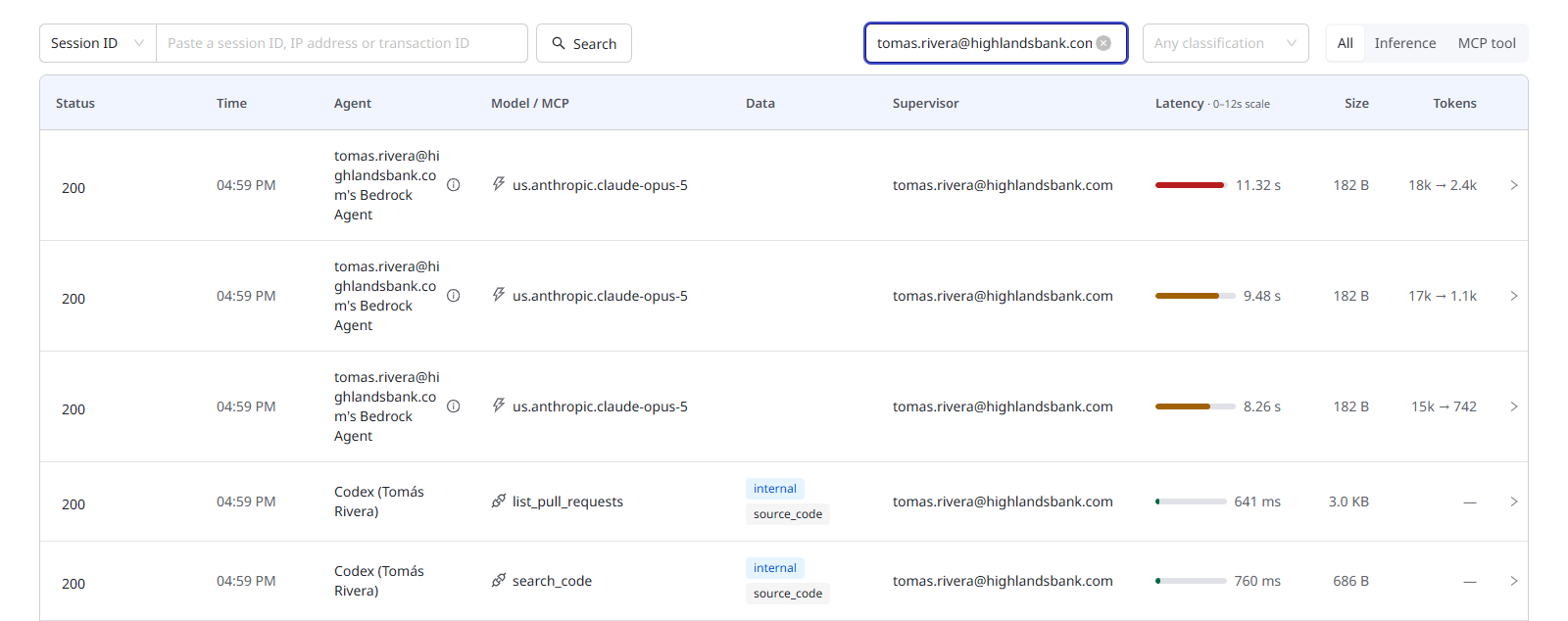
Bedrock traffic appears in the Request Log alongside your other connectors. The model name and token counts are recorded for both buffered and streaming responses.
Cross-Referencing With Your Own AWS Logs
Each Bedrock request records the identifier AWS returned for it. CloudTrail records the same value as requestID, so you can join a row in the AgentPass Request Log to the matching event in your own AWS account.
Naming the Developer Behind a Request
By default, requests are attributed to the AWS account the credential belongs to. Identity enrichment names the developer instead. AgentPass reads CloudTrail in your account to find who called Bedrock in the connector's region: their email, source IP and MFA state. Those details are stored with each Request Log row.
Under Identity enrichment on the connector form, choose how AgentPass reads CloudTrail.
| Option | What you create in AWS |
|---|---|
| Off | Nothing. Requests are attributed to the AWS account |
| IAM role (recommended) | An IAM role that AgentPass assumes, trusted only for your organization |
| Access key | An IAM user, whose access key you enter on the connector |
Both routes use the same caller-identity permission policy. The console shows it with your regions filled in.
Use an IAM Role
The role's trust policy carries an external ID that is unique to your organization. AgentPass creates it the first time you save a Bedrock connector in IAM role mode, so you save the connector before you create the role.
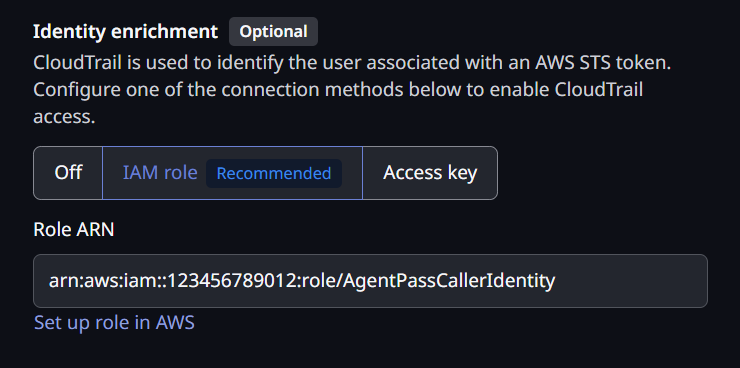
- On the connector form, under Identity enrichment, choose IAM role.
- In Role ARN, enter the ARN of the role you are about to create, in the account the connector serves. For example,
arn:aws:iam::<account>:role/AgentPassCallerIdentity. - Save the connector.
- Edit the connector, and click Set up role in AWS. The Set up the identity role panel opens.
- In the AWS console, create the IAM role with the name you entered, and paste the panel's custom trust policy.
- Attach the permission policy the panel shows to the role.
- Click Test connection. The checklist shows Identity enrichment working.
The trust policy has this shape. The panel fills in the AgentPass principal and your external ID:
{
  "Version": "2012-10-17",
  "Statement": [
    {
      "Sid": "AllowAgentPassCallerIdentityLookup",
      "Effect": "Allow",
      "Principal": { "AWS": "<AgentPass principal, shown in the console>" },
      "Action": "sts:AssumeRole",
      "Condition": {
        "StringEquals": { "sts:ExternalId": "<your external ID, shown in the console>" }
      }
    }
  ]
}
AgentPass assumes the role only to read CloudTrail. The role holds no Bedrock permission, and nothing is stored to rotate.
Your organization has one external ID, so one role can serve both your AWS Bedrock and your AWS Bedrock Mantle connectors. When another Bedrock connector already uses a role, the form offers Use the role from your other Bedrock connector. If the two connectors use different regions, the permission policy covers both.
If you run AgentPass in your own AWS account, AgentPass needs an IAM role of its own. That role needs permission to call sts:AssumeRole on your identity role. When AgentPass has no AWS identity to name in a trust policy, the IAM role option is unavailable, and hovering over it shows why. Use an access key instead. A connector already saved with an IAM role keeps the option, and shows the warning IAM role isn't available here with the reason.
Use an Access Key
- On the connector form, under Identity enrichment, choose Access key, and click Set up IAM user in AWS.
- In the AWS console, create an IAM user in the account the connector serves.
- Attach the caller-identity permission policy to the user, and nothing else.
- Create an access key for the user.
- Enter the Access key ID and Secret access key on the connector. The secret is stored encrypted.
The Caller-Identity Permission Policy
Both routes use this policy. With connectors in more than one region, the console lists every region in the condition.
{
  "Version": "2012-10-17",
  "Statement": [
    {
      "Sid": "AgentPassResolveCallerIdentity",
      "Effect": "Allow",
      "Action": "cloudtrail:LookupEvents",
      "Resource": "*",
      "Condition": {
        "StringEquals": { "aws:RequestedRegion": "<region>" }
      }
    }
  ]
}
The role or key reads CloudTrail only. It cannot invoke Bedrock, and it never signs a developer's request.
The caller-identity policy escalates the grant from "invoke Bedrock" to "read my CloudTrail". It is therefore separate from the permission policy, and entirely opt-in. Without it, the Request Log still records every request, attributed to the AWS account instead of a named person.
An access key is a long-lived IAM user key, so include it in your normal key-rotation schedule. An IAM role has no key to rotate.
When Identity Enrichment Fails
If AgentPass cannot assume the identity role, or the role or key cannot read CloudTrail, the connector's page shows a warning: Identity enrichment failing since a time, such as 2 hours.
The warning names the cause and what to check:
- Can't assume the IAM role, with the error code AWS returned
- The credential can't read CloudTrail, with the error code AWS returned
To see AWS's full reason, click Edit connector in the warning and run Test connection.
It also says that developers show as the AWS account only and, on a Require Approval connector, that Require Approval holds them. Click Edit connector in the warning to correct the role or key.
The warning clears after the next successful identity lookup, a successful Test connection, or a save of the connector. It also clears on its own after a day without lookups.
What the AWS Caller Panel Shows
Select any Bedrock request in the Request Log to open its detail panel, and find the Bedrock caller section. A popover on each row in the request stream shows the same details.
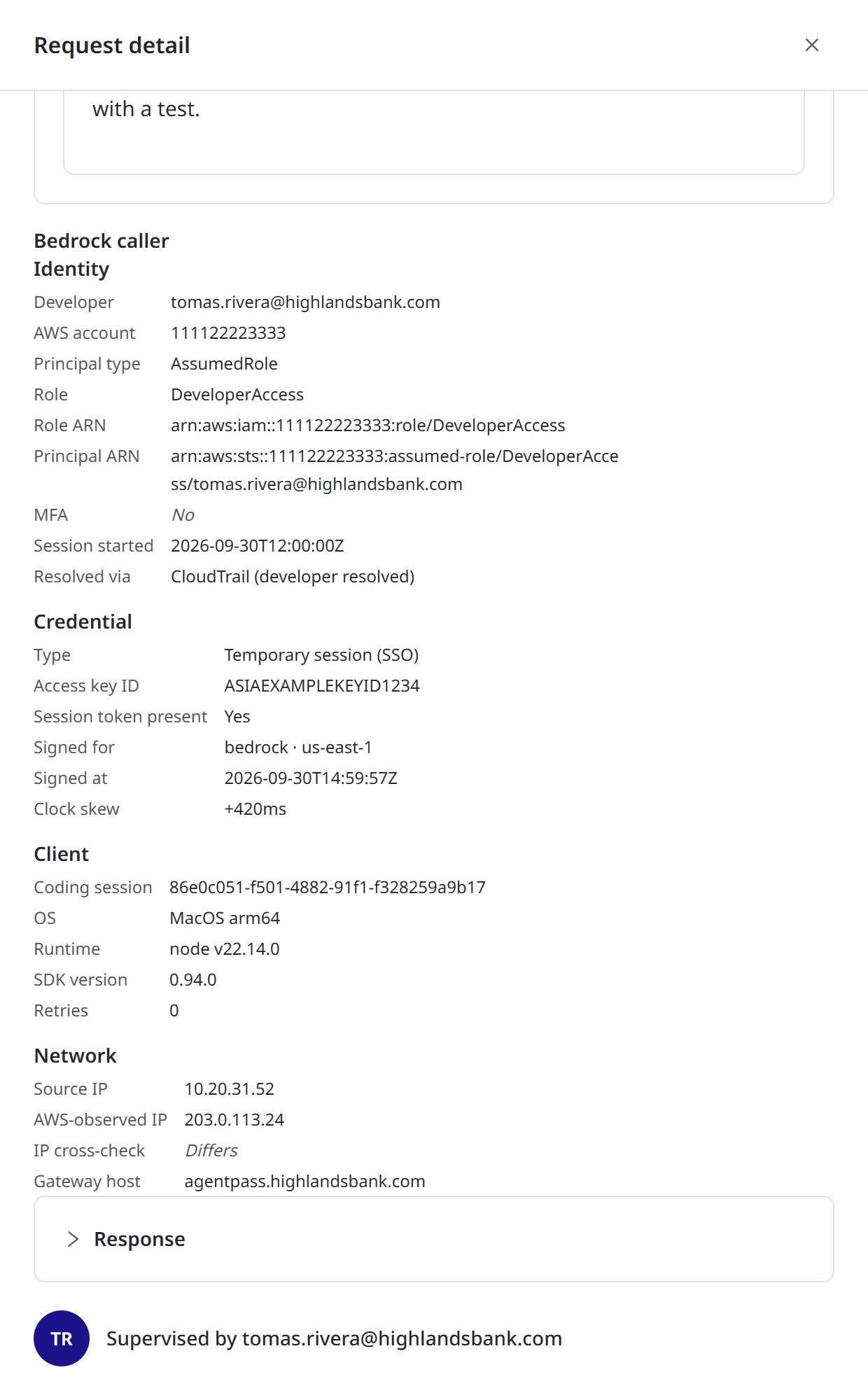
The panel groups what the gateway learned about the caller.
| Group | Details |
|---|---|
| Identity | Developer, AWS account, principal type, role, role ARN, principal ARN, MFA state, session start, how the identity was resolved, and an account cross-check |
| Credential | Credential type, access key ID, whether a session token was present, what the request was signed for, when it was signed, and clock skew |
| Client | Coding session, operating system, runtime, SDK version, retry count, and beta features in use |
| Network | Source IP, the IP AWS observed, an IP cross-check, and the gateway address the developer was configured against |
The coding session groups many requests into one session, so isolated rows become a picture of what one working session did. The retry count separates one intent from several automatic retries when you read request volume.
Rows Without a Developer Name
Two different things leave a row unnamed, and the panel labels which one happened.
| Label | What it means |
|---|---|
| Refused | The gateway stopped the request. The credential was faulted locally, or AWS confirmed it belongs to another account. Nothing was forwarded |
| Not attributed | The request was forwarded and answered normally. The gateway could not name the caller |
Either way, the row carries a short reason. A Not attributed row is ordinary. It means identity enrichment is off, or the caller was new and the identity lookup had not completed. A Refused row from a legitimate developer means they signed in to a different AWS account than the connector serves.
The account, IP and MFA indicators each have ordinary explanations. VPN or NAT egress makes an observed IP differ from the source IP, and legitimate role configurations report no MFA. Treat a flagged value as a prompt to look closer, not as evidence of a problem.
No credential secrets are recorded. The request signature, session token and API key are never captured. A session token is noted only as present or absent. The access key ID is an identifier, not a secret.
Onboarding New Developers
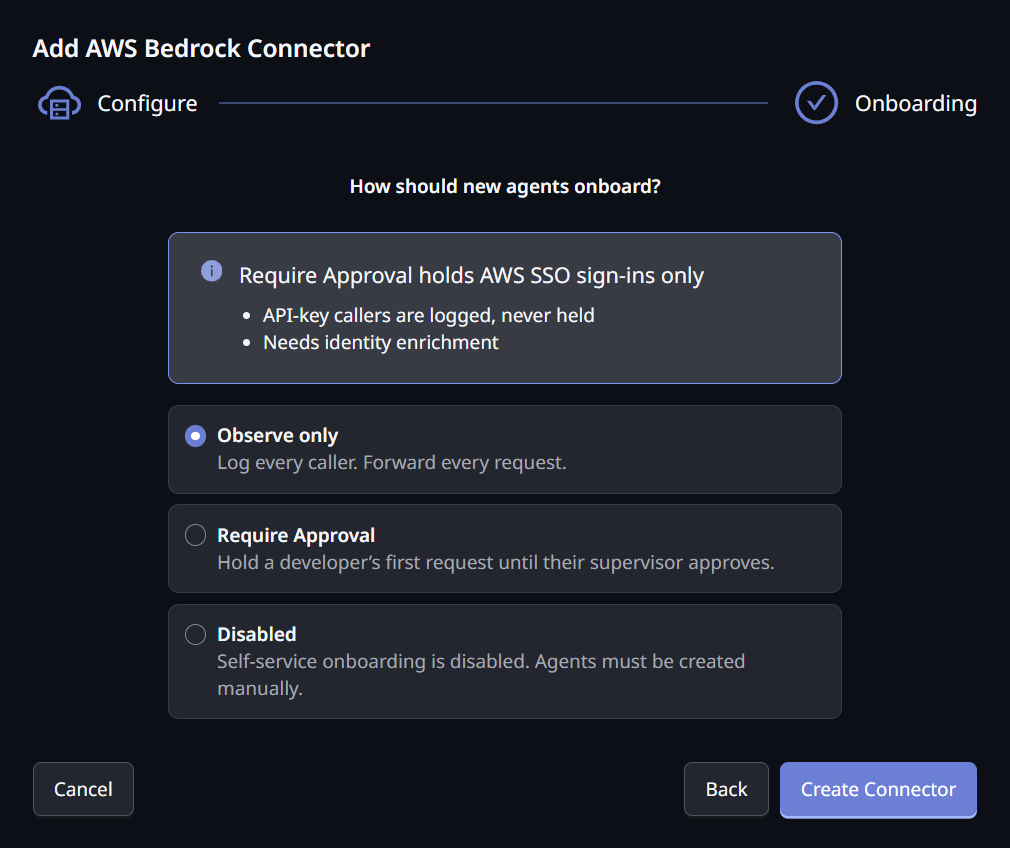
The connector's onboarding mode decides what happens the first time a developer reaches Bedrock through the gateway.
| Mode | What happens on a developer's first request |
|---|---|
| Observe only (the default, and the recommended start) | The request is forwarded, and the developer is recorded. Nothing is held |
| Require Approval | A developer signing in with AWS SSO is held until their supervisor approves them. Once approved, their traffic flows normally |
| Disabled | Requests are forwarded without recording who is calling |
Require Approval uses the same supervisor handshake as your other connectors. The developer's agent is held, an approval appears for their supervisor, and the agent resumes on approval without a restart. See Onboarding Your Agent for the supervisor's side.
Developers who sign in through single sign-on appear on the Agents page. When you turn off a developer's agent there, the gateway refuses their next Bedrock request, in Observe only and in Require Approval. In Disabled mode no caller is recorded, so there is no agent to turn off.
Developers using a Bedrock API key are recorded, but never held, whatever the mode. A key belongs to an AWS account, not a person. An approval raised for one would have no supervisor to route to, and would block automation nobody is sitting behind.
Treat Require Approval as an attribution and workflow control, not an access control. Access control remains your AWS IAM permissions and your policies, and both apply to API-key traffic unchanged.
You cannot save a connector in Require Approval without identity enrichment, and the save reports this. On the connector page's Onboarding Mode card, Require Approval stays unavailable until the connector has identity enrichment, with the hint Needs identity enrichment. Add it in Edit. Approval is per developer, and identity enrichment is what lets the gateway name one. Without it, a single approval would cover your whole AWS account and reach nobody.
The First Request After Signing In
On a Require Approval connector, a developer who has just run aws sso login is asked to wait before they can be held for approval. Their agent shows:
I can't confirm who you are yet. AWS needs a few minutes to record your session
before the gateway can recognise you.

Please try again in 3–5 minutes — this usually clears on its own. If it is still
happening after 15 minutes, ask your administrator to check the Bedrock
connector's CloudTrail identity key.
This is expected once per sign-in. The gateway identifies a developer from the record AWS writes of their activity. A brand-new session has not been recorded yet, so there is a short wait while AWS catches up. A retry after a few minutes names the developer and raises their approval as normal.
The Request Log records each of these waits, so you can see a developer waiting instead of their traffic appearing to stop. Tell your developers to expect this after each AWS sign-in, so the notice does not read as a failure.
Past that point, waiting will not help. The connector's identity role or key can most likely no longer read CloudTrail. Run Test connection to confirm its CloudTrail access. For a key, check that it has not been rotated or disabled in AWS. For a role, check that its trust policy has not changed. Developers on Observe mode are unaffected, because nothing is held.
Governance
Your AgentPass policies apply to every Bedrock request, in every onboarding mode, whichever credential the developer brought. A policy that denies a request stops it at the gateway, and nothing is forwarded to AWS.
AgentPass policies are distinct from the AWS IAM policies described earlier on this page:
- IAM policies decide what the developers' credentials may do in your AWS account.
- AgentPass policies decide which developer requests the gateway forwards at all.
You can also write policies about the AWS developer behind a request: their identity, credential, client and network. See Bedrock Caller Policies.
On Bedrock, inference policies govern Claude models and the Converse API. The caller attributes apply to every Bedrock request, whatever the model.
A developer's AWS signature covers the exact bytes and headers they sent. A pre-request policy that rewrites a Bedrock request body or header invalidates that signature. AWS then answers with an opaque 403 that looks like a credential problem. Policies that inspect and deny work normally.
Troubleshooting
Start with the symptom you see.
| What you see | What to check |
|---|---|
| Test connection cannot reach Bedrock | Confirm the region is one where Bedrock is available, and that your network permits outbound access |
| The connector will not save, reporting the AWS account | The account must be exactly 12 digits, and must not contradict the identity access key or role you entered. Test connection reports which account the credential belongs to |
| Can't assume the role | Read the error AWS returned under the row: it names the role and the principal AWS refused. Recreate the role's trust policy from Set up role in AWS, and confirm the role is in the account the connector serves. If your organization restricts which outside principals may assume its roles, for example with a service control policy, confirm the restriction allows AgentPass. If you run AgentPass in your own AWS account, confirm its role may call sts:AssumeRole on your identity role |
| Couldn't check identity enrichment | AWS did not answer the check. Run Test connection again |
| Can't read CloudTrail in region | Attach the caller-identity permission policy to the role or IAM user, covering that region |
A 403 naming the account the connector serves | The developer signed in to a different AWS account. Have them authenticate to the account shown on the connector |
A 403 describing a fault in the credential itself | The gateway refused a credential it could fault locally. Common causes are a request signed for a different region than the connector serves, or a client clock well out of step. The message names the specific fault |
403 with "not authorized" or AccessDenied | The credential is valid, but lacks permission in that region. Confirm the permission policy is attached to the developer's identity, and that model access is enabled in the Bedrock console for that region |
An opaque 403 that looks like a credential problem, but the credential is known good | Check whether a pre-request policy rewrites the request body or headers. Rewriting invalidates the developer's signature |
401 on a request using a Bedrock API key | Generate a new Bedrock API key in the AWS console, and have the developer enter it again |
AccessDeniedException with "This agent is turned off" | The developer's agent is turned off in AgentPass. Ask its owner or an administrator to turn it back on |
| A developer is asked to retry in 3–5 minutes | Expected once per AWS sign-in on a Require Approval connector. See The first request after signing in |
| A developer is still asked to retry after 15 minutes | The connector's identity role or key can probably no longer read CloudTrail. Confirm with Test connection, and check the role or key in AWS |
| The connector will not save in Require Approval | Require Approval needs identity enrichment. Add an IAM role or an access key, or use Observe only |
| A developer using a Bedrock API key is never held for approval | Expected. API-key callers are recorded but never held. Have them use aws sso login instead, or govern them with a policy |
Bedrock returns 404 | The region is probably not one where Bedrock is available |
A 5xx from Bedrock | Retry in a moment. A transient provider error clears on retry |
| The Request Log shows an AWS account but no developer name | Either identity enrichment is off, or its role or key cannot read CloudTrail. Use Test connection to confirm its CloudTrail access |
| Identity enrichment failing since … on the connector page | The role can't be assumed, or the role or key can't read CloudTrail. Follow the check the warning names, then run Test connection. See When identity enrichment fails |
| IAM role is unavailable on the connector form | AgentPass has no AWS identity to name in a trust policy. Hover over the option for the reason, or use an access key |
| Developer names are missing in bursts, then return by themselves | Many developers started fresh AWS sessions at once and reached the identification rate limit. Inference is unaffected. Raise the limits under Advanced |
Errors That Originate Outside the Gateway
Developers may see two errors that originate outside the gateway. The gateway is working, but something around it is not.
Expired AWS SSO Session
Claude Code shows:
Please run /login · API Error: 403 The security token included in the request is expired
The developer's underlying AWS SSO login has expired. Have them re-authenticate to AWS to refresh their local credentials, then retry:
aws sso login
Local credentials are stored in ~/.aws/credentials by default.
Empty or Malformed Response With HTTP 200
Claude Code shows:
API Error: API returned an empty or malformed response (HTTP 200) — check for a proxy or gateway intercepting the request
Something between the developer and the gateway, or between the gateway and AWS, did not return a complete response. The usual causes are:
- The developer cannot reach the AgentPass gateway, for example because the VPN is off.
- The gateway URL or region on the developer's machine is misconfigured.
- The AWS API returned a transient error.
If the failure happens mid-session and the configuration was working moments earlier, retry. A transient AWS error clears on the next request. If retries keep failing, confirm the developer's VPN is connected, and that ANTHROPIC_BEDROCK_BASE_URL and AWS_REGION match what the connector expects.
Related
- Connectors — the other kinds of connectors you can add
- Viewing the Request Log — read the traffic this connector produces
- Bedrock Caller Policies — govern Bedrock traffic by the developer behind it
- Policies — control which requests are allowed
- HYPR AgentPass: Overview — how connectors fit into the product