Anthropic
An Anthropic connector routes Claude requests through HYPR AgentPass™, from Claude Code, other local agents and cloud agents. Each request is attributed, evaluated by policy and recorded.
Before You Begin
- An Anthropic account with API access
- Optional: an Anthropic Admin API key. The gateway uses it to manage per-agent keys and synchronize agent identities. Without it, the connector still routes and observes traffic, and you can add the key later
- The gateway's public origin, which your agents point at
Create the Connector
- Open Connectors → Add connector → AI Providers → Anthropic.
- Optional: Enter the Admin API Key. Without it, the form warns that agent identity syncing is unavailable.
- Optional: Change the Base URL or API Version only if your Anthropic configuration requires different values.
- Click Next.
- Choose the onboarding mode.
- Click Create Connector. The connector opens.
The first enabled connector for this provider also turns on Claude Code and Claude Desktop under Desktops → Desktop configuration → Configuration. Your organization's first AI provider connector also adds an Atlassian MCP server connector. See What Your First Provider Connector Turns On and One-Click MCP Servers.
What the Overview Tab Shows
The connector's Overview tab has these fields.
| Field | Meaning |
|---|---|
| Name, Enabled | The connector's name. Enabled turns traffic on or off |
| Endpoint | The upstream host and port (api.anthropic.com:443). Click Change to point at a private or regional deployment |
| Allow Channel connections | Lets agents use this gateway as a channel for real-time supervisor messaging. On by default. Turning it off stops new channel connections. Open ones keep working until they expire. See Having Conversations with Your Agent |
| Channel downloads | The Claude Code and Codex channel installers. See Channel Downloads |
| Anthropic Admin API | The base URL, API version and write-only admin API key. Click Update Key to replace the key. Used to sync the account's API keys into agent identities |
| Connect AI tools | The settings to give your developers. See Connect Your Developers |
| Onboarding Mode | What happens to an agent's first request. See Onboarding Mode |
| Routes | The request paths the gateway forwards, such as POST /v1/messages.* (chat completions) and POST /channel-bootstrap/.* (channel session bootstrap) |
Import Agents
To import the account's API keys as agent identities:
- In the console, open Agents.
- Click Import agents. Each connector that imports agents is listed, with when it last synced.
- Click the sync button beside this connector. A message reports how many agents were imported, conflicted and skipped.
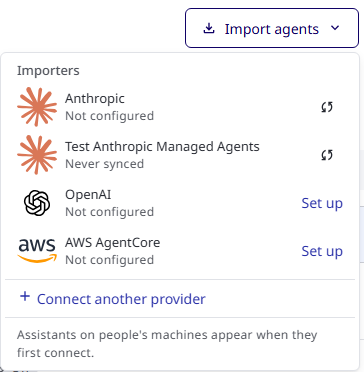
Each key becomes an agent identity, with a name, owner and status, on the Agents page. Sync from Anthropic on this tab does the same. See Import and Create Agents and Agent identity.
Connect Your Developers
The connector's Overview tab shows a Connect AI tools card with the settings to give your developers. The values are filled in for your gateway. The card has three steps: configure the tool, authenticate with Anthropic, and verify the connection. Claude Code then sends its requests through AgentPass, where they are logged and governed by policy.
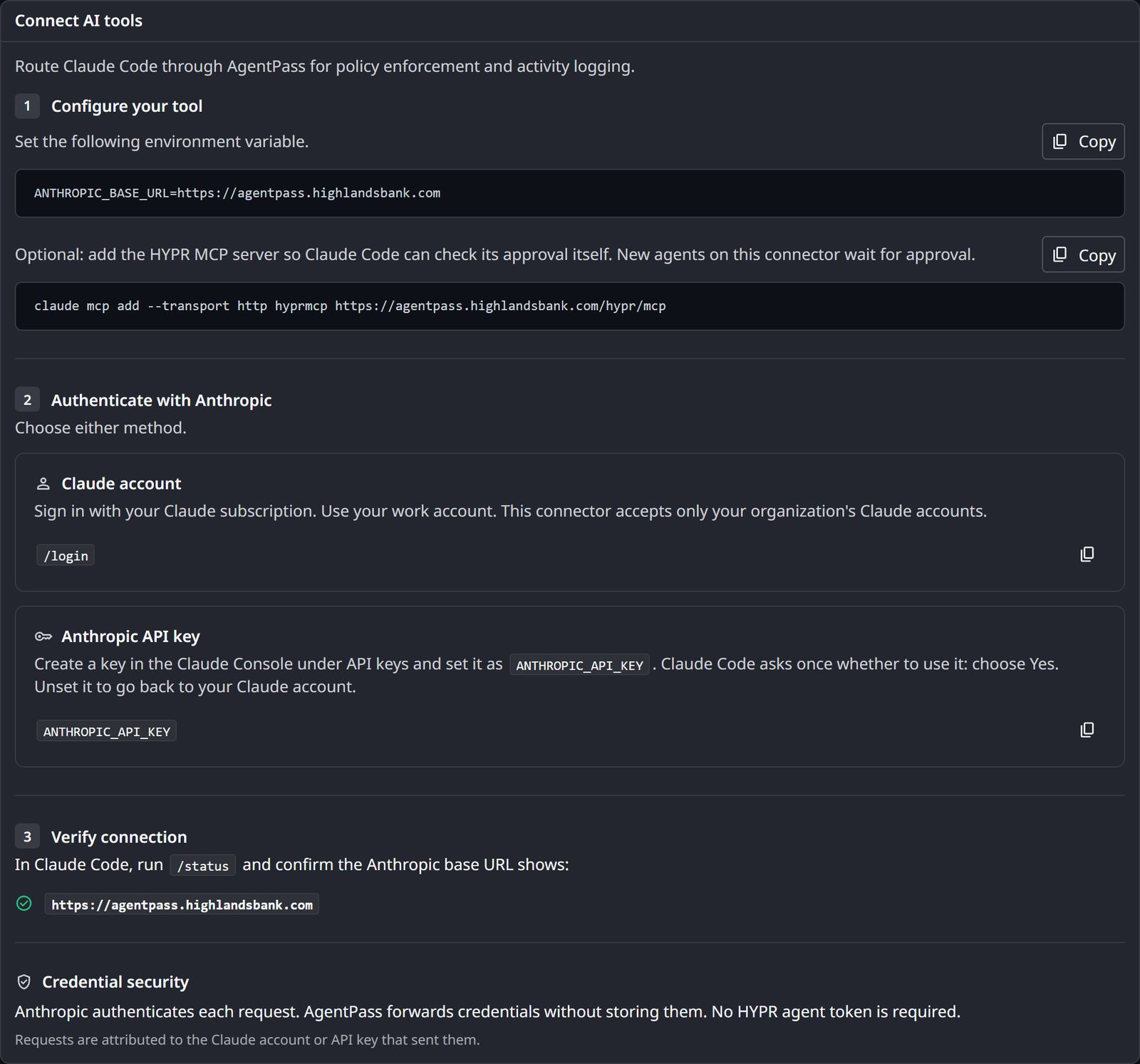
Configure Claude Code
The developer sets this environment variable, using the value on the card:
ANTHROPIC_BASE_URL=<your gateway URL>
The connector name is not part of the URL: the gateway matches the request path, such as /v1/messages, to the connector's routes.
When the connector's onboarding mode is Require Approval, new agents on the connector wait for approval. The card then also offers an optional claude mcp add command that adds the HYPR MCP server, so Claude Code can check its approval status itself. See Onboarding Your Agent.
Authenticate With Anthropic
Each developer authenticates in either of two ways:
- A Claude account. The developer runs
/loginin Claude Code, and signs in with their Claude subscription. When the connector accepts only your company's Claude organizations, they sign in with their work account. - An Anthropic API key. The developer creates a key in the Claude Console, under API keys, and sets it as
ANTHROPIC_API_KEY. Claude Code asks once whether to use the key; the developer chooses Yes. Unsetting the variable returns them to their Claude account.
No HYPR agent token is needed. Anthropic authenticates each request, and AgentPass forwards the developer's credential without storing it. Requests are attributed to the Claude account or API key that sent them.
Verify the Connection
The developer runs /status in Claude Code, and confirms that Anthropic base URL shows your gateway URL.
On workstations under the Endpoint Guard, you can route agents here with no change on the agent side. See Routing and Observation.
Accept Only Your Company's Claude Organizations
By default, the connector accepts any Claude account a developer signs in with, including a personal one. To accept only accounts in your company's Claude organizations, list them on the connector.
- On the connector's page, click Edit.
- In Accepted Claude organizations, enter each organization ID from Claude's admin settings. Separate IDs with a comma or a space.
- Click Save.
An organization ID has the form 4a1c2e9e-0b3d-4f5e-8a7b-1c2d3e4f5a6b. A value in any other form is refused when you save. Leave the field empty to accept any account.
The list applies to people who sign in to Claude Code or Claude Desktop with their own Claude account. When someone signs in with an account from another organization, or a personal account, the gateway refuses the request. Their tool shows a message saying that your gateway accepts only accounts from your company's Claude organization, and asking them to sign in with their work account by running /login in Claude Code. The refusal is recorded in the Request Log.
The list applies in every onboarding mode except Observe only. See Onboarding Mode.
Related
- Connectors — the tabs every connector shares
- Governing Inference Traffic — rules on what the model is asked and answers
- Anthropic Cloud Agents — agents Anthropic hosts, governed through a separate Cloud Agents connector