Workload Agents
A workload agent brings an unattended caller under the same HYPR AgentPass™ governance as the rest of your agent traffic.
Most agents act for a person. The supervisor onboards the agent, and the gateway attributes each call to that supervisor. It governs the call with the supervisor's role.
Some agents have no person to act for. A scheduled automation, a batch job or a model harness in your own cloud account calls the gateway's Model Context Protocol (MCP) servers continuously and unattended. Nobody is available to complete a sign-in or authorize a connection.
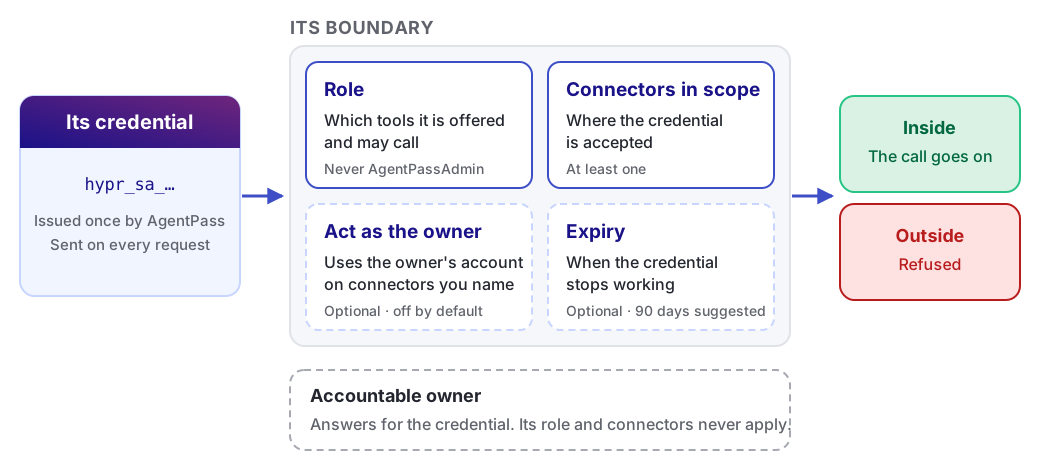
A workload agent is a first-class agent with three things of its own:
-
Its own credential. A static token you issue once and configure in the calling system. There is no interactive sign-in and no browser handshake.
-
Its own role. Its access comes from the role you assign to it, not from the person accountable for it.
-
Its own boundary. You name the connectors it may reach, and the gateway refuses calls to anything else.
Managing workload agents needs Workload agents: Manage, which Admin has out of the box. See Permissions.
At a Glance
The following table sums up a workload agent in four parts. Each links to the detail.
| Part | In short | Read more |
|---|---|---|
| Identity | An agent with its own role, not a person. The Agents page lists it under Acts as: Workload, and under Runs: Local or Runs: Cloud as you choose | How a Workload Agent Differs |
| Token | A credential starting hypr_sa_, shown once when you create it. The caller sends it as Authorization: Bearer. Expiry is optional, and rotating refuses the old token at once | Copy the Credential · Rotate a Credential |
| Connector access | Only the connectors named on the credential, matched exactly. Its role decides which tools it may call there | Choosing the Boundary |
| Owner and supervisor access | A named owner answers for it but lends it no access, unless you opt in per connector. Its calls cannot be sent to a supervisor for approval | The Accountable Owner · What Governs a Workload Agent |
When to Use One
Use a workload agent when a caller needs your gateway's MCP tools and no person is available to authorize it:
-
A model harness in your own cloud account, such as an agent hosted on AWS Bedrock, that calls a tool server through the gateway as part of a workflow
-
A scheduled job or pipeline that uses gateway tools without a human in the loop
-
A system integration that must keep running when the person who set it up is on leave or changes teams
When a person is available, use the ordinary paths instead:
-
An agent a supervisor onboards
-
An MCP server a person authorizes once through the gateway's OAuth handshake
Both keep a human in the loop in a way a static credential cannot. See Connecting to a Gateway MCP Connector.
Set Up a Workload Agent
Setting one up takes an administrator and the person who runs the calling system. Each step links to the page that covers it.
- Get the owner, role and connectors ready. The owner must be a supervisor with a role. See Before You Begin.
- In the console, open Agents, click New agent, then choose New workload agent. The New workload agent form opens.
- Complete the form, and click Create. AgentPass issues the credential. See Create the Workload Agent.
- Copy the credential from the Workload agent created dialog into your secrets manager. AgentPass never shows it again. See Copy the Credential.
- Configure the calling system to send the credential as
Authorization: Bearer, to a connector in scope. See Present the Credential. - Confirm the first call on the agent's Activity tab. See Verify the First Call.
From then on, rotate, disable or extend the credential as needed. See Managing Workload Agent Credentials.
How a Workload Agent Differs
A workload agent appears on the Agents page beside your other agents, and its activity is recorded the same way. To list only workload agents, set Acts as to Workload.
It differs in where its authority comes from, and in which parts of the product apply to it. The following table compares it with an agent that has a supervisor.
| Aspect | An agent with a supervisor | A workload agent |
|---|---|---|
| How it authenticates | Onboarding, or a person's authorization | A static credential you issue |
| Whose role governs it | Its supervisor's role | Its own role |
| Connectors it may reach | Every connector its supervisor may reach | Only the connectors you name on the credential |
| Approvals and conversations | Its supervisor approves and messages it from the HYPR mobile app | Not available, because there is no person to ask |
| Assigning it to people | Available | Not available |
A workload agent carries its own role, so the tools it may call follow that role, not the owner's. Set them on the Agent tools permission tab of the role you assign. See Controlling MCP Tool Access by Role.
The Accountable Owner
Every workload agent names a person as its accountable owner. The owner is who you ask about the credential. The gateway records the owner as accountable for what the credential does.
The owner is not the source of the agent's access. Naming an owner does not give the workload agent any of these:
-
The owner's role
-
The owner's connectors
-
The accounts the owner has connected to the gateway
The separation is deliberate. A credential configured in a running system should not quietly carry a person's full access, or gain access when that person is promoted.
The one exception is opt-in, per connector. You can permit a workload agent to use the owner's connected account on named connectors. Leave it empty unless a connector requires it. See Acting as the owner.
The opt-in applies wherever the gateway would use a person's connected account: REST API connectors, and MCP server connectors whose OAuth tokens AgentPass manages.
Choose an owner who will stay accountable for the credential, such as a team lead or a platform owner, not whoever happens to set it up.
A workload agent keeps working after its owner leaves your organization. Review workload agent owners as part of offboarding, and reassign any that need a new one.
What Governs a Workload Agent
Everything that governs the rest of your agent traffic governs a workload agent too:
-
Policies. The gateway identifies the workload agent on every request. A policy can match it by agent and allow, block or hold its calls, as for any other agent.
-
Tool access by role. The role on the credential decides which MCP tools the workload agent is offered and which calls it may make.
-
Connector scope. The gateway refuses a call to a connector outside the credential's scope.
-
Request Log and activity. Its calls appear in the Request Log and on the agent's own Activity tab, attributed to the workload agent.
-
Retention. Machine traffic can be high-volume, so a workload agent retains request payloads only if you turn that on. Your organization's Data Management settings govern where recorded data goes and how long it is kept.
Actions that need a person are the exception. All of these need someone to answer, so a workload agent cannot:
-
Be sent to a supervisor for approval
-
Hold a conversation
-
Use the gateway's own onboarding, approval and messaging tools
Permissions
One permission controls workload agents.
| Permission | What it allows |
|---|---|
| Workload agents: Manage | Create, edit and rotate workload agents, and view their credentials |
Issuing a credential is an identity decision, so this permission is deliberately narrow. AgentPassAdmin holds it. AgentPassOperator and AgentPassSupervisor do not.
Without it, a person whose role can view agents still sees workload agents on the Agents page.
Other actions follow the rules for any agent:
-
Switching a workload agent on or off. See Who Can Turn an Agent Off and On.
-
Changing its stage. Needs permission to edit agents.
You can grant the permission to a custom role if your organization divides responsibility differently. Its holder chooses the role a credential carries. A role that can manage workload agents can therefore issue a credential that acts with any role except Admin.
Related
- Creating a Workload Agent — issue the credential and set its boundary
- Connecting a Workload Agent — configure the credential in the calling system
- Managing Workload Agent Credentials — rotate, disable and expire