Creating a Workload Agent
You create a workload agent on the Agents page of the HYPR AgentPass™ administration console. Creating one issues its credential.
Decide its role and the connectors it may reach before you start. Together they are the whole boundary the credential works inside.
Creating a workload agent needs Workload agents: Manage, which Admin has out of the box. See Workload Agents.
Before You Begin
Have these ready:
-
The person who will own it. The accountable owner must already be a supervisor on your gateway, with a role assigned. See Roles and Permissions.
-
The role the credential should carry. On that role's Agent tools permission tab, grant only the tools this caller needs. A role created for one workload agent is often clearer than a reused person's role. See Controlling MCP Tool Access by Role.
-
The connectors it will call. If they do not exist yet, add them first so you can select them.
Create the Workload Agent
- In the console, open Agents.
- Click New agent, then choose New workload agent. The New workload agent form opens.
- Complete the form. The fields are described in the following table.
- Click Create. AgentPass issues the credential and shows it once.
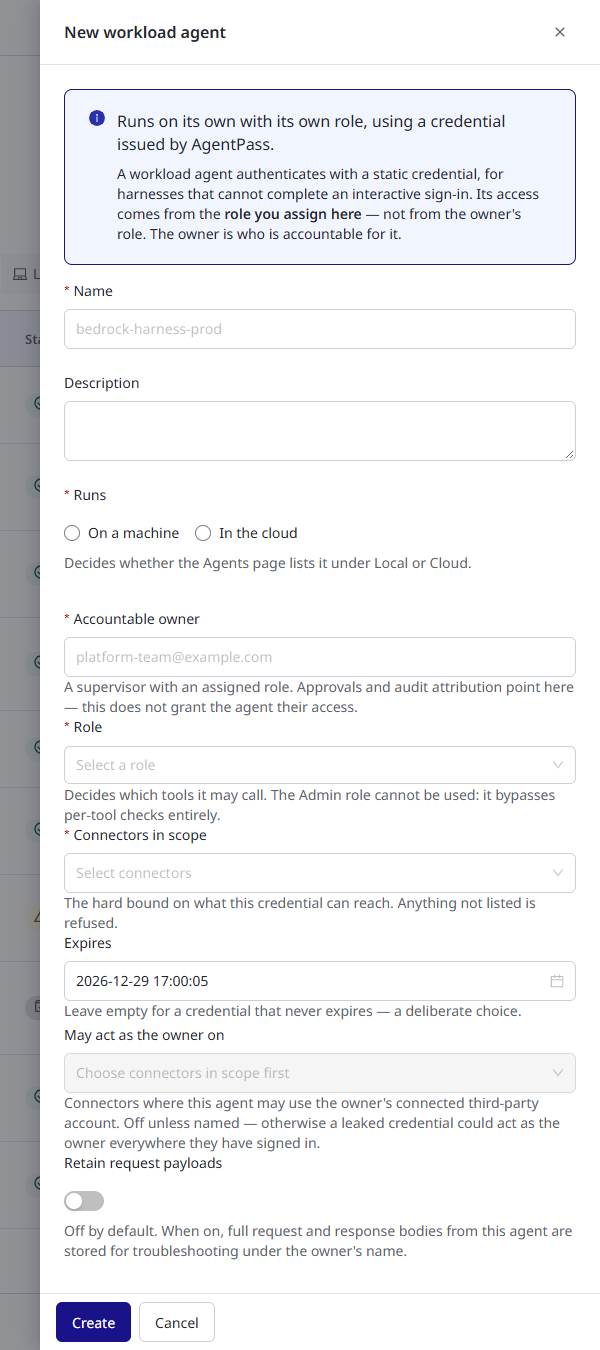
The form has these fields.
| Field | What it does |
|---|---|
| Name | How the workload agent appears in the console, the Request Log and its activity records. Use the name of the system that will hold the credential |
| Description | What the workload agent is for, in plain language |
| Runs | On a machine or In the cloud. Decides whether the Agents page lists it under Runs: Local or Runs: Cloud. When the page's Runs filter is set, the form starts with that choice. Otherwise, choose one |
| Accountable owner | The email address of the person accountable for the credential. Must be an existing supervisor with a role |
| Role | The role the credential acts with. This role, not the owner's, decides which tools it may call |
| Connectors in scope | The connectors the workload agent may reach. Calls to any other connector are refused |
| Expires | Optional. A date and time after which the credential stops working. The form fills in 90 days from now. Clear the field for a credential that never expires |
| May act as the owner on | Connectors where the workload agent may use the owner's connected account. Leave it empty unless the agent must act as the owner. See Acting as the owner |
| Retain request payloads | Whether AgentPass retains this workload agent's request and response bodies. Off by default, because machine callers can be high-volume |
Copy the Credential
AgentPass shows the credential once, in the Workload agent created dialog. AgentPass keeps only a hash of it, so nobody can display or recover the credential later, including your HYPR representative.
Copy it straight into wherever the calling system keeps its secrets. If you lose it, rotate the credential to issue a replacement.
Workload agent credentials begin with hypr_sa_. That makes them easy to recognize in a configuration file or a secrets store.
Anyone holding it can make the calls this workload agent is permitted to make, from anywhere. Store it in a secrets manager, never in source control, a shared document or a ticket.
Choosing the Boundary
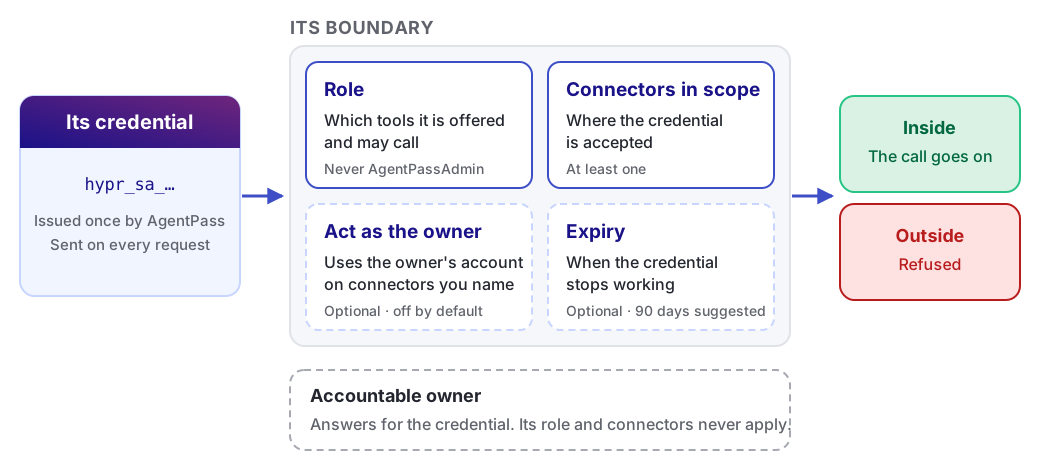
Two settings define what the credential can do: the role and the connectors in scope. Two optional settings adjust it: acting as the owner, and expiry.
The Role
The role on the credential is the workload agent's authority. It decides which MCP tools the gateway offers the workload agent, and which calls it may make. A supervisor's role does the same for a supervised agent.
Grant the narrowest role that works. If a credential leaks, a role holding only this caller's tools limits the damage to the work it was issued for.
You cannot give a workload agent the Admin role. That role reaches every tool without a per-tool check, so a credential carrying it would have no meaningful boundary. AgentPass refuses the assignment.
Connectors in Scope
The connectors in scope bound where the credential works. The gateway matches each call's connector exactly against the names on the credential. It refuses a call to any connector outside the scope, whatever the role permits.
Name only the connectors the caller uses. Scope is checked on every request, so narrowing it later takes effect immediately.
A workload agent with an empty scope reaches nothing, so AgentPass asks for at least one connector.
Acting as the Owner
Some connectors reach a third-party service through an account a person has connected to the gateway, such as the owner's Jira or Slack account. A workload agent uses those accounts only on connectors you name under May act as the owner on.
Leave this empty unless a connector requires it. On a connector you name here, the workload agent acts as the owner:
-
Anyone holding the credential can act as that person on that connector, for as long as the credential is valid.
-
You can select only connectors already in the credential's scope.
Some MCP server connectors are set to OAuth (Managed by Gateway), where AgentPass manages each person's OAuth tokens. On those connectors, every call uses somebody's connected account. There is no organizational credential to fall back to.
The gateway refuses a workload agent's calls there until you name the connector here, even though it is in scope. Leaving the setting off means no access, not reduced access. If a workload agent is refused on one and its scope looks right, check this setting.
Expiry
The form fills in Expires with a date 90 days from now. If you clear the field, the credential never expires. That is a legitimate choice for a long-running integration, but make it deliberately.
Set an expiry when the work has a natural end, such as a migration, a pilot or a proof of concept.
The gateway refuses an expired credential on its next call. The Agents page then shows it as Credential expired, under Needs attention, so it does not fail silently.
What AgentPass Refuses at Creation
AgentPass declines to issue a weak credential, and tells you what to fix. It refuses in these cases.
| AgentPass refuses when | Why |
|---|---|
| The owner is not a supervisor with a role | Accountability has to point at a real person on your gateway |
| The role does not exist | A credential with no valid role would be refused on every call |
| The role is Admin | That role has no per-tool boundary. See The role |
| No connector is in scope | The credential could reach nothing |
| A connector under May act as the owner on is not in scope | The opt-in has to sit inside the boundary, not outside it |
| The expiry is in the past | The credential would be refused immediately |
Next Steps
Configure the credential in the calling system, and confirm its first call. See Connecting a Workload Agent.
Related
- Workload Agents — what a workload agent is and when to use one
- Connecting a Workload Agent — present the credential and verify it works
- Managing Workload Agent Credentials — rotate, disable and expire