Connecting a Workload Agent
A workload agent authenticates to HYPR AgentPass™ by sending its credential on every request. You configure the credential once in the calling system, and it works from the next request.
There is no sign-in step, no browser handshake and no first-connection approval.
This page covers three things:
-
What the calling system sends
-
How to confirm it works
-
What the gateway's answer means when it refuses a call
Present the Credential
The calling system sends the credential in the standard HTTP Authorization header, with the Bearer scheme:
Authorization: Bearer hypr_sa_your-credential-here
Model Context Protocol (MCP) clients and agent frameworks generally have a setting for a static header or a bearer token. Set it there, alongside the server URL.
Read the value from your secrets manager instead of writing it into a configuration file.
The gateway removes the credential before it forwards a call, so the target never receives it.
Point It at a Connector
A workload agent reaches a connector at your gateway URL, followed by the connector's path, such as:
https://<your-gateway-url>/mcp/<connector-name>
The connector's Overview tab in the console shows its exact address.
Use the name of a connector in the credential's scope. Your HYPR representative or administrator provides the gateway URL.
A workload agent is built for connectors where the gateway holds the credential to the target:
- An MCP server the gateway authenticates to on your behalf
- A server whose OAuth tokens the gateway manages
- A REST API connector exposed to agents as MCP tools
On those connectors, the workload agent's credential identifies the caller, and the gateway supplies the credential to the target.
Verify the First Call
Confirm the connection in the console, not in the calling system's own logs.
- Open Agents.
- On the workload agent's row, click ⋮, then click Manage. The agent's page opens.
- Click the Activity tab. The workload agent's calls appear there, attributed to it by name.
- Optional: Open the Request Log to see the same traffic alongside the rest of your agent activity.
A workload agent that has made no calls yet has an empty Activity tab.
If the calling system reports an error and nothing appears there, the credential is not reaching the gateway. Check two things:
-
The header is sent.
-
The URL names a connector, not the gateway root.
When the Gateway Refuses a Call
Every call a workload agent makes must pass each of the gateway's checks. A call that fails one is refused, and the response points to the cause.
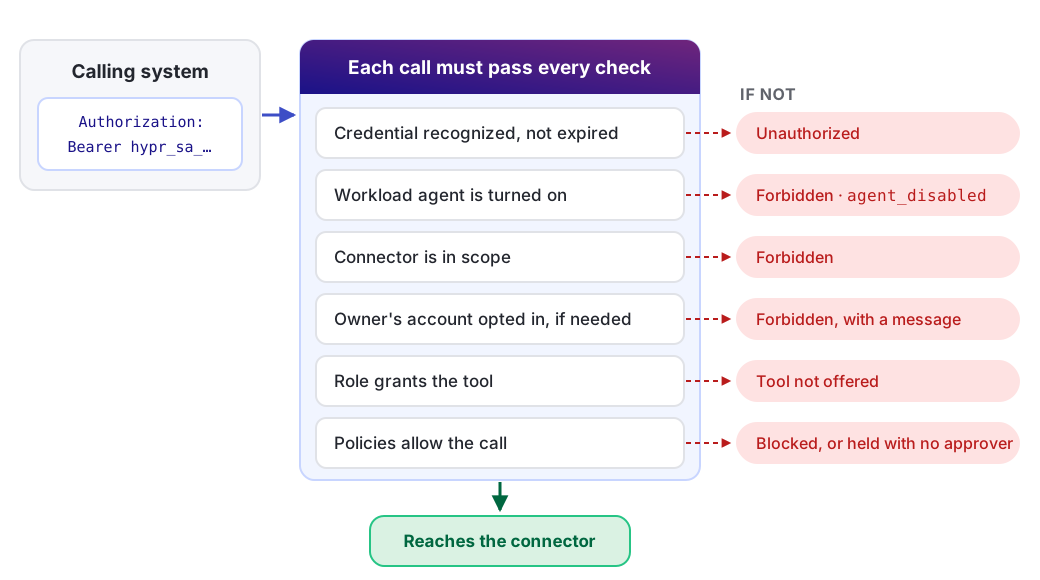
The gateway separates two kinds of refusal:
-
Unauthorized. It does not know who is calling.
-
Forbidden. It knows who is calling, and the caller may not do that.
The following table maps each response to its cause and fix.
| What you see | What it means | What to do |
|---|---|---|
| Unauthorized | The credential was missing or not recognized, or has expired | Confirm the header is sent and reaches the gateway. Then check the workload agent's Credential tab for a past expiry |
Forbidden, agent_disabled | The workload agent is turned off | Turn it back on from the Agents page |
| Forbidden | The credential is valid, but this connector is not in its scope | Add the connector under Connectors in scope, or point the caller at a connector already in scope |
| Forbidden, although the connector is in scope | The call would have used the owner's connected account, and the connector is not on the credential's act-as-owner list. The message says so | Decide whether this workload agent should act as its owner there. If so, add the connector under May act as the owner on. See Acting as the owner |
| A tool is missing from the list | The role on the credential may not call it | Grant the tool to that role on the Agent tools permission tab. See Controlling MCP Tool Access by Role |
| A call is blocked or held | A policy matched it | Review your policies. A held call cannot complete for a workload agent, as the following caution explains |
A policy that requires supervisor approval cannot complete for a workload agent, because nobody is there to approve it.
When a workload agent's traffic can match a policy, choose allow or block instead of require approval. Alternatively, scope the policy so it applies only to supervised agents.
What a Workload Agent Cannot Do
Some capabilities need a person, so a workload agent does not have them:
-
The gateway's own tools. Onboarding, approvals and supervisor messaging come from the
hyprmcpserver described in Connecting to a Gateway MCP Connector. A workload agent cannot use them. -
Conversations. There is no supervisor to message, so the chat surface does not apply.
-
Automations and assignments. No person drives a workload agent, so it is not assigned to one.
The console does not offer these for a workload agent. The gateway refuses them if a caller requests them directly.
Related
- Creating a Workload Agent — issue the credential and set its boundary
- Managing Workload Agent Credentials — rotate a credential you need to replace
- Connecting to a Gateway MCP Connector — the flow to use when a person is available to authorize