Agent Portal Attachments
People chatting in the Agent Portal can attach a file from their own computer, so an agent can work from a document they choose. Before any of it can enter a conversation, the gateway reads the file, checks it against your policies and records what it was.
This page is the administrator's view of that check: which formats it accepts, what it checks and what the record keeps. The end-user experience is in Chatting in the Agent Portal.
Which File Types the Portal Accepts
The portal accepts these formats, including other plain-text files.
| File type | Extensions |
|---|---|
| Plain text and Markdown | .txt, .md |
| Comma-separated values | .csv |
| JSON | .json |
| HTML | .html, .htm |
.pdf | |
| Microsoft Excel | .xls, .xlsx |
| Microsoft Word | .docx |
| Microsoft PowerPoint | .pptx |
Some related formats are not accepted:
- Macro-enabled Office documents:
.docm,.xlsmand.pptm - PowerPoint slideshows:
.ppsx - Legacy binary Word and PowerPoint documents:
.docand.ppt. The legacy Excel format,.xls, is accepted
A file must also be 20 MB or smaller.
The gateway reads a file to determine what it is, so an attachment is governed by what it actually is. A Word document renamed report.txt is still treated as a Word document. A file in any other format is refused, whatever its extension says.
What the Gateway Checks at Upload
Every upload runs through the same sequence. The first check a file fails ends it.
- Size. A file over 20 MB is refused.
- Protection. The gateway reads the contents to determine the format. A rights-protected Office document is refused. Its sensitivity label is read and recorded first. See Protected Documents Are Refused.
- Type. The gateway refuses anything outside the accepted list.
- Text. The gateway reads the document's text. It keeps the first 200,000 characters of a longer document, and tells the person attaching it that the text was shortened.
- Classification. For an Office document, the gateway reads the Microsoft Purview sensitivity label in the same pass.
- Policies. Your policies evaluate the text, the file's measured details and its label. A rule that denies the upload, or requires approval, stops the file there. Uploads have no approval step. The person sees Blocked on the attachment, and your rule's message when they hover over it.
- Record. The gateway writes an entry for the attachment, whether it was accepted or refused.
The gateway keeps neither the file nor its text. Both exist only for the duration of the upload. The text is held in the person's browser until they send their next message, and goes with that message only. Attaching the same file again uploads and checks it again.
Protected Documents Are Refused
The gateway refuses an Office document that Microsoft Purview has encrypted, also called a rights-protected document. The person attaching it sees Encrypted on the attachment, and is told to upload an unencrypted copy. The message names encryption as the cause, so it points at the one thing that fixes it, instead of reading as an unsupported format.
The document's sensitivity label is still read and recorded. Purview seals a document's contents but leaves its classification readable. A refused upload is therefore recorded as "a document classified Highly Confidential was attached," not only "an encrypted file was attached." The person attaching it is told which label the document carries.
The recorded label is the document's own marking, not the gateway's reading of its contents. That is why it is kept for the record and never used to decide the refusal.
No policy decides this refusal. An encrypted document has no readable text, so there is nothing for the gateway to attach to a conversation and nothing for a rule to allow. The document cannot become an agent's context. The attempt is recorded, so you can see that it happened.
Refusal applies to documents Purview has encrypted. A document that carries a sensitivity label but is not encrypted is read normally, and its label is available to your policies, as the following section describes.
The Document's Sensitivity Label
For an Office document, the gateway reads the Microsoft Purview sensitivity label it carries, and makes it available to your policies as request.files[].sensitivity_label. A rule can then say "block documents marked Highly Confidential," or "every Office document must be classified."
Know two things before you write such a rule:
- A label rule acts at upload. The label is the gateway's own reading of the document it received. The later message that sends the file to Copilot or a Copilot Studio agent carries no label, so a label rule does not act there.
- The label is one of the file's details, not its contents. The attachment's record includes the label's name, identifier and classification state, not the document's text.
The fields, their values and when they are present are in The Document's Sensitivity Label, in the Attribute Reference. Working rules are in Policy Examples.
What the Record Keeps
Each attachment leaves an entry on the connector's Recent Requests tab. See Reading a Connector. The entry records:
- The file's name
- The type the gateway read from its contents
- Its size and checksum
- How much text was read, and whether it was shortened
- For a labeled Office document, the label's name, identifier and classification state
The attachment's entry holds only these details, not the document's text. A file that passes policy goes with your next message, and the record of that message keeps its full request, including the document's text. A refused file is not sent, so its text is not recorded.
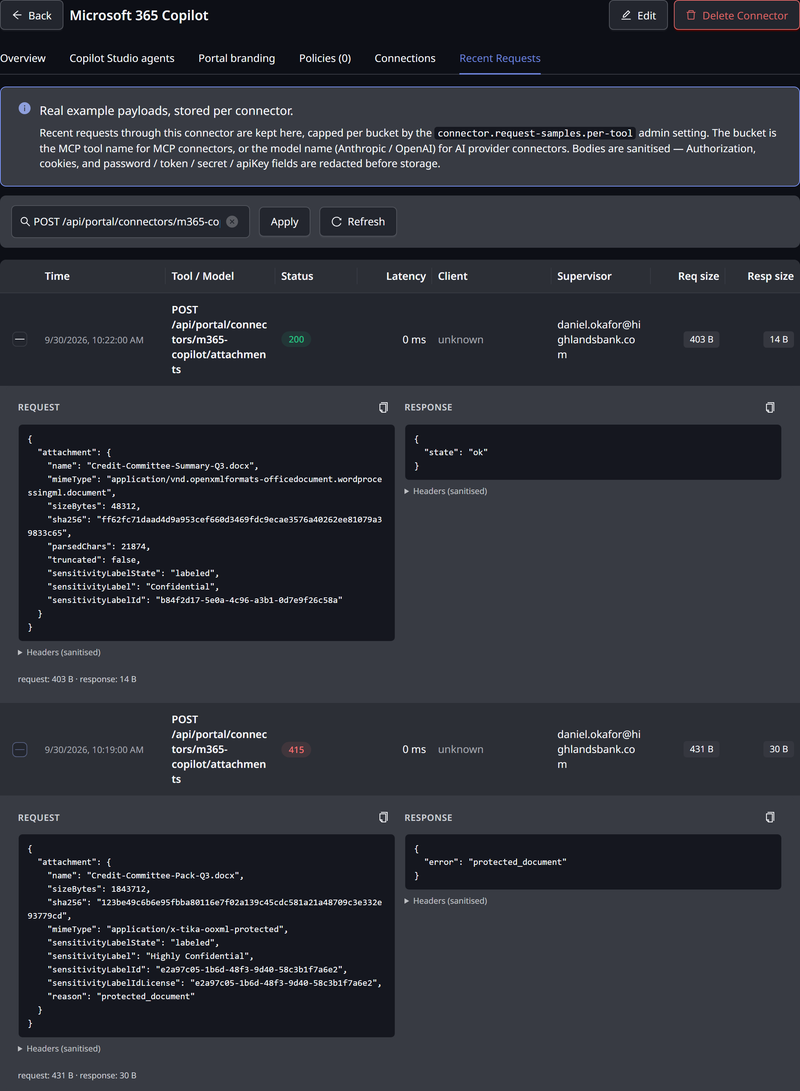
Refused uploads are recorded too, with the reason.
| Reason | What happened |
|---|---|
file_too_large | The file is larger than 20 MB |
unsupported_type | The file's contents are not one of the accepted formats |
protected_document | The document is rights-protected, so its text cannot be read |
parse_failed | The file's text could not be read |
blocked_by_policy | A policy denied the upload |
The record therefore answers both "did someone try to attach a format we do not accept?" and "did someone try to attach a protected document?", alongside the uploads that succeeded.
Related
- Chatting in the Agent Portal — the end-user view of attaching a file
- Microsoft 365 Copilot Policies — writing rules about attachments on a Copilot connector
- Policy Attribute Reference — every attribute a rule can read about a file
- Policy Examples — worked conditions for files and labels
- Data Management — how long the record keeps what it keeps