Microsoft 365 Copilot Agents
Overview
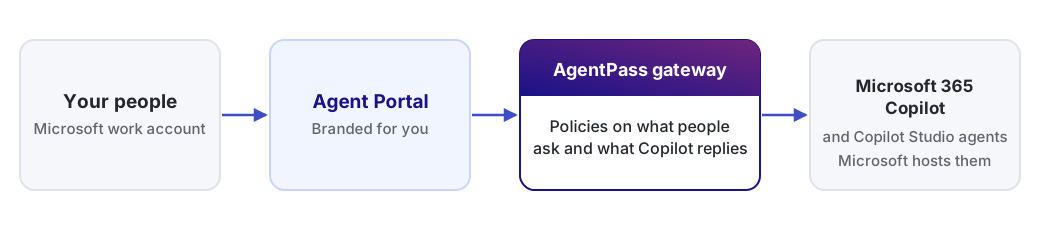
Microsoft 365 Copilot is a provider-managed agent. Microsoft hosts it, and HYPR AgentPass™ governs the conversation between your people and it.
In the console, Copilot is a Cloud Agents connector. People reach Copilot, and the Copilot Studio agents you register on the connector, through the Agent Portal. They sign in to the portal with their Microsoft work account. The Copilot Studio agents you register are also listed on the Agents page, under the Microsoft provider chip.
The following diagram shows the path a conversation takes.
Set Up Microsoft 365 Copilot
You set up Microsoft 365 Copilot on its connector. Each step links to its detailed page.
-
Register the Microsoft Entra applications the connector needs. See Microsoft Entra Setup. To serve a Government Community Cloud (GCC) High tenant, start at Microsoft 365 Copilot on GCC High instead.
-
Add the connector. In Connectors, click Add connector, and under Cloud Agents choose Microsoft 365 Copilot. See Create the Connector.
-
Enter the Agent Portal sign-in details on the connector. See Set Up the Agent Portal.
-
Optional: Register Copilot Studio agents on the connector's Copilot Studio agents tab. See Microsoft 365 Copilot.
-
Govern what people ask and what Copilot replies. See Microsoft 365 Copilot Policies.
-
Optional: Brand the portal your people sign in to. See Portal Branding.
-
Share the portal link. Copy the Portal URL from the connector's Overview tab, and send it to your people.
Your people then chat with Copilot as end users. See Chatting in the Agent Portal.
Related
- Microsoft Entra Setup — register the Entra applications the connector needs
- Microsoft 365 Copilot — add the connector and register Copilot Studio agents
- Microsoft 365 Copilot on GCC High — serve a GCC High tenant
- Microsoft 365 Copilot Policies — govern what people ask and what Copilot replies
- Portal Branding — brand the portal your people sign in to
- Chatting in the Agent Portal — chat with Copilot as an end user