Turning Off an Agent
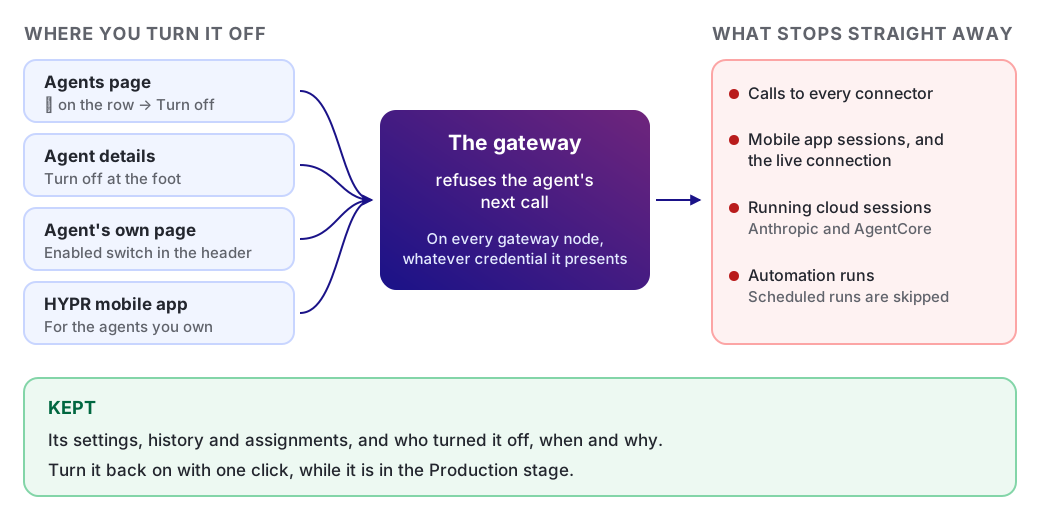
Turning an agent off stops it at the gateway straight away. Its next call is refused on every gateway node, whatever credential it presents. Its settings and history are kept, and you can turn it back on.
One switch works the same way for every kind of agent: local, cloud and workload.
When to Turn an Agent Off
Turn an agent off when it must stop now, but should not be deleted. For example:
-
It is behaving in a way you did not intend.
-
You are investigating it, and it must make no more calls meanwhile.
-
You want it stopped now, not at its next approval.
Turn an Agent Off in the Console
-
Open Agents, and find the agent. See Find an Agent.
-
On the agent's row, click ⋮, then click Turn off.
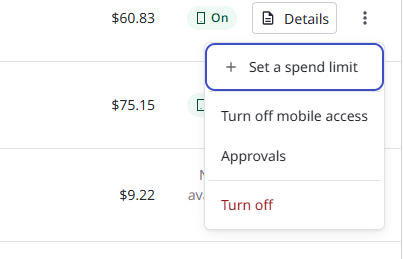
A dialog opens, titled Turn off and the agent's name. The agent's owner, provider and where it runs are under the title.
-
Read Straight away. It lists what happens to this agent as soon as you confirm.
-
Optional: In Reason (optional), enter why you are turning it off, up to 480 characters. AgentPass records the reason with your name.
-
Click Turn off. To leave the agent running, click Keep it on.
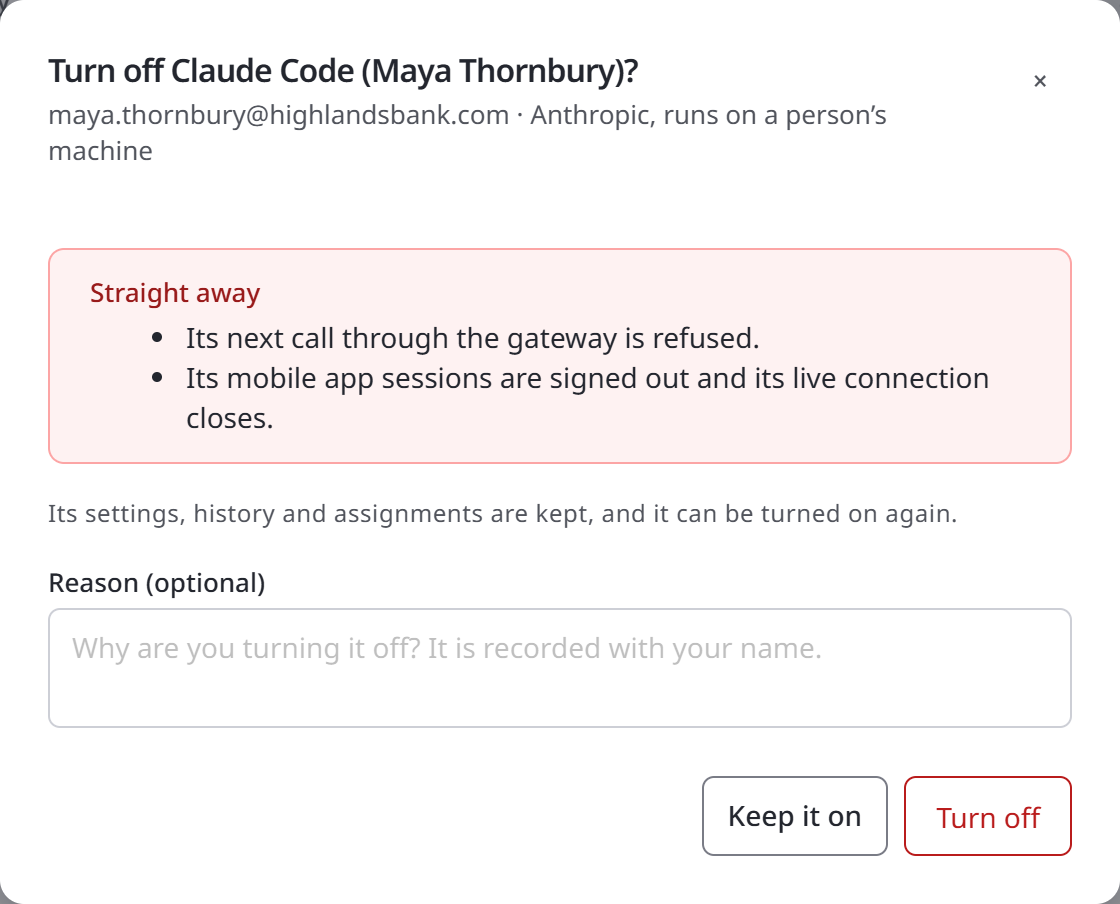
The same dialog opens from two other places:
-
Turn off at the foot of the agent's details.
-
The Enabled switch in the header of the agent's own page.
Turn an Agent Off From the Mobile App
A supervisor can turn off an agent they own from the HYPR mobile app. They do not need to wait for the agent to ask for an approval.
See Turning an Agent Off in the supervisor guide.
What Stops Straight Away
The gateway refuses the agent's next call to any connector. A call already in progress when you turn the agent off is allowed to finish.
Agent status is read fresh on every request, on every gateway node. There is nothing to wait for, and nothing to restart.
What else stops depends on the kind of agent, as described in the following table.
| Agent | What else stops |
|---|---|
| A local agent reached through the HYPR mobile app, such as Claude Code or Codex CLI | Its mobile app sessions are signed out, and its live connection closes |
| Any cloud agent | Messages are refused, in its existing conversations and in a new chat |
| An Anthropic cloud agent | Its running sessions at Anthropic are interrupted, then archived. An archived session is read-only, and cannot be continued |
| An AWS Bedrock AgentCore agent | Its running AgentCore runtime sessions are stopped in AWS |
| A workload agent | Its calls are refused from every caller holding its credential. Any session it holds open is closed |
| An agent with automations | A run in progress ends. Scheduled and triggered runs are recorded as skipped, and never invoke the agent |
For a local agent, see also what the switch does not cover, in Switch a Local Agent Off.
What Is Kept
Turning an agent off removes nothing. AgentPass keeps:
-
Its settings, history and assignments. The agent's definition at its provider is untouched too.
-
Its credential. When a workload agent is turned back on, the same credential works again.
-
A record of the change. While the agent is off, the Agents list and the agent's page show who turned it off and when. The reason, if one was given, is recorded with it.
Who Can Turn an Agent Off and On
One rule decides who can turn an agent off and back on. It applies everywhere an agent is turned off or on:
-
The Agents page and an agent's details
-
The agent's own page
-
The Copilot Studio agents on a Microsoft 365 Copilot connector
-
The HYPR mobile app
The rule depends on what your role reaches, as described in the following table.
| Your role reaches | You can turn off | You can turn back on |
|---|---|---|
| All agents, as AgentPassAdmin and AgentPassOperator do | Any agent | Any agent |
| Only your own agents, as AgentPassSupervisor does | An agent you own | Only an agent you turned off yourself |
Being assigned to an agent does not let you turn it off. A control you cannot use is unavailable. Hover over it to see why, for example:
-
You can't turn this agent off. Ask its owner or an administrator.
-
Only the person who turned this agent off, or an administrator, can turn it back on.
Turn an Agent Back On
On the agent's row, click ⋮, then click Turn on. Turning on needs no confirmation.
Turn on in the agent's details, and the Enabled switch on its page, work the same way.
What happens next depends on the agent:
-
Every agent. The gateway accepts its next call.
-
A local agent. It stays off until someone turns it back on. Signing in to its AI provider again does not turn it on.
-
A cloud agent. People start new conversations with it. A conversation that was running when it was turned off cannot be continued.
-
A workload agent. Its existing credential works again.
An agent outside the Production stage cannot be turned on. Turn on stays unavailable, with the hint Move it to Production before turning it on. See Lifecycle Stages.
When You Need a Narrower or Wider Stop
Turning an agent off acts on the agent, for everyone who uses it. The following table lists the other controls, from narrowest to widest.
| To | Use |
|---|---|
| Freeze one session, and leave the agent running for everyone else | Pausing and Stopping a Session |
| Stop only the agent's HYPR mobile app sessions, and keep its calls flowing | Turn off mobile access in the agent's row menu. It ends the agent's messaging sessions with supervisors, and stops new ones opening. See Act on an Agent |
| Take an agent out of use for good | Move it to the Retired stage. See Lifecycle Stages |
| Remove an agent's access found in a periodic review | Running Access Reviews |
| Revoke everything a departing person held: credentials, sessions, connected accounts and assignments | Offboard a Person |
| Contain a whole organization | Contact your HYPR representative |
The session investigator can also turn an agent off for you. In enforce mode, a verdict that ends a session can also turn off the agent's identity. See A Hostile Verdict Disables the Identity.
Related
-
How AgentPass Organizes Agents — the Agents page, its filters and the row menu
-
Approving and Denying Agent Actions — the supervisor's view, including the mobile app switch
-
Security Controls — the stopping-an-agent controls, AP-KILL-1 to AP-KILL-10