Session Watch: Settings and Cost
Session Watch settings bound how often evaluators are sent activity, what a review may spend, and which sessions can be watched. Changing them needs Session watch: Manage, which Admin holds. See Who Can Do What.
Session Watch Settings
Settings on the Session Watch page opens the controls that apply to your whole organization. Only roles that manage Session Watch see it.
The drawer has three sections:
| Section | What it controls |
|---|---|
| Limits | How often digests are sent, how large they are, how much a review may spend, how long a watch may run, and how many watches may run at once. |
| Unattributable Traffic | Which connectors' anonymous sessions can be watched, and who answers for them. |
| Pause Automatic Attachment | A single control that disables every rule at once. |
Change what you need and select Save. If a value is refused, the drawer stays open and lists what to correct.
Limits
Limits bound what Session Watch costs and how far an automatic rule can reach. They apply to every connector and every evaluator.
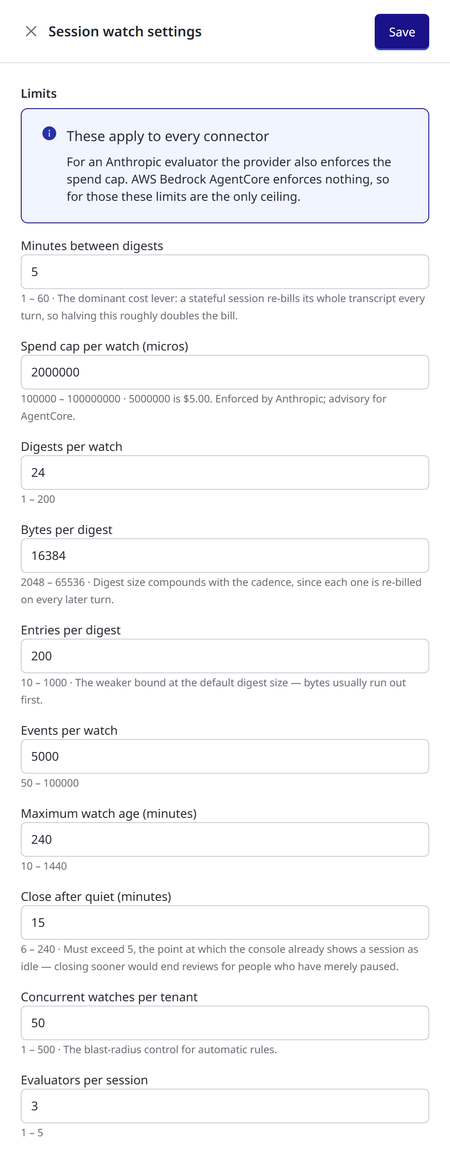
Each limit shows its permitted range beneath the field. AgentPass refuses a value outside that range rather than quietly adjusting it.
| Limit | What it controls | When it is reached |
|---|---|---|
| Minutes between digests | How often a watched session's activity is sent to its evaluator. The shorter the interval, the sooner findings arrive — and the higher the cost (see Controlling Cost). | Not a cap: it sets the pace of every watch. |
| Spend cap per watch | The most one watch may spend at the AI provider. Entered in millionths of a US dollar, so 5000000 is $5.00. | The watch stops with Spend limit reached. For Anthropic evaluators the provider enforces the cap; for AWS Bedrock AgentCore evaluators it is advisory, because AgentCore enforces no spend limit. |
| Digests per watch | How many digests one watch may send. | The watch stops with Timed out. |
| Bytes per digest | The largest one digest may be. | The digest is sent capped, and the rest of its activity follows in the next digest. Nothing is dropped. |
| Entries per digest | The most events one digest may carry. Usually the size limit is reached first. | As for Bytes per digest. |
| Events per watch | How many events one watch may send in total. | The watch stops with Timed out. |
| Maximum watch age | How long one watch may run, however active the session. | The watch stops with Timed out. |
| Close after quiet | How long a session may go without activity before its watch closes. It must be longer than the point at which the console already shows a session as idle, so a person who has merely paused is not dropped. | The watch closes with Ended. This is the normal way a watch ends. |
| Concurrent watches per tenant | How many watches may run at once across your organization — the control that bounds how far a broad rule can reach. | New watches are not started. A manual attach is refused with the reason; a session that matches a rule is recorded as Not started. |
| Evaluators per session | How many evaluators may watch one session at once. | Attaching another evaluator to that session is refused. |
The following table lists each field's label, permitted range and default.
| Field | Range | Default |
|---|---|---|
| Minutes between digests | 1–60 | 5 |
| Spend cap per watch (micros) | 100000–100000000 ($0.10–$100) | 5000000 ($5.00) |
| Digests per watch | 1–200 | 24 |
| Bytes per digest | 2048–65536 | 16384 |
| Entries per digest | 10–1000 | 200 |
| Events per watch | 50–100000 | 5000 |
| Maximum watch age (minutes) | 10–1440 | 240 |
| Close after quiet (minutes) | 6–240. It must be more than 5, the point at which the console shows a session as idle | 15 |
| Concurrent watches per tenant | 1–500 | 50 |
| Evaluators per session | 1–5. The console attaches at most 3 | 3 |
When Changes Take Effect
- New watches use the limits in force when they start.
- Minutes between digests applies to a running watch from its next digest onward. A watch waiting on a long interval sends its next digest on the old schedule, then follows the new one.
- Spend cap per watch applies to watches that start after the change. Watches already running keep the cap they started with.
- Digests per watch, Events per watch, Maximum watch age and Close after quiet are checked periodically against running watches, so a watch may run briefly past a limit before it is stopped.
- Concurrent watches per tenant and Evaluators per session are checked each time an evaluator is attached. Lowering them does not stop watches already running.
How Quickly Findings Arrive
A finding reaches the console no sooner than two intervals of Minutes between digests after the activity it concerns: one for the activity to be sent in a digest, and one for the evaluator's reply to be read on the next delivery. To get findings sooner — for a demonstration or a focused investigation — shorten Minutes between digests, and consider shortening Close after quiet so that a test session's watch ends soon after the session does.
Remember to restore the interval afterwards. It is the setting with the largest effect on cost.
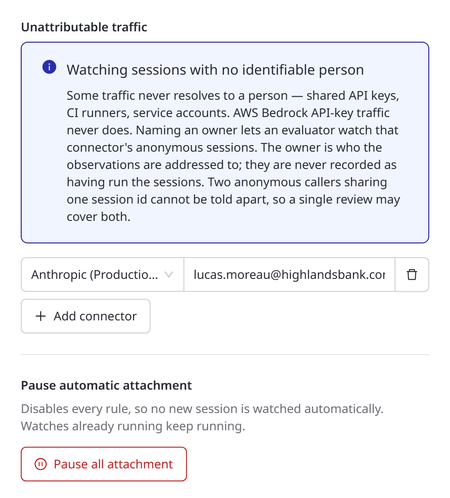
Unattributable Traffic
Some sessions never resolve to an individual. Shared API keys, CI runners and service accounts all look the same to the gateway, and AWS Bedrock API-key traffic can never be traced to a person.
These may be the sessions you most want reviewed, so AgentPass can watch them once somebody agrees to answer for them:
- Open Activity › Session watch, and click Settings.
- Under Unattributable traffic, click Add connector.
- Choose the connector. Only connectors that record sessions appear in the list. Each shows its display name, with its internal name in parentheses.
- Enter the owner's email address.
- Click Save.
The internal name is what session records carry, and what the Unattributed rows of the Sessions list show.
Sessions on that connector then become watchable, and their findings are addressed to that owner. To stop watching a connector's anonymous sessions, remove its row, and click Save. If a row names a connector that no longer exists, the drawer flags it, because it matches nothing.
The owner is accountable, not responsible. AgentPass records them as the person to tell, never as the person who ran the session. No finding, export or Sessions row says they did. Until an owner is named, these sessions show as Cannot watch, and the refusal tells you which setting changes that.
Two anonymous callers that share a session identifier cannot be told apart, because the traffic carries no identity to distinguish them. A single review may therefore cover both. No named individual is ever involved.
Pause Automatic Attachment
Pause all attachment disables every rule at once, so no new session is watched automatically. Use it when you need to stop automatic reviewing quickly — during a cost concern, for example.
- Open Activity › Session watch, and click Settings.
- Under Pause automatic attachment, click Pause all attachment.
- In Pause all automatic attachment?, click Yes, pause attachment.
Two things stay as they are:
- Your rules are kept, not deleted. A rule that covers a single connector can be turned back on from that connector's Session watch tab.
- Watches already running keep running. If you need them ended now, detach them individually from their sessions, or from the session drawer on the Session Watch page.
The confirmation states both. After you confirm, AgentPass reports how many rules were disabled.
Controlling Cost
An evaluator is an AI agent, and reviewing a session costs money at your AI provider. Two things make the cost larger than it first appears:
- An evaluator's conversation is cumulative, so every digest is charged along with everything sent before it.
- A rule can start many reviews at once.
The Limits govern all of it. To open them, click Settings on the Session Watch page.
- Minutes between digests has the largest effect. Because each digest is charged along with every earlier one, halving the interval roughly doubles the cost of a review.
- Bytes per digest compounds with it: a larger digest is charged again on every later turn.
- Spend cap per watch bounds any single review.
- Concurrent watches per tenant bounds how many reviews a broad rule can start at once.
- Maximum watch age and Close after quiet bound how long a review runs.
Evaluator spend does not appear in any other cost view in AgentPass. An evaluator's AI usage goes directly to your provider, without passing through the gateway, so the gateway cannot see it. The Session Watch page footer and each session's Watching this session panel are the only places it is reported. For the same reason, a daily spend limit does not count it.
To stop all automatic reviewing at once, use Pause Automatic Attachment.
Related
- Session Watch — what an evaluator is, the Session Watch page and who can do what
- Session Watch: Attaching Evaluators — attach an evaluator by hand, or with a rule
- Session Watch: Findings — what a finding carries and proves, and how to read one on a session