Session Watch: Findings
Findings are what an evaluator reports about a session it watches. This page covers what a finding carries and proves, and how to read findings and digests on a session. You need Session watch: View and Request log: View. See Who Can Do What.
Findings
A finding is also called an observation. You meet findings in four places:
- The Findings tab on the Session Watch page, which lists every finding from every watched session
- The Findings list on a session's Evaluator agents tab
- The Finding column and the tool-call drawer on the session's activity, described in Reviewing a Session
- Each digest's reply, described in Reading a Digest
Each finding carries:
- A severity and a category, both from a fixed set. An evaluator cannot invent new ones. See Severities and Categories.
- A short rationale.
- A link to the exact request it concerns, which opens the same detail view as the Request Log. A finding about the session as a whole cites no single request.
AgentPass does not record a finding that cites a request it never sent to that evaluator.
A finding may also carry a short title written by the evaluator: a one-line headline, such as Request to post credentials to an external URL. When it has one, the title heads the finding, and the category appears beside it. When it has none, the category heads it. A title is the evaluator's own wording. Like the rationale, it describes what was requested.
To mark a finding as handled, click Dismiss. Dismissing does not delete it. It stays with a dismissed tag, so "an administrator reviewed this and decided it was nothing" stays distinct from "nothing was ever reported."
Severities and Categories
There are five severities. From highest to lowest, they are Critical, High, Medium, Low and Info. A severity an evaluator returns outside this set is recorded as Info.
Each category is worded as a request.
| Category | What it reports |
|---|---|
| Credential access requested | The agent asked to read or use credentials |
| Sensitive file access requested | The agent asked to open a sensitive file |
| Destructive command requested | The agent asked to run a destructive command |
| Network fetch requested | The agent asked to fetch from the network |
| Activity outside the stated task | The activity strayed from the task the session was given |
| Repeated failures | Repeated failures in the session |
| Session summary | A summary of the session |
| Restricted target requested | The agent asked to reach a host, file or system that your organization restricts |
| Security control tampering requested | The agent asked to change, disable or get around a security control, such as a policy, a guard or a check |
| Other | Anything else. A category an evaluator returns outside this set is recorded as Other |
AgentPass tells every evaluator which categories it may use. If an evaluator's own instructions define categories of their own, change them to the names in this table. A finding outside the set is recorded as Other, and is grouped there on the Findings tab. A finding that names the file, host or command it concerns is also placed more precisely in the entity graph.
What a Finding Proves
AgentPass records the calls an agent asked to make, not their results. A command the person denied in their own client looks identical to one that ran. A URL the agent asked to fetch is not proof that any request left the machine.
For this reason, findings are worded as requests, and every row carries a requested tag. The tag survives when you screenshot a finding into a ticket or a chat, where the surrounding explanation would otherwise be lost.
Two more limits apply:
- An empty list is not an all-clear. "Nothing reported" means no evaluator has raised anything from the digests sent so far. It does not say the session was clean, and the list says so.
- An evaluator sees a window, not the whole session. It reviews digests as they arrive. If a session ends between digests, the last of its activity may never be reviewed.
The same caveat covers the entity graph. When it says a file was touched 12 times, the agent requested a call naming that file 12 times. It does not say any of those calls ran.
If No Findings Arrive
A watched session with no open findings never just says "none." Its Findings column on the Sessions list states which of four situations it is in. Hover over the label for an explanation. The session's Digests list shows the same situation for each digest.
| Findings column | On the Digests list | What it means |
|---|---|---|
| No digest sent yet | No digests listed | The evaluator has not been sent any of this session's activity yet. Nothing has been reviewed |
| Awaiting evaluator reply | Awaiting reply | Activity was sent, and the evaluator's answer has not been read yet. It is read on the next delivery |
| Reviewed - nothing found | Reviewed · nothing reported | The evaluator replied and reported nothing. This covers what it was sent, not the whole session |
| Evaluator reply not in the expected format | Reply not in the expected format | The evaluator answered, but not in a form AgentPass can record |
Only Reviewed - nothing found means that an evaluator looked and found nothing. Even then, it covers only the activity the evaluator was sent.
Give a new watch two delivery cycles before you expect findings, roughly ten minutes on the default cadence. AgentPass reads an evaluator's answers on the delivery after it sends, so the first digest of a new watch has nothing to read back yet. Minutes between digests sets how long a cycle takes. See Limits.
A session can show Evaluator reply not in the expected format. Or the watch can show digests delivered and no errors, while no findings arrive after several cycles. In either case, check the evaluator's own system prompt. Each digest asks for findings in the evaluator reply format, but AgentPass records them only when the agent's own prompt asks for that format too. An agent whose prompt tells it to answer in a particular style, such as always summarizing or replying in prose, replies in a form AgentPass cannot record. A finding with no rationale is not recorded either.
If you see either:
- Open the digest to read what the evaluator actually said, and why each finding was not recorded. See Reading a Digest.
- Load the Security session evaluator sample into the agent's system prompt, or make sure the prompt asks for the evaluator reply format. See Adding the Evaluator Prompt.
- Detach the evaluator, and attach it again. A running watch keeps the evaluator session it started with, so it may not pick up the new prompt.
Reviewing a Session
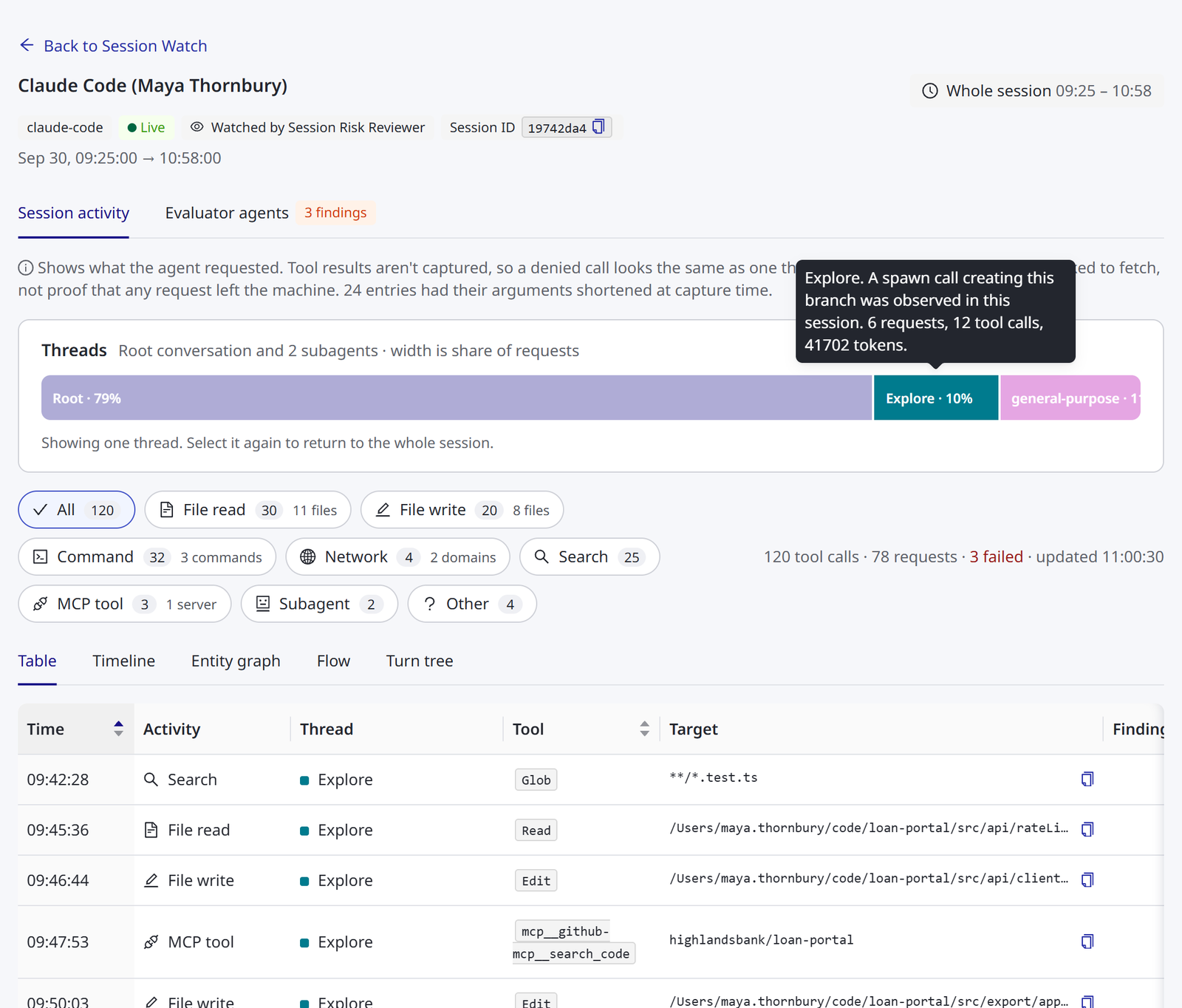
A session page is headed by the agent's name. Beside it are the session's client, whether it is Live, who is watching it, and its Session ID, which you can select to copy. Beneath the header is the session's time span. The page covers the whole session, from its first recorded request to its latest. On a very long session, it shows the most recent activity, and says so.
Back to Session Watch returns you to the Session Watch page, with the tab and filters you had set. A session opened from the Request Log returns you there instead.
The page has two tabs:
- Session activity: what the agent did. It holds the statement of what the record proves, the Threads bar, the activity filters and totals, and the five representations. See Reading a Session.
- Evaluator agents: who is reviewing the session and what they reported. It holds Watching this session, the session's Findings and its Digests. When the session has open findings, the tab's label shows how many, colored by the highest severity. This tab appears only to roles that can view Session Watch. See Who Can Do What.
Findings on the Activity Table
On the Session activity tab, the table's Finding column shows the highest open evaluator finding on each request. It adds +1, +2 and so on when there is more than one. It is empty when nothing open was reported about the request.
The same column shows Failed when the request itself failed. That is the request's own outcome, reported by the gateway, not by an evaluator. A request that both failed and was flagged shows both.
A failed request is not a finding, and a finding is not a failure. An evaluator may flag a request that succeeded.
The Tool-Call Drawer
Select a row in the table to open that tool call in a drawer beside the page. The drawer shows:
- The call's category, tool name and time, and Request failed when it failed
- The thread it belongs to, when the session has more than one, and the connector it went through
- Every finding on that call, each with its severity, title or category, the
requestedtag, its rationale, the evaluator that reported it and when, and Dismiss for roles that manage Session Watch - The Target the call named, with a copy control
- What the call Touched
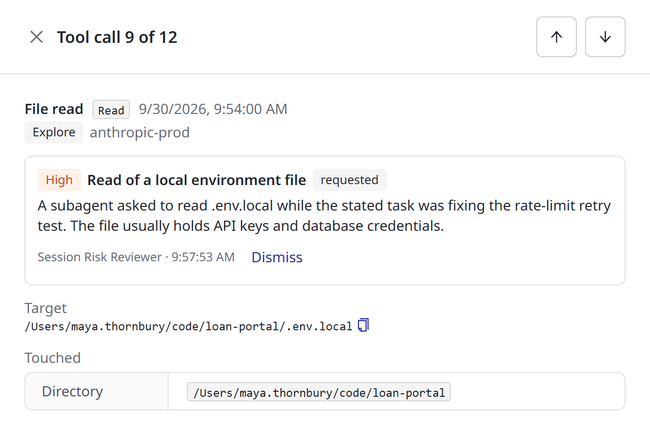
The drawer's title says which call you are on, such as Tool call 10 of 12. To step through the calls in the table's current order and filter, use the up and down arrow buttons, or the arrow keys. Open request detail closes the drawer, and opens the full request in the same view as the Request Log. Show only this thread narrows the session to the call's thread. See Subagent Attribution.
The Evaluator Agents Tab
Attaching an Evaluator to a Session describes Watching this session.
Findings opens with a reminder that findings show what the agent requested, not what actually ran. Beneath it, Why might a finding not be recorded? expands three steps, and Hide steps folds them again:
- AgentPass records only findings written in its reply format, so the evaluator agent's own prompt must ask for that format.
- To add it, edit the evaluator agent from Agents, and choose the Security session evaluator sample above its system prompt box. For an AgentCore agent deployed from the evaluator agent template, restore the template's prompt. See Adding the Evaluator Prompt.
- Open a digest to see why each finding in it was not recorded.
The list shows every finding on the session, highest severity first. Each shows its title or category, the requested tag, its rationale, when it was observed, and the request it cites. The cited request shows its time and tool, and the subagent when the session has more than one thread. Select the request to open it. Roles that manage Session Watch see Dismiss on each open finding.
Digests lists, for each evaluator on the session, every digest it was sent. Each shows when it was sent, how many events it carried, the span of activity it covered, and what came back.
| Outcome | Meaning |
|---|---|
| Reported n findings | The evaluator's reply contained findings |
| Reviewed · nothing reported | The evaluator replied and reported nothing about this digest |
| Reply not in the expected format | The evaluator replied without a findings list AgentPass could read, or wrote findings AgentPass could not record. Check the agent's prompt |
| Awaiting reply | The newest digest, whose reply has not been read yet |
| No reply read | An older digest whose reply was never read, for example because the watch ended first |
A digest marked capped was cut short by a size limit, and the rest of its activity followed in the next one. Select a digest to read it.
Reading a Digest
Selecting a digest opens it in a drawer, so you can read exactly what the evaluator said about it.
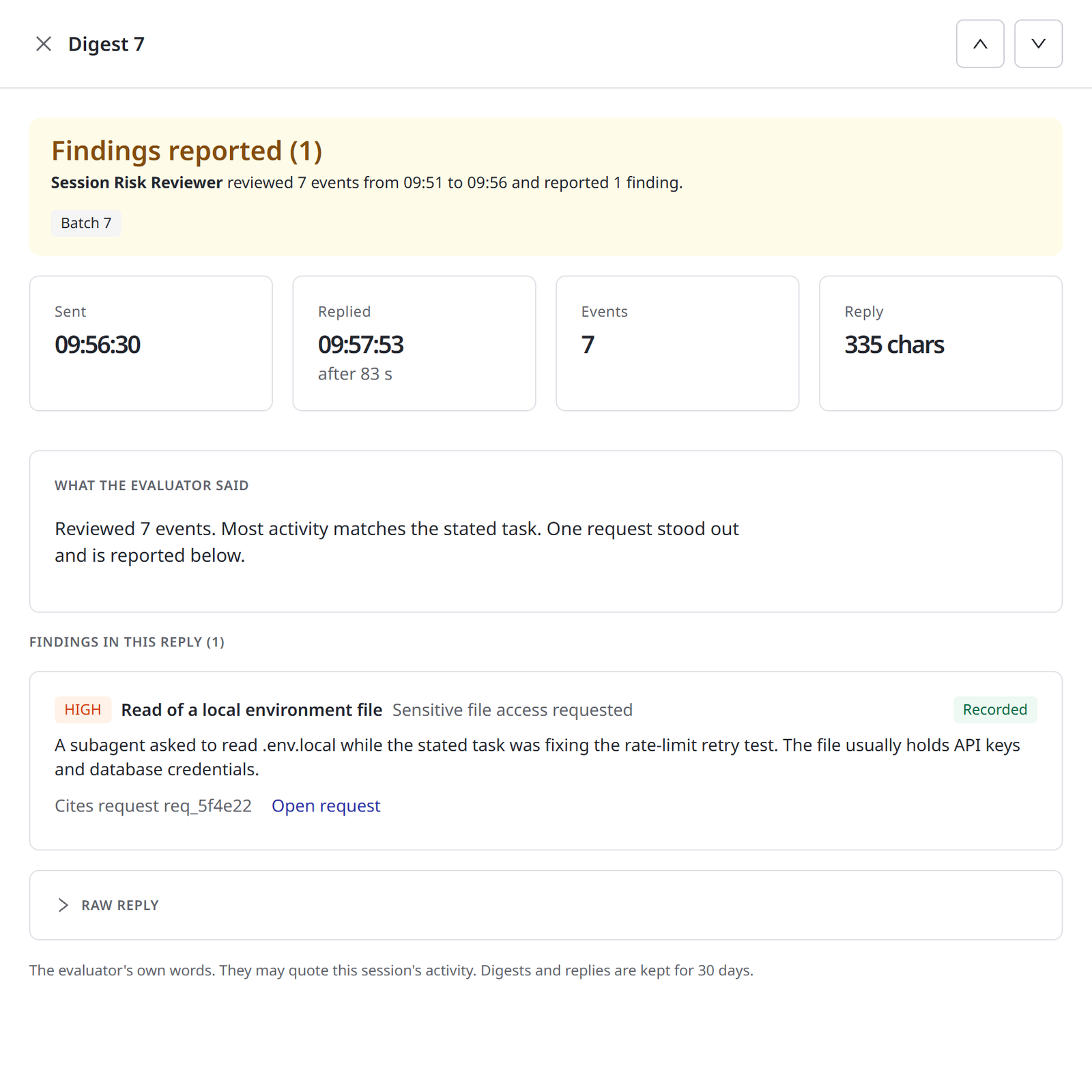
At the top, a banner states the outcome: Findings reported, Nothing reported, Reply not in the expected format or Awaiting reply. It summarizes the outcome in one line: which evaluator reviewed how many events, over what span, and what it reported. When the reply held findings but none could be recorded, the line says the evaluator wrote findings AgentPass could not record. A capped tag appears when a size limit cut the digest short.
Beneath the banner are four figures.
| Figure | Shows |
|---|---|
| Sent | When AgentPass sent the digest |
| Replied | When the evaluator replied, and how long after the digest it was |
| Events | How many events the digest carried |
| Reply | How long the reply was. shortened appears when a very long reply was cut for storage |
Then comes the evaluator's reply:
- What the evaluator said: its reasoning, as it wrote it. When the reply had no findings list AgentPass could read, the heading says so, and the reply is shown here.
- Findings in this reply: each finding the evaluator wrote, with its severity, title or category, rationale and the request it cites. Each one is marked Recorded when AgentPass recorded it as a finding, or Not recorded when it did not. A finding that was not recorded states the reason on its card:
- No rationale. The evaluator's prompt may be missing the reply format.
- Cites a request not in this digest
- The reply held more findings than the per-reply limit allows.
- Raw reply: collapsed by default. Expand it to see the reply exactly as it arrived.
To step to the newer and older digests, use the up and down arrow buttons in the drawer's header.
A reply is the evaluator's own words, and it may quote the session's activity. Digests and replies are kept for 30 days. The digest itself, the activity AgentPass sent, is never shown.
Related
- Session Watch — what an evaluator is, the Session Watch page and who can do what
- Session Watch: Findings Across Sessions — the Findings tab and the entity graph
- Session Watch: Attaching Evaluators — attach an evaluator by hand, or with a rule
- Reading a Session — the session activity views