Session Watch: Attaching Evaluators
An evaluator reviews a session once you attach it: by hand for one session, or with a rule for every session that matches. You need Session watch: Manage, which Admin holds. See Who Can Do What.
To tag an agent as an evaluator first, see What an Evaluator Is.
Attaching an Evaluator to a Session
- Open a session from the Sessions list on the Session Watch page. For the other ways to reach one, see Overview.
- Click the session page's Evaluator agents tab.
- Under Watching this session, choose an evaluator.
- Click Attach, and confirm.
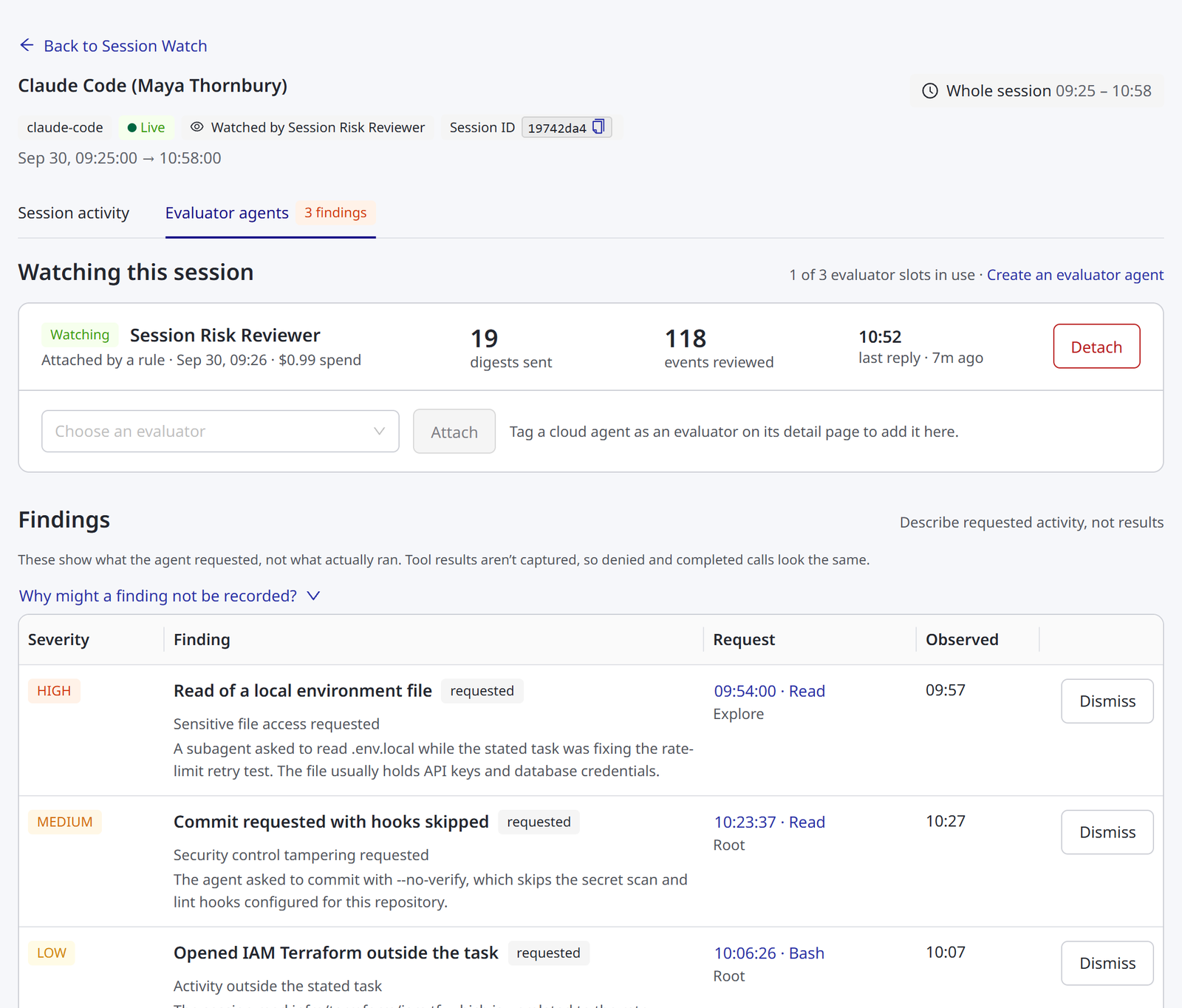
Watching this session lists every evaluator on the session with its state, who attached it and when (Attached by a rule for a watch a rule started), its spend, the digests it was sent, the events it reviewed, and when it last replied. The state is Watching while the evaluator is live. Once it stops, the state says why, such as Detached or Spend limit reached, and a failed watch shows its recorded error. See Watch Statuses. To stop an evaluator that is still watching, click Detach.
A session can have up to three evaluators at once, so you can pair a general reviewer with a specialist. The panel shows how many of those slots are in use. Beside the count, roles that can view agents see Create an evaluator agent, which opens Agents. See Setting Up an Evaluator Agent. To allow fewer, lower Evaluators per session in the limits.
The session header shows Watched by and the evaluator's name, or Not watched. You can tell whether anyone is reviewing a session without opening the tab.
Agents that cannot be attached are shown in the list with the reason, not hidden. An agent that is not tagged, is already watching this session or is not active appears grayed out, and says why. When no agent is tagged as an evaluator, the panel tells you where to tag one.
What the Confirmation Tells You
The confirmation states four things:
- The person is not told. No notification is sent to them.
- The evaluator acts as you. The audit trail attributes anything it does with its own tools, such as a Slack post or a ticket, to the administrator who attached it, not the person being reviewed.
- It reports what was requested. See What a Finding Proves.
- Activity sent cannot be recalled. Detaching stops future digests. It does not retrieve what has already gone to the AI provider.
Sessions That Cannot Be Watched
Attaching is refused when:
- More than one agent or person has sent activity under the session identifier, which would risk reporting one person's work to another.
- The session belongs to a managed agent, not a person.
- The session identifier was recovered from stored request context, not observed on the request.
- No person can be identified for the session, and no owner is named for its connector. See Unattributable Traffic.
- The evaluator is not tagged, is disabled or archived, or is already watching the session.
- The session has reached its evaluator limit, or your organization has reached its concurrent-watch limit. These can pass later, as watches end. See Limits.
Each refusal states its reason when you try.
Watching Sessions Automatically
Attaching by hand suits investigations. For ongoing oversight, create a rule on the Session watch tab of an inference connector: an Anthropic, OpenAI or AWS Bedrock connector.
- Open Connectors, open the connector, and click the Session watch tab.
- Under Add a rule, choose what to watch. For a group or an agent rule, choose the group or the agent.
- Choose an evaluator.
- To cover every inference connector, turn off the Only sessions on switch.
- Click Create rule.
A rule chooses which sessions get an evaluator.
| Rule | Watches |
|---|---|
| Every session | All sessions in scope. The widest setting, so it asks you to confirm |
| Sessions for a group | Sessions started by members of one group. Membership stays current through your existing directory sync |
| Sessions from an agent | Sessions produced by one agent, whoever runs it |
"Sessions from an agent" and "sessions for a group" answer different questions. One agent may be shared by several people, and one person may run several agents. Choose by whether you are reviewing a tool or a team.
Each rule can apply to one connector, or to any inference connector. Choose any connector unless you have a reason not to. Otherwise, someone who uses two AI providers in a day matches two rules, and is reviewed twice, at twice the cost.
Rules apply to sessions that start afterward. Enabling a rule does not reach back over sessions that have already run.
Before you create a rule, the tab shows what it would cover: how many sessions and people used that connector in the last seven days, how many of those sessions cannot be watched at all, and how many watches are running against the concurrent limit.
A rule respects every limit in Session Watch Settings. When your organization is already running as many watches as it allows, a session that matches a rule is recorded as Not started, not watched. To stop every rule at once, use Pause Automatic Attachment.
Rules Table
The Rules table lists each rule that covers the connector. To pause a rule for this connector, turn off its Enabled switch. To remove it, click Delete, then Yes, delete rule. Deleting a rule stops it watching new sessions. Watches it already started keep running until they end.
A rule that covers any inference connector is listed on every connector's tab, but cannot be switched off or deleted there.
The table has these columns.
| Column | Shows |
|---|---|
| Applies to | The rule type, and the group or agent it selects |
| Connector | This connector, or any connector for a rule that covers every inference connector |
| Evaluator | The evaluator the rule attaches |
| Created by | The administrator who created the rule. Watches it starts, and the evaluator's own tool actions, are attributed to this person |
| Enabled | Whether the rule attaches evaluators to new sessions |
Related
- Session Watch — what an evaluator is, the Session Watch page and who can do what
- Session Watch: Findings — what a finding carries and proves, and how to read one on a session
- Session Watch: Settings and Cost — limits, unattributable traffic, pausing rules and cost