Affirm OIDC Settings
OIDC Settings
OIDC settings can be used to trigger OIDC authentication for the requester or approver.
Currently, these are only assignable to a verification flow via the HYPR Affirm API.
For the requester, this will force an OIDC authentication at the specified part of the flow. It must be assigned to the verification flow, and the setting for the specific step should be enabled to trigger when the authentication should take place.
For the approver, this will force an OIDC authentication before the approver enters a verification flow to which they were invited via email or SMS.
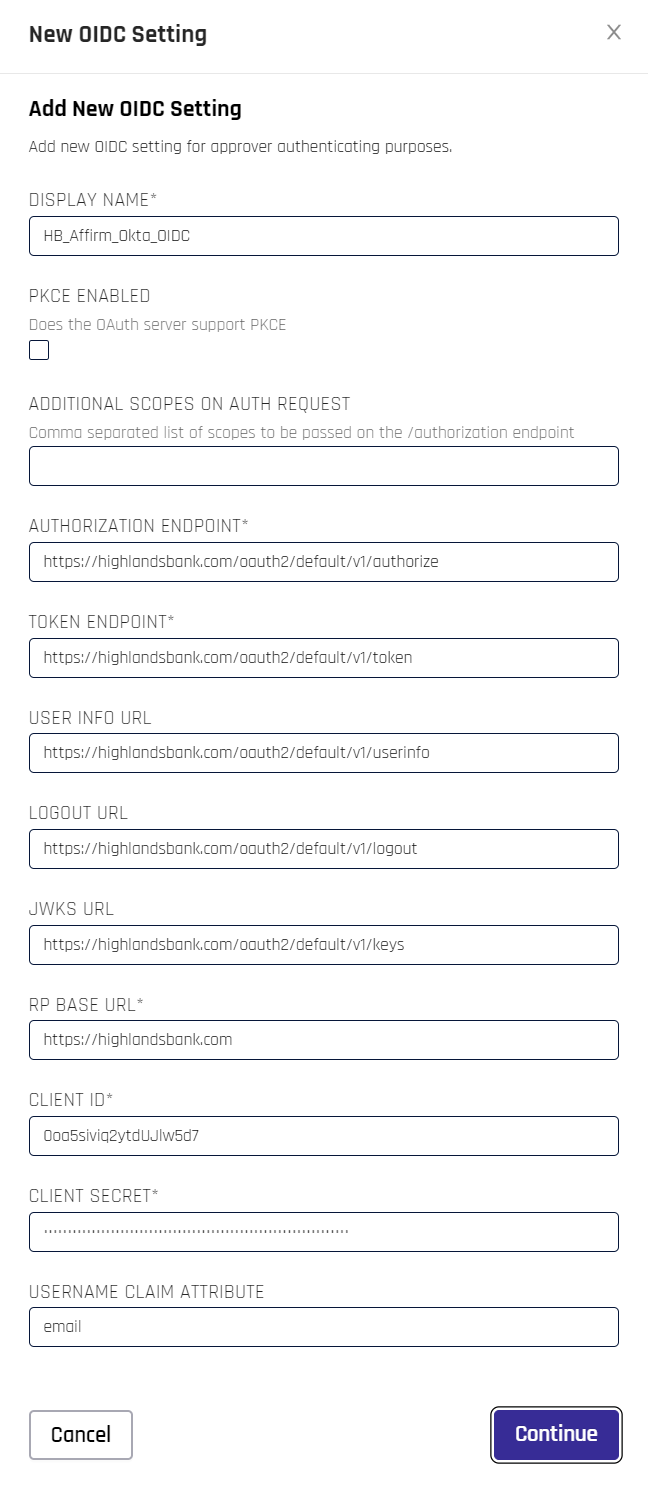
OIDC settings are identical to those defined under Identity Provider (IdP) Management with only a few exceptions, which are listed here:
-
PKCE ENABLED: Check this box if you are using Proof Key of Code Exchange (PKCE)
-
ADDITIONAL SCOPES ON AUTH REQUEST: If you are using non-default Okta API Scopes, list them here separated by commas
-
RP BASE URL: This value is the same as the HYPR URL in IdP Management
OIDC settings enhancements (10.1+)
In HYPR 10.1 and later, Affirm OIDC settings include several enhancements beyond the baseline IdP configuration:
-
Resource field support
Some IdPs require aresourceparameter on authorization or token requests. Affirm OIDC settings support this field so you can supply the correct resource value directly in Control Center. -
Additional name/value parameters
You can configure extra OIDC name/value pairs to be sent with authentication requests when your IdP expects additional parameters. This is intended for advanced scenarios (for example, routing to a specific policy or resource server) and should be configured in coordination with your IdP team. -
Per‑customization OIDC settings
Each Affirm customization can use its own OIDC client configuration. This enables patterns such as:- A Custom User Directory that authenticates against one IdP (for example, Okta) via OIDC, while
- An email‑based flow uses a different IdP (for example, Google Workspace) with its own OIDC settings.
For the core OIDC fields and their semantics, see Identity Provider (IdP) Management. The additional Affirm‑specific options follow the same conventions but are scoped to Affirm verification flows and customizations.
Don't forget to click Continue when you are satisfied with your entries.
Pass additional authorization-request parameters
The OIDC settings form exposes a Generic Parameters key-value editor. Every pair you add is appended to the authorization request Affirm sends to the IdP, which is how you supply parameters that have no dedicated field on the form.
Use it when your IdP requires a request parameter to enforce a particular authentication behavior — for example, acr_values to demand a specific assurance level, or prompt to control whether the IdP re-challenges the user rather than reusing an existing session.
| Field | What it does |
|---|---|
| Additional scopes on auth request | Comma-separated scopes appended to the /authorization request. |
| Resource | Identifies the target service or resource that access is being requested for. |
| Generic Parameters | Arbitrary key-value pairs appended to the authorization request. |
Confirm the exact parameter names and accepted values against your IdP's documentation — Affirm passes them through without interpreting them.
Related
- Writing Affirm Code Customizations — the customization runtime and the
ctxobject - Affirm Customizations (Code Customization API) — per-customization OIDC configuration is part of code customization
- Identity Provider (IdP) Management — core OIDC field semantics