Activity Log
The Activity Log records every verification attempt against the tenant — completed, abandoned, denied — with the per-flow status, decision, and a link to a detail view for each row. A date selection field and a search bar help filter Activity entries.
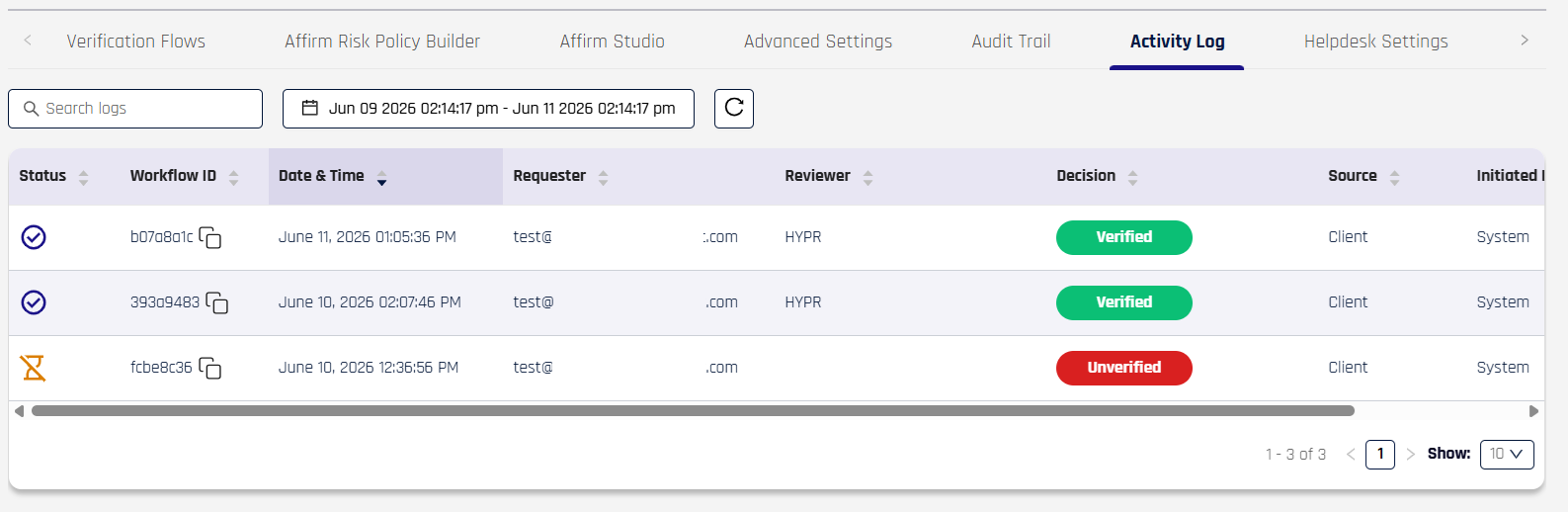
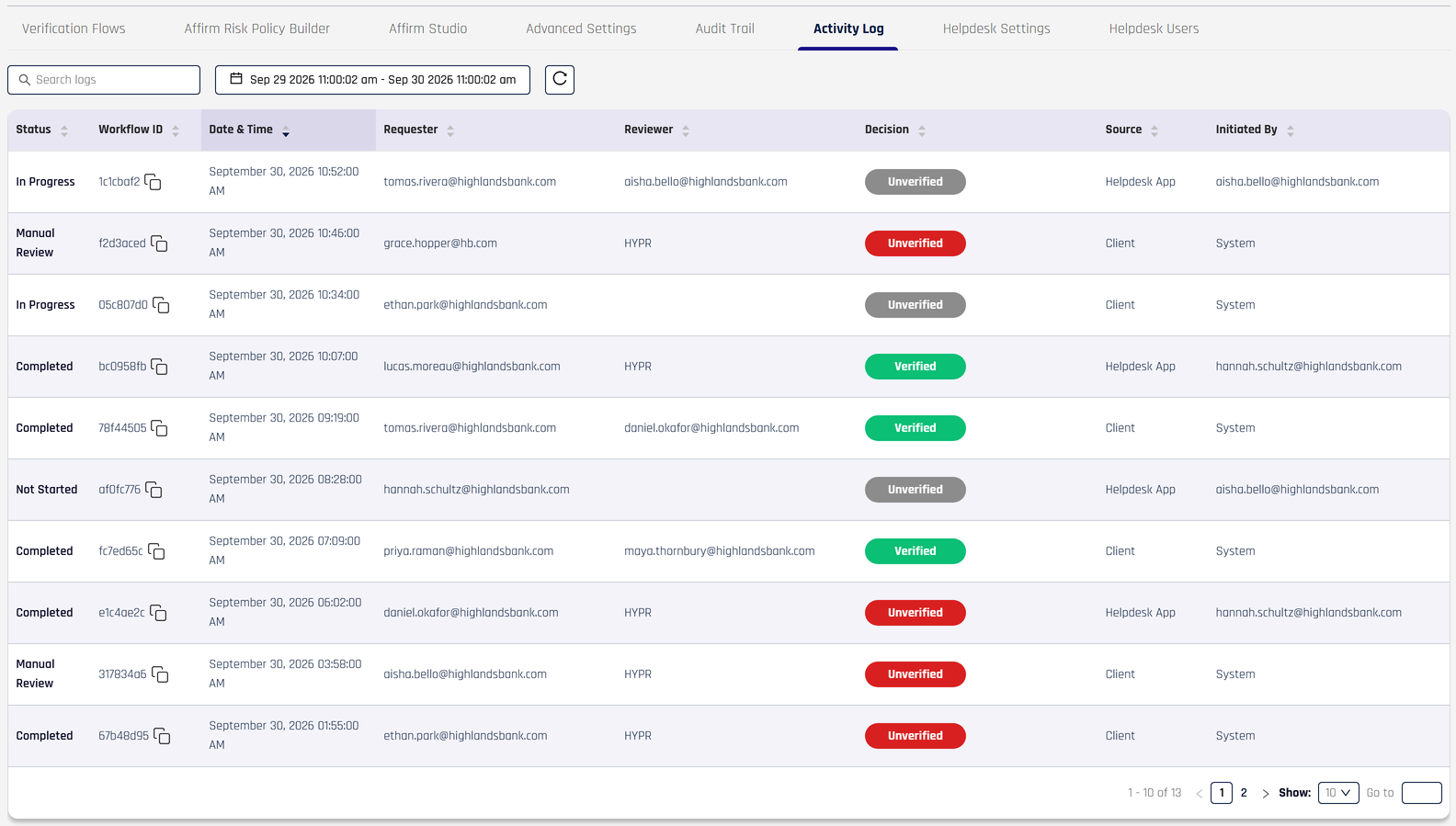
The Activity Log table in Control Center, accessed via the HYPR Affirm menu's Activity Log tab. Each row is a verification attempt with its Status, Workflow ID, Date & Time, Requester, Reviewer, Decision, Source, and Initiated By.
Activity Log fields
The Activity Log table uses the following columns:
| Field | Description |
|---|---|
| Status | The verification's lifecycle state — drawn from the canonical Verification Outcome Status Enum. See the enum reference for the complete value set and what each value means. |
| Workflow ID | The Verification Flow ID — the correlation key that ties this row to the Audit Trail, the Affirm API, and the per-flow event stream. A copy icon next to the value copies the full ID. |
| Date & Time | The start time of the verification, with date and 12-hour time. |
| Requester | The requester's identifier (typically email or UPN). |
| Reviewer | The user who reviewed the verification. If automated approval was used, the Reviewer is HYPR. |
| Decision | The verification's final decision — also drawn from the canonical Verification Outcome Status Enum. Decision values are displayed as colored badges (green for successful verification, red for failure) and stay consistent across the table, API, and event stream. |
| Source | The system surface that originated the verification (for example, Client for a self-service browser flow). |
| Initiated By | The user or system that initiated the verification. For Helpdesk-initiated flows this is the Helpdesk agent's identity; for self-service flows it is System or the originating system identifier. |
Each row is clickable — selecting a row opens the per-flow detail view described below. The bottom of the table shows pagination controls (range, page selector, page-size selector).
Activity Log details view
Clicking a row opens that verification's detail page — a single screen that brings together everything captured about the run.
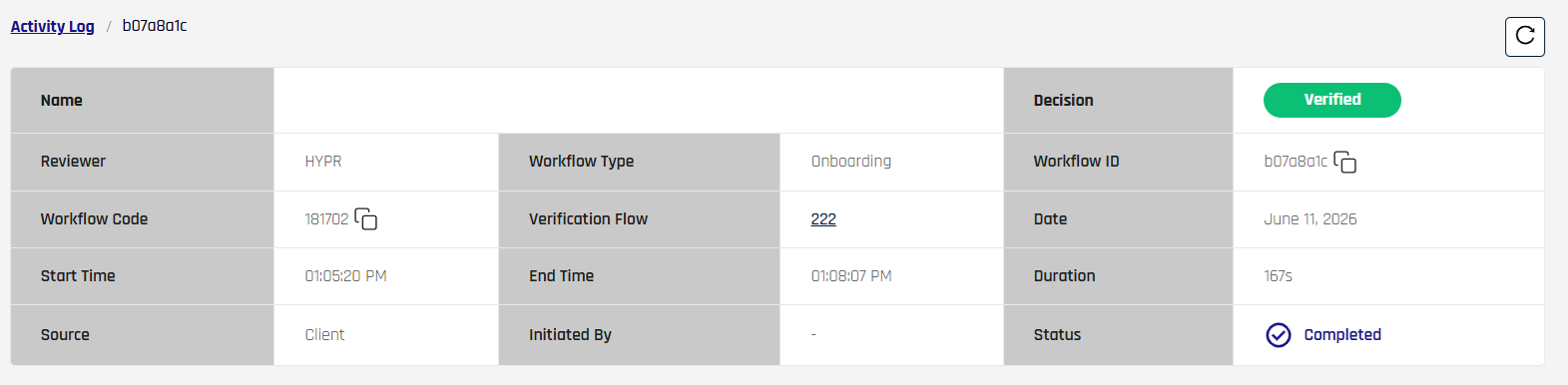
The detail-view header — a summary grid covering the verification's headline values. The Decision badge in the upper right matches the colour-coded value from the table.
The detail page serves the use cases the Activity Log table can't: investigating a single verification end-to-end, correlating it with downstream systems, reproducing what the requester experienced, and producing evidence for audit or compliance review.
It groups information into two regions:
- A summary grid at the top — the verification's headline values laid out as a fixed grid: who, when, how long, which workflow, the final decision, and the correlation identifiers (Verification Flow ID and the Workflow Code shown to the requester). Identifiers are copy-able directly from the grid, so an analyst can paste them into the API, the Audit Trail, or a support ticket.
- A per-step result list below — one expandable card per verification step that actually ran in this flow. Each card shows the step's start, end, duration, and a status indicator with a result counter.
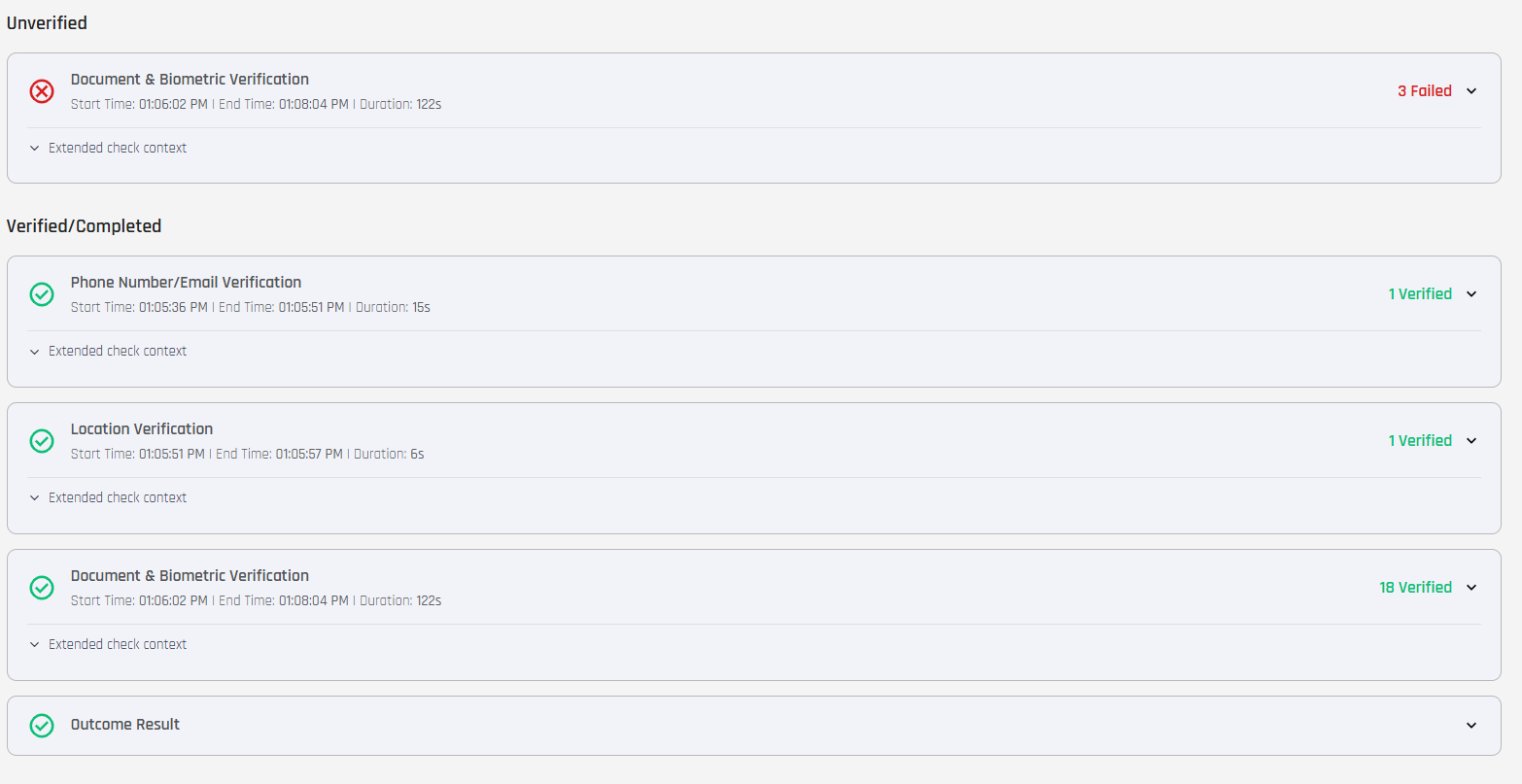
The per-step result list groups step cards by overall status — an Unverified section for steps that produced a failure verdict, a Verified/Completed section for steps that passed, and an Outcome Result card at the bottom summarising the workflow's overall outcome. Each step card carries a result counter — for example, 3 Failed or 18 Verified — drawn from the policy ledger entries the Risk Policy Builder appended during the verification.
When the identity verification provider holds a document and biometric check for its own manual review, the step appears under Unverified/Not Complete, expanded, and lists each held check as Awaiting manual review. If the verification ends for that reason, it is recorded as denied and its status shows Manual Review. A hold is not a rejection: once the provider completes its review, the requester can start a new verification, which can then pass. See Checks Held for Manual Review.
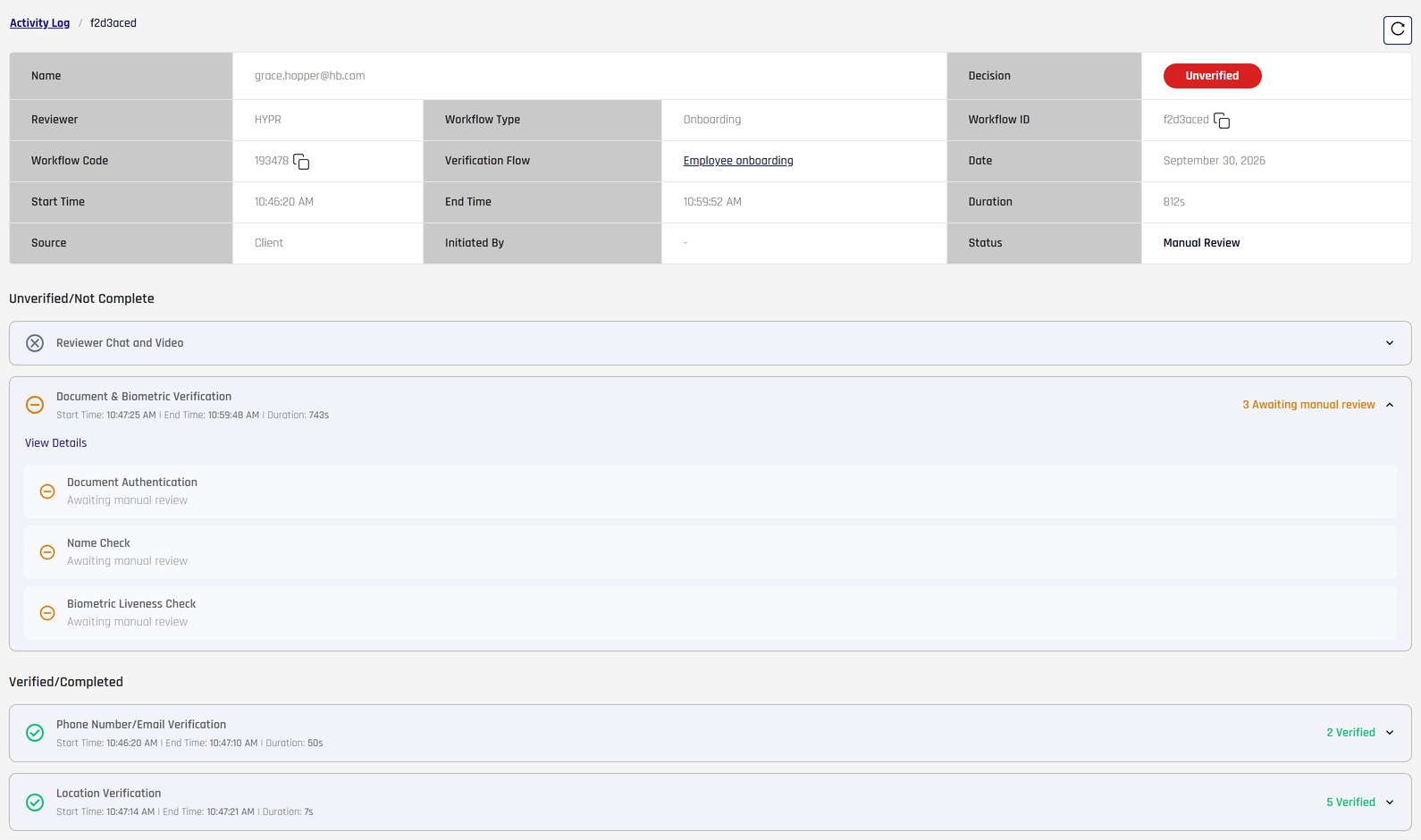
Only steps that this workflow included appear in the result list — there is no noise from steps the flow didn't run. The detail page reflects exactly what the requester went through, in the order they went through it. See Observability and Verification Flow ID for how the detail view fits into the broader correlation model.
Expanding a step card surfaces the named individual checks that ran for that step, each with its own pass/fail status, grouped into reports (Document Report, Watchlist Standard Report, Motion Report, Photo Fully Auto Report). Verification Check Results explains each check and its values.
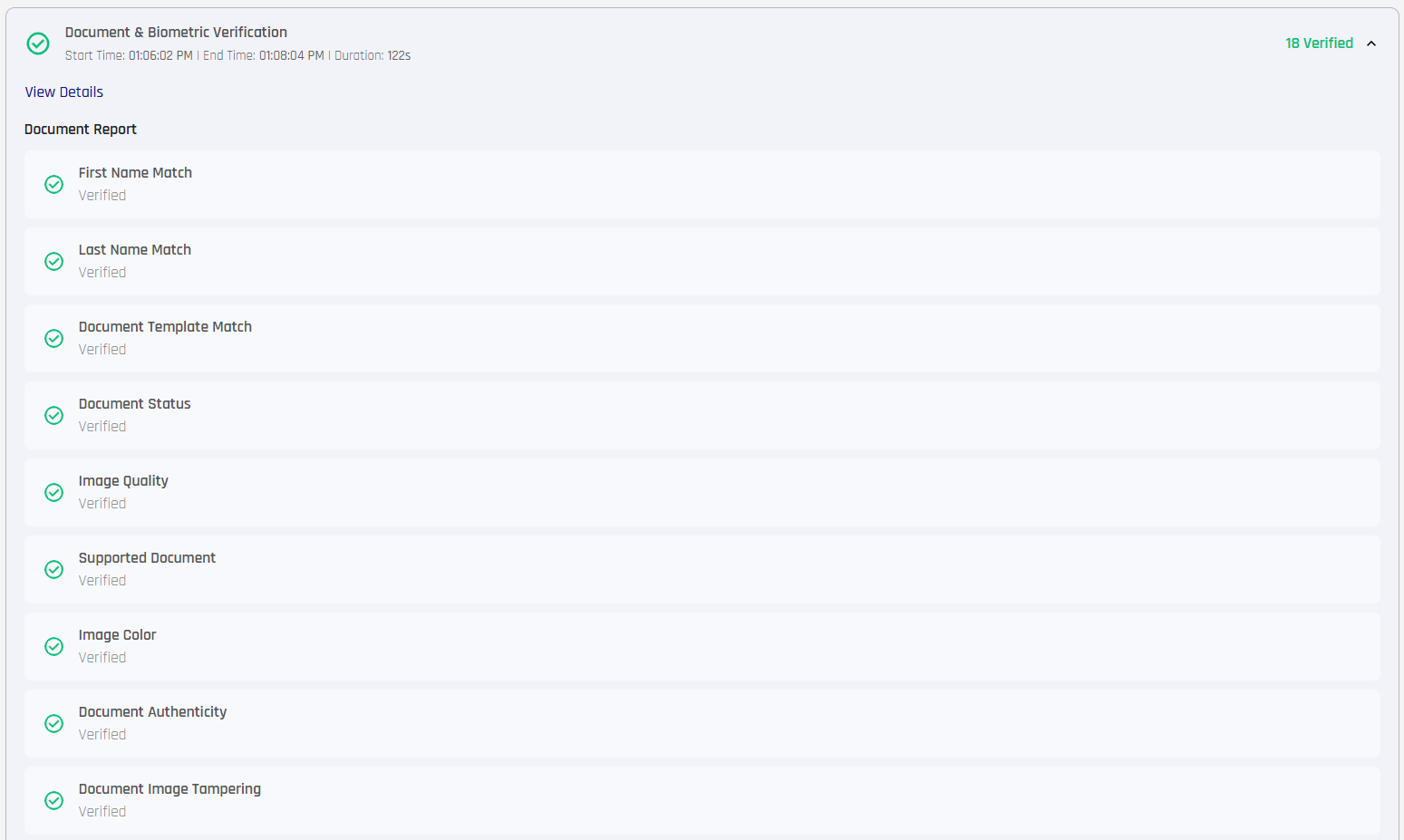
A Document and Biometric Verification step expanded on a successful verification — Document Report with per-check rows.
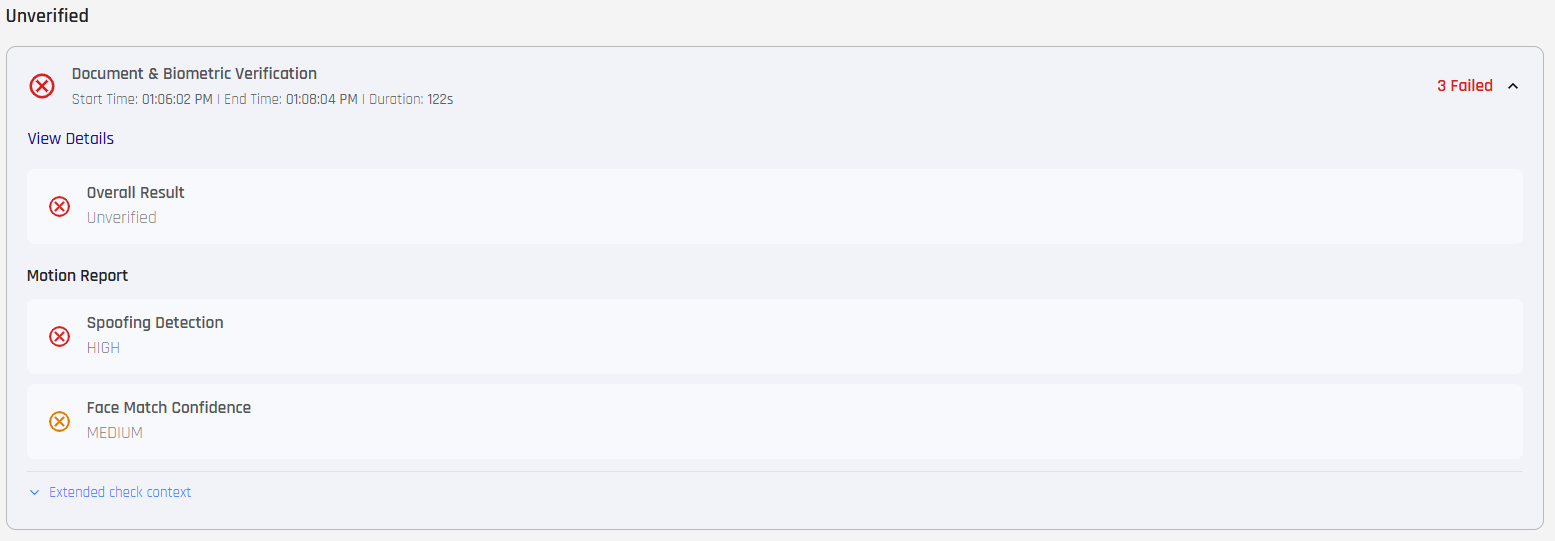
The same step expanded on an unverified verification — Overall Result: Unverified followed by the Motion Report rows that contributed to the failure.
An expanded document and biometric step can also show two identity flags. They give context for the result and are not pass/fail checks themselves:
| Flag | Shows |
|---|---|
| Known Identity (IDP/Directory) | Yes if the requester's profile in your identity provider or directory already held the details the configured checks need (date of birth for AML and OFAC checks; date of birth and address for Identity Verification With Document Issuer), so the requester did not have to enter them. Also Yes when no check that needs those details is configured. |
| Found in Data Sources | Yes if the identity on the document was found in the data sources used for the enhanced identity check. Shown only when that check ran. With Dual Document Verification, it appears once per document, as Document #1 and Document #2. |
The Helpdesk view of a verification shows the same flags.
Where step outcomes come from
Per-step PASS / FAIL outcomes, retry-attempt counters, and the per-check status indicators displayed in the expanded card are written by the Risk Policy Builder at runtime. The Policy Evaluation Kit assigned to the workflow walks its predicate-driven rules against each step's emitted risk signals and writes one ledger entry per evaluation. The Activity Log detail view renders those ledger entries as the step cards, the per-check status rows, and the report-grouped breakdowns. For the rule-authoring side — predicates, operators, Fail-rule outcomes (Deny / Escalate immediately / Continue on failure / Redirect immediately) — see the Risk Policy Builder reference.
Related
- Audit Trail — administrative and lifecycle events covering Affirm application configuration and per-verification activity
- Verification Outcome Status Enum — canonical status values that appear in the Status column
- Observability and Verification Flow ID — how the Activity Log correlates with the other observability surfaces