Single Registration
For administrator deployment and configuration guidance, see the Single Registration Setup Guide playbook.
Single Registration allows users to register their mobile device once and use it for passwordless authentication on both their desktop (workstation) and web applications. This streamlines onboarding and enhances security by eliminating the need for multiple registration steps.
With Single Registration, users register on the workstation with HYPR Passwordless, and HYPR also creates their web profile. This is Workstation-to-Web Single Registration.
Web-to-Workstation Single Registration, where a web registration also issues a workstation login certificate, is deprecated and no longer supported. Users register for web authentication and workstation authentication separately. For a unified web and workstation experience, talk to your HYPR representative about Enterprise Passkeys.
Workstation to Web Single Registration
CBA Workstation-to-Web Single Registration is supported for existing deployments, maintenance only, until August 1, 2027. HYPR no longer enables it for new deployments, and works with affected customers on a transition plan. You can still register users for web authentication and workstation authentication separately.
Overview
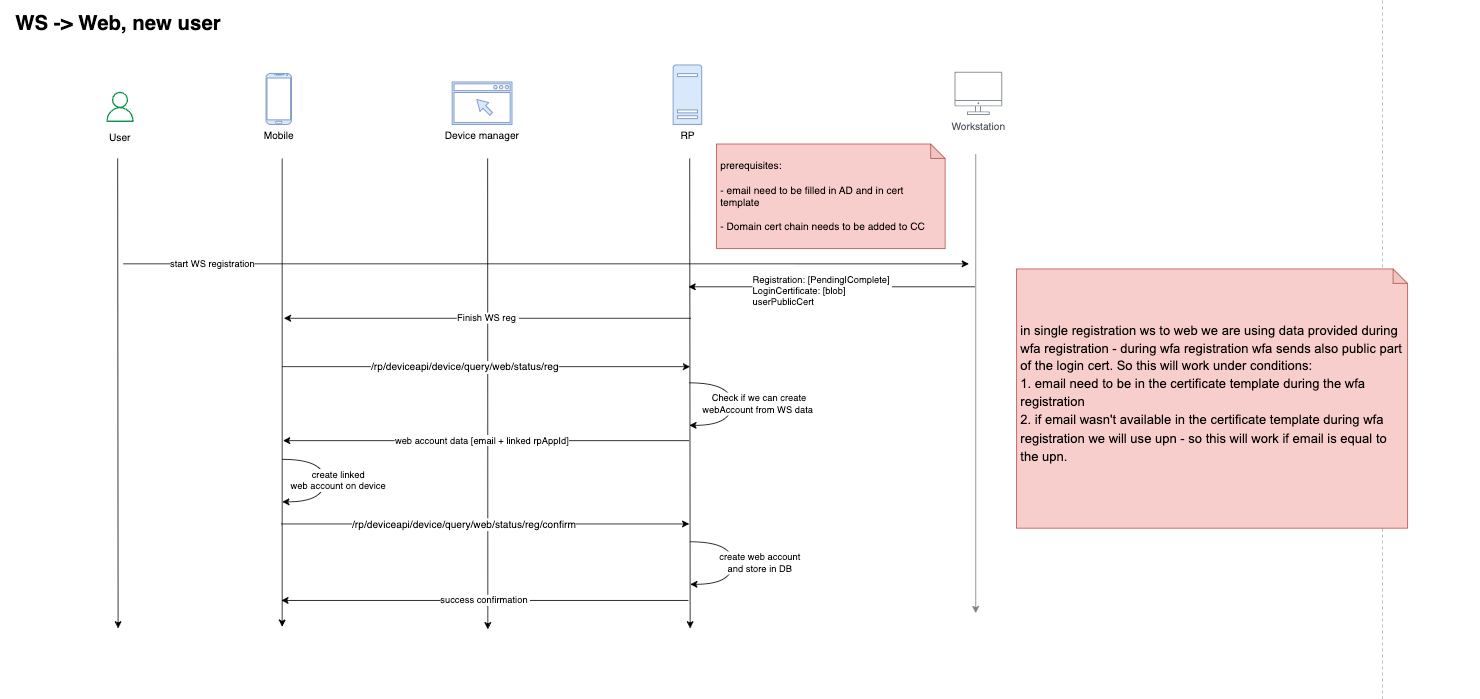
Workstation to Web Single Registration allows users to initiate and complete the registration ceremony a single time using the HYPR WFA Client. Users don't have to register explicitly to the configured web applications. After this single registration ceremony, users can log in to their desktop and web applications.
Registration workflow for a new user (no existing registration):
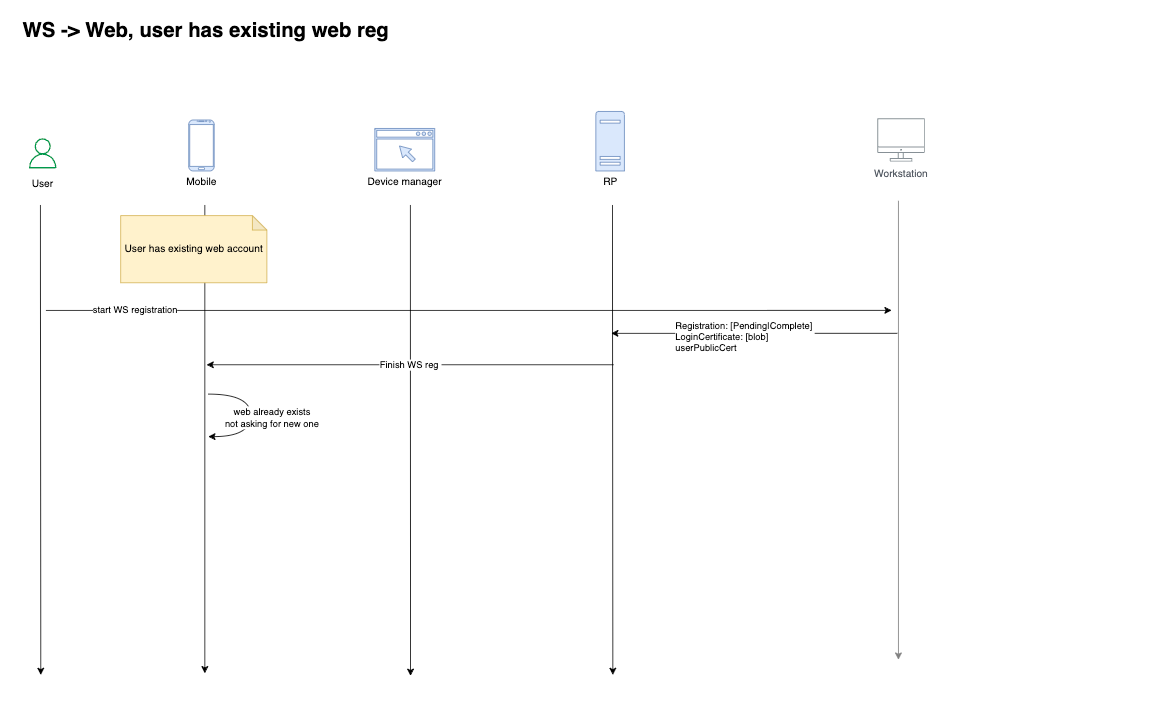
Registration workflow for a new web profile (user already has an existing web profile):
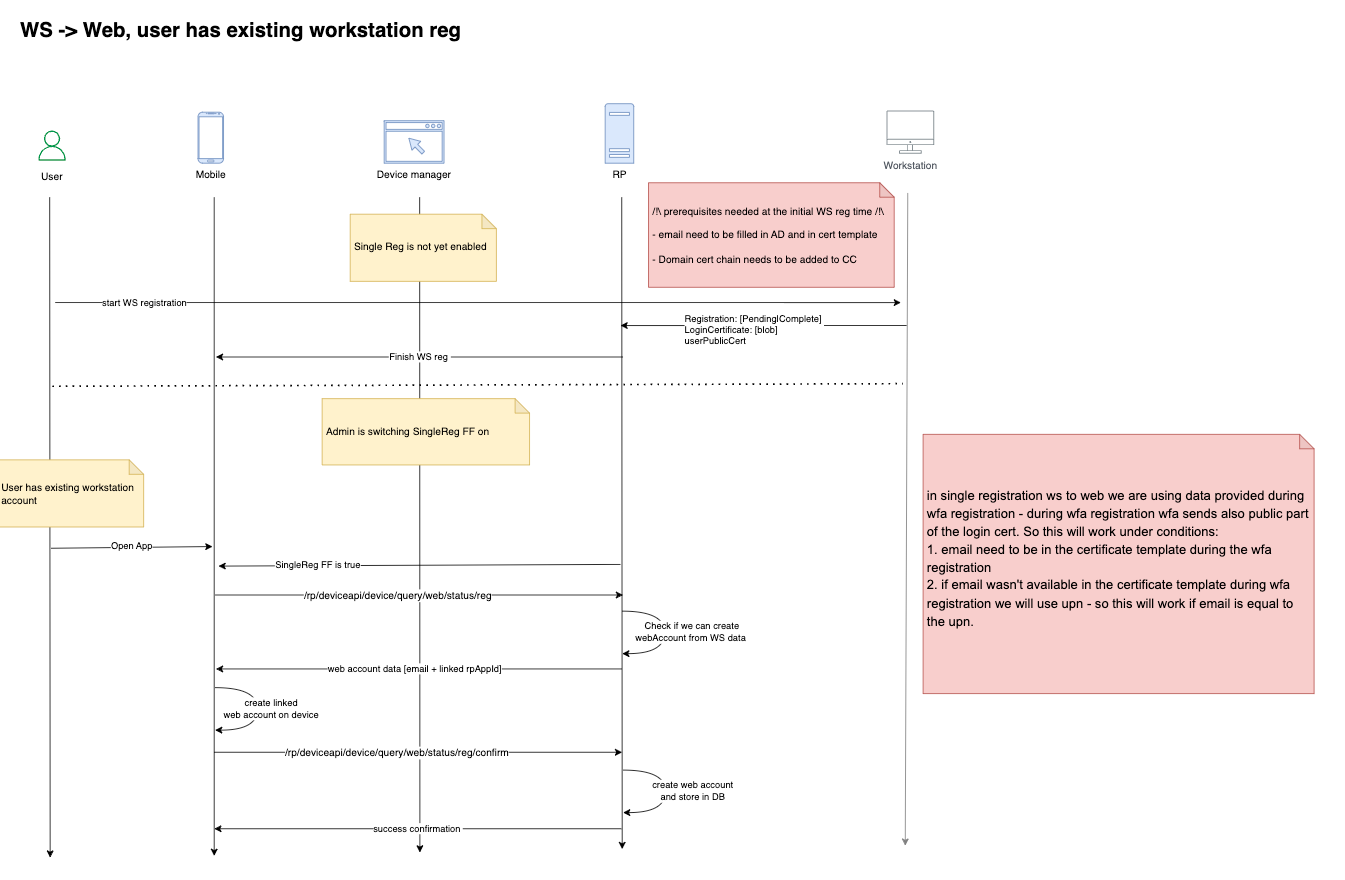
Registration workflow for a new workstation account (user already has an existing registered workstation):
Key Facts
- From the user's perspective, it is a one-time registration experience
- From the backend's perspective, the HYPR Server creates both desktop and web profiles
- This single registration process doesn't stop users from registering explicitly to the web application
- If users register explicitly to the web application, the web registered profile is not linked with the desktop profile
- Users can create multiple desktop profiles for the same user from multiple desktop machines
- All desktop profiles are linked with only one web profile
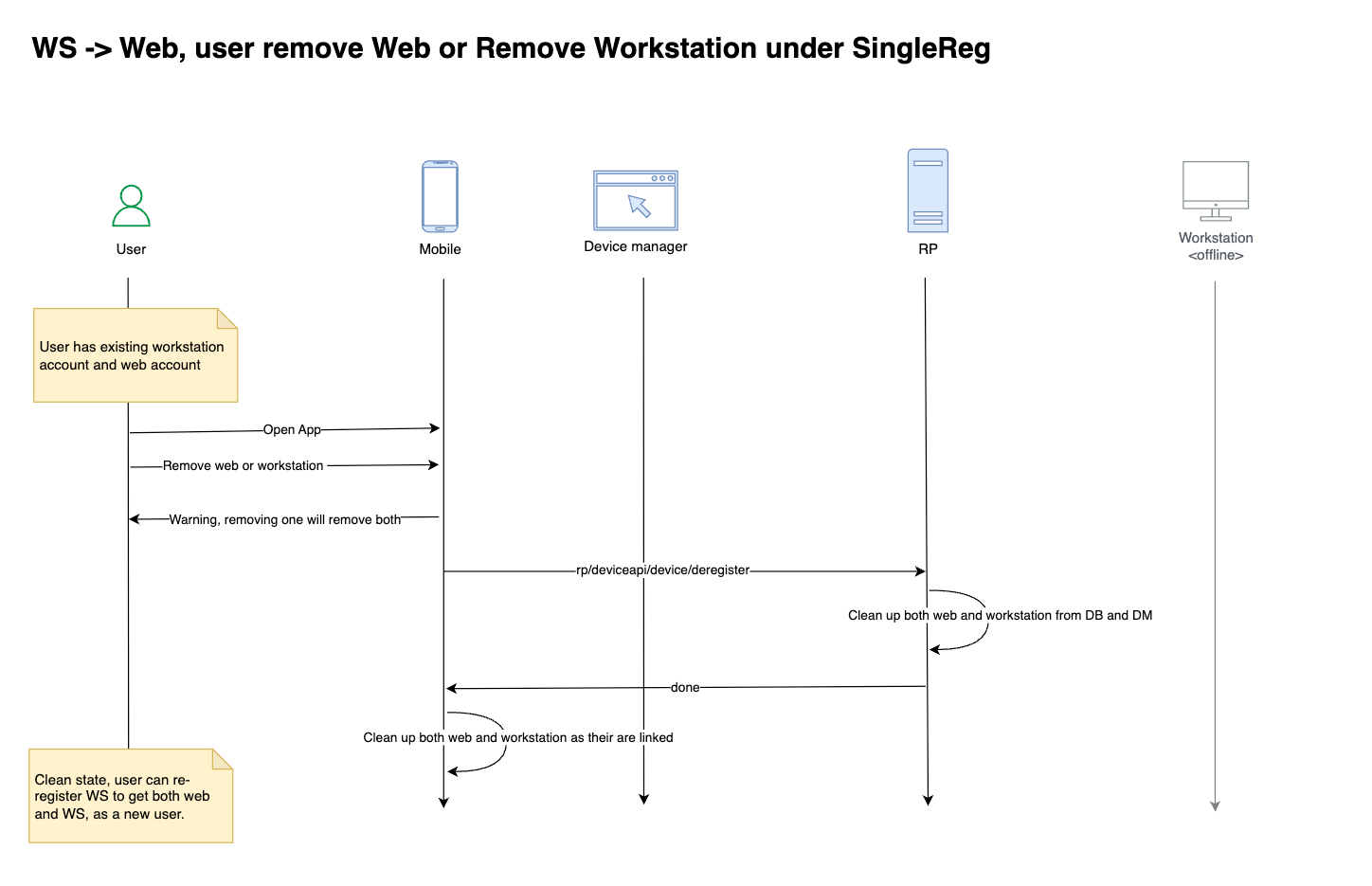
- In HYPR 10.7.0+, deregistering from either platform removes access from both, maintaining a unified profile
Prerequisites
- Create and configure rpApp for Workstation
- Create and configure rpApp for all web applications
- Install the HYPR WFA Client
Configuration
Ask your HYPR representative to enable the following capabilities:
On Workstation rpApp level:
- Web Login with Workstation Registration
On Web rpApp level:
- Web-to-Workstation Single Registration: links the web RP application to the workstation RP application. Workstation-to-Web Single Registration uses this link.
- Workstation RP Application
Once they are enabled, upload your AD CS domain CA certificate to HYPR Control Center:
- Export the domain certificate from your AD CS server in DER format (base64-encoded).
- Upload the certificate to HYPR CC using the following API call:
- API URL:
https://<HOST>/rp/api/domaincertificate - Request Type:
POST - Request Payload:
{ "domainCertificate": "<Base64Encoded>" } - Authorization: Bearer
<AdminToken>
- API URL:
curl --location \
--request POST "https://HOST/rp/api/domaincertificate" \
--header "Authorization: Bearer hypap-edba607b-b400-4c57-9d3d-839a6e07a6f1" \
--header "Content-Type: application/json" \
--data '{
  "domainCertificate": "MIIDczCCAlugAwIBAgIQS0n13f/8s5Np+dFMzF++0TANBgkqhkiG9w0BAQsFADBM-RMwEQYKCZImiZPyLGQBGRYDbmV0MRcwFQYKCZImiZPyLGQBGRYHaHlwcmxhYjEcMBoGA1UEAxMTaHlwcmxhYi1BRFNFUlZFUi1DQTAeFw0yMjA4MTEyMzQ4MTZaFw0zMjA4MTEyMzU4MTVaMEwxEzARBgoJkiaJk/IsZAEZFgNuZXQxFzAVBgoJkiaJk/IsZAEZFgdoeXBybGFiMRwwGgYDVQQDExNoeXBybGFiLUFEU0VSVkVSLUNBMIIBIjANBgkqhkiG9w0BAQEFAAOCAQ8AMIIBCgKCAQEAuDnPO/GZ1HeNMj1X+yDu46oK1x4mnC8aBDUwVlpzcEv4heLuAWZT/dFVFKKZSNQxbAMubuNwFepySrgp7ThBVp4BGBq7b/LmjZJD9oeqpBhKnryIfYSqLbxY3J2h5YtjQiR7nRr9iNyfT+8I91yyhn95sdtNEyeENlyI+dz41bAj/PksJVtdxhI/ClnJTVSCHFid42jcta0VKgfnmRfvvobX2rOpgmKhAYr9fNZ67TlzTTjji8Hz4vpQGm/9fiLKim4idAksTo1x/w0mOLSbaHTZ/qAUdTyye6aDDw1g9xap3cXPRX82Lstq/4CbhNZRHg1QfFMamghb6siX9KXOhQIDAQABo1EwTzALBgNVHQ8EBAMCAYYwDwYDVR0TAQH/BAUwAwEB/zAdBgNVHQ4EFgQUG9IOpL+oXX7mlkOKNqFPWb/hmp0wEAYJKwYBBAGCNxUBBAMCAQAwDQYJKoZIhvcNAQELBQADggEBAEGU/5V1evJKwTFaac6MnA02Pgwvmaer8Gycun4cAJbd9HUtenKcw8+oryojouniJ7Bm7NTrGPHDFgTxg1P9fdA8DE8nVCidCYiN3iJOzQ5v593eK08SxExEGOIcFveOZf0uAXgtr2UkqTBp2K8RYUT5nTpjBXUMcQdHO1fXYJ/cKqH25CiGqMwUQx+aNWzc7/LT4nX9A9zMiwALD1IbTZOlzU7R8mt0A3IZClJJvCl9PdAcpqiHqAUnq8ojJN0neeANJyiXixedrTp6gxEpGWV7tR2NuYesnwjFtV2jV0VdcYVmDQVtqdpkxbx93re2IGhNqO+H0Pujtie2TTv7J4kE="
}'
Then link the two applications: in the web rpApp's Workstation Settings, enter the workstation rpApp's ID in the Single Reg: Workstation Application RPAppId field.
User Experience
When you receive an invitation email, follow these steps:
- On the workstation, start the HYPR Passwordless client if it isn't running already
- Click Start Pairing in the HYPR Passwordless client
- If you already have a device paired, click Pair New Device
- Select Smartphone and a QR code appears in the dialog
- On the HYPR Mobile App, click the pairing label to open the account screen
- Grant access to the Camera, if necessary, and scan the QR on the workstation screen
- After completion, the HYPR Mobile App displays the pairing on your phone as both a Computer Account and a Web account
Deregistration workflow:
Logs and Audit Trail
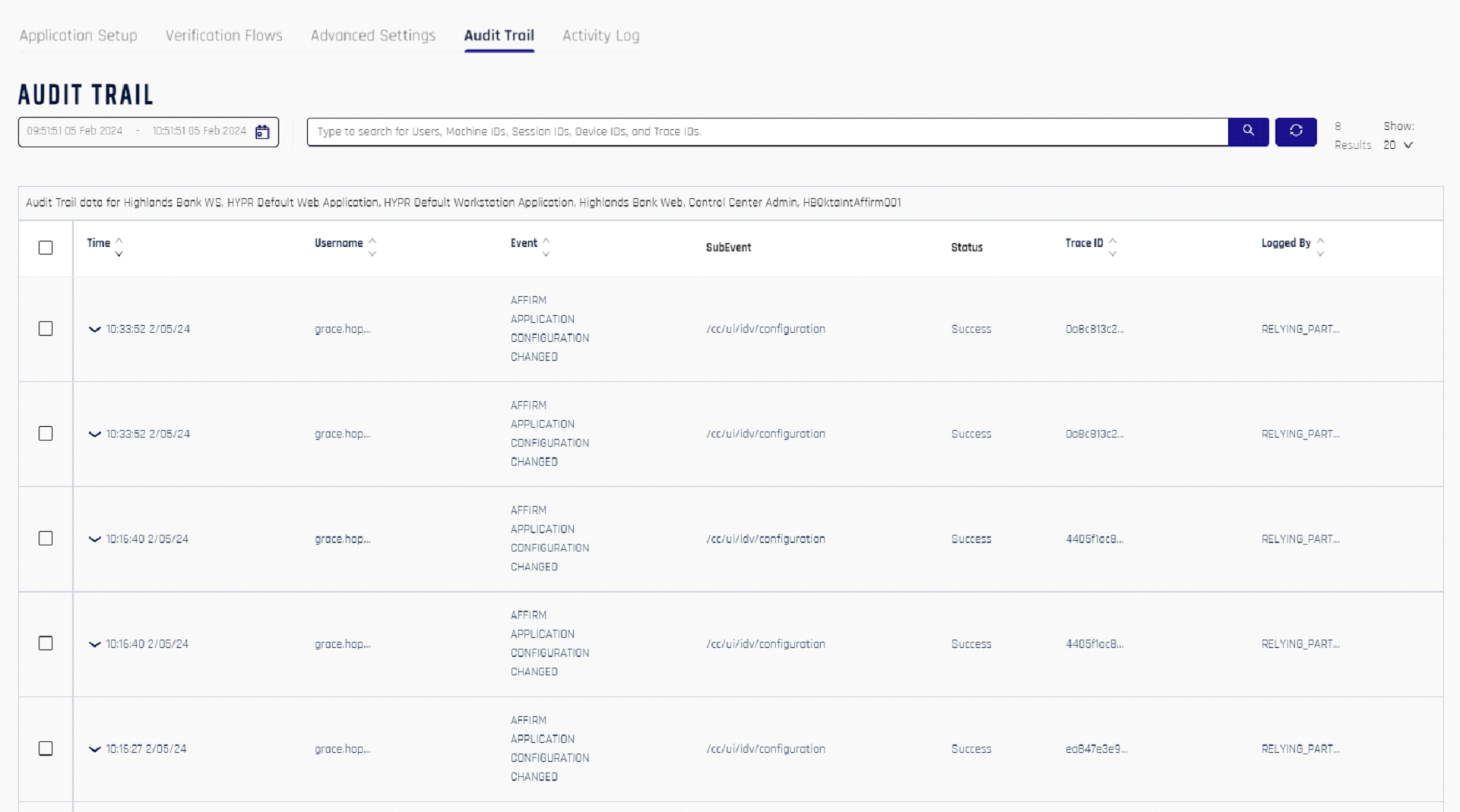
The HYPR CC Console provides administrators with an Audit Trail mechanism for tracking events that flow through the HYPR components. The Audit Trail events are stored in the HYPR database for a limited time. Customers can integrate their existing SIEM footprint with the HYPR Server for permanent storage of these audit events.