Routing and Observation
Overview
Managed tools reach the gateway in one of two ways:
- Routing, for tools that can route their inference: Claude Code, Claude Desktop and Codex. The gateway points the tool at your organization's gateway address, and associates it with a provider connector.
- Observation through hooks, for a tool that cannot route: Cursor. The gateway configures the tool's own event hooks.
Either way, the tool's activity reaches the gateway, attributed to the workstation and user.
Choosing routing targets is an administrator task, and needs permission to view and edit settings.
Route Claude Code and Codex
A routed tool sends its inference requests through the gateway, like your other agents. Your policies govern its traffic, and it appears in your activity views alongside everything else. No developer ever handles a provider key.
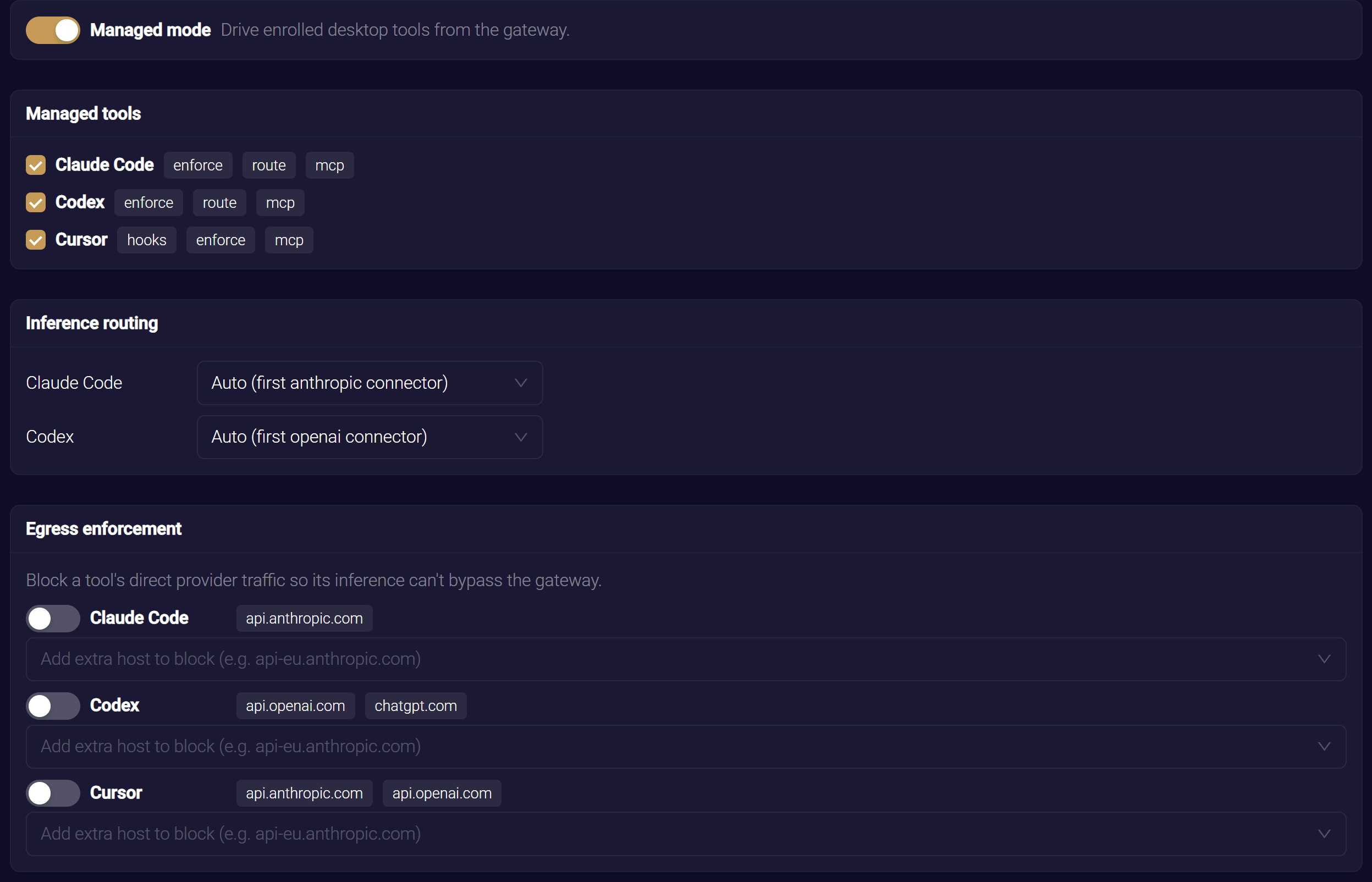
The Inference routing card lists each selected tool that can route, with its provider connector:
- Claude Code and Claude Desktop route to an Anthropic connector.
- Codex routes to an OpenAI connector.
Leave a tool on Auto to use the first enabled connector for that tool's provider. The option reads Auto (first anthropic connector) or Auto (first openai connector). If your organization has more than one connector for a provider, you can pick a specific one instead.
The provider key stays with the connector on the gateway. The workstation receives only your organization's gateway address to send inference to, never a secret.
The card appears only when a selected tool can route and your organization has an enabled connector for its provider. If you select Claude Code and see no routing row, add or enable an Anthropic connector. See Configuring Connectors. Until then, the tool is managed for its other capabilities, but not routed.
The gateway sends each routing-capable tool the address to point its inference at. It uses the ANTHROPIC_BASE_URL setting for Claude Code, and the openai_base_url setting for Codex. The endpoint client writes it at the first location it can. It prefers an enterprise-managed configuration file where one exists, so a developer cannot override it, and otherwise uses the developer's own settings. For Claude Desktop on macOS, the endpoint client writes the address to managed preferences. See Configuration Locations.
How a routed tool authenticates
Routing changes where a tool sends its inference, not how it signs in. The tool keeps its existing sign-in or API key. The gateway recognizes that credential as the agent's identity, as it does for an agent a developer points at the gateway by hand. See Onboarding Your Agent.
The connector's onboarding mode decides what happens to the tool's first requests:
- In observe mode, the gateway attributes the traffic and forwards it.
- In approval mode, the gateway holds the tool's requests until a supervisor approves the agent.
The provider key stays on the connector, and the gateway forwards approved traffic to the provider on the tool's behalf.
Once a routed tool sends inference through the gateway, it appears in your Discovered view. It collapses into a single Gateway + Endpoint row with the activity the endpoint client observed for the same tool on the same workstation. You can read its conversations as sessions in Agent Session Forensics.
Observe Cursor Through Hooks
Cursor cannot route its inference through the gateway. Instead of leaving it unmanaged, the gateway configures Cursor's own event hooks on macOS and Windows workstations, so its activity is reported to the same place as everything else. Cursor still receives your organization's MCP tools and can be included in egress enforcement. Only routing is unavailable.
The hooks report each action Cursor takes to the HYPR endpoint client, which signs it and forwards it to the gateway. Reported actions are:
- A prompt submitted
- An agent response
- A shell command
- An MCP call
- A file edit
- The end of a turn
The endpoint client merges the hooks into Cursor's hooks file, alongside any hooks a developer already has, so nothing of theirs is replaced. Hook-sourced Cursor activity appears in your Discovered view alongside the tools that route directly.
These are observation hooks only. They report what Cursor does, and never block it.
Related
- Configuring Connectors — set up the provider connectors you route through
- Onboarding Your Agent — how a routed tool's first connection is recognized and approved
- Egress Enforcement — block a tool's direct traffic to provider hosts