Egress Enforcement
Overview
Routing sends a tool's inference through the gateway. Egress enforcement makes sure it cannot go anywhere else.
For each managed tool, you can block its direct traffic to the provider hosts it would otherwise reach. Its inference then has to go through the gateway, where it is attributed and governed. The gateway holds the intent, and each workstation applies the block with the network controls it already has.
Configuring egress enforcement is an administrator task, and needs permission to view and edit settings.
Block Direct Traffic Per Tool
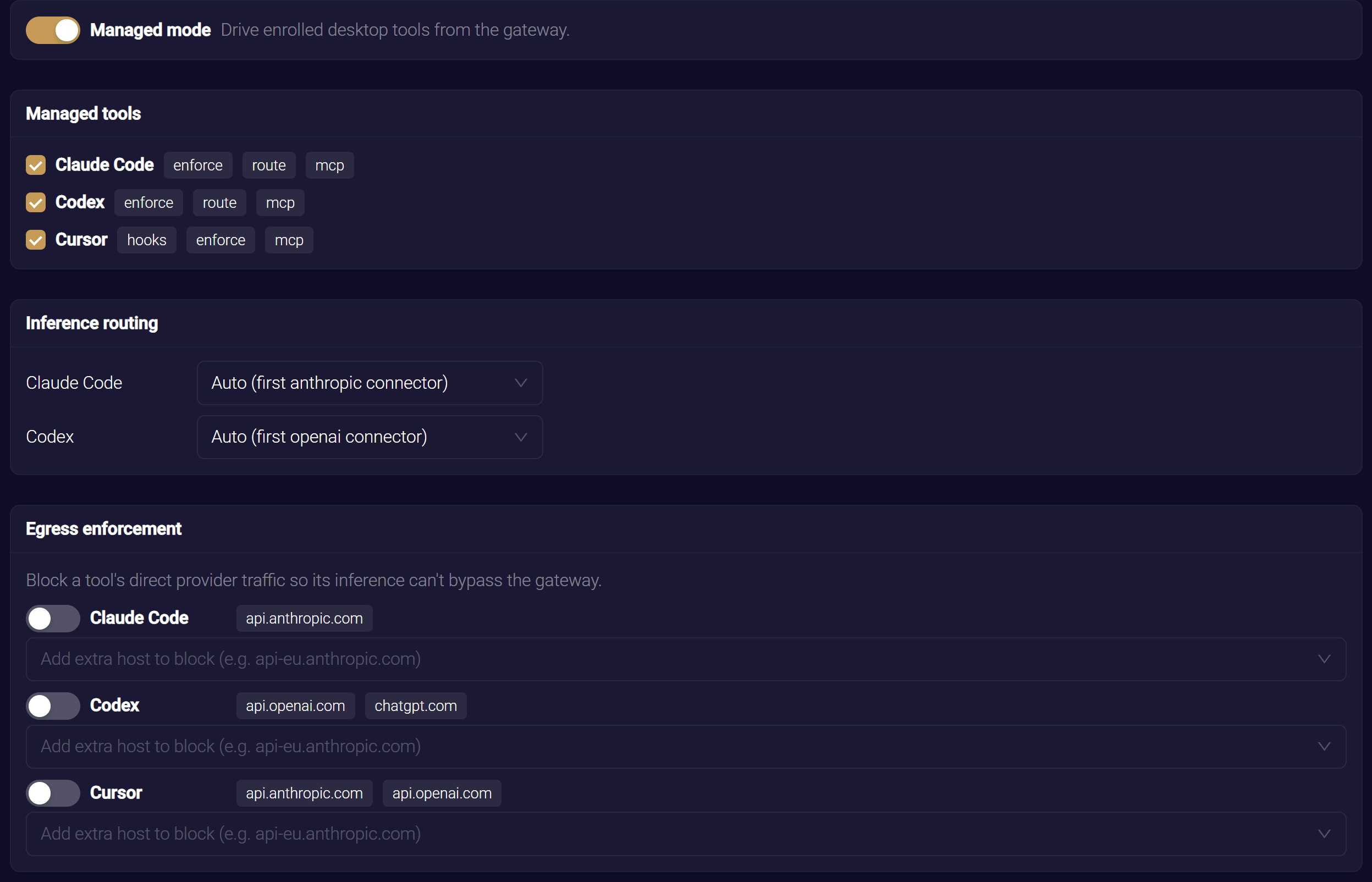
Enforcement is set per tool. The Egress enforcement card lists each selected tool that supports enforcement, with a switch and the hosts it blocks.
- In Oversight → Desktop Tools, find the tool on the Egress enforcement card.
- Turn on the switch beside the tool. The tool can then reach its provider only through the gateway.
- Click Save to publish the change.
With the switch off, the tool's direct traffic is left alone.
On macOS, the block is scoped to the tool. The endpoint client identifies the tool by its code-signing identity. Other applications on the workstation, including browsers, are untouched. The provider's sign-in endpoints stay reachable, so the tool can still authenticate.
On Windows, the block applies to every process on the workstation, browsers included.
On macOS, the endpoint client takes that identity from the tool's code-signing identifiers in your observation manifest. A tool with no identity in the manifest is never blocked device-wide. Instead, the workstation declines to apply the block, and reports enforcement for that tool as failed with the reason no process identity for this tool in the observation manifest. Keep each enforced tool, with its code-signing identifiers, in the manifest so its block stays scoped.
Blocking a tool's direct traffic before it is routed through the gateway leaves it with no path to its provider. The endpoint client applies the two in a safe order: it installs a tool's block only after it confirms the tool's route to the gateway. A tool with no routing connector is never routed, though, so do not enforce it. See Routing and Observation.
Block-Host Lists
Each tool has a list of provider hostnames that enforcement blocks, shown as tags beside the tool's switch. Hosts match by name, including subdomains. The list combines two sources:
- Fleet defaults. A baseline list per tool, inherited from the Platform Desktop Tools defaults, so every organization starts with sensible coverage. For example,
api.anthropic.comfor Claude Code, andapi.openai.comandchatgpt.comfor Codex. - Your additions. Extra hostnames for your organization, merged on top of the fleet defaults. To add one, type it in the Add extra host to block field beneath the tool, and press Enter, a comma or a space.
Your additions extend the fleet defaults, and never remove them. The list is maintained as data, so the hosts a tool blocks can be extended as providers change, without a workstation update.
Outage Behavior
On the Behaviour card, When the gateway is unreachable decides what a workstation does with a tool's egress block when enforcement is on and it cannot reach the gateway:
- Fail open (the default). The tool keeps working. During a grace period, the workstation keeps the tool's last known-good routing and its block, so a short interruption releases nothing. After the grace period, it releases the block and withdraws the tool's routing, so the tool reaches its provider directly and the developer can keep working. When the gateway answers again, the workstation routes and blocks the tool again.
- Fail closed. The tool stays blocked and does not fall back to direct traffic. Inference cannot leave your organization ungoverned, even during an outage. Choose this as a deliberate lockdown.
Windows workstations keep their last configuration while the gateway is unreachable, the same as Fail closed, whatever you choose here.
Outage behavior is an organization-wide default. You can override it for one workstation while troubleshooting. See Managed Devices. For how each operating system's endpoint client applies it today, see Platform Support. For the grace period and what a Mac keeps during an outage, see Endpoint Guard for macOS.
Confirm Enforcement Is Effective
Each workstation reports the state of every tool's block in the Applied column of the Managed Devices dashboard.
| State | Meaning |
|---|---|
| effective | The workstation's network filter holds the block |
| disabled | Blocking is off for that tool, or for that workstation |
| failed | The workstation could not apply the block. A reason is shown |
Disabling enforcement for one workstation, from its own controls, turns off that workstation's blocks without changing your organization-wide setting.
Related
- Routing and Observation — route a tool before you enforce its egress
- Platform Desktop Tools — the fleet-default block-host lists your organization inherits
- Managed Devices — relax enforcement or outage behavior for a single workstation