Input Guardrails
An agent that can read is an agent that can be told what to do by whatever it reads. A web page it fetches, a ticket it summarizes, a document someone shared — any of these can carry instructions aimed at the agent rather than at you. When the agent then has a way to act — send mail, post to a channel, write to a system, run a command — content it merely read can become an action you never asked for. This is indirect prompt injection, and it is the risk Input Guardrails exist to contain.
HYPR AgentPass™ input guardrails do not try to out-argue a hostile instruction. They watch what a session has actually done — what it read, how sensitive that was, and where it is now trying to send it — and hold or stop the exchange when that combination is dangerous, regardless of how the content was worded.
Input guardrails are enforced at the gateway, alongside your policies and tool access. They apply to every kind of connector a session touches — an MCP server, a REST API, or an AI provider — so a session cannot sidestep them by switching tools.
The Pieces
Input guardrails are a set of controls that work together. Each has its own page.
| Control | What it does | Read more |
|---|---|---|
| The Rule-of-Two breaker | Holds or stops a call when a session that has read untrusted and sensitive data reaches a way out — and raises an evidence-bearing, passkey-signed approval when it holds. | The Rule-of-Two Breaker |
| Tool-definition integrity | Quarantines a tool whose definition changes after it was approved — for every role, administrators included — until a person reviews the change. | Tool-Definition Integrity |
| Alerts and containment | Turns a guardrail enforcement into a deduplicated, budgeted alert, gives the SOC a triage queue, and lets a responder pause, end, or disable a session in one tap. | Alerts and Containment |
| Posture and history | A single page showing how well-defended your deployment is right now, and a history view that trends guardrail activity over time. | Posture and History |
| Bring-your-own judges | An optional probabilistic layer that asks a model you choose whether content looks like an injection attempt — advisory signal only, never the decision. | Bring-Your-Own Judges |
| The Proving Ground | A console that runs a scripted attack pack against an isolated sandbox and shows, with evidence, which attacks the guardrails blocked or held — off versus on. | The Proving Ground |
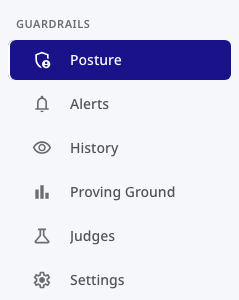
In the console these surfaces are grouped under Guardrails in the navigation. The Posture, Alerts, Judges, and Proving Ground pages all live there; the Rule-of-Two starter rules are adopted from the Policies area.
How the Breaker Reasons
Three facts about a session decide whether the breaker acts. You do not compute them — the gateway tracks them as the session runs.
- Trust. Every connector has a trust setting. It is Untrusted by default; you mark a connector Trusted (with a reason, which is recorded) only when its content comes from a source you control. A single read from an untrusted source marks the session untrusted for the rest of its life.
- Sensitivity. Tool reads carry a sensitivity tier, drawn from your data classification. A session's sensitivity only ever rises — reading Confidential data once keeps the session at that level.
- A way out. Tools are annotated with the kind of sink they are: external communications, a state change, a credential, or code execution. A read is not a sink; sending an email is.
When a session has read untrusted and sensitive data and then reaches an external-communications or state-change sink, that is the dangerous combination the breaker was built to catch. The Rule-of-Two Breaker explains exactly what happens next.
Turning Guardrails On
Input guardrails are adopted deliberately, in two steps, so you can see what they would do before they do it.
-
Enable session data-flow tracking. The breaker needs to know what each session has read. The Data Classification settings carry a session tracking toggle that turns this on. With it off, the
session.*facts the breaker relies on are simply not present, and the guardrail rules never match. -
Adopt the guardrail starter policies in Observe, then promote to Enforce. The Policies area ships a Guardrails (Rule of Two) group of starter rules. Adopted in Observe, each records what it would have held or stopped, with a dry-run match count, so you can confirm the behavior against your own traffic before promoting any rule to Enforce. See How Policies Are Evaluated for what Observe and Enforce mean.
Alert, containment, and approval behavior is configured under Gateway Settings › Guardrails — see Alerts and Containment. The guardrail and classification settings are managed on their own pages and are not writable through the generic settings API, so a change to them is always an intentional, attributable edit.
Who Manages Guardrails
Input guardrails introduce two seeded roles for the security operations and audit personas, alongside the administrator who holds everything:
- Security Analyst — reads the guardrail surfaces, triages alerts, and contains sessions, without the ability to rewrite policies or edit settings.
- Auditor — read-only across the guardrail surfaces, with the ability to export guardrail evidence.
See Alerts and Containment for exactly what each role can do, and Bring-Your-Own Judges for the separate Model Governance Owner role that governs judges.
On the Roadmap
The following are planned extensions to input guardrails. They are not available today — this section is here so you know where the capability is headed, not to describe behavior you can rely on now.
Timelines are not committed here. Confirm current availability with your HYPR representative.
- Endpoint and mobile coverage. Input guardrails today govern traffic that passes through the gateway. Extending the same protections to a managed desktop (AgentPassMac) and to the mobile experience are tracked as separate efforts.
- A fuller Proving Ground. The console sandbox currently runs a representative subset of the scripted attack scenarios; the complete scenario library, adaptive red-team runs, live end-to-end agent runs, and additional persona lenses are planned. See The Proving Ground for specifics.
Related
- Security Controls Reference — input guardrails stated as controls an auditor can check
- Tools Governance — the three axes of tool governance guardrails sit alongside
- Session Watch: Evaluator Agents — a complementary, observational review of agent sessions