Governing What a Session Has Already Read
A classification tells you what one call carries. It cannot tell you that an agent read your finance channel two minutes ago, and is now writing an email. The email itself may carry nothing sensitive, because the agent reworded what it read.
Session tracking closes that gap. When a call reads classified data, HYPR AgentPass™ remembers the most sensitive data that session has touched. Every later call in the same session can then be judged on it, as in "this session has already read Restricted data, and this destination may only receive Internal."
This page builds on Classifying the Data Your Tools Handle. Session tracking has something to remember only once your tools carry labels. A flow rule acts only on a destination that has a data ceiling.
Turning It On
Session tracking is off by default.
- Open Advanced → Data Classification, and click the Policies tab.
- Turn on the switch beside Session tracking is off. The label then reads Session tracking is on.
- Optional: In Forget a session after, enter how many minutes of inactivity end a session. The default is 30 minutes, and the maximum is 1,440 (one day). Every call that counts restarts the clock.
- If you changed the window, click Save window.
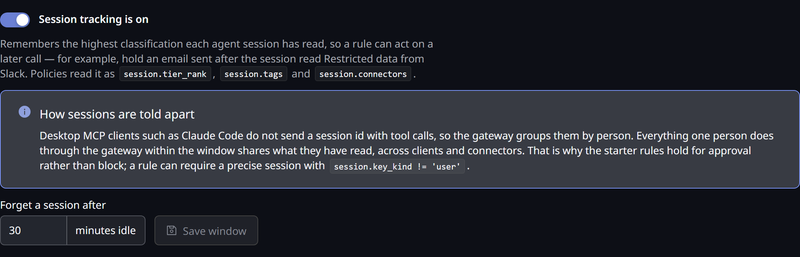
Turning it on changes no traffic by itself. It gives policies something new to read. Nothing is held or refused until a policy uses it.
The History tab records who turned session tracking on or off, and when.
What a Session Remembers
A session remembers:
- The most sensitive tier of data it has read
- Every tag that data carried
- Every connector it has called, classified or not
Only calls that actually returned data to the agent count. A call is remembered when all of these hold:
- It is a tool call, a resource read or a prompt fetch.
- AgentPass forwarded it, and the system behind the connector answered successfully.
- No policy withheld the response.
A call that was refused, held for approval, or failed upstream returned nothing, so it leaves the session as it was. This applies to MCP proxy connectors and REST API connectors alike, so a session can read through one kind and send through the other.
How a Session Is Identified
What counts as one session depends on what the calling client tells AgentPass. AgentPass uses the most precise identity available.
| The caller is | One session is | Shown as |
|---|---|---|
| An AgentCore agent | One conversation, confirmed against the session the gateway started | agentcore_session |
| An Anthropic cloud agent | One cloud-agent session | cma_session |
| Another managed or service agent | Every session of that agent credential — kept separate per user when many people share one AgentCore agent | agent_identity |
| A person in a desktop client | Everything that person does through AgentPass within the window | user |
Desktop clients such as Claude Code and Codex do not send a session identifier with their tool calls. AgentPass therefore groups them by person. Two conversations one person runs side by side, in the same client or different ones, share one record.
That grouping is deliberately broad. A narrower grouping would let an agent read through one connector and send through another, without the two ever being linked. It is also why the recommended rule holds a call for approval, instead of refusing it.
Two more details apply:
- An Anthropic cloud-agent session identifier counts only when the call uses that cloud agent's own credential. Any other caller that sends one is grouped as usual. A caller therefore cannot start a fresh, clean session by changing the identifier it sends.
- Calls are linked only when they arrive under the same identity. If a person reads data through their own AgentPass sign-in, and an agent then sends through a separate agent credential, the two are separate sessions.
Writing a Session Policy
A policy reads a session through the session attributes.
| Attribute | What it holds |
|---|---|
session.tier_rank | Rank of the most sensitive tier the session has read. 0 when it has read nothing classified |
session.tier | The key of that tier, such as restricted. Absent when session.tier_rank is 0 |
session.tags | Every tag the session has read |
session.connectors | Every connector the session has called |
session.contributions | How many calls have counted toward the session so far |
session.key_kind | How the session was identified: agentcore_session, cma_session, agent_identity or user |
The session reflects what happened before the current call. As always, data, tool and connector describe the call being judged.
The session attributes are absent when session tracking is off, when nothing identifies the caller, or when AgentPass cannot read the session record in time. A missing attribute never matches, so a session rule steps aside instead of blocking traffic. In each of these cases, calls carry on normally.
For example, if Restricted is rank 4 in your vocabulary, this rule holds anything sent through a mail connector once the session has read Restricted data. Scope the policy to your mail connector, on the Pre-Request phase:
session.tier_rank >= 4
As with data, compare the rank, not the tier's name, so the rule survives a rename. The starter policies express the same idea against each connector's own ceiling, so one rule covers every destination.
The Session Starter Policies
The Policies tab always lists three session starters. While session tracking is off, each is tagged needs session tracking, and matches nothing until you turn it on. All three compare what the session has read with the destination's data ceiling, so they never act on a connector that has none.
| Policy | Condition | Action |
|---|---|---|
hold-session-data-leaving (recommended) | The session has already read data above the destination's ceiling | Require approval |
refuse-session-data-leaving | The same | Deny |
refuse-session-data-leaving-precise | The same, but only for sessions identified precisely, not a desktop client's per-person session | Deny |
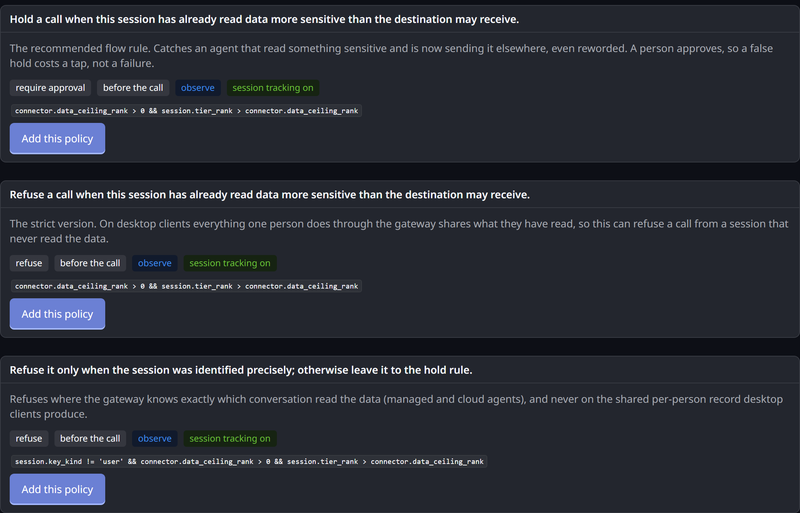
Start with the hold. On desktop clients, a person's parallel conversations share one record, so a refusal could stop a conversation that never read the data. A hold asks a supervisor instead, so a false alarm costs one approval, not a failed task.
To refuse managed and cloud agents outright, use refuse-session-data-leaving-precise alongside the hold. It refuses where AgentPass knows exactly which conversation read the data, and leaves desktop sessions to the hold rule.
Like every starter, these are created in Observe mode. Until you switch them to Enforce, they record what they would have held or refused, without changing traffic.
When a session rule holds a call, the approval tells the supervisor why, below the policy's own message.
It names every connector the session has called, not only the one the data came from. It names up to three, then gives a count.
Seeing a Session in the Request Log
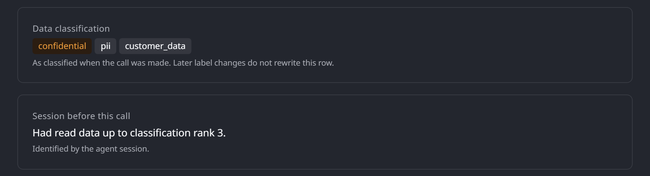
Open a call in the Request Log. When session tracking identified the call's session, a Session before this call card shows how the session was identified, and what it had already read when the call arrived. That is the evidence a session rule acted on, or in Observe mode would have acted on.
The Data Flow Report
The Data flow tab on the Data Classification page counts boundary crossings. A boundary crossing is a call that sent data more sensitive than the destination's ceiling, whether the call itself carried it or its session had read it earlier.
Crossings are recorded only for a destination that has a ceiling, so the report starts filling the day you set one.
Each row covers one day, and has these columns.
| Column | Meaning |
|---|---|
| Day | The day the crossings happened |
| Destination | The connector the data went to |
| Ceiling | That connector's ceiling |
| Carried by | Whether the call itself carried the data, the session had read it, or both |
| Session key | How the session was identified |
| Outcome | What happened: allowed, denied or held |
| Calls | How many calls matched |
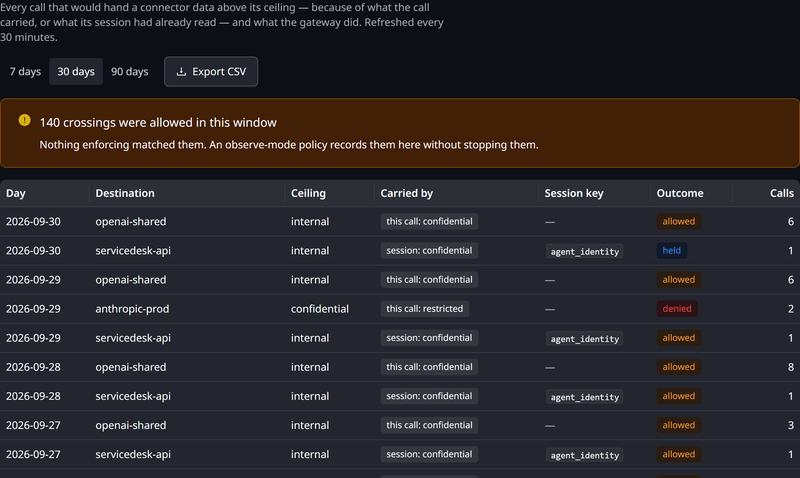
The report opens on the last 30 days. Choose a 7, 30 or 90-day window. Click Export CSV to download the rows for the chosen window as a CSV file. The report refreshes every 30 minutes, and keeps 90 days.
Allowed rows matter most: data crossed a boundary, and nothing stopped it. A crossing that only an Observe-mode policy matched counts as allowed, because the call went through. When a window has allowed crossings, the tab states how many. Each crossing is also recorded as an event, so the same signal reaches your event stream and SIEM.
Related
- Classifying the Data Your Tools Handle — tiers, tags, labels and ceilings
- How Policies Are Evaluated — modes, phases, and what a match does
- Policy Attribute Reference — every attribute a condition can read
- Approving and Denying Agent Actions — what a supervisor sees on a held call