Classifying the Data Your Tools Handle
Data classification lets you say what each tool and connector in HYPR AgentPass™ handles. For example, this one reads payroll records, and that one reads the public product catalog. You then write policies against those labels, instead of against tool names.
That indirection is the point. A rule that says "hold anything Restricted for approval" keeps working when a connector gains forty new tools, when a tool is renamed, and when a second connector arrives carrying the same kind of data. A rule that lists tool names does not.
Labeling is also how you answer a security reviewer who asks which of your agents' tools reach regulated data, and what governs them.
Open Advanced → Data Classification in the console. The page has six tabs: Labels, Assignments, Detectors, Policies, Data flow and History. This page follows the first four in that order, which is the order you need them in. Data flow is covered in Governing What a Session Has Already Read.
The Vocabulary
A label has two parts, because one part cannot express the rules administrators actually write.
| Part | Shape | What it is for |
|---|---|---|
| Tier | Ordered and ranked. One per tool | "At or above Confidential" is a comparison, so tiers are ranked, and a rule compares the rank |
| Tag | Unordered. Any number per tool | "PII" and "export-controlled" are categories, not points on a scale |
Tiers
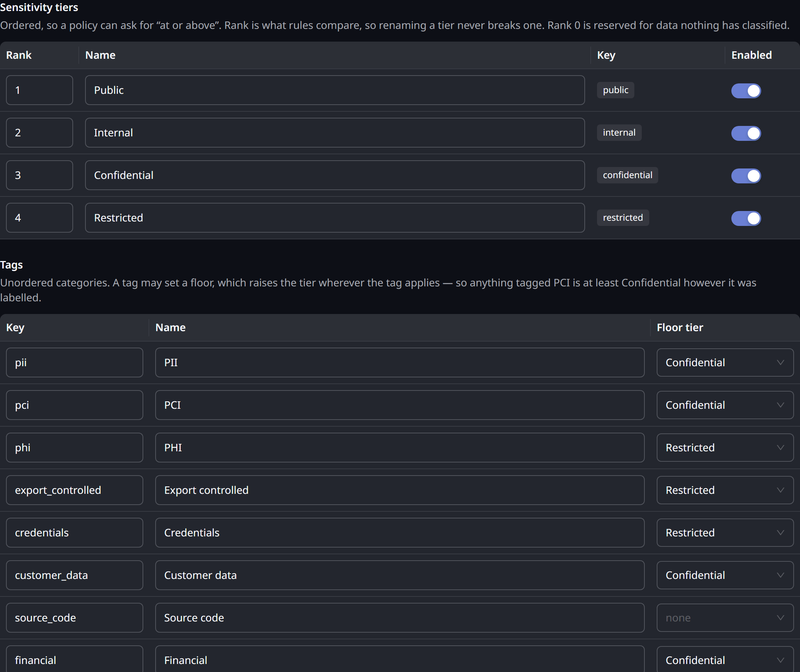
AgentPass ships with four tiers. The rank is the number, starting at 1, that a policy compares.
| Rank | Tier |
|---|---|
| 1 | Public |
| 2 | Internal |
| 3 | Confidential |
| 4 | Restricted |
On the Labels tab, you can rename the tiers to match your organization's existing scheme, reorder them by rank and disable the ones you do not want. To add a tier of your own, use the AgentPass administration API. The names are yours, but policy reads the order. A rule written against rank keeps working after a rename. That is why every example on this page, and every policy AgentPass ships, compares tier_rank, not a tier's name.
Rank 0 is reserved, and is never one of your tiers. It keeps "never classified" distinct from "classified as the lowest tier." Those are two different facts, and an auditor asks about the second. A call nothing classified is not reported as rank 0 either. See When Nothing Classified the Call.
Tags
Eight tags ship with the product. A tag may carry a floor tier: the lowest tier anything carrying that tag can be. Applying a tag with a floor raises the tier if it was lower, and never lowers it.
| Tag | Floor tier |
|---|---|
| PII | Confidential |
| PCI | Confidential |
| PHI | Restricted |
| Export controlled | Restricted |
| Credentials | Restricted |
| Customer data | Confidential |
| Financial | Confidential |
| Source code | (none) |
Source code ships without a floor on purpose. Whether a repository is Confidential is a judgment only you can make. On the Labels tab, you can add your own tags, and set or clear a floor on any of them.
A new organization has no vocabulary rows at all. It resolves to the shipped set, and the Labels tab says so. The first change you save writes the whole set. From then on, the vocabulary is yours, and later AgentPass releases do not alter it. Upgrading AgentPass therefore never renumbers a scale you customized.
Assigning a Label
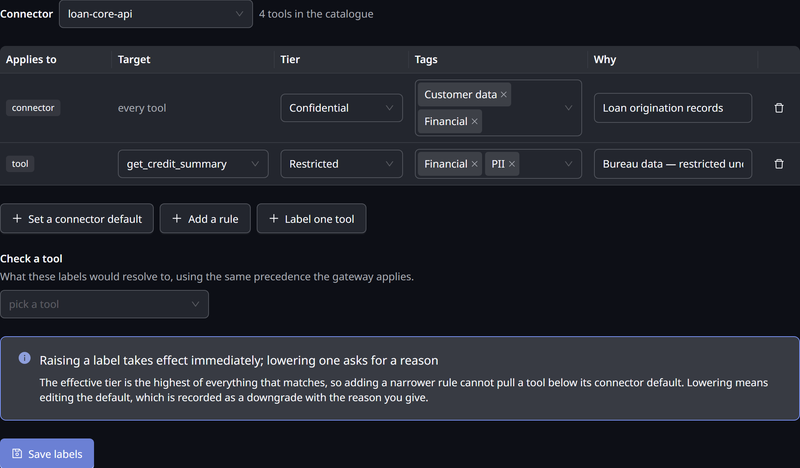
You attach labels on the Assignments tab, one connector at a time. There are three kinds of assignment.
| Kind | Applies to | Use it for |
|---|---|---|
| Connector default | Every tool on the connector | A floor for a whole system, such as "everything on the HR connector is at least Confidential" |
| Rule | Every tool whose name matches a pattern | The bulk case. One rule labels the forty operations on a connector whose names contain payroll |
| Tool | One named tool | The exception you want to state explicitly |
How the Three Combine
Precedence decides which of them apply. An explicit label on a tool beats a rule, which beats the connector default.
Among those that apply, the result is combined, not chosen:
- The effective tier is the highest rank of everything that matched. A rule that says Internal, sitting on a connector whose default is Restricted, still leaves those tools Restricted.
- Tags are the union of every source that matched.
- Then any tag floor raises the tier, if it is higher than what the sources gave.
Taking the maximum is deliberate. A connector default exists to be a floor. If adding a narrower rule could pull tools beneath it, the floor would be only a suggestion. "Somebody added a rule and quietly declassified the connector" is exactly the finding this feature exists to prevent.
The one way to place a tool below its connector's default is to label that tool explicitly. An explicit tool label suppresses the rules and the default, instead of joining them. It is the intended escape hatch for a genuine exception, such as a read-only status endpoint on an otherwise Restricted system. It is also the one assignment that can reduce protection, so review those rows when you review the connector.
See a Rule's Reach Before You Save It
A rule is how you label a connector with hundreds of operations. As you type a rule, it shows how far it reaches, such as matches 12 of 340 tools, or matches no tool on this connector when the pattern is wrong. * spans any part of a name, and ? matches one character. Matching ignores case, and covers the whole name.
Below the table, Check a tool resolves one named tool against everything currently on the screen. It shows the resulting chips, and which assignment produced them. It runs the same precedence the gateway does, so what it shows is what will be stored.
Lowering a Label Needs a Reason
Raising a label is always safe. Saving one takes effect on the next request, with nothing to restart.
Lowering is the audited act. When a save would reduce the highest classification anywhere on that connector, AgentPass stops and asks why, with This lowers the protection on this connector. It refuses the save without an answer.
The History tab, and the change history the administration API returns, record every save, in either direction: what changed, whether it raised or lowered, who did it, when and the reason they gave.
The vocabulary is protected the same way. You can rename a tier or tag freely, because its display name is yours. You cannot remove one, or change its key, while anything still uses it: a tool's label, a rule, a connector default or data ceiling, a Purview mapping, a dictionary or a built-in detector. The save is refused, with a list of what depends on it, so a tier cannot quietly disappear from under the tools labeled with it. Relabel or remove those first.
Detecting Sensitive Content
Everything so far labels a tool before it is ever called. That covers the tools you know about. But a connector gains tools, a tool starts returning something it did not return last quarter, and a label nobody assigned is a label nobody has. Content detection closes that gap by reading the call itself: the arguments going out, and the reply coming back.
Detection runs entirely inside the gateway. Nothing is sent anywhere, and it works on an air-gapped deployment. The one exception is semantic classification, which is a separate switch, off until you supply a credential.
A detector never sets a tier directly. It contributes a tag, and the tier follows from that tag's floor in your vocabulary, as for a tag you assign by hand. A card number found in a reply therefore means the same as a tool you labeled pci.
A rule such as "hold anything at or above Confidential" begins matching calls whose content is classified, not only tools someone labeled. That is the purpose of the feature, but it changes enforcement, so the decision is yours. Consider running the affected policies in Observe mode first, and reading what they would have caught.
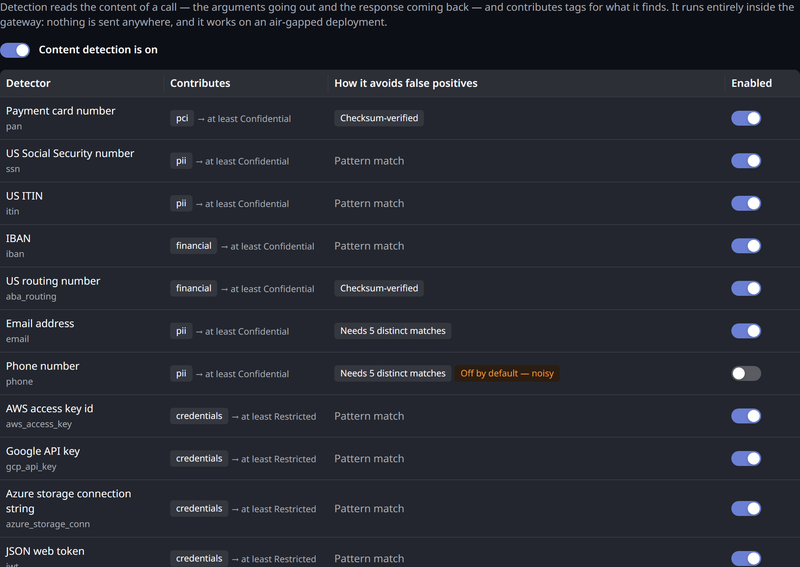
To turn detection on, click the Detectors tab, and turn on the switch beside Content detection is off. The label then reads Content detection is on. Detection is off on every tenant until you do.
The Built-In Detectors
Twelve detectors ship with the gateway. Each one names the tag it contributes.
| Detector | Contributes | How it avoids false positives |
|---|---|---|
| Payment card number | pci | Checksum-verified |
| US Social Security number | pii | Pattern match |
| US ITIN | pii | Pattern match |
| IBAN | financial | Pattern match |
| US routing number | financial | Checksum-verified |
| Email address | pii | Needs 5 distinct matches |
| Phone number | pii | Needs 5 distinct matches. Off by default, because it is the noisiest |
| AWS access key id | credentials | Pattern match |
| Google API key | credentials | Pattern match |
| Azure storage connection string | credentials | Pattern match |
| JSON web token | credentials | Pattern match |
| Private key block | credentials | Pattern match |
Two ideas in the last column keep detection from classifying your whole estate:
- Checksum-verified means the digits must also pass the arithmetic check the real identifier carries. A sixteen-digit order number is not a payment card.
- Needs 5 distinct matches is a density gate. One email address in a reply is a signature. Five different ones are a list of people. The count is of distinct values, so the same address repeated still counts once.
Each detector has its own switch, so you can run the checksum-backed ones and leave the pattern-only ones off. While the master switch is off, none of them run, whatever their individual switches say.
Your Own Terms
The built-in detectors find what looks the same at every organization. A dictionary finds what is sensitive only to yours, such as an export-control marking, an internal project codename, or a customer account format that follows your own scheme.
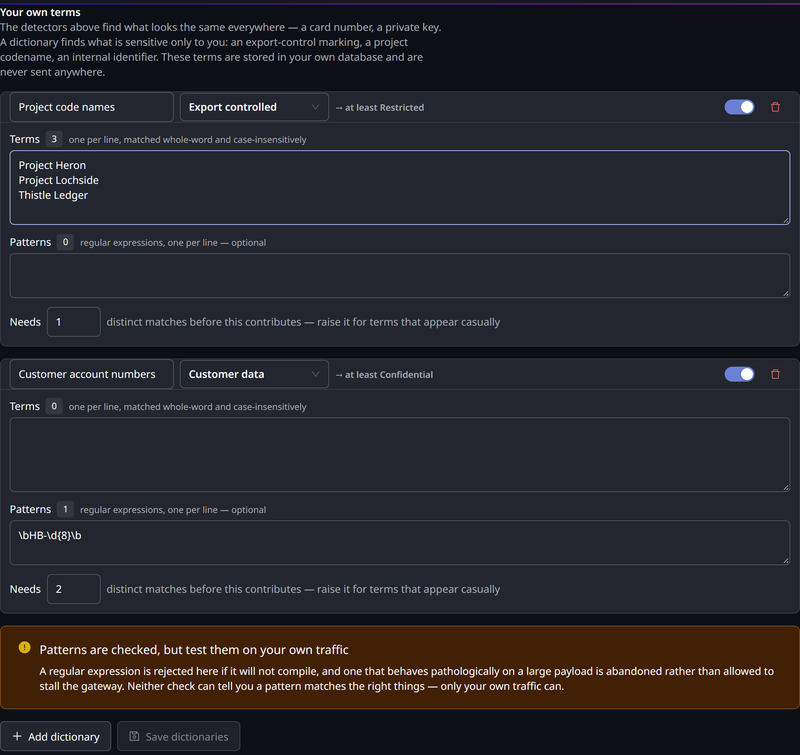
Give a dictionary a name, the tag it contributes, and its terms, one per line. Terms match whole words and ignore case. They are stored in your own tenant database, and never sent anywhere. That matters, because the terms themselves can be as sensitive as the data they find.
| Setting | What it does |
|---|---|
| Terms | Literal words or phrases, one per line. From 3 to 200 characters each, and up to 2,000 per dictionary |
| Patterns | Regular expressions, for identifiers with a shape instead of a fixed value. Up to 400 characters each, and up to 50 per dictionary |
| Needs N distinct matches | The density gate described earlier. Raise it for a term that appears casually |
A pattern is checked when you save it. If it behaves pathologically on a large payload, it is abandoned instead of being allowed to stall a request. Neither check tells you a pattern matches the right things. Only your own traffic can. Add the pattern, and read what it catches in Observe mode before you write a rule on it.
How Much of a Call Is Read
Detection reads up to a fixed number of characters of each call. By default, that is 262,144 characters of the request and 32,768 characters of the reply, both adjustable under Scan window on the Detectors tab. The response window is smaller, because a reply is scanned on a latency-sensitive path.
When a payload is larger than its window, the part beyond it is not read. The scan is reported as truncated, not clean. Policies can read that distinction as data.scan. A rule can then insist on a complete scan, instead of treating "we found nothing" and "we did not look everywhere" as the same answer.
Semantic Classification
The detectors match patterns. Semantic classification asks a different question: what the content is. For example, whether content reads as a customer list, or as an internal plan. No regular expression reaches that judgment.
It is an optional tier. It differs from everything else on this page in one way that governs how you approach it: it sends the arguments of tool calls to a third-party classifier outside the gateway.
What it receives is limited:
- Arguments only. It classifies a tool call's arguments before the call is forwarded. Replies are never sent to it.
- Credentials removed by field name. Values in credential fields are removed before anything is sent.
- Nothing, when a credential is inside a value. If content detection finds a credential inside an argument, nothing is sent for that call, and
data.semanticreadswithheld.
Nothing leaves the gateway until you save an API key, and the switch will not turn on without one. Enabling it makes that vendor a processor of whatever your agents' tool calls carry. First, review its data-protection terms, sub-processors, data residency and retention against your own obligations. Data sent cannot be recalled.
The rest of data classification does not depend on this. Leave it off, and detection still runs, entirely inside the gateway.
When you turn on the switch beside Semantic classification is off, a confirmation titled Send call content to the classifier? states what is sent, and that sent content cannot be recalled. Click Enable and send content to turn the tier on. The History tab records who enabled or disabled the tier and when, and any change to its API key or model.
Two properties keep an imperfect classifier safe to put in an enforcement path:
- It can only raise a classification, never lower one. The deterministic result stays authoritative, and a semantic verdict that disagrees downward changes nothing. The worst a wrong verdict can do is over-classify, which costs an approval, not a disclosure.
- A verdict that looks manipulated is discarded. Content that argues for its own classification is a known way to move a classifier of this kind. The gateway checks for it. When the check fires, it falls back to the deterministic result, and records the call as adversarial.
| Setting | What it does |
|---|---|
| API key | Write-only. Stored encrypted, and never shown again |
| Model | Pinned to a specific version. Thresholds tuned against one version are not guaranteed to hold for another |
| Calls per minute | A budget. Calls beyond it are marked unexamined, not reported clean |
| Act above | A verdict at or above this confidence contributes normally |
| Advise above | Between this and Act above, a verdict still contributes but is marked advisory, so an enforcing rule can exclude it |
| Treat as adversarial above | The threshold for discarding a verdict as manipulated |
| Claim a tag above | The confidence needed before a suggested tag is applied |
Tune the thresholds against your own traffic. The shipped values are a starting point, not a recommendation. If the classifier is unreachable, rate-limited or over budget, the call proceeds, and the attribute records why. Classification never fails a request.
Writing Policies Against a Label
A classification reaches policy conditions through two namespaces, because they answer different questions.
| Attribute | Type | Presence | Description |
|---|---|---|---|
tool.name | String | On a tool call | The tool being called |
tool.connector | String | On a tool call | The connector providing it |
tool.tier | String | When the tool is labeled | The tier's key, as you named it |
tool.tier_rank | Int | When the tool is labeled | What to compare. 1 and up |
tool.tags | List of String | When the tool is labeled | The tags you assigned |
data.tier | String | When anything classified the call | The effective tier's key |
data.tier_rank | Int | When anything classified the call | What to compare |
data.tags | List of String | When anything classified the call | The effective tags |
data.sources | List | When anything classified the call | What contributed the classification, and how. Each entry's origin is assignment, external, detected or semantic |
data.scan | String | When content detection scanned the call | full or truncated. See How Much of a Call Is Read |
data.semantic | String | When the semantic tier is on and the call has arguments to classify | ok, low_confidence, adversarial, unavailable, budget or withheld |
data.confidence | Double | When the classifier returned a confidence | The classifier's confidence in its verdict |
data.advisory | Bool | Only when true | The verdict fell between Advise above and Act above. It still contributes |
connector.data_ceiling | String | When a ceiling is set on the connector | See A Connector's Data Ceiling |
connector.data_ceiling_rank | Int | When a ceiling is set on the connector | What to compare |
response.data.* | — | Post-Response phase, when the call is classified or its reply was scanned | tier, tier_rank, tags, sources and scan. The call's classification, raised by anything detection found in the reply. When the reply was not scanned, it repeats the request's classification |
tool.* is what you assigned to the tool being called. data.* is what this call is carrying: the tool's labels, the connector default, any tag floor, and the sensitivity label on any file the request brought. Write most rules against data.*. Use tool.* when you specifically mean the administrator's assignment, not the call.
Compare the Rank, Not the Name
data.tier_rank >= 4
This matches anything at the top of a four-tier scale. It keeps working after somebody renames Restricted, while data.tier == 'restricted' does not.
'pci' in data.tags && request.method == "POST"
This is a tag rule, narrowed to writes. Reading cardholder data is one question, and sending it somewhere is another.
connector.data_ceiling_rank > 0 && data.tier_rank > connector.data_ceiling_rank
This is the flow rule. It refuses a call that would send data more sensitive than the destination may receive. The > 0 guard keeps it inert until a ceiling exists.
response.data.tier_rank >= 4
On the Post-Response phase, this matches a call that reaches the top tier once the reply is taken into account. It catches sensitivity discovered in what came back, and also matches a call that was already classified that high.
When Nothing Classified the Call
When a classification is unknown, AgentPass omits the attribute entirely, instead of reporting a zero or an empty string. A condition that tests a missing attribute is not a match. The same rule governs every other sometimes-absent attribute. See A Rule About a Detail the Gateway Never Learned Never Acts.
Each situation leaves these attributes absent.
| Situation | What is absent |
|---|---|
| The request is not a tool call | The whole tool namespace |
| Nothing classified the call | data.tier, data.tier_rank, data.tags and data.sources. data.scan and data.semantic can remain |
| The tool is named but unlabeled | tool.tier, tool.tier_rank and tool.tags. tool.name remains |
| The connector has no ceiling | connector.data_ceiling and connector.data_ceiling_rank |
| Pre-Request, or a call nothing classified whose reply was not scanned | response.data |
| Content detection is off, or the call had nothing to scan | data.scan |
| The semantic tier is off | data.semantic, data.confidence, data.advisory |
The consequence is the usual one. A DENY written only on a classification blocks the labeled traffic, and lets everything unlabeled through. That is the safe direction, but the rule is only as good as your labeling. Check what a rule catches in Observe mode before you enforce it.
A REST call, an inference call, or an MCP method other than a tool call has no tool to resolve. The connector default applies, and tool rules do not. Classification never fails a request either. If a classification cannot be resolved, the call is treated as unclassified, and proceeds.
The Starter Policies
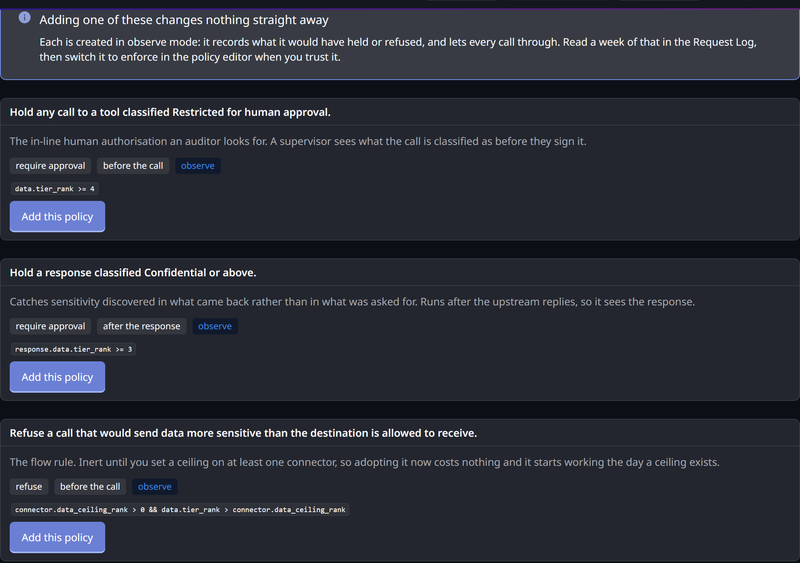
The Policies tab offers three ready-made rules for single calls. They are built against your vocabulary, not the shipped one, so they read correctly whether you kept four tiers or cut them to three.
| Policy | Condition | Action |
|---|---|---|
approve-top-tier-tool-calls | The call is classified at your highest tier | Require approval |
approve-elevated-responses | The call, together with anything found in its reply, is classified at or above your second-highest tier | Require approval, on the Post-Response phase |
refuse-data-above-destination-ceiling | The call would send data more sensitive than the destination's ceiling | Deny |
Every starter is created in Observe mode, so adopting one changes no traffic. It records what would have been held or refused, and you can read weeks of that evidence before deciding. Turning a policy to Enforce is a separate, deliberate step in the policy editor. See How Policies Are Evaluated.
The tab also shows which starters you have already adopted, so you do not create a second copy.
These starters judge each call on what it carries. To catch an agent that reads something sensitive and then sends a reworded version elsewhere, the tab also lists three session starters. Each is tagged needs session tracking, and matches nothing, until you turn session tracking on. See Governing What a Session Has Already Read.
A Connector's Data Ceiling
A ceiling is the highest classification a destination may receive. It is the other half of the picture. A tool's label says what data comes out of a system, and a ceiling says what may go into one.
Set it on the connector itself. Open the connector, and use Highest data classification this connector may receive in its settings.
Leave it unset, and nothing changes. There is no default ceiling. A flow policy that compares against one never matches on a connector that has none. That makes the starter flow rule safe to adopt before you have thought about ceilings at all. It starts acting the day you set the first one.
Where a Classification Shows Up
Once a tool is labeled, the label travels with the call.
| Surface | What you see |
|---|---|
| Connector → Tools, on an MCP connector | A Data labels column, with the resolved tier and tags for each tool in the catalog |
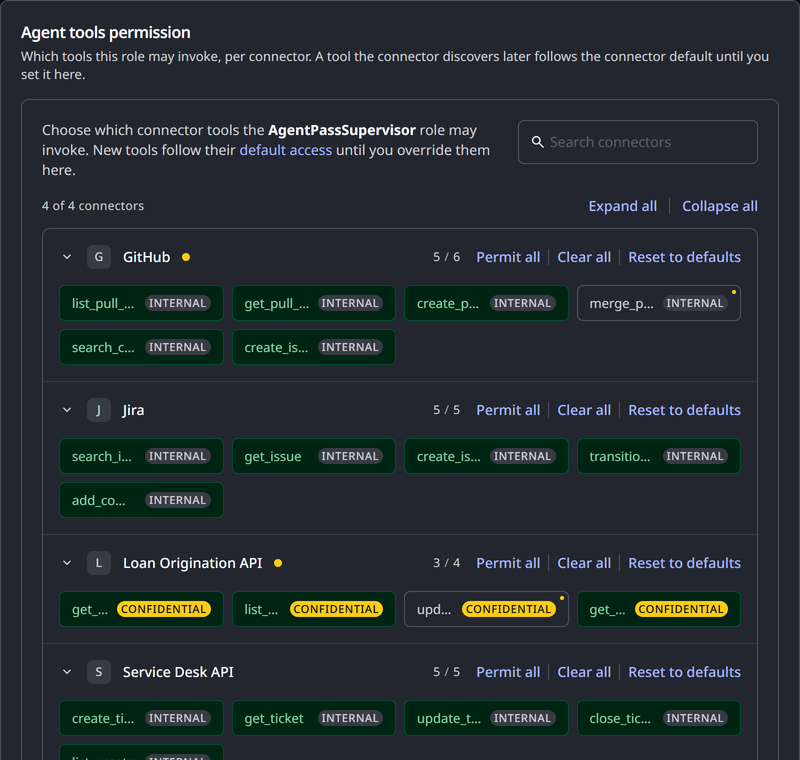
| People → Roles → Agent tools permission | The classification beside each tool as you grant it, so you can see what you are handing a role |
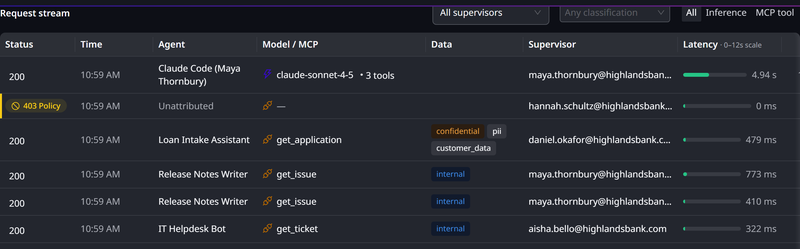
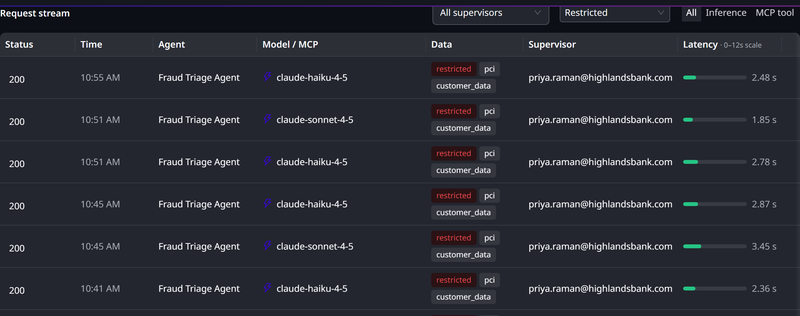
| Request Log | A Data column beside the tool, so a reviewer scanning for Restricted traffic reads the two together. Opening a classified call shows a Data classification card, as classified when the call was made |
| An approval | The classification, added to the approval a supervisor is asked to sign, both in the console and on their phone |
The line on the approval matters. Without it, a supervisor signs "call export_customers on the CRM connector" with no idea whether that is a public report or a regulated extract. The classification is appended to the message you wrote, so your own wording still leads.
Adding a classification to an approval does not change what the supervisor's passkey signs. The signature still covers the agent, the method, the path and the request body. The classification is context for the person, not part of the cryptographic record of the action.
To filter the Request Log by tier, choose a tier from the Any classification picker among the stream's filters. The underlying API filters on classification too, with dataTier and dataTag on the request-stream endpoint. That is how a report such as "every Restricted call last week" is produced. Filtering by tag is available through the API only.
Using Your Microsoft Purview Labels
If your documents already carry Microsoft Purview sensitivity labels, you can fold them into the same vocabulary. You then avoid writing a second set of rules against a Purview-shaped attribute.
You map a Purview label onto one of your tiers, and optionally onto tags. For example: the label we call "Highly Confidential" means Restricted, tagged Customer data. Give the label's name or its GUID, whichever you have. Matching tries both, and ignores case. After that, one rule written on data.tier_rank covers a hand-labeled tool and a Purview-labeled document alike.
The mapping is opt-in, and a label you have not mapped contributes nothing. An organization that never fills in the table is in exactly the position it was before. AgentPass does not invent a classification for your documents.
You configure the Purview mapping through the AgentPass administration API. The Data Classification page does not show it. Your HYPR representative can help you populate it.
The Purview label itself is still available to policies in its original form, as request.files[].sensitivity_label, including its sub-label parent, which a tier mapping flattens away. See The Document's Sensitivity Label for when to use which. A Purview label is read at upload in the Agent Portal, and is absent on the message that sends the file onward.
Who Can See and Change This
Data classification has its own pair of permissions, separate from those that configure a connector.
| Permission | What it allows |
|---|---|
data-labels:view | Read the vocabulary, the assignments and the change history. Every write control on the page is disabled |
data-labels:manage | Change the vocabulary, assign labels and adopt a starter policy |
AgentPassAdmin holds both. AgentPassOperator holds view only. The page and its sidebar entry are hidden from anyone with neither.
Keeping these apart from connectors:edit is deliberate. An administrator who may reconfigure a connector's backend is not automatically the person who decides that its data is Restricted. Those are different jobs, with different audiences, and lowering a classification is the change a reviewer asks about. Grant data-labels:manage to whoever owns data classification in your organization. See Roles and Permissions to build a role that carries it.
Related
- How Policies Are Evaluated — modes, phases, and what a match does
- Policy Attribute Reference — every attribute a condition can read, and when each is present
- Governing What a Session Has Already Read — rules that judge a call on what its session read earlier
- Controlling MCP Tool Access by Role — the other decision made per tool, and the grid the classification appears in
- Viewing the Request Log — where the classification of each call is recorded
- Approving and Denying Agent Actions — what a supervisor sees on an approval