Discovering Unmanaged Agents
HYPR AgentPass™ lists the AI clients it observes that you have not onboarded, often called shadow AI. You can see what is running before you decide how to govern it. Discovery is an observation, not a roster. Nothing listed here has been onboarded, granted access or blocked.
See and Govern the AI Tools Already on Your Workstations takes you from this list to routed, enforced tools.
How Discovery Works
AgentPass discovers unmanaged clients from two sources, and shows them together in one view:
- Gateway. When an unmanaged client sends traffic through the gateway, AgentPass records the activity. Where it can, it attributes the activity to a workstation user and device, and to the provider account the traffic used.
- Endpoint. When you turn on Agent Observability, the HYPR endpoint client reports the AI tools running on enrolled workstations, including tools that never route through the gateway. Endpoint activity is signed by the workstation, and attributed to the user signed in at the time.
Together, these close the gap shadow AI relies on. You see clients that were never explicitly connected, whether they pass through the gateway, run only on the workstation, or both. For how the endpoint client recognizes an AI agent among other software on a workstation, see Endpoint Guard.
Review Discovered Agents
- Open Oversight → Discovered. The view opens on the Shadow AI Discovery tab.
- Click the Discovered Agents tab. It lists every unmanaged client AgentPass has observed in the selected window, with the details it captured.
Shadow AI Discovery, the first tab of the same view, covers AI SaaS your workforce reaches through the browser, matched by domain on enrolled workstations. This tab covers inference clients, identified by their traffic at the gateway or by process on the workstation. Both are shadow AI, and a tool can appear in both. Neither list is a subset of the other.
| Column | What it shows |
|---|---|
| Owner | The workstation user the activity is attributed to: their name, with their login beneath. A client with no reported identity is tagged Unattributed |
| Device | The workstation the client ran on |
| Tool | The AI client or tool observed, such as Claude Code or Codex |
| Source | Where the activity was seen: Gateway, Endpoint or Gateway + Endpoint |
| Provider account | The provider account the traffic used, where the gateway could read one |
| Requests | For gateway-observed clients, the requests proxied through the gateway. For endpoint-observed clients, the tool activity the workstation reported: launches, exits and invocations |
| Errors | The gateway requests that failed. Endpoint-reported activity carries no errors |
| Last seen | When the client was last seen |
Use the time-range selector to focus the view on Last 24 hours, Last 7 days (the default) or Last 30 days. When no unmanaged clients were observed in the selected window, the view says so.
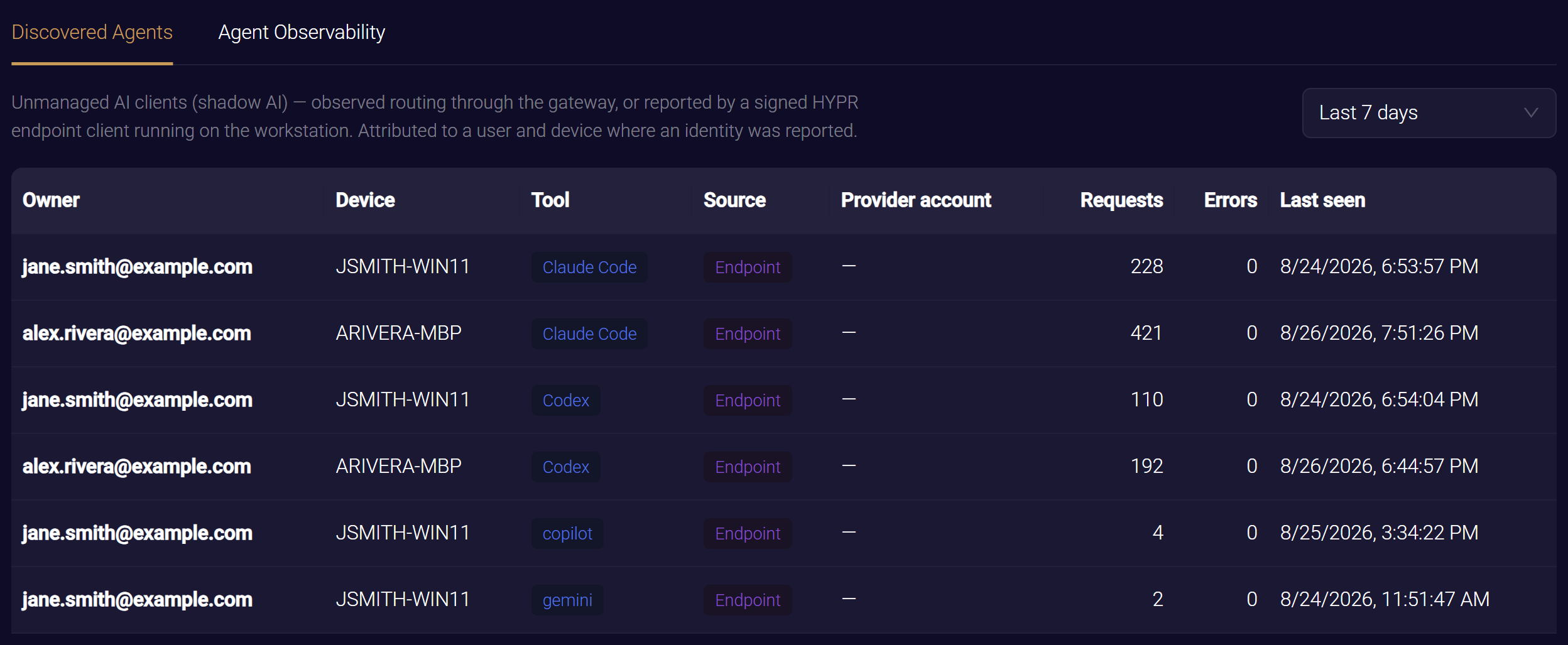
Where Each Agent Was Seen
The Source badge tells you how AgentPass observed each agent:
- Gateway: seen only in traffic that passed through the gateway
- Endpoint: seen only by the HYPR endpoint client on a workstation
- Gateway + Endpoint: seen both ways
When the same tool, on the same device, under the same user, is seen both ways, AgentPass collapses it into a single Gateway + Endpoint row. One workstation's tool therefore shows up once, not twice. The collapsed row keeps the endpoint client's attribution, because the workstation signs it, and the tool itself cannot spoof it.
Until you turn on Agent Observability and enroll workstations, the view shows only agents seen passing through the gateway.
Who Sees What
What the Discovered view shows depends on the viewer's role:
- Administrators and operators, whose view spans the whole organization, see every discovered agent from both sources.
- Supervisors, whose view is limited to the agents they supervise, see only gateway-observed rows for their own agents. Endpoint-reported activity is attributed to a workstation login, not to a supervisor, so supervisors do not see it.
- The Agent Observability tab beside the agent list is shown only to users who can view settings. See Enabling Agent Observability.
For the roles and permissions behind these views, see Roles and Permissions.
Act on What You Find
The Discovered view turns unknown activity into something you can manage. Use it to:
- Understand your exposure. See which AI clients are active, who runs them, and on which devices.
- Prioritize onboarding. Bring the clients that matter under management. A discovered agent stays in this view until it is onboarded, which is a separate, approved step.
- Drive desktop tools from the gateway. For the desktop coding tools you see here, Managed Desktop Tools can route their inference through the gateway, and block their direct provider traffic.
- Inform your policies. Write policies that target the patterns you observe.
Related
- Endpoint Guard — how workstations discover, identify and route AI agents
- Enabling Agent Observability — bring endpoint-observed AI tools into this view
- Managed Desktop Tools — route and enforce the desktop tools you discover