Understanding Your Policies
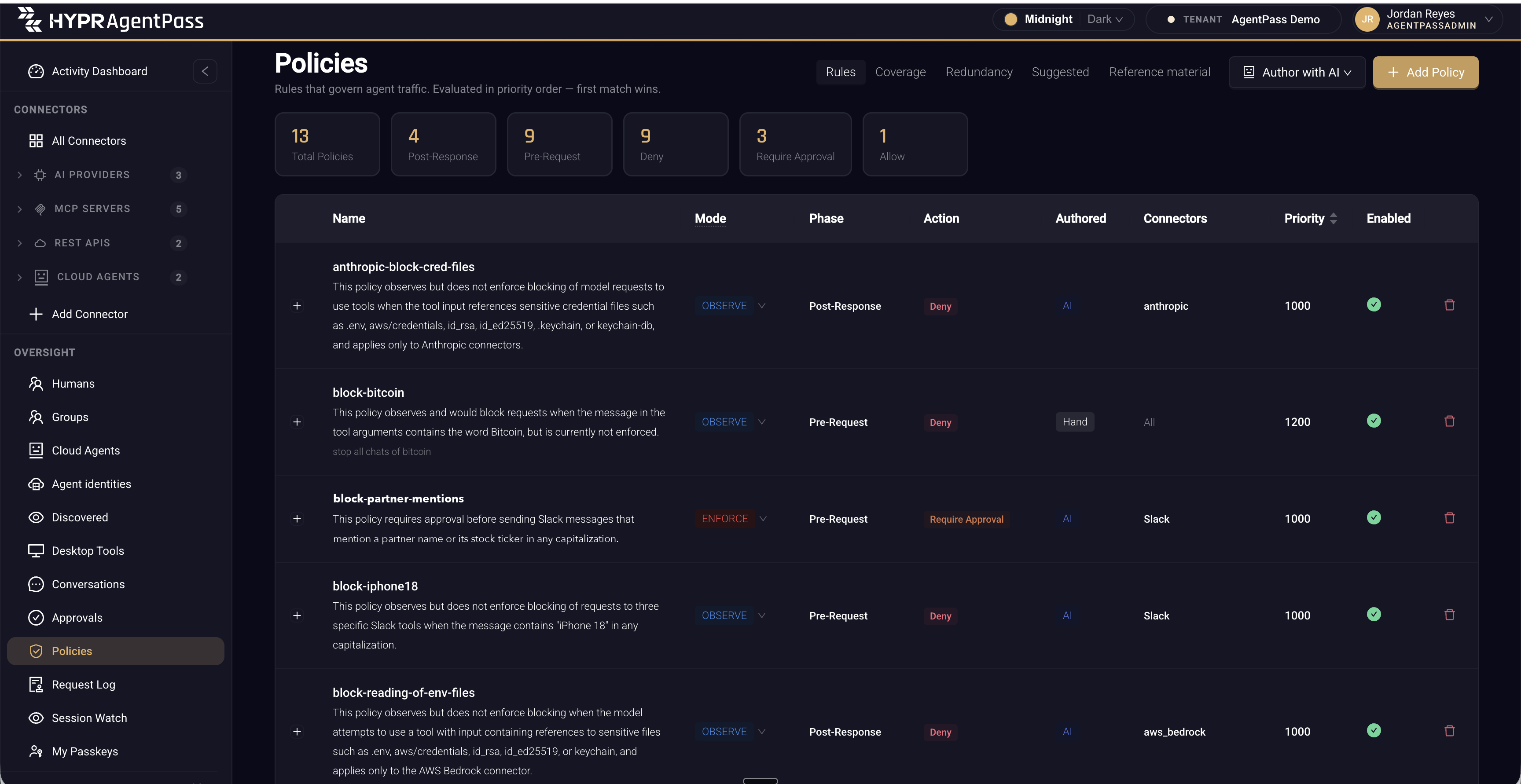
As a policy set grows, it becomes hard to hold in your head. HYPR AgentPass™ reads each rule back to you in plain language, so you can tell what a rule does without reading its CEL expression. The sentence appears beneath the policy name, on the Rules tab of Policies. Above the list, Total Policies sits beside totals by phase and by action.
The other tabs on the same page answer questions the list cannot: Coverage, Redundancy, Suggested and Reference material.
Reviewing policies is an administrator task.
Read a Policy in Plain Language
Each policy's row carries a sentence describing what the rule does: the connector and tool it applies to, the condition that makes it match, and the action it takes. Alongside it are the policy's mode, phase, action and priority. To read the CEL expression itself, click the row to open the policy form.
Until the plain-language sentence is ready, the row shows the literal reading of the expression, which starts Matches when….
What an Expanded Row Shows
Click + at the start of a row to expand it. A row expands once its summary is ready. The expanded row holds the following details.
| Detail | What it tells you |
|---|---|
| The literal reading | The expression rendered word for word, marked with an info icon. It appears when it differs from the plain-language sentence. The icon's tooltip reads Generated from the rule itself, so it is always current. |
| Connectors: … or Applies to every connector | The connectors the policy is scoped to |
| Limited to N tools | The tool scope, when the policy has one |
| Matched N times in the last 7 days | How often the rule matched. See See Whether a Rule Has Ever Fired |
| Drafted by … | The author that drafted the rule, and how many model turns it took. A policy written by hand has no author line |
| Citations | Each reference passage that was in context when the rule was drafted, with the caveat that citing a passage does not mean the rule satisfies it |
The Expression Is the Source of Truth
The sentence is derived from the CEL expression, never stored in its place. When you edit an expression, its sentence is regenerated from the new expression. A summary therefore never describes a rule the gateway no longer runs.
Read the sentence to orient yourself. Read the expression when a decision depends on the exact condition. The expression is always one click away, on the policy form, and it is what the gateway actually evaluates.
The plain-language sentence is different from the policy's Description field. The description is the note you wrote about why the rule exists. The sentence describes what the rule does. AgentPass shows both, and keeps them apart, because they are different claims.
See Whether a Rule Has Ever Fired
The expanded row states how many times the policy matched in the last seven days: Matched N times in the last 7 days, or Has not matched anything in the last 7 days. That line answers a question the policy list cannot. A rule that has matched nothing is either guarding against something that has not happened, or not written the way you think.
The count covers the requests an Enforce rule blocked or held, and the matches an Observe rule recorded as Would block. A match with ALLOW is not counted, so an Allow rule always reads Has not matched anything.
Treat a quiet rule as a prompt to look, not as a defect. For a view across the whole set, including rules that cannot fire because a higher-priority rule always wins first, see Finding Redundant and Conflicting Rules.
Before a Rule Runs
This page is about rules that are already running. To see what a draft would have done before you save it, run the backtest in the AI wizard. See Backtest against last 7 days. To decide when an Observe rule is ready to enforce, see Promoting a Policy to Enforce.
Related
- Policies — the policy form, CEL conditions and enforcement modes
- Policy Coverage — which connectors and tools have a rule reaching them
- Finding Redundant and Conflicting Rules — how two rules relate, and rules that never run