Policies
Policies are the rules that govern agent traffic in HYPR AgentPass™. The gateway checks every request an agent sends against your policies as it passes. When you ask for it, it checks every reply that comes back, too. A control therefore takes effect in real time, not after the fact.
A policy pairs a condition with an action. When the condition matches, the action decides what happens: the traffic goes through, is blocked, or is held until a supervisor approves it. Until you promote a policy to enforce, it only records what it would have done.
Require a Person for High-Value Agent Actions sequences coverage, drafting, impact preview and enforcement.
Writing policies is an administrator task. This section is for administrators who decide how agent traffic is governed.
How It Fits Together
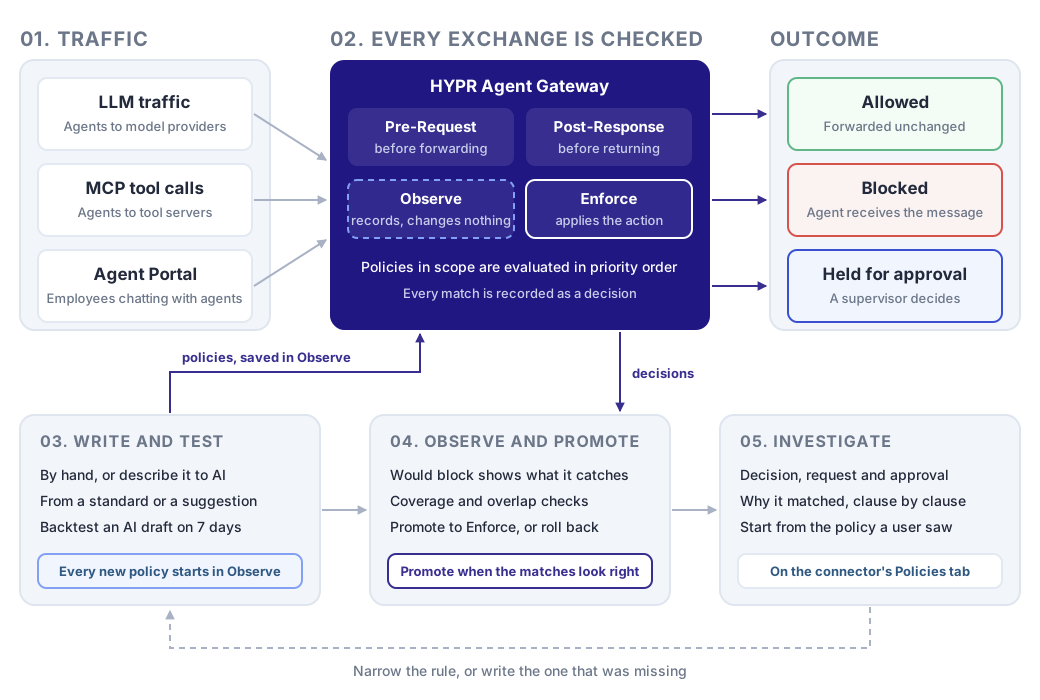
Every exchange is checked. An agent calling a model, an agent calling a tool on an MCP server, and an employee chatting with an agent in the Agent Portal all pass through the gateway. The gateway checks each request before forwarding it, and each reply before returning it, against the policies in scope for that connector.
A match becomes a decision. A policy in Observe mode only records a DENY or REQUIRE_APPROVAL match, as a Would block decision. A policy in Enforce mode applies its action. The request is allowed, blocked with the policy's message, or held until a supervisor approves it. Every decision is kept on the connector, with the request that caused it.
Rules move through a cycle. You write a rule, and it starts in Observe. Its decisions show what it would have caught. When they look right, you promote it to Enforce. When it blocks or holds something, you investigate the decision. That usually sends you back to narrow the rule, or to write one that was missing.
The Policy Cycle
The pages in this section follow the order an administrator works in.
| Stage | What you do | Start with |
|---|---|---|
| Set up | Once: choose the model that drafts policies with AI, who drafts each kind, and which MCP clients may manage policies | Setting Up AI Authoring |
| Write and test | Write a rule by hand, with AI, from reference material or from a suggestion. It is saved in Observe | Writing a Policy by Hand |
| Roll out | Check what the rule caught while observing, then promote it to Enforce, or roll it back | Promoting a Policy to Enforce |
| Monitor | Keep the set healthy: what each rule means, whether it fires, what it covers and where rules overlap | Understanding Your Policies |
| Investigate | When a rule blocks or holds something, trace the decision to the request and the values it matched | Investigating a Policy Decision |
Observe First, Then Enforce
A new policy starts in Observe mode by default. The AI wizard always saves in Observe, and the policy form preselects it. In Observe mode, the gateway evaluates the rule against real traffic and records every DENY or REQUIRE_APPROVAL match, but changes nothing. When the matches look right, promote the policy to Enforce from the policy list, and the action starts to apply. Promoting a Policy to Enforce lists what to check first.
Keep this workflow for every rule. A condition that matches nothing in Observe mode does nothing in Enforce mode either. A condition that matches too much is far cheaper to find while it is still only logging.
When you start writing rules, How Policies Are Evaluated explains the modes, the actions, priority, and what a match does on each kind of connector.
The Policies Page
Open Oversight → Policies. The page lists your rules, evaluated in priority order, where the first match wins. Five tabs sit across the top of the page.
| Tab | What it shows | See |
|---|---|---|
| Rules | Every policy, with Total Policies and totals by phase and by action above the list | Understanding Your Policies |
| Coverage | Which connector and tool pairs carrying traffic have a rule reaching them | Policy Coverage |
| Redundancy | Rules that duplicate, contain or conflict with each other, and rules that never run | Redundant and Conflicting Rules |
| Suggested | Proposed rules, each with the evidence behind it | Suggested Policies |
| Reference material | The standards you uploaded, and the policies that cite them | Writing Policies from Reference Material |
Two buttons sit beside the tabs:
- Author with AI lists your enabled connectors, and opens the drafting wizard for the one you pick. With no enabled connector, the list reads No enabled connectors.
- Add Policy opens the policy form. See Writing a Policy by Hand.
What Your Role Lets You Do
Each action on this page needs a permission under Policies in Roles and Permissions.
| To | Permission |
|---|---|
| Open the page and read every tab | View |
| Author with AI, answer a suggestion, upload a document or run Suggest policies | Add |
| Edit a policy, change its mode or restore its previous expression | Edit |
| Delete a policy or remove a document | Delete |
Author with AI, Upload a document and Remove appear only for roles that hold the permission. Other controls appear for every role that can open the page. The gateway checks the permission when you use one, and refuses a change your role does not allow.
A policy's owner is the address in its Supervisor Email. A policy saved from the wizard is owned by the person who saved it. Where your Add or Edit permission is limited to your own records, the gateway makes you the owner when you save.
Where your View permission is limited to your own records, the tabs narrow in different ways:
- Rules lists only the policies you own, and its totals count only those.
- Coverage counts every rule in your organization, but names only yours. Rules owned by someone else appear as a count.
- Redundancy lists only pairs where you own both rules.
- Suggested and Reference material are the same for everyone who can open the page.
Related
- HYPR AgentPass: Overview — where policies fit in the product
- Controlling MCP Tool Access by Role — decide which MCP tools each role may use, a control that runs alongside policies
- Approving and Denying Agent Actions — what a supervisor sees when a policy requires approval