Choosing Who Drafts Your Policies
By default, HYPR AgentPass™ drafts policies with the HYPR built-in author. The built-in author is not a model that HYPR runs. It is HYPR's drafting instructions, sent from the gateway to an Anthropic model using the Anthropic API key you configure in Setting Up AI Authoring. Until that key is set, the built-in author cannot draft.
You can route drafting to a cloud agent of your own instead. The agent drafts with its own configuration and credentials, in the provider account and region where you created it.
Nothing else about drafting changes. Whichever author runs, the drafted expression must compile and pass the same static checks. It is saved in Observe mode for you to review and promote.
Choosing a policy author is an administrator task, and applies to your whole organization.
The Anthropic API Key and the Policy Author
The Policy Authoring tab holds two separate settings, on two separate cards:
- The Policy authoring (LLM) card holds an Anthropic API key and a model. This is the credential the built-in author uses.
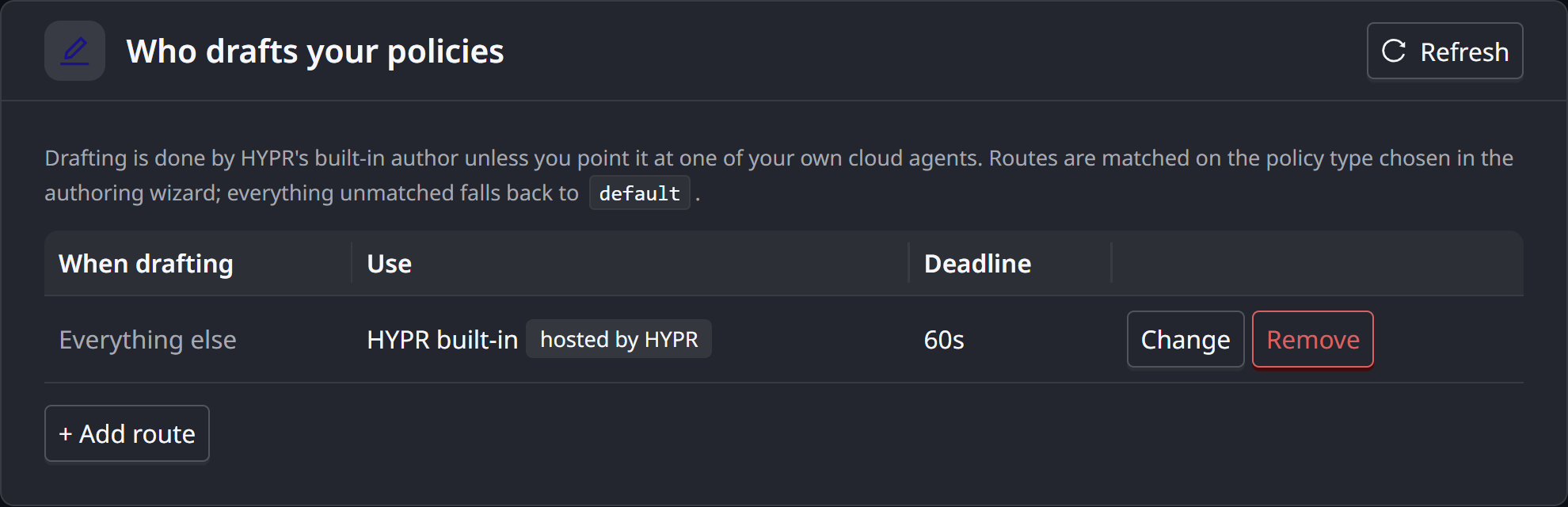
- The Who drafts your policies card chooses the author for each kind of policy: the built-in author, or one of your cloud agents.
A cloud agent never uses the key on the Policy authoring (LLM) card. It uses the credentials of its own connector, the same ones it uses for every other session.
| HYPR built-in author | Your cloud agent | |
|---|---|---|
| Drafting instructions | HYPR's, sent with every draft | HYPR's, sent with every draft, alongside the agent's own system prompt |
| Model | The Author model on the Policy authoring (LLM) card | The model configured on the agent |
| Credentials | The Anthropic API key on the Policy authoring (LLM) card | The agent's own connector |
| Where the model runs | Anthropic, under the account that owns the key | The agent's provider account and region |
| Time allowed per draft | Fixed, 30 seconds per model call | The route's deadline |
| Tokens counted in AI policy spend | Yes | No. See your provider's console |
The Key Is Still Used When Every Route Names an Agent
Routing all drafting to your own agents does not retire the Anthropic API key. AgentPass also uses it, on a schedule, for features that are not routed:
- Policy descriptions. A one-sentence, plain-English description of each policy
- Suggestion wording. The sentence that states each proposed rule under Suggested. See Suggested Policies
Neither feature fails without the key. Without it, a policy shows a description built from its expression, and a suggestion keeps its template sentence.
Reference documents you upload are prepared by the author on your default route. See Reference Material.
If no policy content may be sent through the Anthropic API key, route every kind of drafting, including the default route, to your own agents, and leave the key on the Policy authoring (LLM) card unset. Policy descriptions and suggestion wording then use their plain forms.
Choose an Author
-
Make the agent eligible. Open Oversight → Cloud Agents, open the agent, and turn on the Policy author switch in the header of its page. This is a separate step, needing a separate permission, from configuring where drafting is routed.
-
Open Advanced → Gateway Settings, and click the Policy Authoring tab.
-
On the Who drafts your policies card, click Change on the Everything else row to change the default author, or click + Add route to route one kind of policy.
-
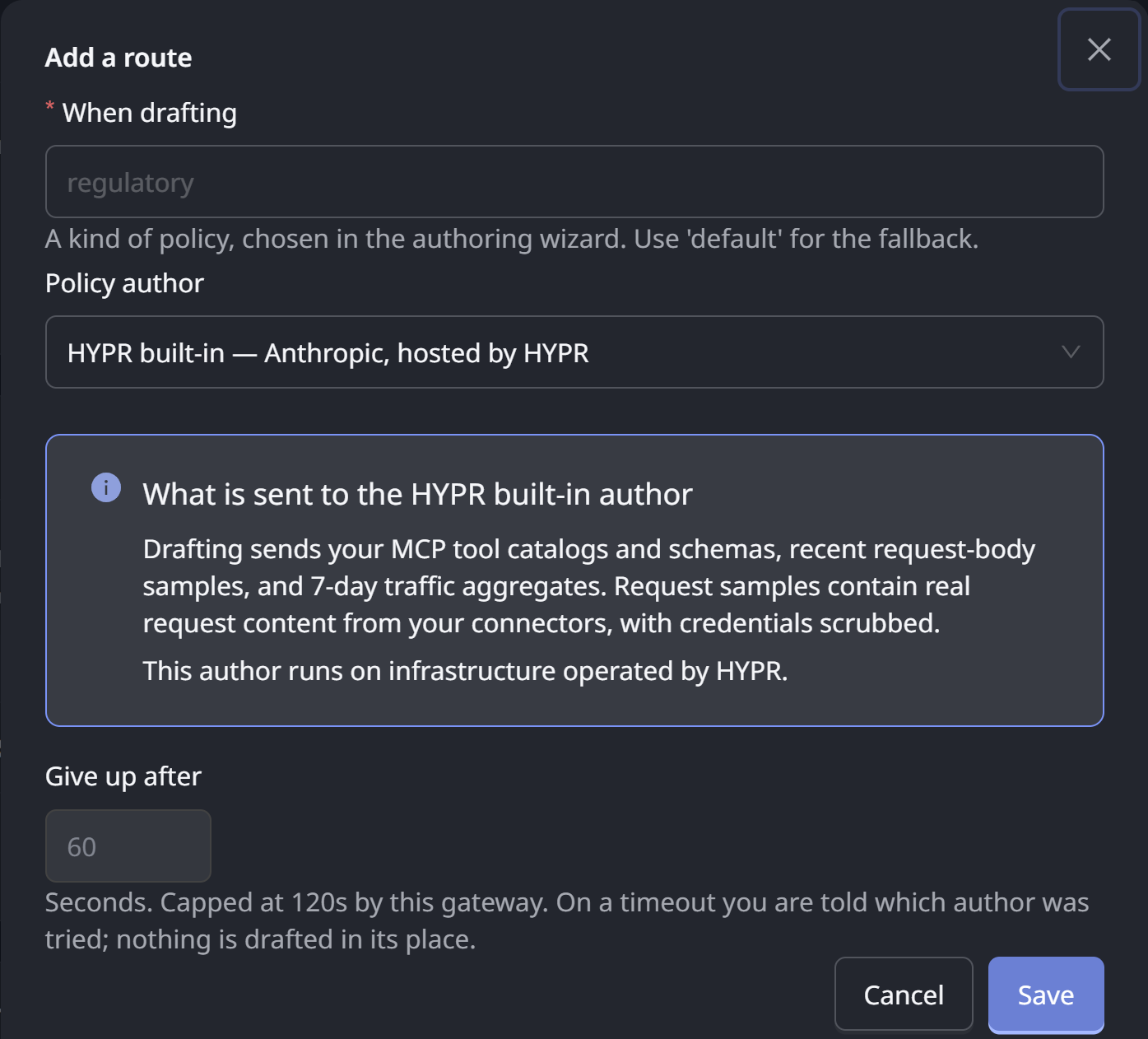
Choose the author from the Policy author list.
-
Read the disclosure panel beneath the list. See What Is Sent to the Author.
-
Click Save.
The author list holds the HYPR built-in author, shown as HYPR built-in — Anthropic, hosted by HYPR, and every cloud agent in your organization. The Anthropic API key and Author model fields that the built-in author uses are on a different card, Policy authoring (LLM), at the top of the same tab. See Setting Up AI Authoring.
Ineligible agents are still listed, with the reason shown, so you can see why an agent you expected is unavailable. Typical reasons are an agent not tagged as a policy author, or one with no session surface to drive.
The list also shows the selected agent's typical drafting time, based on recent drafts. You can see how a configured agent performs before it matters.
What Is Sent to the Author
The disclosure panel beneath the picker names the agent you selected and where it runs. It also states exactly what drafting sends to it:
- Your MCP tool catalogs and schemas. The tools your connectors expose, so the drafted rule names real tools and real fields.
- Recent request samples. Real request content from your connectors, which lets a rule match the shape of the traffic you actually receive. Samples are scrubbed of credentials before they are stored or sent. Scrubbing removes secrets, not meaning.
- Traffic aggregates. Counts over a recent window, showing what is busy and what is governed.
Any reference passages you attach to a draft are sent as well. See Reference Material.
The disclosure follows your selection and updates as you change it. Every choice answers the question "where does my traffic content go?" For the built-in author, the gateway assembles the request and sends it to Anthropic with the Anthropic API key you configured. For a cloud agent, it goes to the agent in its own account.
A configured agent receives the same drafting context as the built-in author. Choosing your own agent changes where that context is processed. It does not reduce what is sent. Read the disclosure before you save the configuration.
A Configured Agent Runs in Your Account
An agent you configure runs in your organization's own provider account and region, and the picker shows which. That is the purpose of the feature. Prompts, traffic samples and uploaded standards are processed where your data governance already applies.
That promise only means something if it always holds. When a configured author cannot be used, AgentPass therefore refuses to draft instead of quietly falling back. That happens if the agent has been deleted, is no longer active, or has lost its policy author tag. The message names the route, says why the agent could not be used, and states that the built-in author was deliberately not used in its place.
To fix it, correct the route under Who drafts your policies, or choose a different author, and draft again.
A policy author has no tools of its own. Unlike other cloud agents, it holds no connector tools and no sandbox. Its only job is to return text, which must compile as a valid expression before it can be saved.
Route by Policy Type
You can send different kinds of drafting to different authors. For example, send regulatory drafting to an agent in a specific region, and everything else to the built-in author.
Routes are a short list with an explicit fallback, not a rule engine. Each row pairs three things:
- When drafting: a policy type you name yourself
- Use: the author that handles it
- Deadline: the time that author is allowed
Click + Add route to add a row. The reserved default route is the fallback, used for anything you have not routed elsewhere.
In the drafting wizard, you choose the policy type under What kind of policy is this? The selector starts on General — use the default author. It appears only when a route other than the default exists, and only to someone who can view gateway settings. Anyone else drafts on the default route. The type is never inferred from the words in your prompt, because a misrouted draft would be invisible.
Timeouts and Fallback
Drafting runs while you wait, so a configured agent gets a bounded window to reply. Each route to a cloud agent carries its own deadline, set under Give up after, in seconds. Your platform sets an upper limit that no route can exceed, and the field's help text shows it. Lowering the platform limit takes effect on existing routes immediately.
The deadline does not apply to the built-in author, and Give up after is unavailable while it is selected. Each call the built-in author makes to Anthropic is limited to 30 seconds.
If the deadline passes, AgentPass tells you which author it tried, and that nothing was drafted. It does not fall back to the built-in author. To draft anyway, raise the route's deadline, or choose a different author for the route, and draft again. You can always see that the configured agent was the one that did not answer.
If drafting with a configured agent often times out, raise that route's deadline. The time an agent needs varies with your provider and region, and the picker's typical drafting time tells you what to expect.
Read a Policy's Provenance
Every drafted policy records who drafted it. Expand the policy's row on the Rules tab to read the author and how many model turns it took, such as Drafted by HYPR built-in · 1 model turn. One turn means the expression compiled on the first attempt. More means the author corrected itself.
Policies created before this feature, and policies written by hand, carry no author line. AgentPass leaves that blank instead of guessing.
When a rule turns out to be wrong, ask first which author wrote it and with what context. Provenance also tells you, months later, whether a rule predates a change of author.
A configured author is not more trusted than the built-in one. Neither is trusted. That is why every draft is validated, previewed against your own traffic, checked for duplicates and conflicts, and saved in Observe mode. Those checks catch a plausible but overly broad rule, whoever produced it.
Related
- Understanding Your Policies — the impact preview and the Observe-mode default
- Reference Material — documents attached to a draft are sent to the same author
- Policies — the policy form and enforcement modes