Connecting AWS Bedrock Mantle
Overview
An AWS Bedrock Mantle connector routes your developers' requests through HYPR AgentPass™ to Amazon Bedrock Mantle in your own AWS account. Use it for models served only on Mantle, such as Claude Mythos. Every request is subject to your policies and recorded in the Request Log.
You choose a region and name the AWS account the connector serves. AgentPass works out the Mantle endpoint from the region. Developers keep their own AWS credentials: AgentPass stores none and adds none, and forwards each request with the developer's credential untouched.
Mantle has its own connector, separate from AWS Bedrock. Use the one that serves the models your developers need.
| Connector | Serves |
|---|---|
| AWS Bedrock | Models on the standard Bedrock runtime |
| AWS Bedrock Mantle | Models served only on Mantle, through the Anthropic Messages API and an OpenAI-compatible API |
The two connectors can exist side by side, and an organization can have one of each. In Observe only mode, a developer attributed the same way on both connectors is one agent, so turning that agent off stops their traffic on both. When Mantle attributes a request only to the AWS account, that account is the agent, and turning it off stops every developer in the account.
Before You Begin
Complete these tasks in the AWS console first. On the connector form, Set up in AWS opens the same steps, with your chosen region filled in and the policy ready to copy.
- Create an IAM policy from the following permission policy, replacing
<region>with your region. - Attach the policy to the permission set or role your developers sign in with. Nothing is granted to AgentPass.
- In Amazon Bedrock, open the region you will use and enable access to the models your developers need. Some models also need provider data sharing.
- If your organization uses service control policies (SCPs), allow
bedrock-mantle:CreateInference,bedrock-mantle:CountTokensandbedrock-mantle:CallWithBearerToken. - If you run AgentPass in your own AWS account, allow the AgentPass role
sts:GetAccessKeyInfo, so each request is attributed to the caller's AWS account. - Optional: to see developer names in the Request Log, set up identity enrichment. See Naming the developer behind a request.
{
  "Version": "2012-10-17",
  "Statement": [
    {
      "Sid": "AgentPassInvokeBedrockMantle",
      "Effect": "Allow",
      "Action": [
        "bedrock-mantle:CreateInference",
        "bedrock-mantle:CountTokens"
      ],
      "Resource": "arn:aws:bedrock-mantle:<region>:*:project/*"
    },
    {
      "Sid": "AgentPassBedrockMantleApiKeys",
      "Effect": "Allow",
      "Action": "bedrock-mantle:CallWithBearerToken",
      "Resource": "*"
    }
  ]
}
The second statement is needed only by developers who use a Bedrock API key.
Create the policy, and the optional identity role or IAM user, in the same AWS account you enter on the connector. A credential from any other account is refused.
Create the Connector
- In the console, open Connectors, and click Add Connector.
- Choose AWS Bedrock Mantle.
- Complete the fields described in the following table.
- Click Test connection. See Test the connection.
- Click Next.
- Choose the onboarding mode. See Onboarding new developers.
- Click Create Connector.
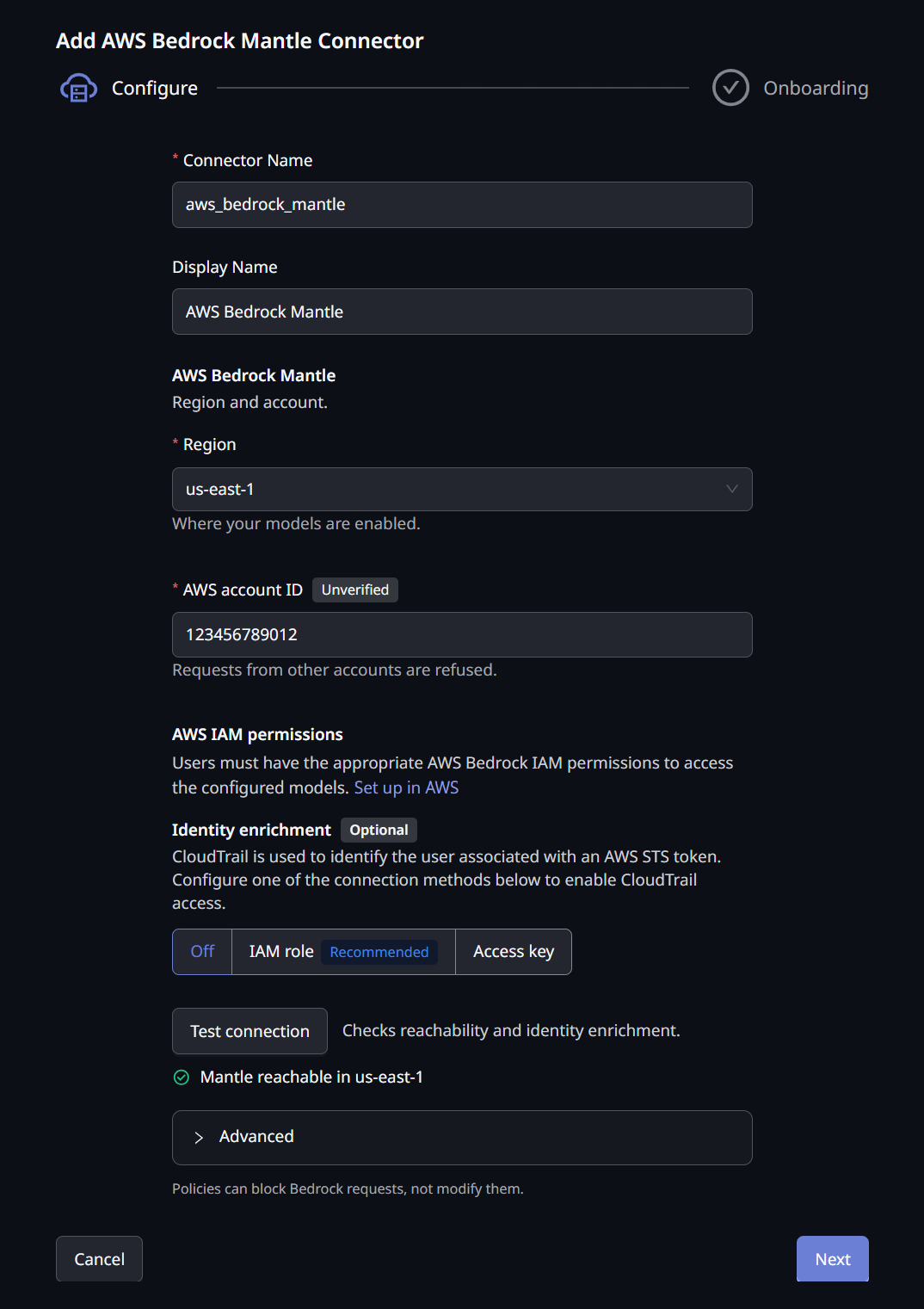
The connector form has these fields.
| Field | Description |
|---|---|
| Connector Name | The internal name for this connector |
| Display Name | The name shown in the console |
| Region | The AWS region your Mantle models run in. Model availability differs by region, so use the region where you enabled model access |
| AWS account ID | The 12-digit account your developers sign in to. Requests signed by any other AWS account are refused |
| Identity enrichment | Optional. Off, IAM role or Access key. Lets the Request Log name developers, and is needed for Require Approval. See Naming the developer behind a request |
There is no authentication field. The connector accepts the AWS credential each developer brings. The Advanced section holds the identification rate limits, which work as they do on the AWS Bedrock connector.
An organization has one Mantle connector. To change the account or region, edit the existing connector. The China and AWS GovCloud (US) regions are not available.
Test the Connection
Test connection works before the connector is saved. It reports a checklist, one row per check.
| Row | Meaning |
|---|---|
| Mantle reachable in region | The gateway reached Mantle in the chosen region |
| Identity enrichment working | The identity role or access key can read CloudTrail |
| Can't assume the role — check its trust policy | AgentPass could not assume the role. See Troubleshooting |
| Can't read CloudTrail in region — check its policy | The role or key lacks the caller-identity permission for that region |
| Account matches | The identity credential belongs to the account you entered |
| Credential is from another account | The identity credential belongs to a different account. Correct the account ID, or use a credential from the account you entered |
| Account not verified | Nothing confirmed the account yet. Saving is allowed, and the first successful request confirms it |
The identity rows appear only when identity enrichment is on.
Connect Your Developers
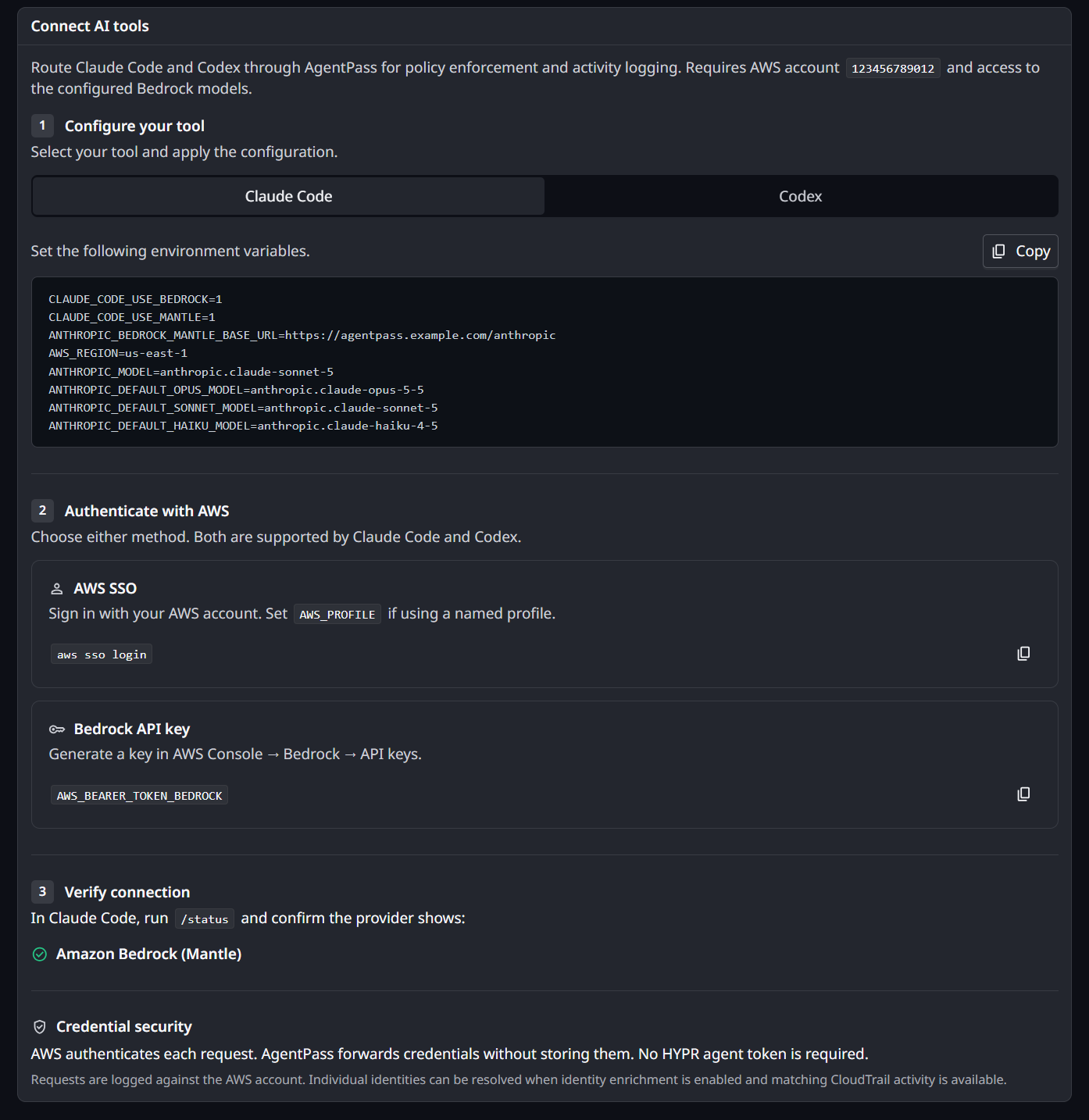
Once the connector exists, its page shows a Connect AI tools card with the settings to give your developers. The values are filled in for your gateway, region and account. The card has three steps: configure the tool, authenticate with AWS, and verify the connection.
Configure the Tool
For Claude Code, the developer sets these environment variables, using the values on the card:
CLAUDE_CODE_USE_BEDROCK=1
CLAUDE_CODE_USE_MANTLE=1
ANTHROPIC_BEDROCK_MANTLE_BASE_URL=<your gateway URL>/anthropic
AWS_REGION=<your region>
The card also pins model IDs in ANTHROPIC_MODEL and the ANTHROPIC_DEFAULT_*_MODEL variables. Use models your AWS account has access to.
For Codex, the developer adds this to ~/.codex/config.toml, and changes profile if they use a named AWS profile:
model_provider = "amazon-bedrock"
model = "<a model ID from the card>"

[model_providers.amazon-bedrock]
base_url = "<your gateway URL>/openai/v1"

[model_providers.amazon-bedrock.aws]
region = "<your region>"
wire_api = "responses"
profile = "default"
Authenticate With AWS
Each developer authenticates in either of two ways. Both work in Claude Code and in Codex, and a developer can switch between them at any time.
- An AWS SSO session. The developer runs
aws sso loginas usual, and setsAWS_PROFILEif they use a named profile. - Their own Bedrock API key. The developer creates a key in the AWS console, under Bedrock → API keys, and sets
AWS_BEARER_TOKEN_BEDROCK.
No HYPR agent token is needed. AWS authenticates every call from the developer's own credential, and authorizes it against their own permissions. AgentPass forwards the credential without storing it.
Verify the Connection
The developer starts their tool and runs /status:
- In Claude Code, the provider shows Amazon Bedrock (Mantle).
- In Codex, the model provider shows
amazon-bedrock, and the base URL is your AgentPass gateway address.
Tell your developers which AWS account the connector serves. A credential from any other account is refused, and AWS's own error does not say which account was expected. The card names the account for you.
Onboarding New Developers
The connector's onboarding mode decides what happens the first time a developer reaches Mantle through the gateway. You choose it on the create form's last step.
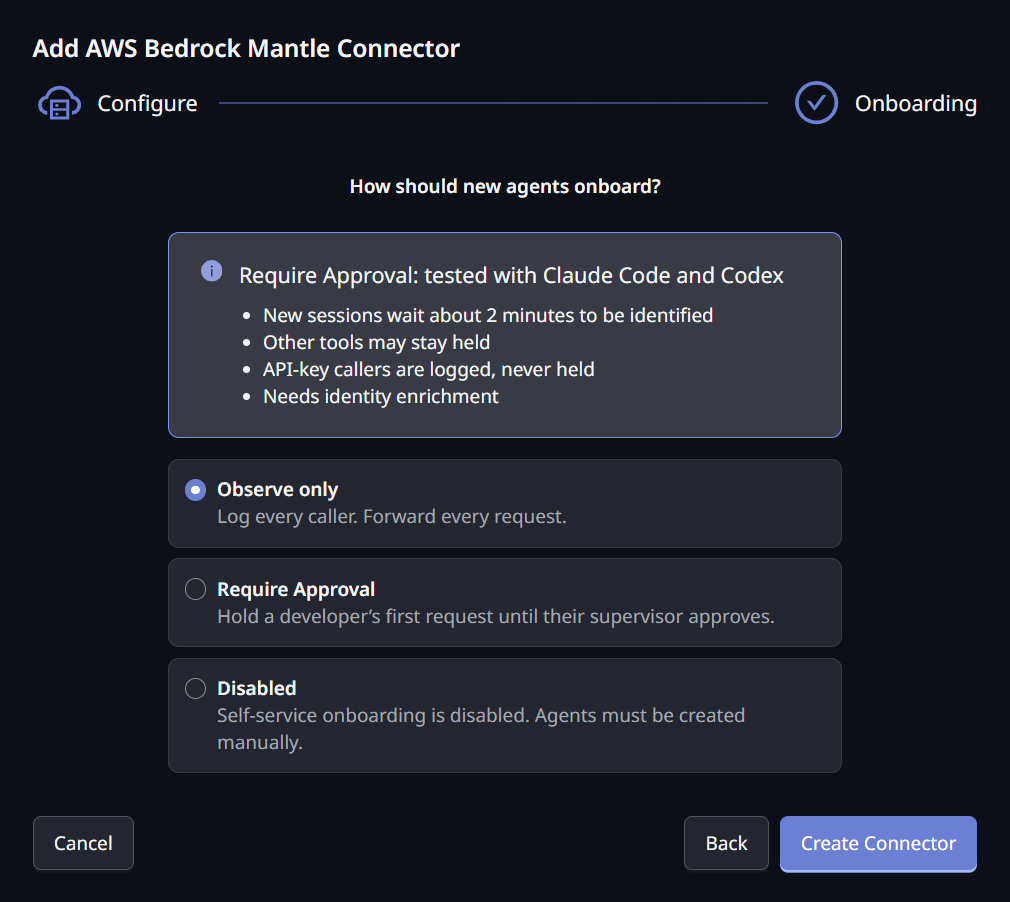
| Mode | What happens on a developer's first request |
|---|---|
| Observe only (the default) | The request is forwarded, and the caller is recorded |
| Require Approval | A developer signing in with AWS SSO is held until their supervisor approves them. Once approved, their traffic flows normally |
| Disabled | Self-service onboarding is off. Agents must be created manually |
Require Approval uses the same supervisor handshake as your other connectors. See Onboarding Your Agent for the supervisor's side.
You cannot save a connector in Require Approval without identity enrichment. Approval is per developer, and identity enrichment is what lets the gateway name one.
What to Expect With Require Approval
Require Approval on Mantle is tested with Claude Code and Codex. Keep these points in mind before you switch it on:
- New sessions wait about 2 minutes to be identified. A developer who has just signed in to AWS is asked to retry until AgentPass can name them.
- Other tools may stay held. AgentPass names a developer from AWS activity their tool records at startup. Claude Code and Codex both do this. A tool that makes no other AWS call, such as a script calling the API directly, is never named, so it stays held.
- API-key callers are recorded, never held. A Bedrock API key belongs to an AWS account, not a person.
Until the developer is named, their tool shows:
AgentPass is still identifying you — new AWS sessions take about 2 minutes.

Try again in 2 minutes. Claude Code and Codex are recognised; other tools may not be. Still blocked? Ask your administrator.
Nothing is sent to Mantle while a developer waits. Once they are named, their approval is raised as normal.
Attribution and the Request Log
Mantle traffic appears in the Request Log alongside your other connectors, with the model name and token counts. Each row opens the same AWS caller details as an AWS Bedrock request.
Requests are attributed to the AWS account the credential belongs to. A long-term Bedrock API key always names its IAM user.
Naming the Developer Behind a Request
To see developer names instead of AWS account IDs, turn on identity enrichment. It works the same way as on the AWS Bedrock connector: you choose an IAM role, which is recommended, or an Access key, and the console walks you through creating it. See Naming the developer behind a request for both routes.
Your organization has one external ID for identity roles, so one role can serve both your Bedrock connectors. If your AWS Bedrock connector already uses a role, choose Use the role from your other Bedrock connector on the Mantle form.
With identity enrichment on, a developer is named once their AWS session has made another AWS call that CloudTrail records. Claude Code and Codex both make one at startup. Until then, their requests are attributed to their AWS account.
Policies on Mantle Traffic
Your AgentPass policies apply to every Mantle request, whichever credential the developer brought. Lead a Mantle-specific rule with a template guard:
connector.template == "AWS_BEDROCK_MANTLE"
The Bedrock caller attributes are filled in for Mantle requests as well. Mantle adds connector.aws.bedrock.project, the Bedrock project the request runs in.
Mantle model IDs carry no version or region prefix, for example anthropic.claude-mythos-5. A rule written for standard Bedrock model IDs does not match them, so write Mantle rules against Mantle IDs.
A developer's AWS signature covers the exact request they sent. A pre-request policy that rewrites a Mantle request invalidates that signature, and AWS then refuses it. Policies that inspect and deny work normally.
Private Connectivity
There is no network setting on a Mantle connector. The gateway can run in an AWS VPC with an interface VPC endpoint for Bedrock Mantle (com.amazonaws.<region>.bedrock-mantle) and private DNS enabled. It then reaches Mantle through that endpoint, with nothing to configure.
Troubleshooting
Start with the symptom you see.
| What you see | What to check |
|---|---|
| Test connection cannot reach Mantle | Confirm the region is one where Mantle is available, and that your network permits outbound access |
| The connector will not save, reporting another Mantle connector | An organization has one Mantle connector. Edit the existing one |
| The connector will not save in Require Approval | Require Approval needs identity enrichment. Add an IAM role or an access key, or use Observe only |
| Can't assume the role — check its trust policy | Recreate the role's trust policy from Set up role in AWS, and confirm the role is in the account the connector serves |
| Can't read CloudTrail in region | Attach the caller-identity permission policy from the setup steps to the role or IAM user |
403 with AccessDenied | The credential is valid, but lacks permission. Confirm the permission policy is attached, the SCPs allow the three Mantle actions, and model access is enabled in that region |
| Codex requests fail | Confirm base_url ends in /openai/v1 |
| A developer is told AgentPass is still identifying them | Expected for about 2 minutes after each new AWS sign-in on a Require Approval connector. See What to expect with Require Approval |
| A developer stays held well past 2 minutes | Their tool may make no AWS call that CloudTrail records. Use Claude Code or Codex, or switch the connector to Observe only. If every developer is held, run Test connection to check identity enrichment |
| The Request Log shows an AWS account but no developer name | Identity enrichment is off, or the developer's session has not yet made an AWS call that CloudTrail records |
Related
- Connecting AWS Bedrock — the connector for the standard Bedrock runtime
- Onboarding Mode — what each mode does on every connector
- Configuring Connectors — the other kinds of connectors you can add
- Bedrock Caller Policies — govern Bedrock and Mantle traffic by the developer behind it
- Viewing the Request Log — read the traffic this connector produces