Policy Matching
HYPR SDK Policy Matching
A policy represents a set of authenticators. Policy Matching is the process of registering and authenticating users with a policy. The policy is specified in the HYPR Control Center (CC) where a policy name maps to a set of authenticators.
FIDO defines a policy as a JSON data structure that allows a relying party to communicate to a FIDO client the capabilities or specific authenticators that are allowed or disallowed for use in a given operation.
Policies can be set up from within CC by following the HYPR Passwordless Policy Management documentation.
SDK for Android
Policy Matching from the Mobile Client
During the Quick Start you should have created a CustomHyprDbAdapter class extending the HyprDbAdapter class. Custom Policy Matching requires some additions to the CustomHyprDbAdapter class. The additions include setting the Reg, Auth, and _AuthStepUp _policies.
// Set Custom Policies here
appProfile.setRpAppActionIdReg(context, "customRegAction");
appProfile.setRpAppActionIdAuth(context, "customAuthAction");
appProfile.setRpAppActionIdAuthStepUp(context, "customAuthStepUpAction");
The complete class with additions is shown here:
public class CustomHyprDbAdapter extends HyprDbAdapter {
    /**
     * Called after a new App Profile is created.
     * Put any DB customizations here for the new App Profile.
     *
     * @param context    current context
     * @param appProfile appProfile object that was just created
     */
    @Override
    public void onNewAppProfileCreated(@NonNull final Context context,
                                       @NonNull HyprAppProfileData appProfile) {
        // Set Custom Policies here
        appProfile.setRpAppActionIdReg(context, "customRegAction");
        appProfile.setRpAppActionIdAuth(context, "customAuthAction");
        appProfile.setRpAppActionIdAuthStepUp(context, "customAuthStepUpAction");
    }
}
SKD for iOS
Policy Matching from the Mobile Client
Registration with Policy Matching
class ViewController: UIViewController {

  // Call this method to register
  func register() {
    // TODO: Registration: Specify the FIDO username that you want to register with. If nil is provided then the SDK will generate the FIDO username
    // TODO: Specify the policy that you want to register with
    HYPRUserAgent.sharedInstance().registerUser(withName: nil, action: "<Your policy name goes here>", completion: { (error) in
      if (error != nil) {
        // Handle Error
      } else {
        // Handle Success
      }
    })
  }
}
Authentication with Policy Matching
class ViewController: UIViewController {

  func authenticate(_ sender: UIButton) {
    // TODO: Authentication: Specify the username that you want to authenticate with. If nil is provided as the user account then the SDK will use the activeUserAccount
    // TODO: Specify the policy that you want to authenticate with
    HYPRUserAgent.sharedInstance().authenticateUser(nil, action: "<Your policy name goes here>", completion: { (error) in
      if(error != nil) {
        // Handle Error
      } else {
        // Handle Successful Authentication
      }
    })
  }
}
Example
Registration and authentication are policy-based. Here we specify the authenticator sets to use during registration and authentication. Authentication might require one method - for example, only Fingerprint Authentication - or more than one (a.k.a. multimodal) authentication method – like requiring passing both Face + Palm biometrics challenges.
Choose an Action Code Name for your policy and add a Description if you want one. Then select all the viable authentication sets by which HYPR users can successfully authenticate. This example shows:
-
Touch + PIN
-
Face only
-
PIN only
Click Save when you have finished defining the Policy.
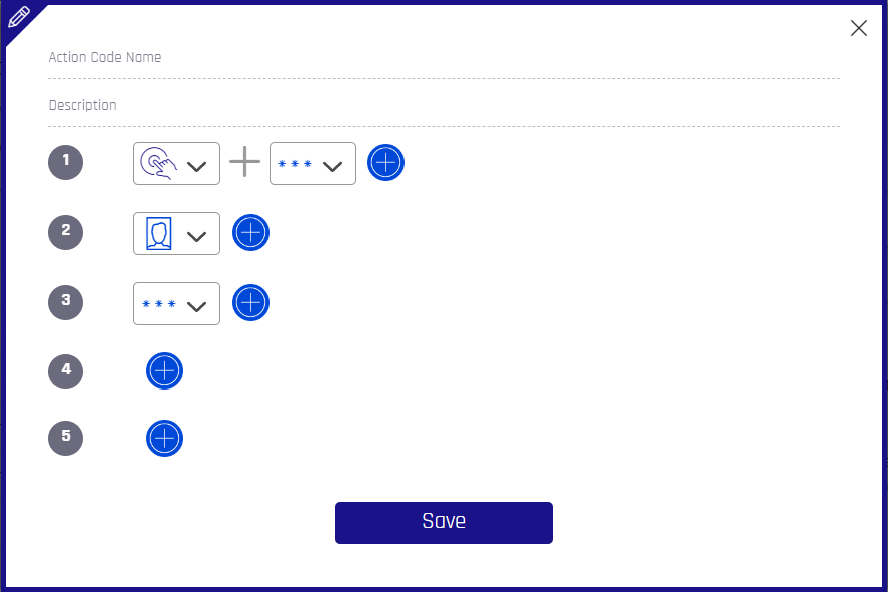
The policy name/Action Code Name is passed as a parameter to the method call.